Which Raspberry Pi board fits your project?
Separate Linux computer jobs from controller-only jobs first. If your project needs an OS, apps, networking, self-hosting, or a headless Linux environment, stay with the Raspberry Pi computer families. If it only needs simple sensor or motor control, timing loops, or low-power automation, a microcontroller is the better fit—either a Pico board on this page or, for wireless IoT control, an ESP32 board.
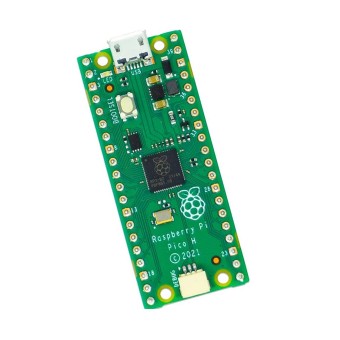
For most Linux builds, the main tradeoff is size versus headroom. Pi 5 brings roughly double the CPU/GPU performance and faster storage I/O than Pi 4, so it makes sense when you know you want more speed or NVMe-oriented storage. Pi 4 is the better-value choice when your needs are moderate or still uncertain. For Pi-hole, simple automation, and many light headless tasks, Pi 4 or even the Raspberry Pi Zero 2 W is enough. The older Raspberry Pi Zero W is 65x30mm with onboard Wi‑Fi 802.11n and Bluetooth 4.0, so it still earns a place in very tight enclosures. Zero 2 W moves to a 1GHz quad-core 64-bit Arm Cortex-A53 CPU, Bluetooth 4.2 with BLE, and a CSI-2 camera connector. That makes it the stronger small Linux option. If you want a ready-to-use desktop form instead of a bare board, Raspberry Pi 400 is Pi 4-based and Raspberry Pi 500 is Pi 5-based, both built as integrated keyboard computers. Compute Module 4 and Compute Module 5 are for custom carrier-board integration, not casual starter builds. Pico boards are microcontrollers, not micro-computers: Raspberry Pi Pico H has 2MB on-board QSPI Flash and 264KB SRAM, while Raspberry Pi Pico 2 uses dual Cortex-M33 or Hazard3 processors at 150 MHz with 520 KB SRAM and 4 MB onboard flash. If that controller route is what you need, this guide to programming a Pico for microcontroller-style projects is the next step.
| Use case |
Best-fit family |
Start here if… |
Step up when… |
Step down / alternative |
| Home server / self-hosting |
Pi 4 or Pi 5 |
A Raspberry Pi 4 Model B with 4GB RAM is enough for lighter services and moderate storage needs |
You want multiple concurrent services or an NVMe SSD path on a Raspberry Pi 5 with 8GB RAM |
For one very light service such as Pi-hole, Zero 2 W can be enough |
| Retro gaming |
Pi 4 mainstream, Pi 5 for heavier systems |
Pi 4 handles most retro consoles well |
More demanding systems justify the 16GB Raspberry Pi 5 or the 8GB Pi 5 |
For arcade builds needing more power than Pi 4 comfortably provides, a mini PC is a legitimate step outside this category |
| Learning / coding |
Pi 4 or Pi 400 |
You want a balanced starting point without overbuying |
You want the keyboard-computer format of Pi 400 or more speed from Pi 5 |
For controller-only learning, move to Arduino boards or Pico boards |
| 3D printer control |
Zero 2 W or Pi 4 |
Klipper or light printer control fits on Zero 2 W |
Webcam streaming or heavier setups benefit from Pi 4 |
For simple control-only hardware, a Pico-class board may be enough |
| Embedded / portable build |
Zero 2 W |
You need wireless Linux in a very small footprint |
More RAM, ports, or USB 3.0 point to Pi 4 |
The smaller Zero W works when enclosure space matters more than compute headroom |
| Desktop / all-in-one use |
Pi 400 or Pi 500 |
You want an integrated keyboard computer instead of a bare board |
Pi 500 is the right call when Pi 4-level desktop performance feels limiting |
A Model B board is better suited when you plan a custom case or HAT stack |
| Custom embedded carrier-board integration |
Compute Module 4 or 5 |
You are designing around a carrier board, eMMC options, or production hardware |
Compute Module 5 makes more sense when you want M.2 NVMe or higher memory ceilings |
A standard Model B board is simpler for hobby builds |
| Sensor / controller-only project |
Pico or other microcontroller |
You do not need Linux, apps, or server features |
Pico 2 adds more headroom than Pico H or Pico W for low-power control tasks |
For wireless microcontroller builds, also compare ESP32 boards |
Pi 4 vs Pi 5: when the upgrade is worth it
Pay for Pi 5 when you are clearing a real bottleneck, not just buying the newest board. Pi 5 delivers roughly double the CPU/GPU performance of Pi 4, and its faster storage I/O is a solid reason to move up even when CPU speed alone is not. For many light tasks such as Pi-hole and simple automation, Pi 5 is overkill, and Pi 4 stays in the better-value tier. If your needs are moderate, cost-sensitive, or still uncertain, a Pi 4 Model B with 4GB RAM is the safer starting point. If you already know you want heavier emulation, multiple concurrent services, or NVMe storage, step up to a Raspberry Pi 5 8GB or the 16GB Pi 5. Keep the RAM tiers simple: 1GB is not a good value anymore, 4GB is the good-enough tier beyond the simplest headless job, and 8GB is the premium tier for heavier server use. If you want a Pi 4-specific project path, this example of running Android on Raspberry Pi 4 shows the kind of workload that still fits the older board well.
| Decision factor |
Pi 4 Model B |
Pi 5 |
Why it matters |
| CPU/GPU headroom |
1.5GHz processor on the 4GB board; the 2GB model uses a 1.5GHz quad-core Cortex-A72 |
Roughly double Pi 4 performance; the 8GB Pi 5 has a 2.4GHz quad-core Arm Cortex-A76 |
This is the main reason to upgrade for heavier multitasking, desktop use, and demanding emulation |
| RAM tier on this page |
2GB Pi 4 and 4GB Pi 4 |
8GB Pi 5 and 16GB Pi 5 with LPDDR4X-4267 memory |
2GB suits lighter budgets and lighter workloads; 4GB is the usual minimum for broader use; 8GB helps when services or apps stack up |
| Storage path |
microSD and USB storage are the practical routes |
PCIe 2.0 x1 adds a clear NVMe path; the 16GB model also uses the RP1 southbridge for I/O control |
Faster storage can matter more than CPU for server responsiveness and boot times |
| Power requirement |
USB-C power connector on Pi 4, but less demanding than Pi 5 in typical use |
Pi 5 requires 5V/5A DC power via USB-C with Power Delivery for optimal performance |
A phone charger is a common failure point here, especially on Pi 5 |
| Cooling expectation |
Cooling is recommended under load |
Active cooling is far more commonly recommended, especially to avoid thermal throttling |
Performance only matters if the board can sustain it |
| Best-fit workloads |
Lighter servers, coding, moderate robotics, web browsing, simpler headless tasks |
Multiple concurrent services, heavier emulation, faster storage builds, dual 4K@60Hz output on the 16GB model |
Match the board to the workload instead of buying headroom you may never use |
Before you checkout: power, storage, cooling, and accessory gotchas
Raspberry pi Price is never just the board price. Most builds need storage, power, cooling, and sometimes adapters before the system will boot and run reliably.
- Raspberry Pi boards generally do not include storage, so plan on a microSD card at minimum. For Pi 5 builds where faster boot and server responsiveness matter, USB SSD or NVMe storage is the reason to move up.
- Underpowered phone chargers are a top cause of instability, boot failure, and random reboots. Pi 5 specifically needs 5V/5A DC power via USB-C with Power Delivery for optimal performance.
- Case and cooling are strongly recommended for Pi 4, and even more so for Pi 5 under sustained load. Active cooling is what prevents Pi 5 from thermal throttling when it is working hard.
- Newer Pi models use micro-HDMI, which catches buyers who only have standard HDMI cables. The Raspberry Pi Zero W also needs Mini-HDMI and Micro-USB adapters for standard display and peripheral connections.
- Bare Model B boards need external keyboard and mouse for direct use, unlike the Raspberry Pi 400 integrated keyboard computer and Raspberry Pi 500.
- Many “unreliable Pi” complaints come back to PSU quality, SD card quality, or overheating rather than the board itself.
After you choose storage, you still need to write an OS image before the board does anything; this guide to installing Raspberry Pi OS on a microSD card covers that step.
Reference matrix: compare the Raspberry Pi boards on this page
Use this as a side-by-side reference, not a recommendation order. Where a supported attribute is not available for a board, the table shows “—” rather than guessing it. If you need Raspberry pi 4 B pin layout details or broader GPIO context after narrowing down the board, use this guide to GPIO pin usage after choosing a board.
| Product name |
Family / type |
Processor / platform |
Memory |
Wireless |
Notable I/O / expansion |
Best fit |
| Raspberry Pi 5 - 8GB RAM |
SBC |
2.4GHz quad-core Arm Cortex-A76, BCM2712 |
8GB LPDDR4X-4267 RAM |
— |
PCIe 2.0 x1, built-in power button, RTC battery support |
Strong standard-board choice for faster I/O and heavier workloads |
| Raspberry Pi 5 - 16GB RAM |
SBC |
BCM2712 |
16GB LPDDR4X-4267 RAM |
— |
RP1 southbridge for I/O control, PCIe 2.0 x1 lane, dual 4K@60Hz HDMI outputs |
Top RAM tier for advanced workloads |
| Raspberry Pi 4 Model B - 4GB RAM |
SBC |
1.5GHz processor, BCM2711 |
4GB LPDDR4 RAM |
— |
Dual-monitor support up to 4K resolution, two USB 3.0 ports |
Mainstream mid-tier board |
| Raspberry Pi 4 Model B - 2GB RAM |
SBC |
1.5GHz quad-core Cortex-A72, BCM2711 |
2GB LPDDR4 RAM |
— |
Dual-display support up to 4K resolution, USB-C power connector |
Lower-RAM Pi 4 for lighter workloads |
| Raspberry Pi Zero W |
Compact SBC |
1GHz single-core processor |
512MB RAM |
Wi‑Fi 802.11n, Bluetooth 4.0 |
65x30mm board |
Ultra-compact older Zero-class Linux board |
| Raspberry Pi Zero 2 W |
Compact SBC |
1GHz quad-core 64-bit Arm Cortex-A53 |
512MB LPDDR2 SDRAM |
Bluetooth 4.2 with BLE |
CSI-2 camera connector |
Small Linux board with meaningfully more headroom than Zero W |
| Raspberry Pi 400 |
Integrated keyboard computer |
BCM2711 |
4GB LPDDR4-3200 memory |
— |
Integrated 78- or 79-key keyboard, dual micro HDMI supporting 4Kp60, horizontal 40-pin GPIO header |
Pi 4-based desktop-style setup |
| Raspberry Pi 500 |
Integrated keyboard computer |
2.4GHz quad-core Cortex-A76 CPU, BCM2712 |
8GB LPDDR4X-4267 SDRAM |
— |
Integrated keyboard, dual micro HDMI (4Kp60) |
Pi 5-based all-in-one desktop use |
| Raspberry Pi Compute Module 4 |
System-on-module |
BCM2711 |
Configurable RAM from 1GB to 8GB |
— |
eMMC options, PCIe Gen 2 x1, dual HDMI 4Kp60, dual-lane and quad-lane MIPI interfaces |
Custom embedded carrier-board designs |
| Raspberry Pi Compute Module 5 |
System-on-module |
BCM2712 |
Configurable RAM up to 16GB |
— |
eMMC up to 64GB, M.2 M-Key for NVMe, onboard Gigabit Ethernet PHY, 30 GPIO signals |
Advanced embedded and production-oriented builds |
| Raspberry Pi Pico H |
Microcontroller board |
RP2040 |
264KB SRAM |
— |
Pre-soldered headers, 3-pin JTAG connector, 2MB QSPI Flash |
Ready-to-use controller board |
| Raspberry Pi Pico W |
Wireless microcontroller board |
RP2040 |
— |
On-board 2.4GHz 802.11n wireless |
2MB Flash, castellated edges, 3-pin ARM SWD debug port |
Wireless controller projects |
| Raspberry Pi Pico 2 |
Microcontroller board |
Dual Cortex-M33 or Hazard3 processors at 150 MHz, RP2350 |
520 KB SRAM |
— |
4 MB onboard flash, 3x Programmable I/O blocks |
Higher-spec low-power control tasks |
When a Raspberry Pi is the wrong buy
A Raspberry Pi makes sense when you want a small Linux computer, low power draw, and the convenience of Pi-focused OS images and community workflows. It is not the right answer every time. Mini PCs or old PCs win on raw power and price-to-performance for demanding compute or general desktop use when size is not a constraint. If your project only needs simple I/O, sensors, or automation control, a microcontroller fits better than a Raspberry Pi computer. For a broader SBC comparison, see how Raspberry Pi compares with other single-board computer options.
| Alternative |
Choose it when… |
Trade-off versus Raspberry Pi |
| Mini PC / old PC |
You need more compute for general desktop work, heavier server loads, or arcade/emulation builds beyond what Pi 4 comfortably handles |
Larger, higher power draw, and less convenient for compact embedded installs |
| Arduino boards / ESP32 boards |
The job is simple sensor, motor, or wireless IoT control rather than a Linux computer |
Cheaper and lower power, but not substitutes for server, desktop, or Linux workloads |
| Orange Pi and other SBCs |
Price or availability is pushing you outside the Pi ecosystem |
Attractive on cost in some cases, but software and community support are usually weaker |
| Pico-class boards on this page |
You want a Raspberry Pi-branded microcontroller instead of an SBC; Raspberry Pi Pico H, Raspberry Pi Pico W, and Raspberry Pi Pico 2 are for controller tasks |
These are microcontrollers, not replacements for Pi 4 or Pi 5 Linux boards |
FAQs on Raspberry Pi
Pi 4 or Pi 5: which should I buy for a home server or self-hosting setup?
Pi 5 offers roughly double the CPU/GPU performance of Pi 4 and faster storage I/O, while Pi 4 is still enough for lighter services. Choose Pi 5 when you expect multiple concurrent services or want NVMe-oriented storage performance; choose Pi 4 when the workload is smaller and cost matters more than headroom.
Is the Raspberry Pi 5 overkill for Pi-hole, simple automation, or other light headless tasks?
Yes—Pi 5 is overkill for many light tasks, and Pi 4 or even Zero 2 W is often enough for Pi-hole and simple automation. Move up only when you already know you need more RAM, faster storage, or more multitasking margin.
How much RAM do I actually need on a Raspberry Pi board?
1GB is discouraged even for basic use, 4GB is the good-enough tier for anything beyond the simplest headless job, and 8GB is the safer choice for heavier multitasking or server use. The lower-cost 2GB tier still has a place for lighter workloads, but it is easier to outgrow.
Do Raspberry Pi boards come with storage, and do I need SSD instead of microSD?
No—Raspberry Pi boards generally do not include storage, so you need at least a microSD card. Pi 5 buyers aiming for faster boot times and better server responsiveness may prefer USB or NVMe SSD options, while lighter builds can stay on a quality microSD card.
Will a normal phone charger power a Raspberry Pi reliably?
No—underpowered USB chargers are a top cause of boot failures and random reboots, and Raspberry Pi 5 specifically requires 5V/5A DC power via USB-C with Power Delivery for optimal performance. If you want stable 24/7 behavior, power supply quality is one of the first decisions, not an afterthought.
What’s the difference between Raspberry Pi 400/500 and regular Pi boards?
Pi 400 and Pi 500 are integrated keyboard computers, not bare Model B boards; Pi 400 is Pi 4-based with 4GB memory, while Pi 500 is Pi 5-based with 8GB memory. They are easier desktop-style choices, but they are less suited to custom cased builds than a standard board.
Are Raspberry Pi boards reliable enough to run 24/7?
Yes for many hobby and home-lab setups, but reliability depends heavily on proper power, cooling, and storage quality. Many reports of “unreliable” behavior trace back to underpowered PSUs, poor SD cards, overheating, and, in some always-on builds, SD card corruption rather than the board alone.
Glossary
- SBC
- A single-board computer: a complete small computer on one board, which is what Pi 4, Pi 5, Zero, and Compute Module families are built around.
- Headless
- Running a Raspberry Pi without a monitor, keyboard, or mouse attached, which is common for servers, Pi-hole, and embedded projects.
- GPIO
- General-purpose input/output pins used to connect electronics such as sensors, relays, LEDs, and other hardware.
- Active cooling
- Fan-based cooling that helps Pi 4 and especially Pi 5 avoid heat-related slowdowns under sustained load.
- NVMe / PCIe
- A fast storage path; this matters because Pi 5 and Compute Module 5 are the models here that make SSD-focused builds more practical.
- Image (SD card image)
- A prepared operating-system file written to a microSD card so the board can boot.
- Model B / Zero / Compute Module
- The main Raspberry Pi form factors here: full-size boards, compact boards, and system-on-modules for custom carrier hardware.
- RP1 chip
- The Pi 5 I/O controller, relevant when you are comparing newer Pi 5 storage and peripheral behavior against earlier boards.



Please complete your information below to login.
Sign In
Create New Account