
Product added to cart

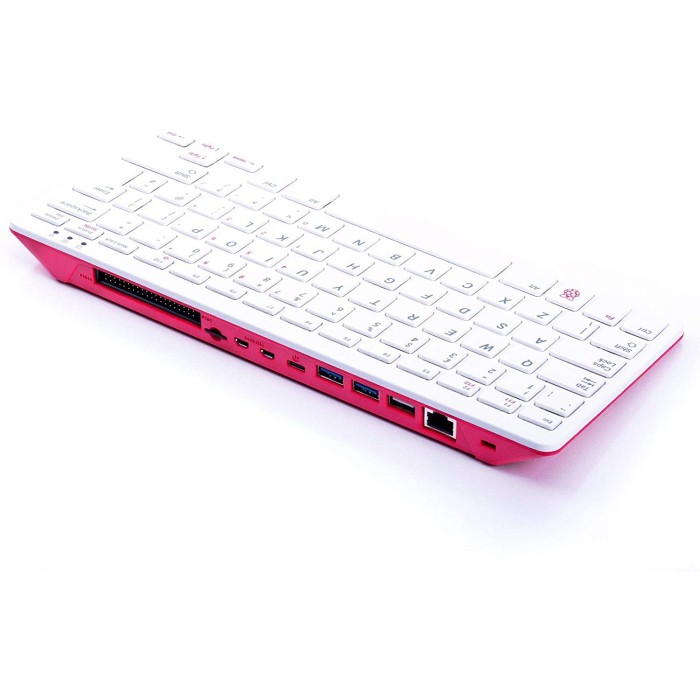
Raspberry Pi 400 Keyboard Development Board
$81.9500
In stock
SKU
MIN-01-122
Volume discounts:
- +5 1 % $81.1900
- +10 1 % $80.8100
- +25 2 % $80.4300
- +50 2 % $80.0400
- +100 3 % $79.6600
Add an Accessory:

-
 USB to Type-C Sync and Charge Cable - 1m (Black)$4.9500
 - USB to Type-C Power Cable - with ON/OFF Switch$0.7500


View more


Ships in 2-3 business days, then:
Free delivery in 12-15 days by Tracked Economic Shipping on orders over $100.
Free delivery in 7-10 days by Express Shipping on orders over $300.
More shipping info

Shop with confidence Learn More
 Raspberry Pi 4 Model B - 8G RAM Previous
Raspberry Pi 400 Keyboard PC Review
The Raspberry Pi 400 is a compact keyboard computer that combines a BCM2711 processor, 4GB memory, networking, dual micro HDMI, USB ports, MicroSD storage, and a horizontal 40-pin GPIO header in one desktop-style unit. It suits learning, light Linux work, coding, and physical-computing projects where a tidy keyboard-and-board arrangement is more useful than a separate case and keyboard.
This is a Raspberry Pi 4-class platform in a more finished desktop format. Its passive design keeps operation quiet, and review testing found better stock thermals than a bare Raspberry Pi 4 under load, with reported temperatures around 50–52°C and no throttling in those tests. It is less suitable for demanding desktop performance, a mechanical keyboard, direct 5V GPIO logic, or two 4K displays at 60Hz.
For a separate board that fits a custom enclosure or embedded build, the Raspberry Pi 4 Model B (4GB RAM) is more appropriate. Compare form factors among related Raspberry Pi keyboard computers and boards.
Specifications of Raspberry Pi 400 Keyboard Development Board
- Processor: Broadcom BCM2711 quad-core Cortex-A72 (ARM v8) 64-bit SoC @ 1.8GHz
- Memory: 4GB LPDDR4-3200
- Wireless LAN: Dual-band (2.4GHz and 5.0GHz) IEEE 802.11b/g/n/ac wireless LAN
- Bluetooth: Bluetooth 5.0, BLE
- Ethernet: Gigabit Ethernet
- USB 3.0: 2 × USB 3.0 ports
- USB 2.0: 1 × USB 2.0 port
- GPIO: Horizontal 40-pin GPIO header
- Video output: 2 × micro HDMI ports (supports up to 4Kp60)
- H.265: H.265 (4Kp60 decode)
- H.264: H.264 (1080p60 decode, 1080p30 encode)
- Graphics: OpenGL ES 3.0 graphics
- Storage: MicroSD card slot for operating system and data storage
- Keyboard: 78- or 79-key compact keyboard (depending on regional variant)
- Power: 5V DC via USB connector
- Operating temperature: 0°C to +50°C ambient operating temperature
- Dimensions: 286 mm × 122 mm × 23 mm (maximum)
Raspberry Pi 400 Specifications Explained
The BCM2711 quad-core Cortex-A72 processor and 4GB LPDDR4-3200 memory make this a practical Raspberry Pi desktop for programming, web browsing, office tasks, light media playback, and maker tools. It is not intended for demanding desktop workloads or high-end emulation. It is adequate for a compact coding station, classroom computer, or local setup terminal for electronics projects.
| Area | Why it matters |
|---|---|
| USB and networking | Two USB 3.0 ports, one USB 2.0 port, Gigabit Ethernet, dual-band Wi-Fi, and Bluetooth 5.0 BLE provide connections for storage, a mouse, wireless devices, and wired networking. The port mix supports a desk setup without a separate hub for basic peripherals. |
| MicroSD storage | The operating system and project data live on a MicroSD card. Storage performance affects boot time and desktop responsiveness, so a suitable card matters more here than on a computer with internal SSD storage. |
| Display outputs | The two micro HDMI ports support flexible monitor connections. The practical limit is one 4K display at 60Hz or two 4K displays at 30Hz, not two 4K displays at 60Hz. |
| Horizontal GPIO header | The standard 40-pin header keeps the board useful for LEDs, sensors, HATs, robotics hardware, and electronics experiments. Its horizontal position means any add-on board must also physically clear the keyboard enclosure. |
| Keyboard-sized enclosure | At 286 mm × 122 mm × 23 mm maximum, this is a keyboard-sized desktop unit rather than a pocket-size single-board computer. It reduces desk clutter but is less adaptable than a bare board for custom enclosures. |
| Operating environment | The 0°C to +50°C ambient operating temperature defines the intended surrounding environment. It should not be treated as a guarantee for enclosed, hot, or industrial installations beyond that range. |
For the same integrated-keyboard approach with a supplied 8GB LPDDR4X memory configuration and 2.4GHz quad-core CPU, consider the Raspberry Pi 500 (8GB RAM).
Raspberry Pi 400 Desktop and GPIO Compatibility
Raspberry Pi OS is the primary supported operating system and installs and boots from a MicroSD card. Typical Raspberry Pi OS use supports the integrated Wi-Fi, Bluetooth, Ethernet, and USB hardware without separate drivers. A USB mouse helps with first-time setup and everyday desktop navigation; the Official Optical Mouse for Raspberry Pi400/4B/3B+ pairs naturally with this keyboard computer.
| Area | Compatibility and limits |
|---|---|
| Displays | Two micro HDMI ports support one 4K display at 60Hz or two 4K displays at 30Hz. A suitable micro HDMI cable is required for connection to a standard HDMI monitor. |
| USB peripherals | USB mice, keyboards, storage devices, and other peripherals connect through the two USB 3.0 ports and one USB 2.0 port. |
| Networking | Dual-band 2.4GHz and 5.0GHz Wi-Fi, Bluetooth 5.0 BLE, and Gigabit Ethernet cover common wireless and wired network arrangements. |
| GPIO hardware | The horizontal 40-pin header works with the standard Raspberry Pi GPIO ecosystem. Check mechanical clearance before fitting HATs or pHATs around the keyboard enclosure. |
| GPIO voltage | GPIO logic is 3.3V and is not 5V-tolerant. Do not connect 5V logic directly to GPIO pins. Use a logic-level shifter for 5V sensors and logic devices. |
| Audio | There is no 3.5 mm audio jack. Use HDMI audio, USB audio, or Bluetooth audio instead. |
| Keyboard layout | The compact keyboard is specified as 78 or 79 keys depending on regional variant. Regional 83-key versions also exist, so confirm the supplied layout before purchase. |
The built-in header supports LEDs, sensors, motors, robotics demonstrations, and bench testing. For a conventional x86 desktop with Windows 11 Pro and NVMe SSD storage rather than native Raspberry Pi GPIO, the GMKtec G3 Intel N100 Mini PC takes a different approach.
See more Raspberry Pi boards and GPIO-capable computers for projects requiring a different enclosure or port arrangement.
Raspberry Pi 400 4K, Power and Setup
The board uses 5V DC power via its USB connector. The connector is USB-C, and a 5.1V 3A (15W) supply is recommended for stable operation. A low-output USB-C phone charger can cause reboots, USB faults, or unreliable behavior under load.
Operating system and data storage require a MicroSD card unless package contents explicitly confirm that one is included. Package contents do not confirm a power supply, MicroSD card, display cable, mouse, or operating system, so verify what is supplied before ordering.
Display limits and 4K60 setup
The two micro HDMI ports do not provide dual 4K displays at 60Hz. The supported arrangement is one 4K display at 60Hz or two 4K displays at 30Hz. For a single 4K60 display, connect the monitor to HDMI-0, the port nearest the MicroSD slot. Use an HDMI 2.0-capable cable, add hdmi_enable_4kp60=1 to /boot/firmware/config.txt, reboot, and select 60Hz in display settings.
First boot
- Prepare a MicroSD card with Raspberry Pi OS.
- Insert the MicroSD card, then connect a display through micro HDMI and a USB mouse.
- Connect a stable 5V 3A USB-C power supply.
- Complete Raspberry Pi OS first-boot setup for locale, networking, and updates.
- Confirm keyboard input, mouse movement, networking, display resolution, and MicroSD storage.
There is no dedicated power button. Shut down through the operating system, then use Fn+F10 for power control. For help selecting an operating system before preparing storage, see Raspberry Pi OS choices for different projects.
Required accessories
- Power supply: The Official Raspberry Pi 4 Power Adapter - 5V, 3A provides the stable power needed for normal operation.
- Operating-system storage: The SanDisk Micro SD Memory Card - 32GB, 120MBps (class 10) provides storage for Raspberry Pi OS and project files.
- Display connection: The Micro HDMI to HDMI Cable - 1m connects the Pi 400 to a standard HDMI display.
Recommended and optional additions
- Recommended: A UHS-I A1 or A2-class MicroSD card can improve boot and desktop responsiveness.
- Recommended: Use a logic-level shifter when interfacing 5V electronics with GPIO.
- Recommended: An external USB keyboard may be more comfortable for heavy typing.
- Optional: An Ethernet cable provides stable wired networking where Wi-Fi is not preferred.
- Optional: A USB hub helps when several peripherals are required.
- Optional: HATs and pHATs add project-specific functions if their physical fit suits the keyboard enclosure.
For supplied 16GB LPDDR4X memory, a pre-installed 256GB SSD, and a mechanical keyboard, the Raspberry Pi 500+ (16GB RAM, Mechanical) is more appropriate. It requires an external 5V/5A power supply.
Raspberry Pi 400 Keyboard Limitations
The integrated Pi 400 keyboard is a compact membrane design, not a mechanical keyboard. It works well for light desktop use and classroom work, but buyers who spend long periods typing may prefer the feel and key travel of an external keyboard.
Keyboard layout varies by regional version. The specified layout is 78 or 79 keys, while some regional 83-key versions are also available. Confirm the supplied regional layout before purchase, particularly if key placement matters for programming or touch typing.
Community reports describe missed, doubled, or erratic keystrokes on some units, along with internal ribbon or connector seating issues. These are recurring reports rather than a quantified failure rate. Some users have resolved the behavior by reseating the internal ribbon cable; an external USB keyboard remains an alternative input option.
The other purchase-critical limits are straightforward:
- It cannot run two 4K displays at 60Hz.
- GPIO is not 5V-tolerant.
- There is no dedicated power button.
- Reliable operation depends on adequate USB-C power.
- Buyers using it as a desk computer may also want the Official Optical Mouse for Raspberry Pi400/4B/3B+ for routine navigation.
Buyers who specifically want a supplied mechanical keyboard design should consider the Raspberry Pi 500+ (16GB RAM, Mechanical), which provides mechanical keys with RGB lighting, 16GB LPDDR4X memory, and a pre-installed 256GB SSD.
Raspberry Pi 400 vs Pi 4 and Pi 500
The main decision is form factor. The Raspberry Pi 400 places a Raspberry Pi 4-class computer inside a compact keyboard, while the Raspberry Pi 4 Model B is a credit-card-format bare board without an integrated keyboard. The Pi 400 suits a compact desktop or coding bench; the Pi 4 is more flexible for custom cases, automation, robotics, IoT, and embedded installations.
| Model | Supplied differences | Choose it for |
|---|---|---|
| Raspberry Pi 400 | BCM2711 at 1.8GHz, 4GB LPDDR4-3200, integrated compact keyboard, and GPIO header. | A compact Raspberry Pi desktop with direct access to GPIO for learning, coding, and light electronics work. |
| Raspberry Pi 4 Model B (4GB RAM) | Credit-card form factor, 4GB RAM, and no integrated keyboard. | Modular builds requiring a custom enclosure, separate keyboard, robotics layout, or embedded installation. |
| Raspberry Pi 500 (8GB RAM) | Integrated compact keyboard, supplied 8GB LPDDR4X memory, and supplied 2.4GHz quad-core CPU. | An integrated keyboard design with a higher supplied CPU and memory tier. |
| Raspberry Pi 500+ (16GB RAM, Mechanical) | Supplied 16GB LPDDR4X memory, mechanical keyboard with RGB lighting, and pre-installed 256GB SSD. | Mechanical typing preference, supplied SSD storage, and a higher supplied memory tier. |
Choose the Raspberry Pi 4 Model B (4GB RAM) when a separate board is needed for a modular project. The Raspberry Pi 500 (8GB RAM) suits an integrated keyboard computer with the supplied 8GB LPDDR4X memory and 2.4GHz quad-core CPU. Select the Raspberry Pi 500+ (16GB RAM, Mechanical) when its supplied SSD, mechanical keyboard, RGB lighting, and 16GB memory configuration matter to the project.
Raspberry Pi 400 FAQ and Buying Checklist
Can the Raspberry Pi 400 run two 4K monitors at 60Hz?
No. The Raspberry Pi 400 supports one 4K display at 60Hz or two 4K displays at 30Hz.
What power supply does the Raspberry Pi 400 need?
Use a stable 5V 3A USB-C power supply. A 5.1V 3A (15W) supply is recommended; the Official Raspberry Pi 4 Power Adapter - 5V, 3A is the matched option.
Do I need a MicroSD card for the Raspberry Pi 400?
Yes, unless package contents explicitly confirm a prepared card is included. The operating system and data storage use MicroSD, and the package contents do not confirm included storage.
Is Raspberry Pi 400 GPIO 5V-tolerant?
No. Raspberry Pi GPIO uses 3.3V logic and is not 5V-tolerant, so 5V logic devices require a level shifter.
Does the Raspberry Pi 400 have a physical power button?
No dedicated power button is provided. Shut down through the operating system, then use Fn+F10 for power control.
What keyboard layout will I receive?
The keyboard is specified as a 78- or 79-key compact layout depending on regional variant. Some regional 83-key variants also exist, so confirm the supplied layout before purchase.
Is the Raspberry Pi 400 keyboard mechanical?
No. It uses a compact membrane keyboard. Buyers who need mechanical keys should consider the Raspberry Pi 500+ (16GB RAM, Mechanical).
What is the difference between Raspberry Pi 400 and Raspberry Pi 4 Model B?
The Raspberry Pi 400 integrates a compact keyboard around the BCM2711 platform. The Raspberry Pi 4 Model B is a credit-card-format bare board without an integrated keyboard, making it more suitable for custom cases and embedded layouts.
Is Raspberry Pi 500 a better choice than Raspberry Pi 400?
The Raspberry Pi 500 is a different tier for buyers who need its supplied 8GB LPDDR4X memory and 2.4GHz quad-core CPU. The Raspberry Pi 500+ adds supplied 16GB LPDDR4X memory, a mechanical RGB keyboard, and a pre-installed 256GB SSD, while the Pi 400 remains suited to light desktop and GPIO work.
Purchase decision
- Suited to: Raspberry Pi learners, classrooms, makers, light Linux desktop users, GPIO experimentation, compact coding benches, and users who want a keyboard computer rather than a separate board-and-case arrangement.
- Possible fit: Home-lab users, kiosk builders, retro-gaming front-end users, and dual-display users satisfied with 1080p60 or dual 4K30.
- Consider another option if: You need dual 4K at 60Hz, demanding desktop or gaming performance, an x86 Windows desktop, direct 5V GPIO logic, a modular bare board, or a confirmed mechanical keyboard.
For x86 architecture, NVMe SSD storage, and Windows 11 Pro instead of a Raspberry Pi GPIO platform, the GMKtec G3 Intel N100 Mini PC is an alternative approach.
Buying checklist
- ✓ Confirm whether a power supply, MicroSD card, mouse, display cable, and operating system image are included.
- ✓ Confirm the keyboard region and compact layout before purchase.
- ✓ Confirm that your display accepts a micro HDMI connection through the required cable.
- ✓ Confirm that one 4K60 display or two 4K30 displays meets your monitor requirement.
- ✓ Add a stable 5V 3A USB-C power supply if one is not included.
- ✓ Add a MicroSD card if one is not included.
- ✓ Add a USB mouse for normal desktop setup.
- ✓ Confirm that GPIO hardware uses 3.3V logic, or add a level shifter for 5V devices.
- ✓ Choose a Raspberry Pi 4 Model B for a separate board and custom enclosure, or a Pi 500-series model if its supplied higher memory tier, faster CPU tier, mechanical keyboard, or SSD is required.
A Micro HDMI to HDMI Cable - 1m and a SanDisk Micro SD Memory Card - 32GB, 120MBps (class 10) complete the basic display and storage requirements. For operating-system selection, review these Raspberry Pi OS options.
| Processor (SoC) | Broadcom BCM2711 |
|---|---|
| CPU | Quad-core ARM Cortex-A72 @ 1.8GHz |
| Architecture | ARM Cortex-A72 |
| RAM | 4GB |
| RAM Type | LPDDR4 |
| Storage Support | microSD |
| Storage Capacity | MicroSD card slot |
| GPU/VPU | Broadcom VideoCore VI |
| NPU (TOPS) | No |
| Ethernet | 1 Gbps |
| Wi-Fi | WiFi 5 |
| Bluetooth | Bluetooth 5.0 |
| USB Ports | 2 x USB 3.0, 1 x USB 2.0 |
| Video Output | micro HDMI |
| Hardware Interfaces | I2C, SPI, UART |
| GPIO Pins | 40-pin horizontal GPIO header |
| Camera/Display | No |
| Power Input | 5V 3A DC via USB-C |
| PCIe | No |
| Dimensions (mm) | 285 x 122 x 22 mm |
| OS Support | Ubuntu, Raspberry Pi OS, Debian |
| Weight (g) | 385 |
| Operating Temp (°C) | 0°C to +50°C |
Write Your Own Review

Please complete your information below to login.
Sign In
Create New Account