Choose the right Orange Pi family for your project
Choose by workload first, not by product name. Entry-tier boards such as Orange Pi Zero, One, PC, and Lite families fit learning Linux, embedded control, and lighter IoT jobs. RK3588-family boards are the step up for AI, edge computing, NAS or self-hosting, emulation, and heavier media work.
| Use case |
Best-fit family in this category |
Why it fits |
Example products from this page |
Main tradeoff |
| Learning Linux, basic IoT, simple DIY electronics |
Entry-tier H3 boards |
Avoids paying for RK3588-class performance you do not need |
Orange Pi Zero H3 with 512MB DDR3, Orange Pi One H3 with 512MB RAM |
Lower RAM and lighter networking |
| Wireless embedded builds |
Lite / compact wireless boards |
Wireless is built in, and some models add onboard flash |
Orange Pi Lite H3 with Wi‑Fi and 8GB eMMC, Orange Pi Zero H3 compact Wi‑Fi board |
Older wireless boards can have 32-bit or 10/100M limits |
| Lightweight media or retro projects |
H3 boards with more ports or onboard flash |
Extra USB, audio, and eMMC are more useful here than raw AI performance |
Orange Pi PC Plus H3 with 8GB eMMC, Orange Pi PC H3 with 1GB RAM |
Older platform and lighter OS headroom |
| Compact modern 64-bit builds |
H618 / H6 middle-ground boards |
Better networking and newer OS fit without jumping to 5-class pricing |
Orange Pi Zero 3 H618 with Gigabit Ethernet, Orange Pi 3 LTS H6 with 2GB LPDDR3 |
Still not in the same expansion class as RK3588S boards |
| AI, heavier media, higher-resolution display |
Orange Pi 5 Development Board class |
RK3588S, 6TOPS NPU, 8-core CPU class, and stronger display/expansion options |
Orange Pi 5 Development Board with 4GB RAM and 8K support, Orange Pi 5 Pro with 6TOPS NPU |
More demanding on power, cooling, and software setup |
| Storage-heavy self-hosting |
Orange Pi 5 Pro-class |
M.2 M-Key with NVMe/SATA support is the feature that changes the decision |
Orange Pi 5 Pro with M.2 M-Key |
Added complexity and add-ons may be required |
The Orange Pi Zero H3 is the small-footprint option here: 512MB DDR3 RAM, built-in Wi‑Fi, 10/100M Ethernet, 2MB SPI Flash, and a 13-pin header. It fits simple IoT and DIY electronics, not server or AI workloads. The Orange Pi One H3 keeps 512MB DDR3 RAM and adds HDMI, a CSI camera interface, and a 40-pin GPIO header. That makes it the better call for embedded or robotics builds that need camera or GPIO access, but still not for heavy multitasking.
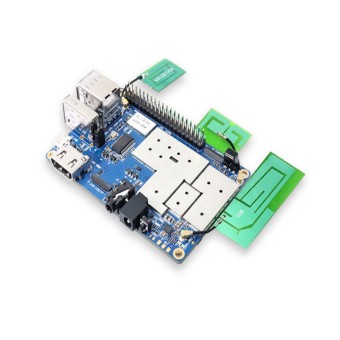
Need more physical I/O? The Orange Pi PC H3 adds 1GB DDR3 RAM, three USB 2.0 Host ports, CVBS and HDMI output, a 3.5mm audio jack, and an onboard microphone, which is more practical when a project needs analog AV or extra peripherals. If wireless matters more than Ethernet, the Orange Pi Lite H3 includes Realtek Wi‑Fi (802.11 b/g/n), 8GB onboard eMMC flash, IR input, an IPX Wi‑Fi antenna socket, and onboard microphone; the tradeoff is its 32-bit architecture. The Orange Pi PC Plus H3 is the more complete lightweight media or retro pick because it combines 1GB DDR3 RAM, 8GB onboard eMMC flash, built-in Wi‑Fi, three USB 2.0 Host ports, IR input, and a 3.5mm audio jack.
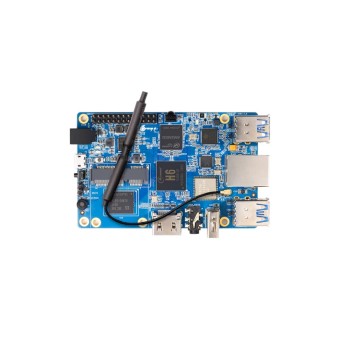
In the middle of the range, the Orange Pi 3 LTS H6 gives you 2GB LPDDR3 RAM, 8GB eMMC flash, Gigabit Ethernet, Wi‑Fi 5, BT 5.0, and a USB 3.0 Host port. It makes sense when you want stronger connectivity and 64-bit capability without moving straight to RK3588S. The Orange Pi Zero 3 H618 stays compact but moves to a 64-bit CPU with 16MB SPI Flash, Gigabit Ethernet, Wi‑Fi 5, BT 5.0, and Micro HDMI 2.0a output. That makes it the more modern small-board option when older H3 boards feel restrictive.
For heavier work, the Orange Pi 5 uses Rockchip RK3588S with an 8-core 64-bit CPU, 6TOPS NPU, 8K video processing, USB-C 3.1 with DP 1.4, and PCIe 2.0. The Orange Pi 5 Pro also uses RK3588S with an 8-core CPU and 6TOPS NPU, then adds LPDDR5 RAM, M.2 M-Key for NVMe or SATA, 8K@60Hz HDMI 2.1, and PoE+ support for more advanced AI, media, and storage-heavy projects.
Orange Pi is not a drop-in Raspberry Pi replacement. Software ecosystem, OS support maturity, and community documentation are meaningfully weaker. Buyers with low troubleshooting tolerance are better served by Raspberry Pi boards, while Orange Pi suits people who are comfortable checking forums, wikis, and Linux-driver issues. If you are still weighing that tradeoff, how Orange Pi compares with other Raspberry Pi alternatives gives more context.
Orange Pi 5 vs Orange Pi 5 Pro: what the specs here actually change
Both stocked 5-series boards sit in the same raw compute class: each uses Rockchip RK3588S and a 6TOPS NPU. The choice is not about which one is faster in the abstract. It comes down to memory class, storage flexibility, and infrastructure options.
| Model |
CPU / AI class |
Memory detail stated on card |
Storage / expansion detail |
Display / video detail |
Special fit |
Gotcha |
| Orange Pi 5 Development Board with 4GB RAM |
RK3588S, 8-core 64-bit CPU, 6TOPS NPU |
4GB RAM model |
PCIe 2.0 |
8K video processing, USB-C 3.1 with DP 1.4 |
Simpler entry into high-performance SBC use, especially for high-resolution display output and general RK3588S projects |
Card does not state onboard eMMC or M.2 storage |
| Orange Pi 5 Pro |
RK3588S, 8-core CPU, 6TOPS NPU |
LPDDR5 RAM |
M.2 M-Key for NVMe/SATA |
8K@60Hz HDMI 2.1 |
Better suited when the build depends on faster memory class, M.2 storage options, or PoE-ready network installs |
PoE+ needs an additional HAT; eMMC and SPI flash are optional and not included by default |
Choose the Orange Pi 5 board when your priority is RK3588S performance, 8K video processing, USB-C 3.1, DP 1.4 support, and PCIe 2.0 in a simpler starting point. Choose the Orange Pi 5 Pro model when LPDDR5, M.2 M-Key storage for NVMe or SATA, 8K@60Hz HDMI 2.1, or future PoE+ deployment is the reason you are buying. Match the variant to RAM, storage, and interface needs rather than buying the newest name. If you are still deciding whether higher-spec SBC hardware is worth the support tradeoff, this piece on whether higher-spec SBC hardware is worth the support tradeoff is a useful next read.
Before you buy an Orange Pi: OS support, power, cooling, and storage checks
These checks matter before you commit to a board:
- OS support is inconsistent across Orange Pi models. Some boards have mature Armbian support, while newer boards can launch with limited or buggy support, so buying a newer or higher-spec board without checking current OS maturity is a common mistake.
- Armbian is a separate, community-maintained OS, while Orange Pi OS is the vendor’s own image. Do not assume they offer the same support quality on the same board.
- Debian or Ubuntu viability depends on the exact model, not the Orange Pi name. If you want to see what that setup can look like, an Orange Pi Ubuntu installation example shows the process in practice.
- Third-party OS options such as DietPi and balenaOS are community-driven and inconsistent across the range rather than guaranteed on every model.
- Some RK3588 boards have community Windows 11 ARM ports, but Windows support is limited and unofficial depending on chipset. Do not buy one of these as a general Windows SBC unless you have already confirmed the exact build path.
- Stable operation requires a proper 5V/4A to 5V/5A power adapter. A phone charger or a computer USB port can cause instability, random reboots, crashes, or file-system corruption.
- Storage choice matters. A high-endurance A2-rated microSD card is the safer minimum when you are using SD boot, because cheap generic cards are a common source of instability. Where supported, onboard eMMC or NVMe is the more robust choice.
- Not every board supports the same storage path. The Orange Pi PC Plus and Orange Pi 3 LTS include onboard eMMC, while the Orange Pi 5 Pro is the board here with M.2 M-Key support for NVMe or SATA.
- For sustained heavy workloads such as AI inference or video encoding, active cooling is recommended. Passive cooling is only borderline acceptable on higher-performance boards, and temperatures above 85°C are where thermal throttling starts to matter.
- NPU features are real, but not plug-and-play. The 6TOPS NPU on Orange Pi 5-class boards requires the RKNN toolkit and model conversion, and not all AI operators are supported.
- Klipper and other niche Linux projects should be checked model by model before purchase. Support is mixed, especially on newer boards with weaker Armbian or project-specific coverage.
- Buying based on price alone without checking community-reported reliability and support for the specific model is another recurring mistake. If your main priority is the most mature software support with the least troubleshooting friction, Raspberry Pi boards are often the safer call.
Quick spec matrix for the Orange Pi boards on this page
Specs only matter when they match the job. Use this matrix to compare RAM, networking, wireless, onboard flash, display output, and the interfaces that change what you can build.
| Board |
SoC / family |
RAM |
Ethernet |
Wireless |
Onboard flash / storage note |
Video / display output |
Notable interfaces / notes |
| Orange Pi One H3 |
Allwinner H3 |
512MB DDR3 |
10/100M Ethernet |
— |
— |
HDMI output |
CSI camera interface, 40-pin GPIO header; compact embedded board with camera/GPIO focus |
| Orange Pi PC H3 |
Allwinner H3 |
1GB DDR3 |
— |
— |
— |
CVBS and HDMI output |
Three USB 2.0 Host ports, 3.5mm audio jack, onboard microphone; better when extra ports or analog AV/audio matter |
| Orange Pi Lite H3 |
Allwinner H3 |
— |
— |
Realtek Wi‑Fi (802.11 b/g/n) |
8GB onboard eMMC flash |
— |
Onboard microphone, IR input, IPX Wi‑Fi antenna socket, 32-bit architecture |
| Orange Pi PC Plus H3 |
Allwinner H3 |
1GB DDR3 |
— |
Built-in Wi‑Fi |
8GB onboard eMMC flash |
— |
Three USB 2.0 Host ports, IR input, 3.5mm audio jack, 32-bit architecture |
| Orange Pi 3 LTS H6 |
Allwinner H6 |
2GB LPDDR3 |
Gigabit Ethernet |
Wi‑Fi 5, BT 5.0 |
8GB eMMC flash |
— |
USB 3.0 Host port; stronger connectivity than older H3 boards |
| Orange Pi Zero H3 |
Allwinner H3 |
512MB DDR3 |
10/100M Ethernet |
Built-in Wi‑Fi, no BT |
2MB SPI Flash |
— |
13-pin header; tiny IoT board with limited onboard I/O unless expanded |
| Orange Pi Zero 3 H618 |
Allwinner H618 |
1GB to 4GB RAM |
Gigabit Ethernet |
Wi‑Fi 5, BT 5.0 |
16MB SPI Flash |
Micro HDMI 2.0a output |
64-bit CPU; more modern compact option than the original Zero |
| Orange Pi 5 Pro |
Rockchip RK3588S |
LPDDR5 RAM |
— |
— |
M.2 M-Key for NVMe/SATA; eMMC and SPI flash optional, not included by default |
8K@60Hz HDMI 2.1 |
8-core CPU, 6TOPS NPU, PoE+ support |
| Orange Pi 5 |
Rockchip RK3588S |
4GB RAM model |
— |
— |
PCIe 2.0 port |
8K video processing |
8-core 64-bit CPU, 6TOPS NPU, USB-C 3.1 with DP 1.4 support |
FAQs on Orange Pi Boards
Is Orange Pi better than Raspberry Pi?
Orange Pi often offers better raw specs for the price, especially around RAM, PCIe or NVMe options, and NPU features, while Raspberry Pi has stronger software support, documentation, and longer update expectations. If you want the easier beginner path and broader community help, Raspberry Pi is the safer platform choice.
Is Orange Pi a good first SBC for beginners?
Raspberry Pi is the better first SBC for true beginners, while Orange Pi suits buyers who are comfortable troubleshooting Linux and driver issues. The hardware can be appealing, but the software ecosystem and documentation are weaker.
Can I use a normal phone charger or USB port to power an Orange Pi?
No — a proper high-current 5V/4A to 5V/5A power adapter is recommended, because phone chargers and computer USB ports commonly cause random reboots, crashes, and file-system corruption. If a board seems unstable, power is one of the first things to rule out.
Do I need a fan, or is a heatsink enough?
For sustained heavy workloads such as AI inference or video encoding, active cooling is recommended; passive heatsinks alone are only borderline acceptable, and temperatures over 85°C are commonly associated with throttling. For lighter use, passive cooling can be enough, but high-performance boards should be budgeted with a fan in mind.
What’s the difference between Armbian and Orange Pi OS?
Armbian is an independent, community-maintained OS, while Orange Pi OS is the vendor’s own image; support quality and stability can differ by board, so buyers should check the exact model before assuming parity. The OS name alone does not tell you how mature support is on that board.
Can I use the NPU for AI right away?
Not automatically — the 6TOPS NPU on Orange Pi 5-class boards is usable, but it requires the RKNN toolkit and model conversion, and not all AI operators are supported. That matters more than the TOPS figure if your project depends on a specific model or framework.
Will any Orange Pi work for Klipper or niche Linux projects?
No — support is mixed, and newer or less-mature boards may have poor Armbian or project-specific support, so buyers should verify the exact model in community resources before purchase. This is especially important if the project depends on a prebuilt image or a known-good kernel version.
Glossary
- SBC
- A single-board computer is a complete small computer on one board, and Orange Pi and Raspberry Pi both fall into that category.
- Armbian
- Armbian is a community-maintained Linux distribution for ARM boards, and its support quality varies by exact Orange Pi model.
- NPU / TOPS
- An NPU is dedicated AI hardware, and TOPS is its throughput rating, but it only matters if your software can use it through the RKNN toolkit.
- eMMC vs NVMe vs SD card
- eMMC is onboard flash, NVMe is faster SSD storage through an M.2 slot, and an SD card is the most universal but usually the slowest and most failure-prone option.
- Active vs passive cooling
- Active cooling uses a fan and is the right choice for sustained heavy loads, while passive cooling relies on a heatsink alone and is better suited to lighter workloads.
- RK3588S
- RK3588S is the Rockchip processor family behind Orange Pi 5-class boards, where you step up for heavier media, AI, and expansion-focused projects.



Please complete your information below to login.
Sign In
Create New Account