
Product added to cart

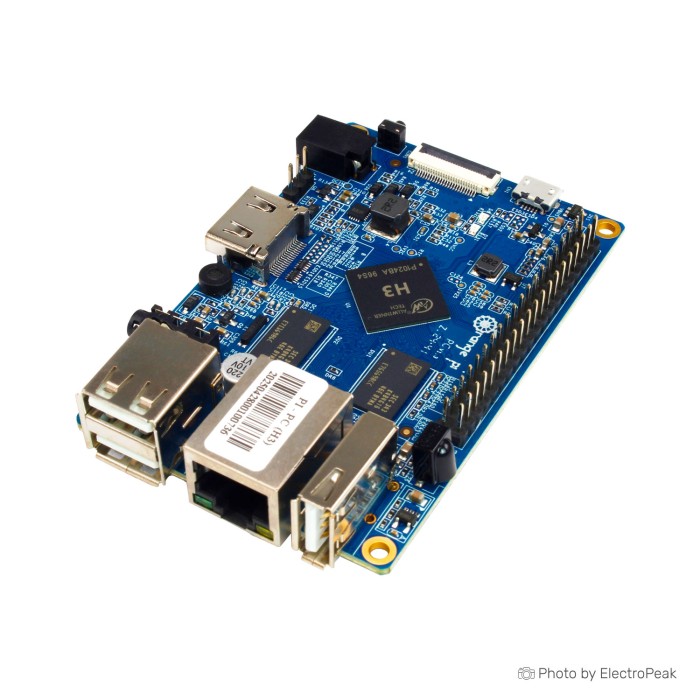
Orange Pi PC H3 Quad-core Development Board
$48.9500
In stock
SKU
MIN-02-003
Volume discounts:
- +10 2 % $47.7600
- +25 4 % $47.1700
- +50 5 % $46.5800
- +100 6 % $45.9800
- +300 7 % $45.3900
Product Variations:


Add an Accessory:


Ships in 2-3 business days, then:
Free delivery in 12-15 days by Tracked Economic Shipping on orders over $100.
Free delivery in 7-10 days by Express Shipping on orders over $300.
More shipping info

Shop with confidence Learn More
 Orange Pi PC2 Quad Core Development Board - 64bit, 1GB RAM Previous
Orange Pi PC H3 Overview and Specifications
The Orange Pi PC H3 is an open-source single-board computer built around the Allwinner H3 quad-core processor and 1GB of DDR3 SDRAM. Built for electronics, robotics, and embedded development, it provides HDMI and CVBS video outputs, 10/100 Ethernet, four USB ports, a CSI camera connector, and a 40-pin expansion header. Originally launched as an accessible development platform, it suits intermediate makers comfortable configuring Linux or Android environments rather than beginners seeking an out-of-the-box desktop replacement.
This board suits headless controllers, local sensor hubs, and display tasks that work within 1GB of system memory. Projects requiring onboard Wi-Fi, Gigabit network throughput, integrated eMMC storage, or direct plug-and-play Raspberry Pi software compatibility should evaluate other options. For alternate purchasing or packaging options, see the alternate Orange Pi PC listing within the broader Orange Pi board range.
Specifications of Orange Pi PC H3 Quad-Core Development Board
- CPU: H3 Quad-core Cortex-A7 H.265/HEVC 4K
- GPU: Mali400MP2 GPU @600MHz
- GPU API Support: OpenGL ES 2.0
- Memory: 1GB DDR3 SDRAM
- Memory Sharing: Shared with GPU
- Onboard Storage: TF card
- Onboard Storage Maximum: 64GB
- Onboard Storage: MMC card slot
- Onboard Storage: Up to 2T on 2.5 SATA disk
- Onboard Network: 10/100 Ethernet RJ45
- Video Input: CSI input connector
- Video Input: 8-bit YUV422 CMOS sensor interface
- Video Input: CCIR656 protocol for NTSC and PAL
- Video Input: SM pixel camera sensor support
- Video Input: 1080p@30fps
- Audio Input: MIC
- Video Output: HDMI output with HDCP
- Video Output: HDMI CEC
- Video Output: HDMI 30 function
- Video Output: Integrated CVBS
- Video Output: Simultaneous HDMI and CVBS output
- Audio Output: 3.5 mm Jack
- Audio Output: HDMI
- Power Source: DC input
- Power Source: USB OTG input is not power input
- USB 2.0 Ports: One USB 2.0 OTG
- USB 2.0 Ports: Three USB 2.0 HOST
- Header: 40 pins
- Compatibility: Raspberry Pi B+
- Button: Power Button
- Input: IR
- LED: Power LED
- LED: Status LED
- Communication: UART
- Supported OS: Android
- Supported OS: Ubuntu
- Supported OS: Debian
- Supported OS: Rasberry Pi Image
- Dimensions: 85mm x 55mm
- Weight: 70g
Orange Pi PC H3 Specifications Explained
A development board's practical fit comes down to how its core silicon and physical interfaces translate into day-to-day development trade-offs. The table below explains what each primary specification means in deployment.
| Specification | Hardware Value | Why It Matters |
|---|---|---|
| Processor & Architecture | Allwinner H3 Quad-core Cortex-A7 (32-bit ARMv7) | Handles lightweight Linux services, script execution, and 1080p video decoding. It is a legacy 32-bit architecture, meaning modern 64-bit ARM packages and heavy computational tasks will not run. |
| Graphics Core | Mali400MP2 GPU @600MHz (OpenGL ES 2.0) | Provides basic 2D and 3D acceleration for retro-gaming emulators or lightweight Android interfaces, but lacks support for modern desktop graphical compositors. |
| System Memory | 1GB DDR3 SDRAM (shared with GPU) | Because video memory is carved directly out of the 1GB pool, usable RAM for applications is restricted. Running modern web browsers or memory-heavy databases will cause aggressive swapping. |
| Display Output | HDMI with HDCP/CEC & integrated CVBS | Supports standard monitors through an HDMI display connection, as well as legacy CRT televisions or composite monitors simultaneously. This suits classic media setups. |
| Networking | 10/100 Ethernet RJ45 | Delivers steady network access for MQTT brokers, lightweight automation, or serial bridges, but caps throughput well below what high-speed network-attached storage requires. |
| USB Connectivity | 3x USB 2.0 Host, 1x USB 2.0 OTG | Offers ample connectivity for keyboards, mice, flash storage, and wireless dongles without an external hub. The OTG port handles peripheral communication but cannot power the board. |
| Audio Interfaces | Onboard microphone, 3.5mm analog jack, HDMI audio | Enables direct audio output and sound capture for voice prompts or basic intercom builds without requiring separate USB sound cards. |
| Form Factor | 85mm x 55mm (70g listed weight) | Matches the standard credit-card footprint, making it easy to integrate into medium enclosures, robotics chassis, or wall-mounted control panels. |
For headless background tasks that do not require HDMI or composite display jacks, the smaller Orange Pi One H3 (512MB RAM) is a streamlined alternative. Space-constrained embedded setups that omit display hardware entirely may suit an ultra-compact headless SBC project such as the NanoPi NEO2.
Orange Pi PC H3 Compatibility and Operating Systems
Software and peripheral compatibility on the Orange Pi PC H3 needs careful verification. Despite its physical layout, the board does not follow the standard Raspberry Pi software ecosystem.
The board supports Android, Ubuntu, Debian, and community-ported Raspberry Pi images. Modern development centers on community-maintained distributions such as Armbian, which provide updated Debian and Ubuntu kernels tailored for Allwinner H3 hardware. Standard, unmodified Raspberry Pi OS images will not run because Broadcom and Allwinner system-on-chip architectures differ fundamentally.
| Interface / Subsystem | Compatibility Status | Integration Details |
|---|---|---|
| Operating Systems | Debian, Ubuntu, Android, Armbian | Requires images built specifically for the Allwinner H3 platform. Armbian is widely maintained by the community for stable server and desktop use. |
| GPIO Header | 40-pin header (3.3V logic level) | Physically mirrors the 40-pin Raspberry Pi B+ form factor, but pin functions, internal pull-ups, and driver libraries differ. Pins are strictly 3.3V and not 5V tolerant. |
| Raspberry Pi HATs | Physical fit only; software variance | Passive breakout boards work if pin mapping is adjusted, but HATs requiring specific Linux drivers, I2C overlays, or SPI configurations often require custom device tree overlays. |
| Camera Interface | Parallel CSI connector | Incompatible with standard Raspberry Pi ribbon cameras. Works exclusively with supported camera modules such as the OV5640 or GC2035 using 8-bit YUV422 sensors. |
| Wireless Connectivity | No onboard Wi-Fi or Bluetooth | Projects requiring wireless access must incorporate a compatible external USB Wi-Fi dongle. |
| Serial Debugging | Dedicated 3-pin UART header | Enables serial console access for kernel boot debugging, requiring an external 3.3V USB-to-TTL serial adapter. |
Connecting 5V sensors or microcontrollers directly to the 40-pin header will permanently damage the H3 processor. Always place a bidirectional logic level shifter between the header and higher-voltage signals. For builds requiring factory-integrated wireless networking, the Orange Pi Lite meets the onboard Wi-Fi requirement without occupying a USB port. If your build depends on standard Raspberry Pi OS, standard HAT drivers, and official camera modules, the standard Raspberry Pi ecosystem with a Raspberry Pi 3 Model B is the reliable choice.
Orange Pi PC H3 Limitations and Thermal Review
The Orange Pi PC H3 offers versatile physical connectivity, but several hardware limitations and documentation contradictions need attention before permanent deployment.
Under sustained CPU or GPU workloads, the Allwinner H3 SoC generates significant heat. Without active airflow or a passive heatsink, the chip quickly throttles its clock speeds to protect silicon integrity, causing noticeable performance degradation and potential kernel instability. An adhesive aluminum or copper heatsink on the processor is strongly advised for server, media playback, or continuous data-logging operations. Modern community distributions such as Armbian, with configured dynamic voltage and frequency scaling (DVFS) tables, further stabilize operating temperatures.
Storage specifications on this board contain notable conflicts. The hardware specification sheet lists TF card, MMC card slot, and up to 2TB on a 2.5-inch SATA disk. In physical implementation, the board relies on a TF (microSD) card slot for its primary operating system and storage. There is no native onboard SATA connector or dedicated MMC slot on this model; those capabilities belong to other boards in the product family. While the listing gives a 64GB maximum TF capacity, a high-quality 32GB Class 10 card is the verified, reliable choice for boot stability.
Networking is capped at 10/100 Fast Ethernet, setting an upper boundary on network transfer speeds. For higher throughput or a modern 64-bit environment, move to 64-bit processing and Gigabit Ethernet with the Orange Pi PC2. High-bandwidth applications that need USB 3.0, integrated wireless, and high-resolution decoding call for the Orange Pi 3 and its higher-tier connectivity and multimedia needs. To protect the board from accidental contact during use, fit it in a protective board enclosure.
Orange Pi PC H3 Setup and Power Requirements
The Orange Pi PC H3 needs the correct power delivery and boot media preparation for a successful first start. Miss either one, and failed boots or system instability are likely.
- Flash the Operating System: Download an Allwinner H3-specific Linux or Android image, such as an Armbian release. Use a dedicated flashing utility to write the image to a verified, high-speed 32GB Class 10 boot card.
- Insert Media Before Powering: Place the flashed card fully into the TF slot while the board is completely unpowered. The H3 processor does not support hot-plugging boot media.
- Connect Video and Peripherals: Attach your monitor through an HDMI display connection and connect input devices to the full-size USB host ports.
- Apply Power via the DC Input: Connect an Orange Pi DC power adapter providing 5V at a minimum of 2A, with 3A recommended if multiple USB peripherals or hard drives are connected.
The USB OTG port is strictly a data interface and does not route power to the board circuitry. Powering the system with a standard micro-USB phone charger connected to the OTG port results in a completely dead board. A persistent red LED with no HDMI output or green status flashing points to an unbootable card image or insufficient DC input voltage.
Orange Pi PC H3 Accessories and Project Uses
The right external peripherals help the Orange Pi PC H3 run reliably across automation and media tasks.
Recommended Project Configurations
- Headless Home Automation Controller: Run Armbian over wired 10/100 Ethernet for Home Assistant, Node-RED, or local MQTT servers. This requires stable DC power, a 32GB microSD card, and an SoC heatsink.
- Retro-Gaming & Media Player: Run Android or dedicated emulation front-ends, connect a living-room television through HDMI, and use the full-size USB ports for gamepads. This requires an HDMI cable, 5V/3A DC power, and a ventilated case.
- Robotics & Sensor Hub: Interface with motor controllers, environmental sensors, and microcontrollers through the 40-pin header. This requires an external bidirectional level shifter for 5V components and a 3.3V USB-to-TTL serial cable for console monitoring.
- Lightweight CSI Vision Node: Capture 1080p video streams for basic security monitoring or computer vision experiments with an Orange Pi-compatible OV5640 or GC2035 camera sensor.
Peripheral Checklist
- Required: An Orange Pi DC power adapter delivering 5V/2A, or 5V/3A with attached peripherals, to the DC barrel jack.
- Required: A reliable 32GB Class 10 boot card to host the operating system.
- Required for Display: A quality HDMI display connection cable for digital monitors.
- Recommended: A dedicated SoC heatsink to prevent thermal throttling under sustained processor loads.
- Recommended: A fitted protective board enclosure to guard the circuit board against static and debris.
- Recommended: A 3.3V USB-to-TTL serial adapter for direct command-line console debugging during setup.
- Optional: A compatible USB Wi-Fi dongle for wireless networking, or a bidirectional level shifter when bridging 5V sensor circuits.
26-pin extension ribbons are not physically compatible with this board's 40-pin expansion header. For other form factors, see the complete Orange Pi board range.
Orange Pi PC H3 FAQ and Buying Decision
Can I power the Orange Pi PC H3 through the USB OTG port?
No. The USB OTG port cannot supply power to the board. The circuitry requires power through the dedicated 4.0mm x 1.7mm DC barrel jack using an Orange Pi DC power adapter rated for 5V and at least 2A, or 3A when running external USB devices.
Does Orange Pi PC H3 have Wi-Fi or Gigabit Ethernet?
No. The board has no onboard Wi-Fi, and its wired network port is standard 10/100 Fast Ethernet. Wireless capability requires an external USB Wi-Fi adapter connected to one of the host ports.
Is the Orange Pi PC H3 fully compatible with Raspberry Pi HATs and Raspberry Pi OS?
No, it is not a direct drop-in replacement. Although the 40-pin header shares the physical pin spacing of a Raspberry Pi B+, the underlying pin definitions, internal controllers, and driver stacks are completely different. The GPIO pins operate strictly on 3.3V logic and will be damaged by 5V signals. For a setup built around standard Raspberry Pi HAT drivers and Raspberry Pi OS, choose the standard Raspberry Pi ecosystem with a Raspberry Pi 3 Model B.
What TF-card size should I buy for Orange Pi PC H3?
A 32GB Class 10 card is the documented, reliable standard for this board. While the hardware listing notes a 64GB maximum, larger cards frequently encounter compatibility or boot-loader partition issues. A 32GB Class 10 boot card avoids these configuration problems.
Does Orange Pi PC H3 support eMMC, MMC, or SATA storage?
No native SATA port or onboard eMMC storage exists on the physical Orange Pi PC board. Booting and daily filesystem operations rely on the TF (microSD) card slot. References to SATA disks and MMC slots reflect specifications belonging to different models in the lineage.
Why does Orange Pi PC H3 need cooling?
The Allwinner H3 processor generates substantial heat when all four cores run under heavy load. Without a heatsink or moderate airflow, the processor automatically throttles its clock frequency to avoid damage, causing system lag or intermittent stability issues during demanding operations.
Can I use a Raspberry Pi camera module with Orange Pi PC H3?
No. Standard Raspberry Pi CSI camera modules are incompatible with this board. The Orange Pi PC H3 uses an 8-bit parallel CSI camera interface designed specifically for sensors such as the OV5640 or GC2035.
Which Orange Pi board should I choose if I need Wi-Fi, Gigabit Ethernet, or 64-bit capability?
For onboard Wi-Fi in a compact form factor, consider the Orange Pi Lite for the onboard Wi-Fi requirement. For Gigabit networking and 64-bit execution, choose the Orange Pi PC2 with 64-bit processing and Gigabit Ethernet. Modern USB 3.0 ports, Bluetooth, and high-throughput multimedia processing point to the Orange Pi 3 and its higher-tier connectivity and multimedia needs. If you need a separate supply source for this exact platform, see the alternate Orange Pi PC listing.
Purchase Decision Summary
- Ideal for: Intermediate embedded developers, electronics hobbyists, and robotics builders seeking a budget-friendly 32-bit Linux or Android platform with multiple USB ports, HDMI/CVBS display output, and wired Ethernet.
- Maybe for: Lightweight home automation hubs or local network services where 10/100 Ethernet throughput and 1GB of shared memory are sufficient, provided you install a heatsink and add an external USB Wi-Fi dongle if wireless is required.
- Avoid if: You need onboard Wi-Fi, Gigabit Ethernet, true SATA storage, native eMMC, 5V-tolerant GPIO pins, out-of-the-box Raspberry Pi OS support, or an ultra-compact display-free format such as an ultra-compact headless SBC project or the headless compact headless H3 projects.
Buying Checklist
- Confirm your software workload runs comfortably within 1GB of shared DDR3 memory and a 32-bit ARMv7 processor architecture.
- Verify that 10/100 Fast Ethernet meets your data transmission requirements, or acquire a compatible USB Wi-Fi dongle.
- Include a dedicated 5V/2A or 5V/3A DC power supply equipped with a 4.0mm x 1.7mm barrel jack; the USB OTG port will not power this board.
- Prepare a Class 10 32GB microSD card for your operating system image to ensure reliable booting.
- Order an adhesive SoC heatsink to manage processor temperatures under sustained load.
- Source a bidirectional logic level shifter if you intend to connect 5V sensors or microcontrollers to the 3.3V GPIO header.
- Ensure any intended camera peripheral is an Orange Pi-compatible OV5640 or GC2035 module rather than a standard Raspberry Pi camera.
| Processor (SoC) | AllWinner H3 |
|---|---|
| CPU | H3 Quad-core (Cortex-A7) |
| Architecture | ARM Cortex-A7 |
| RAM | 1GB |
| RAM Type | DDR3 |
| Storage Support | microSD, SATA |
| Storage Capacity | Max. 64GB TF card, up to 2TB on 2.5 SATA disk |
| GPU/VPU | Mali400MP2 GPU @600MHz |
| Ethernet | 100 Mbps |
| Wi-Fi | No |
| Bluetooth | No |
| USB Ports | 3x USB 2.0 HOST, 1x USB 2.0 OTG |
| Video Output | HDMI |
| Hardware Interfaces | UART |
| GPIO Pins | 40-pin header |
| Camera/Display | CSI (Camera) |
| Power Input | 5V DC input, 2A (via 4.0mm x 1.7mm port) |
| PCIe | No |
| Dimensions (mm) | 85mm x 55mm |
| OS Support | Linux, Ubuntu, Debian, Android |
| Weight (g) | 70g |
Write Your Own Review

Please complete your information below to login.
Sign In
Create New Account