Choose by project: tilt, rotation, heading, Klipper, or impact
Start with the measurement task. Static tilt and gravity reading need a different sensor family than rotation control, heading, or impact logging. ADXL345 is an accelerometer only, while MPU6050 combines an accelerometer and gyroscope; if you need rotation sensing as its own category, see these gyro sensor modules. For heading-capable builds, this example shows how a 9-axis IMU handles heading and orientation.
| Project goal |
What you actually need to measure |
Best-fit sensor type |
Product examples on this page |
Watch-out |
| Static tilt, gravity direction, basic vibration |
Gravity and linear acceleration on 3 axes |
3-axis accelerometer |
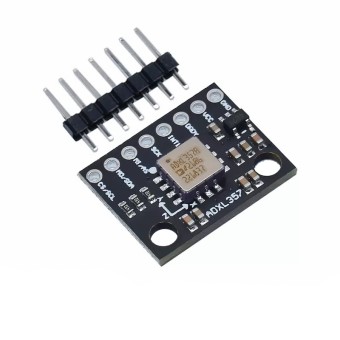
ADXL345 digital accelerometer module, ADXL335 analog accelerometer board |
Accelerometer-only parts fit stationary tilt work, but they do not add rotation-rate data |
| Motion + rotation for balancing robots, drones, or motion control |
Linear acceleration plus angular rotation |
6-axis IMU with accel + gyro |
GY-521 MPU6050 accelerometer and gyroscope |
MPU6050-class boards are the right call when rotation matters, but they do not provide drift-free heading on their own |
| Absolute heading or yaw correction |
Accel + gyro + magnetometer |
9-axis IMU |
MPU9250 9-axis IMU module, GY-91 10-DOF motion and pressure board, GY-801 10DOF IMU board |
Use these instead of MPU6050 if the project needs heading; a magnetometer is what corrects yaw drift |
| Klipper input shaping |
Fast digital acceleration data over SPI |
3-axis digital accelerometer with SPI |
ADXL345 module with I2C and SPI |
Klipper input shaping requires an ADXL345 or pin-compatible part on SPI, not ADXL335 and not I2C-only boards |
| Impact, crash, or shock logging |
Acceleration above ±16g without clipping |
High-g accelerometer |
ADXL375 200g accelerometer |
Standard ±16g parts saturate in hard impacts; ADXL375 is the fit when you need 200g range |
| Battery-powered wake-on-motion |
Low-power motion detection with autonomous wake |
Ultra-low-power accelerometer |
ADXL362 ultra-low power accelerometer |
ADXL362 is positioned for battery-powered motion sensing with motion-activated wake-up, but check SPI fit before assuming a drop-in replacement |
“10DOF” only means a board adds a barometer such as BMP180 or BMP280; it does not improve motion sensing by itself.
ADXL345 vs MPU6050 vs ADXL335: the fastest way to avoid the wrong first buy
| Product type |
Measures |
Interface/output |
Best for |
Avoid if |
| ADXL335 analog accelerometer |
Acceleration and gravity on X, Y, Z |
Analog X, Y, Z outputs |
Simple tilt or light-motion projects on controllers with analog inputs |
Avoid it for Raspberry Pi unless you are adding an ADC; the Pi cannot read analog ADXL335 directly. Also avoid mixing it up with ADXL345: ADXL335 is analog, ADXL345 is digital |
| ADXL345 digital accelerometer |
Acceleration and gravity on 3 axes |
I2C or SPI |
Digital tilt, tap, vibration, and SPI-specific uses such as Klipper; selectable range up to ±16g |
Avoid it if your project needs gyro rotation data rather than accel-only sensing |
| MPU6050 accelerometer and gyroscope |
3-axis acceleration plus 3-axis rotation |
I2C |
Balancing, drones, motion control, and other rotation-heavy builds |
Avoid it for SPI-only workflows like Klipper, and avoid it for compass heading because it has no magnetometer |
For the digital accelerometer route, there is solid code support for using a digital ADXL345 with Arduino. Raspberry Pi users should stay with digital I2C or SPI sensors and pair them with compatible Raspberry Pi boards instead of starting from an analog board.
Compatibility checks before you buy: host, voltage, address, and mounting
Digital modules are the simpler path here. Analog modules change the wiring and the extra parts you need.
- Digital modules generally fit Arduino, ESP32, Raspberry Pi, and Pico projects through I2C or SPI at 3.3 V logic, so they are the default choice when you want the simplest host path. If you still need a controller for one of these sensors, start with compatible Arduino boards.
- Raspberry Pi has no analog inputs, so the ADXL335 analog accelerometer board needs an ADC such as MCP3008 or ADS1115. A digital board like the ADXL345 digital accelerometer or GY-521 MPU6050 accelerometer and gyroscope avoids that extra step.
- Most sensor chips here are 3.3 V devices, but breakout boards vary in whether they add a regulator or level shifting. Do not assume every module is universally 5 V-safe just because it plugs into an Arduino.
- The GY-521 MPU6050 accelerometer and gyroscope specifically lists an onboard voltage regulator, which reduces risk on common hobby hosts, but it is still worth verifying the exact board wiring before applying 5 V signals.
- MPU6050 uses selectable I2C address 0x68 or 0x69, and ADXL345 commonly appears at 0x53 or 0x1D. Those addresses matter if you are sharing a bus or troubleshooting a module that is not detected.
- Klipper results depend on rigid mounting and correct axis orientation, not just buying the right chip. A loosely mounted ADXL345 can produce poor resonance data even when the electrical connection is correct.
- The X, Y, and Z arrows on the PCB show the chip’s axis orientation, and those markings affect both physical mounting and axes_map or sign conventions in code.
- The ADXL362 ultra-low power accelerometer mentions SPI on its product card and does not mention I2C, so low-power buyers should confirm interface fit before treating it like a direct MPU6050 or ADXL345 substitute.
For a quick pre-purchase wiring check, this walkthrough covers wiring and addressing an MPU6050 on Arduino.
Feature and spec matrix for the modules on this page
Once you have the right sensor family, this matrix is the quickest way to compare the features that separate one board from another.
| Product name |
Sensor stack |
Interface/output |
Key differentiator |
Voltage / board note |
Best-fit use |
| MPU6050 accelerometer & gyroscope |
3-axis accel + 3-axis gyro |
I2C |
DMP, FIFO buffer, selectable 0x68/0x69 address |
Onboard voltage regulator |
Balancing, drones, motion control |
| ADXL345 digital accelerometer |
3-axis accelerometer |
I2C, SPI |
Selectable range up to ±16g |
Includes test code for 51, AVR, and Arduino |
Digital tilt, vibration, Klipper SPI setups |
| GY-801 10DOF IMU |
L3G4200D gyro + ADXL345 accel + HMC5883L/MMC5883MC magnetometer + BMP180 barometer |
— |
Real 10DOF stack on one board |
Internal regulator for 3.3V/5V |
Robotics plus barometer-based altitude or environmental data |
| MPU9250 9-axis IMU |
9-axis sensing: accel + gyro + magnetometer |
— |
512-byte FIFO, onboard I2C pull-up resistors, internal digital motion processing |
— |
Heading-capable robotics and AHRS builds |
| ADXL335 analog accelerometer |
3-axis accelerometer |
Analog X/Y/Z outputs |
Ultra-low power, simple analog path |
±3.6g range |
Basic analog tilt and light-motion sensing |
| GY-25 serial angle sensor |
MPU6050-based accel + gyro tilt/angle module |
TTL serial at 9600/115200 bps |
Direct angle output, continuous and query modes |
Not compatible with computer 9-pin serial ports |
Buyers who want Euler-angle style output without writing fusion |
| ADXL375 200g accelerometer |
High-g 3-axis accelerometer |
— |
200g range, impulse event detection |
10,000g shock resistance; 35μA measurement mode |
Impact, crash, and shock logging |
| ADXL346 with tap detection |
3-axis accelerometer |
— |
13-bit resolution, 4 and 6 position orientation monitoring, tap/double-tap, freefall detection |
Integrated LDO for 2V-10V input; main supply voltage range limited to 1.7 V to 2.75 V |
Event detection and orientation-aware builds |
| ADXL362 ultra-low power accelerometer |
3-axis accelerometer |
SPI |
270 nA wake-up mode, motion-activated wake-up, deep embedded FIFO, autonomous interrupt processing |
I2C not mentioned |
Battery-powered motion sensing |
| GY-91 10-DOF motion & pressure module |
MPU-9250 + BMP280 |
— |
Adds barometric pressure and temperature to 9-axis motion sensing |
Dual-chip design |
Motion tracking plus altitude/pressure data |
If you are comparing these boards mainly for the BMP180 or BMP280 side, that is as much a pressure and altitude sensor decision as a motion-sensor one. Buyers who want direct serial angle output can also review using a serial angle-output IMU.
When not to buy an accelerometer module
Accelerometers cannot reliably measure distance or position because double integration of noisy acceleration makes error grow very quickly, often within seconds. If the real goal is position or distance, use GPS, wheel encoders, or optical flow instead, and choose a capable controller such as an ESP32 board when the project also needs fusion or logging.
If your real goal is orientation output rather than raw sensor data, fused IMUs such as BNO055 or BNO085 are often considered because they output orientation directly. The tradeoff is 5–10× price, plus a real community split: convenience is the appeal, but calibration behavior and raw-noise quality are often criticized compared with MPU6050-style raw-data workflows. For heading, a 6-axis MPU6050 alone will still drift in yaw; use a magnetometer-based 9-axis option such as the MPU9250 9-axis IMU module or see this example of building a heading-capable setup with accel, gyro, and magnetometer.
FAQs on Accelerometer Modules for Arduino, Raspberry Pi & Robotics
ADXL345 or MPU6050 — which should I buy?
MPU6050 fits rotation and balancing, while ADXL345 fits tilt, tap, vibration, and Klipper SPI setups. ADXL345 is an accelerometer only with I2C/SPI, while MPU6050 adds a gyroscope but uses I2C, so MPU6050 fits rotation and balancing while ADXL345 fits tilt, tap, vibration, and Klipper SPI setups. If the project must track turning motion, choose MPU6050; if it mainly reads gravity direction or needs SPI, choose ADXL345.
Can an accelerometer measure distance or speed?
No — GPS, wheel encoders, or optical flow are the better options. Accelerometers cannot reliably measure distance or speed because integrating noisy acceleration once for speed and twice for position makes error grow very quickly. Accelerometers are useful for tilt, vibration, impacts, and motion events, not for accurate standalone position tracking.
Will this work with Klipper input shaping?
Yes, but Klipper specifically wants an ADXL345 on SPI, and analog ADXL335 plus I2C-only boards are the wrong choice for Klipper input shaping. The chip choice matters. Rigid mounting and correct axis setup matter too.
Does MPU6050 drift, and does that mean the sensor is bad?
Calibrate at every startup, and remember that yaw needs a magnetometer reference. All MEMS gyros drift, including MPU6050-class parts, so drift is not proof the sensor is broken. The accelerometer can help stabilize pitch and roll through sensor fusion, but a 6-axis board alone cannot hold absolute heading.
Why does the accelerometer show about 1g when it is sitting still?
That is why tilt measurement works. An accelerometer at rest measures gravity, so seeing about 1g on the vertical axis is normal. A resting sensor is not “seeing motion”; it is sensing the gravitational acceleration vector.
Can Raspberry Pi read ADXL335 directly?
Use a digital ADXL345 or MPU6050 instead, or add an ADC. Raspberry Pi cannot read an ADXL335 directly because the ADXL335 outputs analog X/Y/Z voltages and the Pi has no analog inputs. That analog-vs-digital difference is one of the most important filters on this page.
Are MPU6050 and MPU9250 discontinued, and should I worry about clones?
ICM-20948 is the named newer successor, and MPU6050 and MPU9250 are EOL/discontinued by TDK, so many modules come from old stock, gray market, or clones. That does not make every available module unusable, but it does mean buyers who care about authenticity or long-term design stability often prefer newer current-production alternatives.
Glossary
- Accelerometer
- A sensor that measures acceleration and gravity on three axes, which makes it useful for tilt, vibration, and impact detection but not reliable position tracking.
- Gyroscope
- A sensor that measures rotation rate, and it is the deciding difference between accel-only boards like ADXL345 and IMUs like MPU6050.
- Magnetometer
- A digital compass sensor that provides the reference needed for drift-corrected heading.
- DOF / axis
- On this page, 3-axis means accelerometer only, 6-axis adds a gyroscope, 9-axis adds a magnetometer, and 10DOF adds a barometer.
- g-range
- The maximum acceleration the sensor can measure before clipping, such as ±3.6g on ADXL335, ±16g on ADXL345, or 200g on ADXL375.
- Drift
- The slow wandering in gyro-based readings that is inherent to MEMS sensors and managed through calibration and sensor fusion.
- SPI
- A faster digital interface than I2C, and the one that matters for Klipper input shaping and some higher-rate logging setups.
- ADC
- An analog-to-digital converter, required when you want to use an analog-output sensor like ADXL335 with a host that has no analog inputs, such as Raspberry Pi.



Please complete your information below to login.
Sign In
Create New Account