Product added to cart


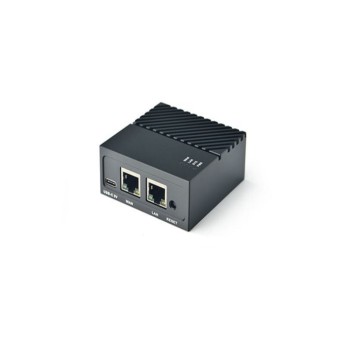
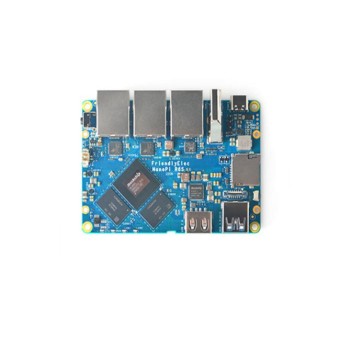
No — most NanoPi NEO-family boards are headless and have no video or display output. If you need HDMI, choose the NanoPi M1, which provides HDMI 1.4 and CVBS video output for monitor-connected projects.

Creating an account has many benefits: check out faster, keep more than one address, track orders and more.
Start with the main split: if your project needs a monitor, most NEO-family boards are out because they are headless and have no display output. If it will run over SSH as a small server, controller, or embedded Linux node, choose based on network connection, storage, and throughput.
Raspberry Pi Zero is the common alternative because it has the larger community and support base, while the base Pi Zero does not include onboard Ethernet. If mainstream tutorials, broader accessory support, or Raspberry Pi HAT compatibility matter more, it makes more sense to look at Raspberry Pi boards.
| Project need | Best-fit board/family | Why it fits | Key trade-off / when to step elsewhere |
|---|---|---|---|
| Wired headless server, DNS box, VPN node, simple always-on Linux task | NanoPi NEO H3 board with 512MB RAM | The base NEO is the Ethernet-only model, with 10/100M Ethernet in a 40x40mm board for simple wired deployments | No HDMI, no onboard wireless, and not the right fit if you need higher network throughput |
| Compact wireless IoT node | NanoPi NEO Air with 8GB eMMC | NEO Air adds WiFi 802.11b/g/n and Bluetooth 4.0 in a smaller wireless-oriented variant, plus 8GB onboard eMMC | WiFi and Bluetooth behavior can take more setup work, and range is limited if you do not use the external antenna socket |
| Small board with onboard storage and faster networking | NanoPi NEO Plus2 with Gbps Ethernet | NEO Plus2 adds Gigabit Ethernet and eMMC-oriented storage headroom, with built-in WiFi/Bluetooth 4.0 and dual micro SD card slots | Better suited to compact networked builds than monitor-based projects |
| Compact 64-bit board for embedded Linux | NanoPi NEO2 with 512MB RAM | NEO2 is the 64-bit quad-core H5 option in the family and the usual step from older H3-based choices | The supplied card confirms 10/100M Ethernet, so verify your actual throughput need before assuming it replaces an R-series board |
| HDMI or display-based project | NanoPi M1 with HDMI and IR receiver | NanoPi M1 includes HDMI 1.4 and CVBS video output, plus a Raspberry Pi compatible 40-pin GPIO header | Larger and less specialized for tiny headless installs than a NEO board |
| Breadboard or camera-focused IoT build | NanoPi Duo2 with camera interface | NanoPi Duo2 is breadboard-compatible, measures 25.4 x 55mm, and includes onboard WiFi/Bluetooth plus an OV5640 camera interface | Choose it for wiring access and compact camera work, not for Ethernet-first server jobs |
| Router, NAS-lite, or heavier edge networking | NanoPi R6S with 8GB RAM and dual 2.5G Ethernet | The R6S steps far beyond NEO-class hardware with dual 2.5G Ethernet plus one Gbps port, 8GB LPDDR4X RAM, 32GB eMMC, and 8K@60fps HDMI support on RK3588S | Higher class and complexity than you need for a simple ad-blocker or light controller |
| Simple sensor-only build without full Linux | ESP32 or ESP32 boards / ESP8266 | ESP32 and ESP8266 are the lower-cost choice when you do not need a full Linux SBC or Ethernet | They are microcontrollers, not Linux single-board computers |
The similar names lead to a lot of wrong-board purchases, especially when buyers assume wireless, Ethernet speed, RAM, and processor generation are the same. For Nano Pi NEO and Nano Pi NEO Air shopping, the useful split is straightforward: wired vs wireless, 10/100M vs Gigabit-oriented, H3 vs H5, and micro SD only vs onboard eMMC.
If you go with the H5 model, this walkthrough for setting up a NEO2 with Armbian is the next step after selection.
| Board name | CPU family | RAM | Ethernet | Wireless | Storage notes | Size/format | Best-fit use |
|---|---|---|---|---|---|---|---|
| NanoPi NEO | Allwinner H3 | 512MB DDR3 | 10/100M Ethernet | Ethernet-only | micro SD | 40x40mm | Lowest-friction wired headless tasks |
| NanoPi NEO Air | Allwinner H3 | — | — | WiFi 802.11b/g/n, Bluetooth 4.0 dual-mode | 8GB onboard eMMC | 7.5g | Very compact wireless Linux node |
| NanoPi NEO Plus2 | Allwinner H5 | 512MB DDR3 | Gbps Ethernet | Built-in WiFi/Bluetooth 4.0 | Dual micro SD card slots | — | Feature-richer compact build with faster networking |
| NanoPi NEO2 | Allwinner H5 | 512MB DDR3 | 10/100M Ethernet | — | Supports u-boot and UbuntuCore | 40x40mm | 64-bit compact embedded Linux board |
Choose a Raspberry Pi Zero when ecosystem support matters more than raw board specs. It is the most common upstream comparison because it brings a much larger community, official support, and the Raspberry Pi HAT ecosystem. Choose a NanoPi NEO instead when smaller size, a faster quad-core CPU, and onboard Ethernet matter more than mainstream tutorials, since the base Raspberry Pi Zero lacks Ethernet. If you are cross-shopping similarly small low-cost SBCs, Orange Pi boards are another common comparison, though community feedback includes some dissatisfaction with specific processor performance on Orange Pi Zero-class options.
For display output, step sideways to the NanoPi M1, which adds HDMI 1.4, CVBS video output, and a Raspberry Pi compatible 40-pin GPIO header. For router or NAS-class work, skip the base NEO family and move to the NanoPi R6S: dual 2.5G Ethernet plus one Gbps port, 8GB LPDDR4X RAM, and 32GB eMMC are the hardware jump that makes the difference. If you want to buy Nano Pi hardware for simple sensor-only jobs, that is overbuying; ESP32 or ESP8266 boards are much cheaper and lower power. For niche firmware such as OpenWRT, verify community-confirmed support before buying rather than assuming the whole NEO family is covered. For a broader comparison, see NanoPi, Raspberry Pi, and other small-board alternatives.
No — most NanoPi NEO-family boards are headless and have no video or display output. If you need HDMI, choose the NanoPi M1, which provides HDMI 1.4 and CVBS video output for monitor-connected projects.
The quick version: the base NEO is Ethernet-only, NEO Air adds WiFi/Bluetooth and 8GB eMMC, NEO Plus2 adds built-in WiFi/Bluetooth 4.0 plus Gbps Ethernet, and NEO2 is the 64-bit H5 variant in the family. That split matters more than the similar names because it changes whether the board fits wired, wireless, or higher-throughput work.
No — the NEO uses a 24-pin + 12-pin header setup rather than the Raspberry Pi 40-pin layout, so Raspberry Pi-specific HATs are not directly compatible. If you need that accessory ecosystem, Raspberry Pi or NanoPi M1 is the safer fit.
Usually not for anything beyond short-range placement, because community reports describe weak onboard antenna range on the NEO Air. Buyers get more reliable WiFi by using the external antenna socket instead of relying only on the onboard antenna.
Yes for mainstream headless Linux use, but WiFi and Bluetooth behavior can vary by board and by kernel branch in Armbian or DietPi, especially on NEO Air. Wired models are the safer choice if you want fewer wireless setup variables.
Yes for many headless projects: NanoPi NEO is smaller, uses a faster quad-core CPU, and includes Ethernet that the base Raspberry Pi Zero lacks. Raspberry Pi still has the larger ecosystem, easier accessory compatibility, and a simpler support path for beginners.
Simple digital I/O and I2C use are the safer expectation, but community reports describe mixed reliability with timing-sensitive sensors such as DHT22 on some board and kernel combinations. If your project depends on precise GPIO timing, verify that exact sensor setup before choosing a Linux SBC.
Please complete your information below to login.
Sign In
Create New Account