
Product added to cart

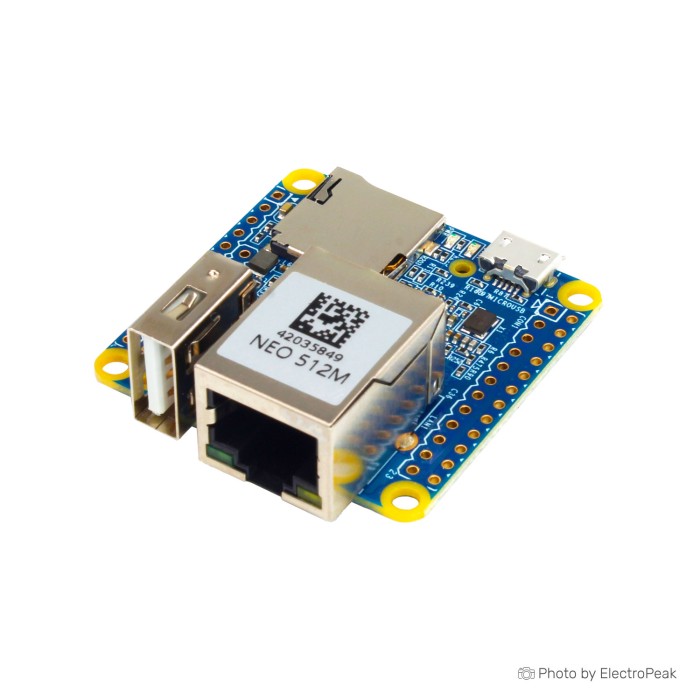
NanoPi NEO H3 Quad-Core Development Board - 512MB RAM
$33.7500
In stock
SKU
MIN-07-008
Volume discounts:
- +10 3 % $32.6100
- +25 5 % $32.0300
- +50 7 % $31.4600
- +100 8 % $30.8900
- +300 10 % $30.3200
Product Variations: View out of stock variants


Add an Accessory:


-
 CH340G USB to TTL Converter$0.7400
 - FT232RL FTDI 3.3V/5V Mini USB to TTL Serial Converter Adapter Module$1.7700


View more

Ships in 2-3 business days, then:
Free delivery in 12-15 days by Tracked Economic Shipping on orders over $100.
Free delivery in 7-10 days by Express Shipping on orders over $300.
More shipping info

Shop with confidence Learn More
 Nano Pi R4S 4G RAM Development Board Previous
NanoPi NEO H3 Overview
The NanoPi NEO H3 is a 40x40 mm ARM single-board computer built around an Allwinner H3 quad-core processor and 512MB DDR3 RAM. It is intended for compact embedded systems, robotics controllers, and headless utilities, with 10/100M Ethernet, a single USB host port, and dual expansion headers in a 7.5 g footprint. Historical documentation places the board in the $7.99 to $10 range, but no current price is supplied.
The main trade-off is between physical density and connectivity. This board fits a functional Linux environment and physical pin breakouts into an exceptionally compact form factor, but deployment requires a 5V/2A power source, external microSD storage, and passive cooling under sustained loads. For projects that need onboard Wi-Fi, Bluetooth, or Gigabit throughput, see the alternatives in our NanoPi development boards catalog or the comparison below.
Specifications of NanoPi NEO H3 Quad-Core Development Board - 512MB RAM
- Processor: H3
- CPU: Quad-core Cortex-A7 @ 1.2GHz
- GPU: Mali400MP2 @ 600MHz
- OpenGL ES 2.0 support
- Memory: DDR3 RAM: 512MB
- Storage: micro SD slot
- Network: 10/100M Ethernet
- Ports: 1 USB host
- Ports: 1 micro USB OTG port
- Ports: 2 USB through pins
- Expansion: 24-pin header for I2C, 2x UART, SPI, PWM and power signals
- Expansion: 12-pin header with 2 USB, IR pin, microphone and Line OUT signals
- LED: Power and status LEDs
- Dimensions: 40x40 mm
- Weight: 7.5 g
- Power: 5V/2A through micro USB port or VDD pin on the header
- Operating system: u-boot
- Operating system: Ubuntu Core
NanoPi NEO H3 Specifications Explained
Here is how the hardware specifications translate to real embedded deployments and runtime constraints:
| Specification | Hardware Value | Why It Matters in Practice |
|---|---|---|
| Processor & Architecture | Allwinner H3 (Quad-core Cortex-A7 @ 1.2GHz) | Provides sufficient 32-bit computing capacity for headless background services, telemetry collection, and local network routing without unnecessary power draw. |
| System Memory | 512MB DDR3 RAM | Suited for lightweight Linux instances, small Python runtimes, and low-footprint daemons; unsuited for memory-intensive multi-container stacks or desktop interfaces. |
| Storage Medium | MicroSD slot | Serves as both bootloader medium and root filesystem; throughput and system longevity depend directly on the write endurance and speed class of the chosen card. |
| Network Interface | 10/100M Ethernet | Delivers stable, low-latency wired networking for local endpoints, though total throughput is capped below Gigabit standards. |
| Physical USB Connectivity | 1 USB Host Type-A, 1 Micro USB OTG | Accommodates one standard external USB peripheral directly, while OTG provides serial communication or device-mode operations. |
| Header USB Routing | 2 USB through pins | Supplies two additional USB signal pairs via the 12-pin expansion block, requiring custom wiring, daughterboards, or breakout cables rather than standard plugs. |
| Expansion Headers | 24-pin and 12-pin headers | Exposes hardware buses including I2C, SPI, two UARTs, PWM, GPIO lines, analog audio in/out, and infrared input for direct sensor and peripheral integration. |
| Graphics Core | Mali400MP2 @ 600MHz (OpenGL ES 2.0) | Capable of basic 2D/3D acceleration, though practical graphical utilization depends heavily on kernel drivers and display server configuration in headless environments. |
Need more than 10/100M networking or integrated wireless? The NanoPi NEO Plus2 H5 adds Gigabit Ethernet, onboard Wi-Fi, and Bluetooth on a slightly longer 40x52 mm PCB. Its title lists 1GB RAM, while its technical description specifies 512MB DDR3 RAM.
NanoPi NEO H3 Setup, Power and Compatibility
The NanoPi NEO H3 needs reliable peripheral hardware and careful power delivery during setup. It accepts 5V/2A input through either the micro USB port or the direct VDD pin on the 24-pin header. An under-rated 5V/1A supply or high-resistance charging cable is a primary cause of boot failure, erratic reboots, and storage corruption under load.
| Subsystem | Compatibility Status | Integration Details |
|---|---|---|
| Primary Power Input | 5V/2A required | Supply clean DC power via micro USB or the VDD pin; pair with a dedicated adapter such as the 5V 2A power adapter. |
| Boot / OS Storage | MicroSD card | Requires a high-speed card such as the SanDisk 32GB microSD card flashed with a compatible boot image. |
| Operating Systems | Linux distributions | The board specification lists u-boot as the bootloader and Ubuntu Core as the OS. Debian, FriendlyWrt (an OpenWrt-targeted build), Armbian, and DietPi provide broader software support. |
| GPIO Control Libraries | Custom pin mapping | Standard Raspberry Pi GPIO libraries do not work directly. Peripheral interfacing requires adapted libraries such as wiringNP or RPi.GPIO_NP. |
| Wireless Networking | Not integrated | This board has no onboard Wi-Fi or Bluetooth; external connectivity relies strictly on the RJ45 port or an external USB wireless dongle. |
For installations where physical Ethernet is impractical and onboard storage is essential, choose the NanoPi NEO Air H3. It provides integrated 802.11b/g/n Wi-Fi, Bluetooth 4.0, and 8GB of onboard eMMC flash in the same compact 40x40 mm form factor.
Use these verification steps for initial bench testing:
- Flash a recognized Linux image, such as Ubuntu Core, Armbian, or DietPi, onto a reliable microSD card with a dedicated imaging utility.
- Seat the microSD card firmly in the underside card slot.
- Connect a patch cable between the 10/100M Ethernet jack and your local network router or switch.
- Connect a verified 5V/2A DC power supply to the micro USB port.
- Check the onboard power and status LEDs. A solid power LED indicates correct voltage input; blinking activity on the status LED then indicates kernel execution.
- Find the assigned IP address through your local DHCP table, or attach a 3.3V USB-to-serial debug adapter to the dedicated UART pins to monitor boot console output.
NanoPi NEO H3 Cooling and Limitations
Reliable NanoPi NEO H3 deployment depends on accounting for its thermal and architectural limits. The Allwinner H3 SoC runs warm during sustained CPU tasks. Without active airflow or passive heat dissipation, thermal throttling engages quickly, and severe thermal saturation can trigger automatic system shutdowns. Fit a dedicated NanoPi aluminum heatsink whenever the board operates in an enclosure or handles continuous compute loads.
Hardware revisions over the production lifecycle have changed power regulators and pin arrangements. Because the PCB revision in current retail stock is not fixed, do not assume identical debug-pin positions or audio circuitry between manufacturing batches.
Peripheral and graphical constraints also define this platform. The board edge provides exactly one standard USB-A host port; expanding connectivity requires soldering to the 12-pin header or using an external USB hub. Mainline Linux kernel support for the Mali400MP2 GPU and video processing unit (VPU) remains limited compared with legacy BSP kernels. That makes the board ill-suited for hardware-accelerated media rendering or video transcoding. Its 512MB of single-channel RAM also limits heavy multitasking, large database operations, and high-concurrency network servers.
For 64-bit ARMv8 execution and documented Raspberry Pi pin compatibility, consider the NanoPi NEO2 H5. It uses a Cortex-A53 processor while retaining the identical 40x40 mm profile.
NanoPi NEO H3 vs NEO2, NEO Air and Plus2
The FriendlyELEC NanoPi series uses small footprints, but each model addresses different network, storage, and processing requirements. Review the factual differences below.
| Feature | NanoPi NEO H3 | NanoPi NEO2 H5 | NanoPi NEO Air H3 | NanoPi NEO Plus2 H5 |
|---|---|---|---|---|
| Processor | Allwinner H3 (4x Cortex-A7 @ 1.2GHz) | Allwinner H5 (4x Cortex-A53 64-bit) | Allwinner H3 (4x Cortex-A7 @ 1.2GHz) | Allwinner H5 (4x Cortex-A53 64-bit) |
| System Memory | 512MB DDR3 | 512MB DDR3 | 512MB DDR3 | 512MB DDR3 (Title states 1GB) |
| Integrated Storage | MicroSD slot | MicroSD slot | 8GB eMMC + MicroSD slot | Dual MicroSD slots |
| Wired Network | 10/100M Ethernet | 10/100M Ethernet | 10/100M Ethernet | Gigabit Ethernet (10/100/1000M) |
| Wireless Network | None | None | 802.11b/g/n Wi-Fi & BT 4.0 | 802.11b/g/n Wi-Fi & BT 4.0 |
| Dimensions | 40x40 mm | 40x40 mm | 40x40 mm | 40x52 mm |
| Included Cooling | None included | None included | None included | None included |
Choose the NEO2 when your project benefits from 64-bit computing architectures. The NEO Air suits builds that need onboard eMMC reliability and wireless telemetry within a 40x40 mm boundary. Choose the NEO Plus2 when Gigabit routing speed, dual microSD redundancy, and onboard wireless justify its slightly longer physical footprint.
NanoPi NEO H3 Projects and Accessories
The compact footprint and physical Ethernet port make this board a practical host for focused, headless infrastructure utilities. Verified deployments and community applications include:
- Network-Wide DNS Sinkhole: Run Pi-hole or AdGuard Home under Armbian to filter local network traffic with minimal power draw.
- Lightweight Software-Defined Radio Server: Operate an RTL-TCP distribution to stream raw RF sample data over Ethernet to remote processing clients.
- Compact Network Storage Controller: Use manufacturer Debian NAS Dock configurations for low-throughput file serving.
- Home Automation Broker: Run lightweight MQTT brokers, such as Mosquitto, or isolated Node-RED instances under DietPi.
- Industrial / IoT Edge Gateway: Bridge field sensors through I2C or SPI headers to local Ethernet SCADA networks.
- Embedded Robotics Controller: Handle motor-driver logic, PWM controls, and sensor acquisition through the 24-pin expansion block.
For built-in Wi-Fi, Bluetooth, Mini HDMI output, and camera integration out of the box, the Raspberry Pi Zero 2 W offers an adjacent platform approach. It lacks an RJ45 port and leaves its GPIO headers unpopulated.
Required Accessories
- MicroSD Storage: Use a fast, high-endurance card such as the SanDisk 32GB microSD card for the operating system and user files.
- Regulated DC Power: Use a stable 5V power source delivering at least 2A, such as the 5V 2A power adapter.
- Network Cabling: A standard RJ45 Cat5e or Cat6 patch cable provides local network connectivity.
Recommended Accessories
- Thermal Management: Use a dedicated NanoPi aluminum heatsink to prevent throttling during continuous processing.
- Serial Debug Adapter: A 3.3V USB-to-UART bridge module supports direct boot troubleshooting and headless console recovery without network access.
- Protective Housing: A ventilated plastic or aluminum enclosure protects exposed pins and component solder joints.
Optional Add-ons
- USB Wi-Fi Adapter: Use a compatible USB dongle where external wireless connectivity is required.
- Prototyping Hardware: Add jumper wires, external motor drivers, and I2C/SPI sensors for header-based expansion projects.
NanoPi NEO H3 FAQ and Buying Checklist
Does the NanoPi NEO H3 need a heatsink?
Yes. A heatsink is recommended for sustained CPU workloads or enclosed builds. The Allwinner H3 processor generates substantial heat under load, and uncooled boards risk thermal throttling or protective shutdowns. An aluminum heatsink helps maintain reliable operating temperatures.
What power supply does the board require?
The board requires a 5V/2A power supply through the onboard micro USB port or the direct VDD pin on the 24-pin header. A standard 5V/1A phone charger will cause instability, boot loops, and filesystem corruption.
Does the NanoPi NEO H3 have Wi-Fi or Bluetooth?
No, the NanoPi NEO H3 has no onboard Wi-Fi or Bluetooth. Network communication depends on its integrated 10/100M Ethernet port unless you connect an external USB wireless adapter.
Does the board have three physical USB ports?
No. The board has one physical USB 2.0 Type-A host port and one micro USB OTG port. The specification of "2 USB through pins" refers to raw USB signal pins routed to the 12-pin header, requiring custom wiring or breakout boards to connect USB devices.
Can the NanoPi NEO H3 run Armbian or DietPi?
Yes, the board supports third-party Linux distributions including Armbian and DietPi alongside official manufacturer Ubuntu Core and FriendlyWrt builds. The specification lists u-boot and Ubuntu Core; u-boot is the bootloader, while various community Linux distributions can run as the operating system.
Are the expansion pins compatible with Raspberry Pi hats?
No, the NanoPi NEO H3 uses a 24-pin primary expansion header rather than a standard 40-pin Raspberry Pi layout. Pin assignments differ, and peripheral code requires libraries such as wiringNP or RPi.GPIO_NP instead of standard RPi.GPIO tools.
What alternative board should I choose if I need built-in wireless?
For an Allwinner H3 platform with native wireless, the Orange Pi Zero H3 includes 802.11b/g/n Wi-Fi and 10/100M Ethernet. AV video and auxiliary USB lines require an external daughterboard.
Purchase Decision Summary
- Ideal for: Compact wired embedded Linux gateways, headless background services (DNS filters, MQTT brokers), physical telemetry nodes, and developers comfortable with Linux terminal workflows.
- Maybe for: Small web API endpoints, SDR streaming servers, or robotics builds where memory consumption and thermal output can be actively managed.
- Avoid if: You require onboard Wi-Fi/Bluetooth, Gigabit network speeds, direct desktop video output, plug-and-play Raspberry Pi hat compatibility, or continuous multi-core processing without added cooling.
Pre-Purchase Verification Checklist
- [ ] My project can operate comfortably within 512MB of system RAM.
- [ ] 10/100M Ethernet meets my throughput requirements without needing Gigabit speed.
- [ ] I have accounted for a wired network connection or plan to use an external USB Wi-Fi dongle.
- [ ] I have a verified 5V/2A DC power supply and a reliable micro USB cable ready.
- [ ] I have included a high-endurance microSD card for the operating system and storage.
- [ ] I have added a passive aluminum heatsink if the board will operate under continuous load.
- [ ] I understand that the board features one standard USB-A port, with additional ports requiring pin breakout.
- [ ] I have verified that my GPIO code can be adapted to wiringNP or RPi.GPIO_NP pin mappings.
| Processor (SoC) | H3 |
|---|---|
| CPU | Quad-core Cortex-A7 @ 1.2GHz |
| Architecture | ARM Cortex-A7 |
| RAM | 512MB |
| RAM Type | DDR3 |
| Storage Support | microSD |
| GPU/VPU | Mali400MP2 @ 600MHz |
| Ethernet | 100 Mbps |
| Wi-Fi | No |
| Bluetooth | No |
| USB Ports | 1 USB Host, 1 Micro USB OTG, 2 USB via pins |
| Video Output | No |
| Hardware Interfaces | I2C, SPI, UART, IR, Line OUT, Microphone, PWM |
| GPIO Pins | 24-pin header, 12-pin header |
| Camera/Display | No |
| Power Input | 5V/2A |
| PCIe | No |
| Dimensions (mm) | 40x40 mm |
| OS Support | Ubuntu |
| Weight (g) | 7.5 |
Write Your Own Review

Please complete your information below to login.
Sign In
Create New Account