
Product added to cart

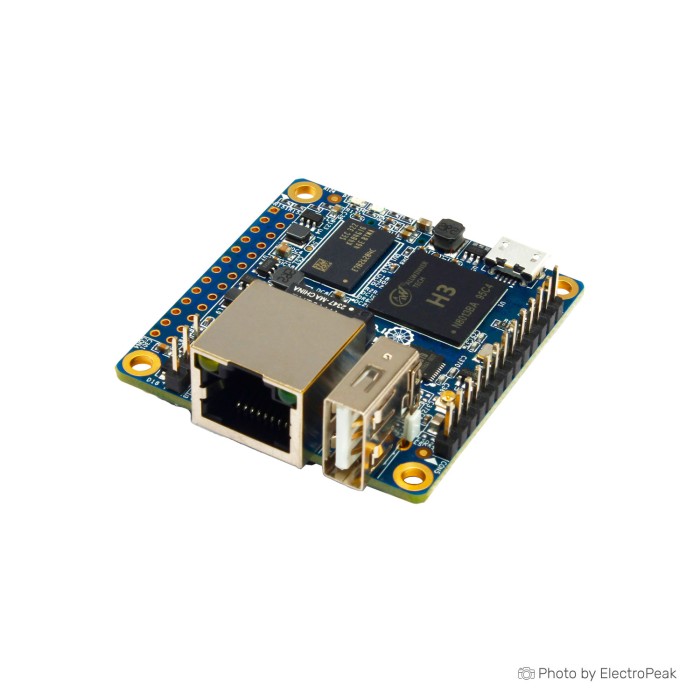
Orange Pi Zero H3 Quad Core Development Board
$35.9500
In stock
SKU
MIN-02-030
Volume discounts:
- +10 2 % $35.1100
- +25 4 % $34.6800
- +50 5 % $34.2600
- +100 6 % $33.8400
- +300 7 % $33.4200
Ships in 2-3 business days, then:
Free delivery in 12-15 days by Tracked Economic Shipping on orders over $100.
Free delivery in 7-10 days by Express Shipping on orders over $300.
More shipping info

Shop with confidence Learn More
 Orange Pi 3 H6 Quad Core Development Board Previous
Orange Pi Zero H3 Board Review
The Orange Pi Zero H3 Quad Core Development Board is a compact 512MB Linux-capable single-board computer for headless Ethernet and GPIO projects. Orange Pi Zero family boards often appear in the $10 to $15 range, but this platform requires hands-on configuration. It is not intended for builds that require dependable onboard Wi-Fi, native HDMI output, plug-and-play setup, or uncooled sustained processing workloads.
For the same platform under an LTS release designation, the Orange Pi Zero LTS H3 availability alternative provides an equivalent hardware foundation within the broader Orange Pi board range.
Specifications of Orange Pi Zero H3 Quad Core Development Board
- CPU: H3 Quad-core Cortex-A7 H.265/HEVC 1080P
- GPU: Mali400MP2 GPU @600MHz,Supports OpenGL ES 2.0
- Memory(SDRAM): 512MB DDR3 SDRAM(Share with GPU)
- Onboard Storage: TF card slot (Max. 32GB),2MB SPI Flash
- Onboard Network: 10/100M Ethernet RJ45 POE is default off.
- Onboard WiFi+BT: XR819, IEEE 802.11 b/g/n,It **doesn't** have Bluetooth.
- Video Outputs: AV OUT(via 13 pins external board)
- Audio output: 3.5mm audio port (2-ch output 1-ch input, Via 13pin interface board)
- Power Source: MicroUSB OTG can supply power
- USB 2.0 Ports: 3*USB 2.0 HOST (Two of them are via 13pin interface board)
- Low-level peripherals: 26pin header with I2C, SPI, UART and multiple GPIO ports,13pin header with 2*USB Host, IR pin, AV-out, AUDIO (MIC, AV),3pin Debug ports
- Debug serial port: UART-TX,UART-RX,GND
- LED: Power led,Status led
- IR receiver: Support IR remote control (via 13pin interface board)
- Supported OS: Android,Lubuntu,Debian
- Dimension: 48mm,46mm
Orange Pi Zero H3 Specifications Explained
This board's low-level hardware choices set clear limits on software performance and physical integration.
| Specification | Hardware Value | Why It Matters |
|---|---|---|
| Processor & Memory | Allwinner H3 Quad-core Cortex-A7; 512MB DDR3 SDRAM | The 512MB memory is shared directly with the Mali400MP2 GPU. This leaves a modest footprint best suited for command-line utilities, lightweight daemons, and embedded runtime environments rather than desktop interfaces or memory-intensive container stacks. |
| Wired Networking | 10/100M Ethernet RJ45 | Provides a stable, low-latency wired interface for local network controllers and serial bridges. It does not provide Gigabit throughput, which caps continuous local file transfers. For projects that demand high-speed routing, consider the Gigabit Ethernet and HDMI-capable Orange Pi Zero variant instead. |
| Physical Footprint | 48mm × 46mm | The square form factor fits custom 3D-printed enclosures and compact sensor pods where space is constrained. |
| Display Output | AV OUT (via 13-pin header) | The board does not provide an onboard HDMI port. Video output requires composite AV signaling through an optional breakout board, making this hardware impractical for standard computer monitors. |
| Primary Storage | TF card slot (Max. 32GB), 2MB SPI Flash | The operating system must boot from an external card. A high-endurance media card such as a 32GB Class 10 MicroSD boot card is required to hold the root filesystem, as the 2MB onboard SPI Flash is reserved for bootloader storage. |
Orange Pi Zero H3 WiFi, Cooling and Power Limitations
Review several operational factors before deploying this board in long-term or unattended service.
Wireless networking uses an onboard XR819 module that supports 802.11 b/g/n, with no Bluetooth support. Community testing frequently reports driver instability, dropped connections, and MAC-address inconsistencies under mainstream Linux kernels. For mission-critical connectivity, use wired Ethernet or connect an external USB WiFi adapter to bypass the internal wireless hardware entirely. Projects that require reliable integrated wireless alongside Bluetooth should use the newer Orange Pi Zero wireless, Bluetooth, and HDMI option instead.
Thermal management is essential. Under compute loads, the uncooled Allwinner H3 SoC routinely operates between 60°C and 80°C, leading to thermal throttling and potential system lockups. A physical heatsink paired with active airflow is strongly advised for sustained background tasks.
Power delivery also needs to be stable. Although the board receives power through MicroUSB OTG, typical PC USB ports and low-quality multi-port phone chargers often fail to maintain the necessary voltage during transient CPU spikes. Pair the board with a dedicated 5V/2A Orange Pi power adapter to prevent sudden reboots during boot sequences.
Although the network jack references Power over Ethernet (POE default off), it does not adhere to active IEEE 802.3af/at standards. Ethernet power requires hardware-level board modifications and passive 5V POE injectors. Connecting the board directly to an active POE network switch will not power the device and risks hardware damage without an external splitter.
Orange Pi Zero H3 GPIO and Expansion Compatibility
Physical interfacing on the Orange Pi Zero is divided across multiple headers. Distinguish onboard ports from peripheral signals before planning a connection.
The primary 26-pin header exposes standard embedded buses, including I2C, SPI, UART, and multiple general-purpose input/output pins. All GPIO lines run strictly at 3.3V logic levels and are not 5V tolerant. Connecting 5V digital devices or legacy 5V microcontroller logic directly to these pins will permanently damage the SoC; inline logic-level shifters are required for mixed-voltage circuits. An 26-pin GPIO extension cable can simplify prototyping access by routing pins clear of the board.
A secondary 13-pin unpopulated expansion header provides the extra interfaces. The single onboard USB-A port handles primary peripherals, while the two additional USB 2.0 host channels, composite AV output, infrared receiver, and 3.5mm analog audio input/output all route through these 13 pins. An external breakout module is necessary to access those ports.
For onboard eMMC flash, integrated HDMI, native Bluetooth, or a camera connector without wiring an add-on daughterboard, examine the Orange Pi board with eMMC, camera input, HDMI, and Bluetooth.
| Interface | Physical Location | Integration Requirements |
|---|---|---|
| Primary USB 2.0 Host | Onboard standard USB-A receptacle | Direct plug-in for keyboards, storage drives, or wireless adapters. |
| Secondary USB Hosts (x2) | 13-pin expansion header | Requires a secondary interface board or custom wiring harness. |
| Analog Audio (In/Out) & AV | 13-pin expansion header | Requires a breakout board; no physical 3.5mm audio jack exists onboard. |
| Debug Serial | Dedicated 3-pin header (TX, RX, GND) | Connects to a 3.3V USB-to-UART serial cable for headless OS recovery. |
| Digital I/O (I2C, SPI, UART) | 26-pin header | Strictly 3.3V logic levels; 5V peripherals must use level conversion. |
Orange Pi Zero H3 vs Orange Pi Zero Boards
Your choice depends on networking throughput, memory constraints, and display needs. The table below compares this board with alternatives across the family and adjacent architectures.
| Model | Processor & Memory | Networking | Display & Audio | Primary Role |
|---|---|---|---|---|
| Orange Pi Zero H3 | H3 Cortex-A7 (32-bit), 512MB DDR3 | 10/100M Ethernet, 802.11b/g/n Wi-Fi (XR819, no BT) | AV out via 13-pin header, no HDMI | Compact, low-cost headless Ethernet controller and serial gateway. |
| Orange Pi Zero LTS H3 | H3 Cortex-A7 (32-bit), 256MB/512MB DDR3 | 10/100M Ethernet, 802.11b/g/n Wi-Fi (XR819, no BT) | AV out via 13-pin header, no HDMI | Direct platform equivalent maintained under long-term support sourcing. |
| Orange Pi Zero H2+ (512MB) | H2+ Cortex-A7 (32-bit), 512MB DDR3 | 10/100M Ethernet, 802.11b/g/n Wi-Fi (no BT) | AV out via 13-pin header, no HDMI | Alternative budget platform using the Allwinner H2+ system architecture. |
| Orange Pi Zero 2W (H618) | H618 Cortex-A53 (64-bit), 1GB–4GB LPDDR4 | Wi-Fi 5 + Bluetooth 5.0 (Ethernet via 24-pin expansion) | Mini HDMI (up to 4K@60fps) | Wireless-first edge controller with modern RAM configurations and 40-pin GPIO. |
| Orange Pi Zero 2 (H616) | H616 Cortex-A53 (64-bit), 512MB/1GB DDR3 | Gigabit Ethernet (10/100/1000M), Dual-Band Wi-Fi + BT 5.0 | Micro HDMI (up to 4K@60fps) | High-speed wired networking, local monitoring, and network-attached appliances. |
| Orange Pi Zero Plus 2 (H5) | H5 Cortex-A53 (64-bit), 512MB DDR3 + 8GB eMMC | Wi-Fi + Bluetooth 4.2 (POE default off) | Full-size HDMI output, CSI camera input | Embedded imaging and standalone deployments requiring reliable onboard storage. |
| Raspberry Pi Zero 2 W | BCM2710A1 Cortex-A53 (64-bit), 512MB LPDDR2 | 2.4GHz 802.11b/g/n Wi-Fi, Bluetooth 4.2 (no Ethernet) | Mini HDMI, CSI-2 camera connector | Adjacent alternative for projects tied to the Raspberry Pi ecosystem and toolchains. |
| NanoPi NEO H3 (512MB) | H3 Cortex-A7 (32-bit), 512MB DDR3 | 10/100M Ethernet (no wireless onboard) | No video output | Ultra-compact 40x40mm footprint dedicated strictly to wired headless Linux tasks. |
Makers often consider the unlinked Raspberry Pi Zero W during initial planning because of its broad community software footprint. That board lacks a native RJ45 jack and relies strictly on Wi-Fi, while this board provides built-in 10/100M wired Ethernet out of the box.
Orange Pi Zero H3 Accessories and First Boot
The bare board does not ship with storage or power hardware, so assemble these items before setup.
Required Accessories
- Boot Media: A reliable card such as the 32GB Class 10 MicroSD boot card is necessary to host the operating system image.
- Power Supply: Use a dedicated 5V/2A Orange Pi power adapter that delivers a steady 5V rail over MicroUSB.
Recommended Accessories
- Thermal Dissipation: An aluminum heatsink and 5V mini cooling fan are strongly recommended to prevent thermal throttling under sustained CPU loads.
- Network Stability: Use an external USB WiFi adapter for reliable wireless operation without relying on the onboard XR819 chip.
- Header Access: An 26-pin GPIO extension cable routes breadboard and sensor wiring from the 3.3V header.
- Expanded I/O: A 13-pin expansion breakout board provides access to the secondary USB ports, audio output, and IR receiver.
Optional Accessories
- Debug Interface: A 3.3V USB-to-UART serial adapter monitors initial boot output through the 3-pin debug header.
- Logic Conversion: A bidirectional logic-level shifter supports interfacing with 5V sensors.
- Enclosure: A ventilated plastic or acrylic protective case with clearance for thermal cooling.
- Power over Ethernet: An active 802.3af-to-5V MicroUSB POE splitter runs power and data over one cable without modifying the board.
First-Boot Verification Path
- Download a supported operating system image. Official documentation lists Android, Lubuntu, and Debian, with introductory references to Ubuntu; Armbian is widely used across the H3 user base for stable headless deployments. Review this general Orange Pi Ubuntu installation reference for an overview of flashing procedures on related hardware.
- Flash the image to your MicroSD card with standard imaging software, then insert it into the TF card slot.
- Connect an Ethernet cable directly from your local network switch to the RJ45 port.
- Plug in the 5V/2A power supply. The onboard power and status LEDs will illuminate.
- Find the board's IP address in your local DHCP client list and establish an SSH session, or connect a 3.3V USB-to-serial adapter to the 3-pin debug header to monitor boot progress directly.
Orange Pi Zero H3 FAQ and Buying Checklist
Does the Orange Pi Zero H3 have Bluetooth?
No. The integrated XR819 wireless module provides 802.11 b/g/n Wi-Fi only and does not include a Bluetooth radio.
Does the Orange Pi Zero H3 have HDMI output?
No. Display output is limited to analog composite AV through the 13-pin expansion header. For native video output, select an HDMI-equipped alternative such as the newer Orange Pi Zero wireless, Bluetooth, and HDMI option or the Raspberry Pi ecosystem alternative.
Are all three USB ports built directly onto the board?
No. Only one standard USB 2.0 Type-A port is physically mounted on the PCB. The other two USB host signals route through the unpopulated 13-pin expansion header and require an external breakout interface.
Is the onboard Wi-Fi reliable for production use?
No. The XR819 module has recurring driver instability, dropped packets, and interface resets under Linux. For dependable connectivity, use the wired 10/100M Ethernet port or connect a supported external USB wireless adapter.
What power supply does the board require?
The board requires a stable 5V supply delivering at least 2A through the MicroUSB port. Power supplies providing less than 2A frequently cause instability and boot loops during processor spikes.
Can the GPIO pins connect directly to 5V sensors?
No. The 26-pin header operates at 3.3V logic levels and will suffer damage if exposed to 5V signals. A bidirectional logic-level shifter must sit between the board and any 5V sensor or microcontroller.
Can I power the board directly from a standard POE switch?
No. The onboard POE circuit is disconnected by default and requires physical soldering modifications paired with passive 5V power injectors. It does not negotiate power with standard active IEEE 802.3af network equipment.
Which operating systems are compatible?
Official specifications list Debian, Lubuntu, and Android, while the listing text also mentions Ubuntu. Armbian is also widely used by the community for headless utility and server tasks.
Do I need the 13-pin expansion board?
Only if your setup requires analog audio input/output, composite AV video, an IR receiver, or more than one physical USB port. Standard Ethernet, 26-pin GPIO, and the primary USB port function fully without it.
Purchase Decision Summary
- Ideal for: Compact, wired headless Linux utilities, remote serial console servers, Ethernet-connected OctoPrint setups, and lightweight I2C/SPI sensor nodes managed via SSH.
- Maybe for: Basic home automation controllers or low-traffic local servers where wired Ethernet is available and passive heatsinks can be installed.
- Avoid if: You require plug-and-play desktop operation, native HDMI monitor support, reliable out-of-the-box Wi-Fi, Bluetooth peripherals, uncooled enclosed operation, or direct 5V GPIO interfacing.
Pre-Purchase Verification Checklist
- ✓ 512MB shared RAM meets the execution requirements of your target software stack.
- ✓ 10/100M wired Ethernet satisfies your network bandwidth requirements.
- ✓ The project operates headlessly via SSH/serial or accepts composite AV instead of digital HDMI.
- ✓ A dedicated high-endurance Class 10 MicroSD card (up to 32GB) is available for OS installation.
- ✓ A dedicated 5V/2A MicroUSB power supply is ready for deployment.
- ✓ A physical heatsink and fan are planned for sustained compute workloads.
- ✓ All connected peripherals and sensors use 3.3V logic levels or incorporate level shifters.
- ✓ You understand that audio, IR, and two of the three USB ports require an external 13-pin breakout board.
| Processor (SoC) | Allwinner H3 |
|---|---|
| CPU | Quad-Core Cortex-A7 |
| Architecture | ARM Cortex-A7 |
| RAM | 512MB |
| RAM Type | DDR3 |
| Storage Support | microSD |
| Storage Capacity | up to 32GB |
| GPU/VPU | Mali400MP2 |
| NPU (TOPS) | No |
| Ethernet | 100 Mbps |
| Wi-Fi | WiFi 4 |
| Bluetooth | No |
| USB Ports | 1x USB 2.0 HOST, 1x USB 2.0 OTG |
| Video Output | No |
| Hardware Interfaces | I2C, SPI, UART |
| GPIO Pins | 26-pin and 13-pin headers |
| Camera/Display | No |
| Power Input | MicroUSB OTG |
| PCIe | No |
| Dimensions (mm) | 48x46mm |
| OS Support | Linux, Ubuntu, Debian, Android |
| Weight (g) | 26g |
| Audio Interface | 3.5mm jack via expansion board (2ch out, 1ch in) |
Write Your Own Review

Please complete your information below to login.
Sign In
Create New Account