
Product added to cart

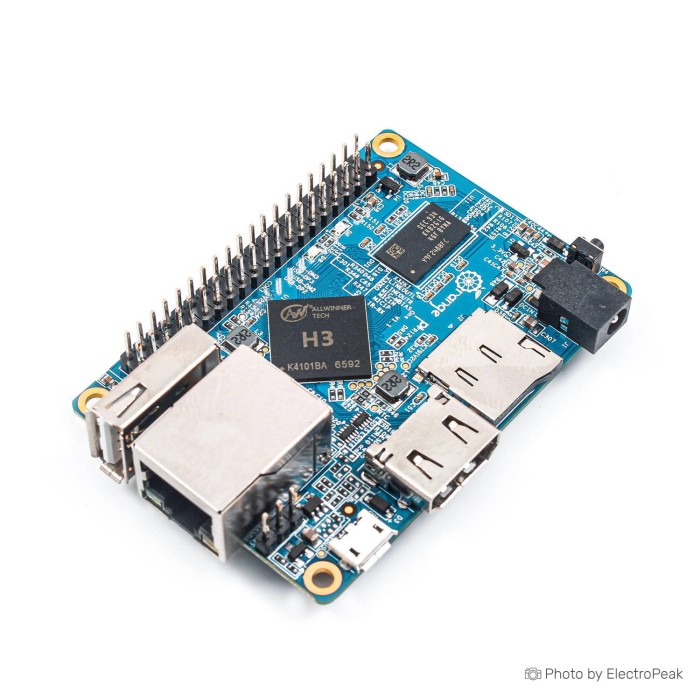
Orange Pi One H3 Quad Core Development Board
$35.9500
In stock
SKU
MIN-02-001
Volume discounts:
- +10 4 % $34.5800
- +25 6 % $33.8900
- +50 8 % $33.2100
- +100 10 % $32.5200
- +300 11 % $31.8400
Add an Accessory:


Ships in 2-3 business days, then:
Free delivery in 12-15 days by Tracked Economic Shipping on orders over $100.
Free delivery in 7-10 days by Express Shipping on orders over $300.
More shipping info

Shop with confidence Learn More

Orange Pi One H3 Review: Compact Wired Quad-Core Development Board
The Orange Pi One H3 is a compact Allwinner H3 single-board computer with 512MB DDR3 RAM, 10/100M Ethernet, HDMI output, a CSI camera interface, TF card storage, and a 40-pin GPIO header. At just 69 x 48 mm and 36 g, it suits lightweight wired Linux services, embedded control, and hands-on hardware development. Choose a higher-tier board if your application needs integrated wireless networking, more system memory, multiple native USB host ports, or the direct plug-and-play software ecosystem of Raspberry Pi OS.
Historically cited at roughly $10 to $15 at launch, the board was an accessible entry point for ARM Linux experimentation. It remains a capable fixed-function wired controller for projects that do not require high multitasking throughput or wireless freedom. For alternative listing packages, see the Orange Pi Lite H3, or compare other form factors in our Orange Pi Boards.
Specifications of Orange Pi One H3 Quad Core Development Board
- Processor: Allwinner H3 Quad-core Cortex-A7
- Processor support: H.265/HEVC
- Processor support: 4K
- GPU: Mali400MP2
- GPU frequency: 600MHz
- GPU support: OpenGL ES 2.0
- RAM: 512MB DDR3
- RAM: shared with GPU
- Storage: TF card
- Storage capacity: up to 64GB
- Networking: 10/100M Ethernet RJ45
- Camera input: CSI interface
- Camera input support: 8-bit YUV422
- Camera input protocol: CCIR656
- Video output: HDMI
- Video output support: HDCP
- Video output support: HDMI CEC
- Video recording: up to 1080p
- Video recording frame rate: 30fps
- USB ports: one USB 2.0 host
- USB ports: one USB OTG
- GPIO: 40-pin header
- GPIO compatibility: Raspberry Pi B+
- Button: SW4 power button
- Supported OS: Android
- Supported OS: Ubuntu
- Supported OS: Debian
- Supported OS: Raspberry Pi Image
- Power supply: DC input
- USB OTG power supply: does not supply power
- Dimensions: 69 x 48 mm
- Weight: 36 g
Orange Pi One H3 Specifications Explained
A single-board computer balances processing power, peripheral bandwidth, and physical footprint. The table below shows what each primary specification on this Orange Pi One single-board computer delivers in practice, along with the associated trade-offs.
| Specification | Technical Value | Why It Matters in Practice |
|---|---|---|
| Processor (SoC) | Allwinner H3 Quad-core Cortex-A7 | Provides four 32-bit ARM cores suitable for running headless Linux distributions, handling network daemons, local data logging, and low-complexity automation tasks. |
| Graphics (GPU) | Mali400MP2 @ 600MHz (OpenGL ES 2.0) | Accelerates 2D/3D user interfaces and basic graphical environments, but relies on properly compiled graphics drivers to function under Linux. |
| System Memory | 512MB DDR3 (shared with GPU) | Because system RAM is shared with video memory, the memory space available to the OS and running processes is less than the full 512MB, making modern web browsing or heavy multitasking impractical. |
| Storage Interface | TF card slot (up to 64GB listed) | The board boots directly from a removable microSD card, holding both the base operating system and all user files without relying on soldered storage. |
| Network Connectivity | 10/100M Ethernet RJ45 | Ensures stable, low-latency wired communication for headless servers, IoT gateways, and network infrastructure, eliminating wireless interference risks. |
| Video Output & Decode | HDMI (HDCP, HDMI CEC); 4K / H.265 decode support | The H3 silicon includes hardware decoding support for H.265/HEVC at up to 4K resolutions; practical display output over HDMI operates at standard desktop resolutions such as 1080p. |
| Camera Interface | CSI (8-bit YUV422, CCIR656) | Allows direct sensor attachment for video capture up to 1080p at 30fps using compatible sensor modules, bypassing USB bandwidth constraints. |
| USB Connectivity | 1x USB 2.0 Host, 1x USB OTG | A single USB Type-A port restricts direct peripheral attachments; connecting both an external Wi-Fi dongle and a keyboard requires an external USB hub. |
| Form Factor | 69 x 48 mm, 36 g | A compact footprint makes it simple to embed inside compact instrumentation boxes, custom 3D-printed enclosures, and small robotics chassis. |
For a similarly compact Allwinner H3 footprint with more built-in USB ports for peripherals, the NanoPi M1 512MB takes a different approach with three dedicated USB 2.0 Type-A host ports on board.
Orange Pi One H3 Compatibility, Power, and Operating Systems
Understand the power arrangement before unboxing the board. The Orange Pi One H3 requires an external DC input for operation. Its onboard micro-USB OTG port does not supply power; attempting to power the board through that port will result in a failed boot. For reliable operation, pair the board with a dedicated 5V 2A Power Adapter connected to its DC input barrel jack.
The operating system boots entirely from external media. A reliable card such as the SanDisk 32GB Class 10 Micro SD Card provides stable write performance and dependable boot sectors. Although the listing notes storage capacity up to 64GB, 32GB cards are the most thoroughly validated configuration across community releases. For initial imaging guidance, our reference on preparing an Orange Pi Ubuntu installation covers general ARM Linux image-flashing workflow, but you must download an image compiled specifically for the Orange Pi One H3 SoC.
| System Domain | Compatibility Status | Operational Notes |
|---|---|---|
| Operating Systems | Ubuntu, Debian, Android, Armbian | Actively maintained Linux images (notably Armbian) provide the most stable modern package managers and kernel drivers. |
| "Raspberry Pi Image" | Ambiguous / Non-native | Listed in the specifications, but this refers to historical Allwinner-ported Raspbian distributions. Official Raspberry Pi OS images designed for Broadcom SoCs will not boot on this hardware. |
| Power Supply | DC Input Only | Requires a dedicated DC power supply. USB OTG cannot power the board under any configuration. |
| Wireless Support | No onboard Wi-Fi or Bluetooth | All network communication is wired via the 10/100M RJ45 port. Wireless requires an external USB dongle that consumes the single host port. |
| Camera Port | Orange Pi CSI Specific | Physically incompatible with Raspberry Pi camera ribbon cables; requires modules supporting 8-bit YUV422 and CCIR656 with matching drivers. |
| Expansion Header | 40-Pin Header | Physical pin layout matches the Raspberry Pi B+ form factor, but processor registers and internal pin mappings differ entirely. |
Need built-in wireless networking, integrated storage, and additional USB ports without adding accessories? The Orange Pi PC Plus with 8GB eMMC removes the need for external storage cards and USB dongles.
Orange Pi One H3 Limitations: RAM, Heat, Wireless, and GPIO
The Orange Pi One H3 is cost-effective, but several architectural limits should guide your engineering decisions:
- Memory Headroom: The 512MB DDR3 RAM is shared directly with the Mali400MP2 GPU, leaving limited dynamic memory for user-space applications. It handles lightweight headless services such as Pi-hole, MQTT brokers, or basic Python daemons cleanly, but struggles with modern desktop browsers or multi-container Docker workloads. For workloads requiring additional application overhead, move to the Orange Pi PC with 1GB RAM.
- Thermal Dissipation: Under continuous multi-core compute loads, the Allwinner H3 processor can generate substantial heat. Without passive cooling or proper airflow, internal thermal throttling drops CPU clock speeds to maintain safe die temperatures. An open heatsink or the ABS Protective Case for Orange Pi One, which permits convective airflow, helps maintain sustained operating frequencies.
- Single USB Host Port: The single USB 2.0 host connector cannot accommodate both a standard mouse and keyboard without an unpowered or powered USB hub. Add an external USB Wi-Fi dongle, and all native external host connectivity is consumed.
- GPIO and HAT Differences: Although the 40-pin header shares the physical pin dimensions of the Raspberry Pi B+, standard Raspberry Pi HATs and software libraries such as RPi.GPIO do not work out of the box. Register-level pin mappings differ, requiring Orange Pi-specific libraries such as WiringOP or custom device-tree overlays to control digital logic levels and communications buses. Before using the Orange Pi 26P GPIO Extension Cable to extend signals from the board, verify the header pinout: it breaks out 26 pins rather than the full 40-pin array.
- Camera Interface Boundaries: The onboard CSI socket is electrically and mechanically configured for specific parallel camera sensors, such as OV5640 or GC2035. It does not interface with standard Raspberry Pi camera boards.
Orange Pi One vs Orange Pi PC and Orange Pi PC Plus
Xunlong designed multiple single-board computers around the Allwinner H3 SoC. The right model depends on memory limits, peripheral counts, and onboard wireless requirements. The table below compares the Orange Pi One directly with its closely related family variants.
| Feature | Orange Pi One | Orange Pi PC | Orange Pi PC Plus |
|---|---|---|---|
| SoC | Allwinner H3 Quad-Core Cortex-A7 | Allwinner H3 Quad-Core Cortex-A7 | Allwinner H3 Quad-Core Cortex-A7 |
| System Memory | 512MB DDR3 | 1GB DDR3 | 1GB DDR3 |
| Onboard Storage | TF Card slot only | TF Card slot only | 8GB eMMC Flash + TF Card slot |
| Wired Networking | 10/100M Ethernet | 10/100M Ethernet | 10/100M Ethernet |
| Wireless Networking | None (requires USB adapter) | None (requires USB adapter) | Onboard 802.11 b/g/n Wi-Fi |
| USB 2.0 Host Ports | 1x USB Host + 1x USB OTG | 3x USB Host + 1x USB OTG | 3x USB Host + 1x USB OTG |
| Analog Audio / Video | HDMI only | HDMI + 3.5mm CVBS Audio/Video Jack | HDMI + 3.5mm CVBS Audio/Video Jack |
| Power Input | DC Input (OTG does not power) | DC Input (OTG does not power) | DC Input (OTG does not power) |
For dedicated wired installations where board size and cost must remain minimal, the Orange Pi One is the right fit. Prioritize desktop responsiveness and external peripherals, and step up to the Orange Pi PC with 1GB RAM. For a self-contained installation that boots from high-speed flash and connects wirelessly without extra cables, choose the Orange Pi PC Plus with 8GB eMMC. Other configurations are available in the full collection of Orange Pi Boards.
Orange Pi One H3 Accessories and First Boot Check
An Allwinner board needs the right companion hardware in place before you flash images. Have the required power, storage, and networking peripherals ready at your workstation.
Required Hardware
- DC Power Supply: A dedicated 5V power supply terminating in a center-positive barrel plug is required. The 5V 2A Power Adapter matches the electrical needs of the board. USB OTG will not power the system.
- MicroSD Storage: An operating system carrier card is essential. Use a vetted SanDisk 32GB Class 10 Micro SD Card for reliable boot performance.
Recommended Hardware
- Protective Housing: Protect exposed SMD components and traces from accidental workbench shorts with an ABS Protective Case for Orange Pi One.
- Passive Heat Sink: A small aluminum adhesive heatsink mounted to the H3 chip helps dissipate sustained heat and minimize thermal throttling.
- Ethernet Patch Cable: An RJ45 patch cable connects the board directly to your local router or network switch for headless terminal access.
- HDMI Cable & Display: Necessary when running graphical desktop builds or when local terminal output is required during initial configuration.
Optional Hardware
- GPIO Prototyping: For basic wiring experiments from the header, the Orange Pi 26P GPIO Extension Cable can assist, provided your pin assignments match the 26-pin sub-block.
- USB Wi-Fi Adapter: An external USB wireless dongle with Linux driver support is necessary when physical Ethernet cabling is not available in your deployment area.
- USB 2.0 Hub: Required when you plan to connect both a USB mouse and keyboard simultaneously.
First Boot Sequence
- Download an Orange Pi One H3 image, such as an Armbian release. For background on flashing tools and image preparation, see our guide on preparing an Orange Pi Ubuntu installation.
- Flash the image onto your microSD card using a reliable card-flashing utility, then insert the card firmly into the TF slot.
- Connect an Ethernet cable from your network switch directly to the RJ45 jack. For a local monitor, connect an HDMI cable before applying power.
- Insert the DC power adapter barrel jack into the DC input port.
- Watch the board LEDs for activity. The board reads boot files from the TF card and initializes the network interface, allowing SSH login through the IP address assigned by your local router.
Common startup failures come from attempting to power the board through the micro-USB OTG port, flashing an operating system image built for a different board revision, or using an unrated power supply that sags under core load.
Orange Pi One H3 FAQ and Buying Checklist
Can Orange Pi One H3 be powered through micro-USB?
No. The board cannot be powered through micro-USB; power must be delivered through the onboard DC input barrel connector. The micro-USB port is wired strictly for USB OTG data transfers and does not supply current to the system power rails.
Does Orange Pi One H3 run Raspberry Pi OS?
No, standard official Raspberry Pi OS images will not boot on this board. Although the product listing cites "Raspberry Pi Image," this refers to legacy third-party Raspbian builds compiled specifically for Allwinner ARM architectures. Modern installations should use distribution builds such as Armbian, Debian, or Ubuntu built specifically for the Orange Pi One.
Does Orange Pi One H3 have Wi-Fi or Bluetooth?
No, it has no onboard wireless hardware. Network connectivity uses the 10/100M Ethernet port. For wireless connectivity, connect a supported USB Wi-Fi or Bluetooth adapter to the single USB 2.0 host port.
Is the Orange Pi One H3 a 4K HDMI board?
No, it should not be treated as a true 4K desktop display board. The Allwinner H3 processor provides hardware decoding for H.265/HEVC video up to 4K resolutions, but practical HDMI video output is configured for standard display modes such as 1080p at 30 to 60Hz.
Can I use a 64GB TF card with Orange Pi One H3?
The specifications list storage capacity up to 64GB, but a 32GB card is the conservative, universally verified choice. Certain high-capacity 64GB cards may experience filesystem boot quirks depending on the selected distribution and bootloader version.
Will Raspberry Pi HATs and GPIO tutorials work with Orange Pi One H3?
Not directly. Although the board has a 40-pin header that physically mirrors the Raspberry Pi B+ form factor, its internal processor registers and GPIO pin assignments are completely different. Standard Raspberry Pi libraries will not control these pins; you must use Allwinner-compatible packages such as WiringOP.
Can I use any CSI camera with Orange Pi One H3?
No, standard Raspberry Pi camera modules are incompatible. The onboard CSI connector uses a different pin configuration and expects specific sensors, such as the GC2035 or OV5640, paired with appropriate kernel driver modules.
Should I choose Orange Pi One H3, Orange Pi PC, or Orange Pi PC Plus?
Choose the Orange Pi One for a low-cost, compact wired SBC with 512MB RAM. Choose the Orange Pi PC when your software needs 1GB RAM, extra USB ports, and analog audio output. Choose the Orange Pi PC Plus when you require onboard 802.11 b/g/n Wi-Fi, 1GB RAM, and 8GB eMMC flash memory.
Purchase Decision Summary
- Ideal for: Lightweight wired network services such as Pi-hole, DNS, and MQTT; headless automation appliances; low-cost multi-board clusters; and developers comfortable with Linux terminal configuration.
- Maybe for: Basic GPIO experimentation using WiringOP, compact camera capture rigs using supported OV/GC sensors, and low-complexity embedded robotics controllers.
- Consider another option if: You need onboard Wi-Fi, run applications requiring more than 512MB RAM, require multiple direct USB peripherals, or want plug-and-play compatibility with Raspberry Pi HATs. For projects requiring integrated Wi-Fi, Bluetooth, four USB ports, and broader educational community software, the Raspberry Pi 3 Model B offers an alternative development platform.
Buying Checklist
- ✓ 512MB shared DDR3 RAM meets my software application requirements.
- ✓ My deployment area has wired 10/100M Ethernet access, or I have an external USB Wi-Fi adapter.
- ✓ I have added a compatible 5V/2A DC barrel power adapter and am not attempting to power via micro-USB.
- ✓ I have selected a reliable Class 10 microSD card, with 32GB recommended for verified stability.
- ✓ I understand that the 40-pin header requires Orange Pi-specific pin-mapping libraries rather than standard Raspberry Pi software.
- ✓ I have planned adequate airflow or passive heatsink cooling if the CPU will run sustained compute loads.
- ✓ I have verified that one USB 2.0 host port is sufficient, or I have a USB hub ready for additional peripherals.
For alternative specifications and memory tiers, see the complete selection of Orange Pi Boards.
| Processor (SoC) | Allwinner H3 Quad-core Cortex-A7 |
|---|---|
| CPU | Quad-core Cortex-A7 |
| Architecture | ARM Cortex-A7 |
| RAM | 512MB |
| RAM Type | DDR3 |
| Storage Support | microSD |
| Storage Capacity | up to 64GB |
| GPU/VPU | Mali400MP2 |
| Ethernet | 100 Mbps |
| Wi-Fi | No |
| Bluetooth | No |
| USB Ports | One USB 2.0 host, one USB OTG |
| Video Output | HDMI |
| Hardware Interfaces | CSI (Camera), I2C, SPI, UART |
| GPIO Pins | 40-pin |
| Camera/Display | CSI (Camera) |
| Power Input | DC input |
| PCIe | No |
| Dimensions (mm) | 69x48 mm |
| OS Support | Linux, Ubuntu, Debian, Android |
| Weight (g) | 36g |
Write Your Own Review

Please complete your information below to login.
Sign In
Create New Account