
Product added to cart

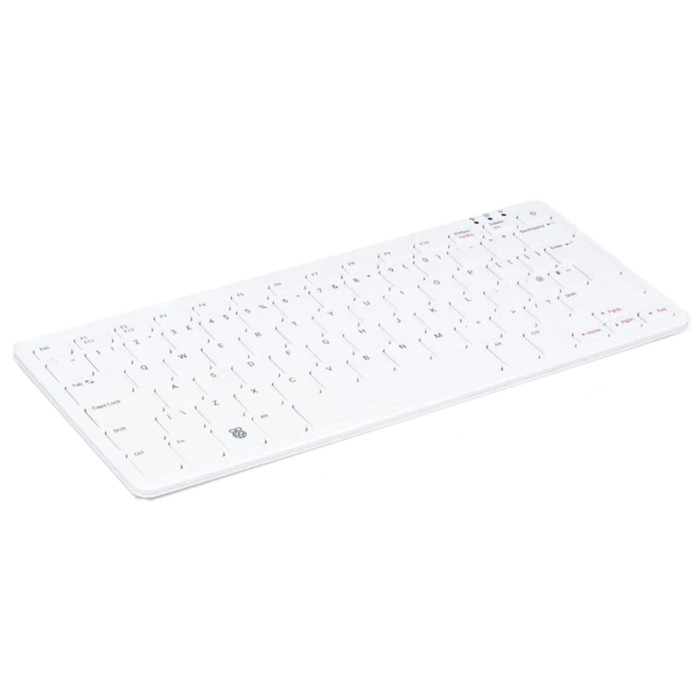
Raspberry Pi 500
$180.0000
In stock
SKU
DEV-21-007
Volume discounts:
- +5 4 % $173.0500
- +10 6 % $169.5700
- +25 8 % $166.0900
- +50 10 % $162.6100
- +100 12 % $159.1400
Ships in 2-3 business days, then:
Free delivery in 12-15 days by Tracked Economic Shipping
Free delivery in 7-10 days by Express Shipping on orders over $300.
More shipping info

Shop with confidence Learn More
 Raspberry Pi Pico 2 W Previous
Raspberry Pi 500 Desktop Computer Overview
The Raspberry Pi 500 is an all-in-one compact computer with an integrated keyboard, 8GB memory, GPIO access, dual micro HDMI outputs, and microSD-based storage. It brings Raspberry Pi 5-class platform hardware to a desktop-style format for Linux learning, coding, light office work, classrooms, and maker projects.
This Raspberry Pi 500 desktop computer keeps the desk simpler than a separate board, case, and keyboard. Choose a Raspberry Pi 5 with 8GB RAM if you need a separate board with a more modular physical layout; buyers needing internal NVMe storage, native camera ribbon connectors, PoE, or a mechanical keyboard should choose a different platform.
Specifications of Raspberry Pi 500
- CPU: 2.4GHz quad-core 64-bit Arm Cortex-A76 CPU
- L2 cache: 512KB per-core L2 cache
- L3 cache: 2MB shared L3 cache
- Memory: 8GB LPDDR4X-4267 SDRAM
- Wi-Fi: Dual-band IEEE 802.11b/g/n/ac Wi-Fi (2.4GHz and 5.0GHz)
- Bluetooth: Bluetooth 5.0, BLE
- Ethernet: Gigabit Ethernet
- USB 3.0 ports: 2x USB 3.0 ports
- USB 2.0 ports: 1x USB 2.0 port
- GPIO: Horizontal 40-pin GPIO header
- Display outputs: 2x micro HDMI ports (supports up to 4Kp60 resolution)
- Video decode: H.265 (4Kp60 decode)
- Graphics: OpenGL ES 3.0 graphics
- Storage: MicroSD slot for OS and data storage
- Keyboard layout: 78-, 79-, or 83-key compact layout (depending on regional variant)
- Power: 5V DC via USB connector
- Operating temperature: 0°C to +50°C operating temperature
- Dimensions: 286mm x 122mm x 23mm (maximum)
- Production commitment: Guaranteed production until at least January 2034
The 2.4GHz quad-core 64-bit Arm Cortex-A76 CPU and 8GB LPDDR4X-4267 SDRAM support an ARM Linux desktop for browsing, documents, coding, scripting, and lightweight development. The production commitment through at least January 2034 also helps schools, labs, and repeat deployments that need a stable hardware platform over time.
For projects that do not need the keyboard-computer form factor, browse Raspberry Pi boards with different expansion layouts.
Raspberry Pi 500 Display and Connectivity Specifications
Two micro HDMI ports support displays at up to 4Kp60 resolution, while H.265 4Kp60 decode supports compatible media playback workflows. Most monitors with a full-size HDMI input need a micro-HDMI-to-HDMI cable, such as this Micro HDMI to HDMI Cable - 1m.
For a conventional graphical desktop, add a pointing device such as the Official Optical Mouse for Raspberry Pi400/4B/3B+. Audio can run through HDMI, USB, or Bluetooth devices. No standard 3.5mm analogue audio jack is identified.
| Connection | What it supports | Why it matters |
|---|---|---|
| micro HDMI | 2x outputs, up to 4Kp60 resolution | You can run one or two compatible monitors, but most displays require micro-HDMI-to-HDMI cables. |
| Gigabit Ethernet | Wired networking | A wired connection is useful for stable desktop networking, local services, and network setup without Wi-Fi credentials. |
| Dual-band Wi-Fi | 2.4GHz and 5.0GHz IEEE 802.11b/g/n/ac networks | Connects to common home, school, and office wireless networks without an external adapter. |
| Bluetooth 5.0, BLE | Wireless peripherals and Bluetooth devices | Useful for Bluetooth audio, keyboards, mice, and low-energy devices. |
| USB | 2x USB 3.0 ports and 1x USB 2.0 port | Connect a mouse, external storage, USB audio, cameras, and other peripherals without a hub in many setups. |
The port selection covers everyday desktop connections and common Raspberry Pi peripherals. If your main requirement is an x86 desktop with pre-installed Windows 11 Pro rather than GPIO and an ARM Linux maker platform, consider the GMKtec G3 Intel N100 Mini PC.
Raspberry Pi 500 Storage, GPIO and Expansion Limits
The Raspberry Pi 500 uses its microSD slot for operating-system and data storage. There is no supported factory-accessible internal M.2 or NVMe connector. For larger storage or write-heavy workloads, an external USB SSD is the practical option rather than internal expansion.
This matters for databases, larger local development environments, and projects that write data continuously. A SanDisk Micro SD Memory Card - 32GB, 120MBps (class 10) can provide boot media and ordinary storage if a card is not included. Choose an external USB SSD when microSD capacity or write endurance is not sufficient.
The horizontal 40-pin GPIO header supports sensors, LEDs, I²C, SPI, UART, and compatible GPIO accessories. Its rear horizontal orientation is less convenient for direct HAT stacking than a standard board-mounted header. A breakout, ribbon cable, extension, or HAT-specific adapter is often more practical. GPIO uses 3.3V logic; do not apply 5V directly to GPIO pins.
The Raspberry Pi 500 does not provide a dedicated CSI camera connector, DSI display connector, accessible PCIe connector, or native PoE interface. USB cameras are the practical camera option, while HDMI/USB displays suit display and touch-screen projects. Do not assume Raspberry Pi 5 NVMe HATs, camera modules, DSI displays, or PoE accessories connect directly.
After confirming that the rear-header arrangement fits your hardware, see the Raspberry Pi GPIO Pins: A Python Guide to Input and Output Control for GPIO projects. Choose the Raspberry Pi 5 with 8GB RAM for a standard board layout and direct prototyping, or the Raspberry Pi 5 with 4GB RAM for compact electronics, robotics, and automation projects needing PCIe 2.0 x1 access.
Raspberry Pi 500 Keyboard Layout, Setup Requirements and Known Limits
The integrated keyboard uses a compact 78-, 79-, or 83-key layout depending on the regional variant. Confirm the physical layout before ordering. Regional layouts are not simply a software preference, and the exact layout supplied with this board must be verified.
This is a membrane/chiclet keyboard, not a mechanical keyboard. It suits ordinary desktop input and learning environments, but buyers who type heavily and specifically want mechanical keys should look at the distinct Raspberry Pi 500+ with 16GB RAM and SSD, which has a premium RGB mechanical keyboard, 16GB memory, and a pre-installed 256GB SSD. The Raspberry Pi 400 with 4GB RAM remains an option for buyers who prefer the older keyboard-computer platform and accept its older BCM2711 processor and 4GB LPDDR4-3200 memory.
What you need for a normal desktop setup
- Required: A display. No matching display product is supplied here.
- Required: A suitable monitor cable, such as the Micro HDMI to HDMI Cable - 1m, unless one is confirmed in the package.
- Required: A mouse for graphical desktop use, such as the Official Optical Mouse for Raspberry Pi400/4B/3B+, unless one is confirmed in the package.
- Required: A bootable microSD card if one is not included.
- Required: A suitable USB-C power supply unless package contents confirm one is supplied.
The specification lists 5V DC via USB connector. The power input is USB-C, and a 5V/5A 27W Raspberry Pi USB-C power supply is the recommended baseline; the Official Raspberry Pi 5 27W USB-C Power Supply matches that requirement. A 5V/3A supply limits total USB peripheral current to 600mA, which can restrict attached storage and other USB devices.
Operate the computer within its 0°C to +50°C temperature range in a well-ventilated location, and do not cover it during use. Passive thermal performance is strong in independent testing, but airflow still matters during sustained workloads. There are isolated reports of keyboard flex, chassis rocking, and key-registration issues; treat these as arrival checks rather than evidence of a widespread fault, and test keys and chassis stability promptly.
For help selecting an operating system after confirming your boot-media needs, see 13 Best Raspberry Pi OS For Any Project [Updated 2024].
Raspberry Pi 500 vs Raspberry Pi 5, Pi 400 and Pi 500+
The main Raspberry Pi 500 choice is between desktop convenience and board-level accessibility. Its integrated keyboard creates a compact Linux desktop with fewer separate parts. Raspberry Pi 5 boards leave the processor, GPIO header, and expansion area more accessible for electronics work.
| Model | Choose it for | Key difference |
|---|---|---|
| Raspberry Pi 500 | Integrated keyboard convenience, 8GB memory, ARM Linux desktop work, and GPIO projects that can use a breakout or extension | Compact membrane/chiclet keyboard computer with microSD-only native storage. |
| Raspberry Pi 5 with 8GB RAM | 8GB memory in a standard board layout | Requires a separate keyboard but offers more accessible board-level hardware expansion. |
| Raspberry Pi 5 with 4GB RAM | Compact electronics, robotics, automation, and PCIe 2.0 x1 projects | Has 4GB LPDDR4X-4267 memory and PCIe 2.0 x1 access. |
| Raspberry Pi 400 with 4GB RAM | An older Raspberry Pi keyboard-computer platform | Uses a 1.8GHz Broadcom BCM2711 processor and 4GB LPDDR4-3200 memory. |
| Raspberry Pi 500+ with 16GB RAM and SSD | 16GB memory, internal SSD storage, and a mechanical typing experience | A distinct model with a pre-installed 256GB SSD and premium RGB mechanical keyboard. |
Choose the Raspberry Pi 500 for a compact keyboard desktop with GPIO. Choose Raspberry Pi 5 for direct hardware expansion, Pi 400 for the older keyboard-computer platform, or Pi 500+ when 16GB memory, internal SSD storage, and mechanical keys are requirements. More form factors are available in the Raspberry Pi Boards range.
Raspberry Pi 500 Setup and First Boot Check
First boot is straightforward once the required peripherals and boot media are ready. Raspberry Pi Imager is the documented tool for preparing Raspberry Pi OS on blank microSD media.
- Confirm the keyboard layout and the package contents.
- Prepare a bootable microSD card with Raspberry Pi OS if a bootable card is not included.
- Insert the microSD card into the Raspberry Pi 500.
- Connect a monitor through micro HDMI and connect a USB mouse.
- Connect Ethernet or prepare Wi-Fi credentials.
- Connect a suitable USB-C power supply, such as the Official Raspberry Pi 5 27W USB-C Power Supply.
- Start the computer, complete the first-run configuration, and update Raspberry Pi OS and firmware.
- Test every key, USB ports, Ethernet, Wi-Fi, Bluetooth, both micro HDMI outputs, microSD operation, and the power key during the return period.
If you need boot media, the SanDisk Micro SD Memory Card - 32GB, 120MBps (class 10) is suitable for Raspberry Pi OS installation and ordinary storage. A successful first check reaches the Raspberry Pi OS setup or desktop, connects to Wi-Fi or Ethernet, accepts mouse and keyboard input, and displays video correctly.
Common first-time problems include a wrong regional keyboard layout, damaged or non-bootable microSD media, inadequate USB-C power, an incorrect display cable, missing peripherals, or attempting to connect Pi 5 NVMe, CSI camera, DSI display, or PoE accessories directly. For operating-system selection, refer to 13 Best Raspberry Pi OS For Any Project [Updated 2024].
Raspberry Pi 500 FAQ and Buying Checklist
Does Raspberry Pi 500 include a power supply?
Package contents are not confirmed, so do not assume a power supply is included. The computer uses 5V DC via USB connector, with USB-C input and a 5V/5A 27W Raspberry Pi USB-C power supply recommended for normal peripheral use.
Does Raspberry Pi 500 include a microSD card?
MicroSD card inclusion is not confirmed. A bootable microSD card is needed for the operating system and data storage if one is not included.
Is Raspberry Pi 500 the same as Raspberry Pi 500+?
No. Raspberry Pi 500 has 8GB LPDDR4X-4267 SDRAM and a compact regional keyboard layout, while Raspberry Pi 500+ is a distinct model with 16GB LPDDR4X memory, a pre-installed 256GB SSD with OS, and an RGB mechanical keyboard.
Can Raspberry Pi 500 use an internal NVMe SSD?
No supported factory-accessible internal M.2 or NVMe connector is identified. Native storage is microSD; a USB SSD can be used as external storage.
Can I use a Raspberry Pi 5 NVMe HAT with Raspberry Pi 500?
No accessible PCIe connector is identified for a Raspberry Pi 5 NVMe HAT. Select a Raspberry Pi 5 platform if PCIe expansion is required.
Can I connect a Raspberry Pi camera or official ribbon touch display?
Not directly. There is no dedicated CSI camera connector or DSI display connector, so use a USB camera and an HDMI/USB display instead.
Is the Raspberry Pi 500 keyboard mechanical?
No. The Raspberry Pi 500 uses a compact membrane/chiclet keyboard; the Raspberry Pi 500+ is the model with a mechanical keyboard.
Can Raspberry Pi 500 run two 4K monitors?
Yes, it has two micro HDMI ports supporting up to 4Kp60 resolution. Each compatible monitor needs a suitable micro-HDMI display cable, such as the Micro HDMI to HDMI Cable - 1m.
Can I use GPIO HATs and jumper wires?
Yes, with planning for the horizontal rear 40-pin GPIO header. Jumper wires and breakout hardware are practical, while direct HAT stacking can be less convenient; GPIO uses 3.3V logic and must not receive 5V directly.
Does Raspberry Pi 500 have a headphone jack or native PoE?
No standard 3.5mm analogue audio jack or native PoE support is identified. Use HDMI, USB, or Bluetooth audio, and remember that Ethernet does not replace USB-C power.
Which keyboard layout will I receive?
The keyboard can have a 78-, 79-, or 83-key compact layout depending on regional variant. Confirm the exact physical layout before purchase.
Purchase decision
- Good fit for: Linux learners, students, schools, families, Raspberry Pi enthusiasts, light desktop users, ARM Linux developers, and makers who accept a rear horizontal GPIO header.
- Consider for: Home dashboards, lightweight ARM64 containers, web development, media playback, digital signage, retro computing, and network services where microSD storage is sufficient or external USB storage is acceptable.
- Avoid if: You need internal NVMe, PCIe access, native camera or DSI display connectors, native PoE, direct HAT stacking, a mechanical keyboard, a built-in screen and battery, heavy virtualization, x86-only software, or high-end desktop graphics performance.
Buying checklist
- ✓ Confirm the exact regional keyboard layout.
- ✓ Confirm whether the package includes a microSD card, power supply, mouse, micro-HDMI cable, and guide.
- ✓ Add a suitable USB-C power supply, such as the Official Raspberry Pi 5 27W USB-C Power Supply, if one is not included.
- ✓ Add a micro-HDMI cable for each monitor if one is not included.
- ✓ Add a mouse for graphical desktop use if one is not included.
- ✓ Add boot media, such as the SanDisk Micro SD Memory Card - 32GB, 120MBps (class 10), if no bootable card is included.
- ✓ Decide whether microSD storage is sufficient for the intended workload.
- ✓ Choose external USB storage or another platform if internal NVMe is required.
- ✓ Choose Raspberry Pi 5 if the project needs PCIe, native camera, DSI display, PoE, or more accessible GPIO.
- ✓ Confirm that required desktop software and containers support ARM64.
- ✓ Plan ventilation and do not cover the computer during use.
Buyers who need an x86 mini PC with pre-installed Windows 11 Pro rather than an ARM Raspberry Pi platform should consider the GMKtec G3 Intel N100 Mini PC.
| Processor (SoC) | 2.4GHz quad-core 64-bit Arm Cortex-A76 |
|---|---|
| CPU | 2.4GHz quad-core Arm Cortex-A76 |
| Architecture | ARM Cortex-A76 |
| RAM | 8GB |
| RAM Type | LPDDR4X |
| Storage Support | microSD |
| GPU/VPU | OpenGL ES 3.0 graphics |
| Ethernet | 1 Gbps |
| Wi-Fi | WiFi 5 |
| Bluetooth | Bluetooth 5.0 |
| USB Ports | 2x USB 3.0 ports, 1x USB 2.0 port |
| Video Output | micro HDMI |
| Hardware Interfaces | I2C, SPI, UART |
| GPIO Pins | 40-pin GPIO header |
| Camera/Display | No |
| Power Input | 5V DC via USB connector |
| PCIe | No |
| Dimensions (mm) | 286mm x 122mm x 23mm |
| OS Support | Linux, Raspberry Pi OS |
| Operating Temp (°C) | 0°C to +50°C |
Write Your Own Review

Please complete your information below to login.
Sign In
Create New Account