
Product added to cart

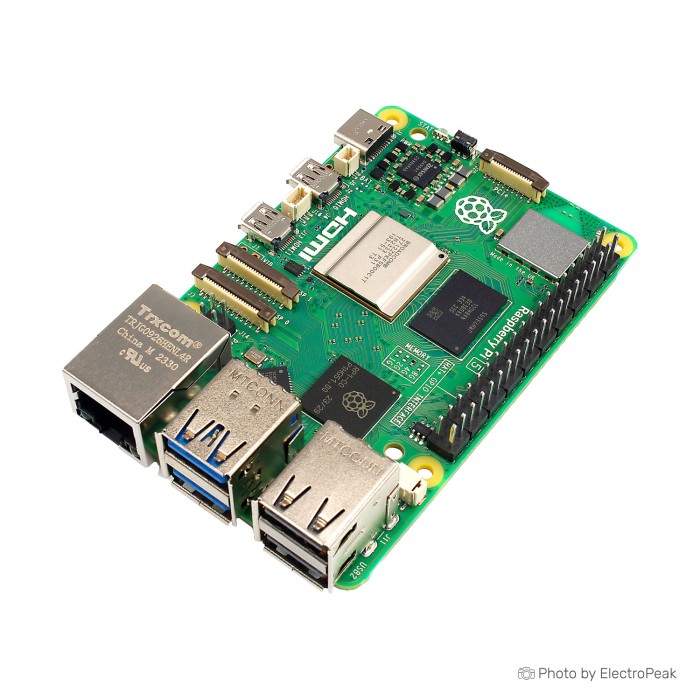
Raspberry Pi 5 - 4GB RAM
$189.0000
In stock
SKU
MIN-01-147
Volume discounts:
- +5 1 % $187.8000
- +10 1 % $187.2000
- +25 1 % $186.6000
- +50 2 % $186.0000
- +100 2 % $185.4000
Ships in 2-3 business days, then:
Free delivery in 12-15 days by Tracked Economic Shipping
Free delivery in 7-10 days by Express Shipping on orders over $300.
More shipping info

Shop with confidence Learn More
 Raspberry Pi 5 - 8GB RAM Previous
Raspberry Pi 5 4GB Review and Specifications
The Raspberry Pi 5 - 4GB RAM is a compact single-board computer for electronics, robotics, automation, home-server, and Linux projects. Its BCM2712 platform, standard 40-pin GPIO header, modern wired and wireless connectivity, and display expansion support many focused builds. Plan for power, cooling, storage, and the fixed memory capacity before purchase.
This Raspberry Pi 5 4GB single board computer suits dedicated appliances and light desktop workloads. Buyers planning heavy multitasking, many containers, virtual machines, or large local AI workloads need to account for the soldered 4GB memory and the accessories required for sustained operation. Browse the wider Raspberry Pi Boards range if another Raspberry Pi configuration better matches the project.
Specifications of Raspberry Pi 5 - 4GB RAM
- Processor: Broadcom BCM2712
- CPU: Quad-core Arm Cortex-A76
- Processor frequency: 2.4GHz
- L2 cache: 512KB per core
- L3 cache: 2MB shared
- GPU: VideoCore VII
- OpenGL ES: 3.1
- Vulkan: 1.2
- Video output: Dual micro-HDMI
- Display resolution: 4Kp60
- Feature: HDR support
- Codec support: 4Kp60 HEVC decode
- RAM: 4GB LPDDR4X-4267
- Wireless: Dual-band 802.11ac Wi-Fi
- Bluetooth: 5.0
- Feature: BLE support
- Storage: microSD slot
- Storage mode: SDR104
- USB ports: 2 x USB 3.0
- USB 3.0 speed: Up to 5Gbps
- USB ports: 2 x USB 2.0
- Ethernet: Gigabit Ethernet
- Feature: PoE+ support
- Requirement: PoE+ HAT required
- Camera and display interfaces: Two 4-lane MIPI connectors
- Expansion interface: PCIe 2.0 x1
- Requirement: M.2 HAT or adapter required
- Input voltage: 5V/5A DC
- Power input: USB-C
- Feature: Power Delivery support
- GPIO header: Standard 40-pin header
- RTC: Onboard real-time clock
- Requirement: External battery required
- Feature: Power button
Raspberry Pi 5 4GB Specifications Explained
The Broadcom BCM2712 combines a quad-core Arm Cortex-A76 CPU running at 2.4GHz with 4GB LPDDR4X-4267 memory. The board is responsive for focused Linux appliances, programming, home automation, light server work, and light desktop use. Memory is soldered to the board and cannot be upgraded later. Here, 4GB is a capacity decision rather than a starting point for later expansion.
| Area | What it means in a project |
|---|---|
| Processor and memory | The quad-core 2.4GHz CPU handles several modest services well, but 4GB becomes restrictive with heavy browser use, many containers, virtual machines, or large local AI workloads. |
| VideoCore VII graphics | VideoCore VII supports OpenGL ES 3.1 and Vulkan 1.2. Dual micro-HDMI outputs support 4Kp60 displays with HDR support, while 4Kp60 HEVC decode is useful for media-centre, kiosk, and display projects. |
| Networking | Gigabit Ethernet suits wired servers and fixed installations. Dual-band 802.11ac Wi-Fi, Bluetooth 5.0, and BLE support cover wireless networking, Bluetooth peripherals, and low-energy devices. |
| USB | Two USB 3.0 ports provide up to 5Gbps for fast external storage and other high-throughput peripherals. Two USB 2.0 ports remain available for keyboards, mice, adapters, and lower-speed devices. |
| GPIO and MIPI | The standard 40-pin header supports Raspberry Pi expansion boards, sensors, relays, and interface projects. Two 4-lane MIPI connectors provide camera or display expansion paths; confirm exact camera module, cable, and display compatibility for the selected hardware. |
| PCIe and system functions | PCIe 2.0 x1 opens a path to NVMe storage and other expansion through a separate M.2 HAT or adapter. The onboard power button simplifies normal start and shutdown workflows, while the RTC can retain time when fitted with an external battery. |
For GPIO work, the Raspberry Pi GPIO Pins: A Python Guide to Input and Output Control provides useful programming context. A local display needs a Micro HDMI to HDMI Cable - 1m; the board uses micro-HDMI rather than full-size HDMI.
If your workload already needs more memory headroom, choose the same Raspberry Pi 5 family in an Raspberry Pi 5 - 8GB RAM configuration with 8GB LPDDR4X-4267 SDRAM. For explicitly memory-intensive work, select a Raspberry Pi 5 - 16GB RAM configuration with 16GB LPDDR4X-4267 RAM.
Raspberry Pi 5 4GB RAM, Power, and Cooling Limits
The board requires 5V/5A DC through USB-C and supports Power Delivery. A 5V/5A PD supply is strongly recommended for full USB peripheral support. Weaker supplies can boot the board, but they can produce under-voltage warnings and reduce the power available to USB peripherals. A 5V/5A label alone does not confirm correct USB-C PD negotiation.
For reliable full-power operation, pair the board with the Official Raspberry Pi 5 27W USB-C Power Supply (EU Standard). This matters most when using USB storage, several USB peripherals, or a sustained compute workload.
Cooling is not optional in practice for continuous heavy use. Without active cooling under sustained load, the board can thermal throttle around 82–86°C. An Official Raspberry Pi 5 Active Cooler is strongly recommended for servers, desktop use, gaming, compilation, media workloads, and long-running compute tasks. A Raspberry Pi 5 Metal Active Cooling Case provides an enclosure option for projects that need an actively cooled housing.
The 4GB RAM capacity suits Pi-hole, Home Assistant, MQTT, retro-gaming systems, light containers, and other focused appliances. It is fixed in place. For heavier multitasking or many services, the Raspberry Pi 5 - 8GB RAM configuration provides 8GB memory, while the Raspberry Pi 5 - 16GB RAM configuration provides 16GB for advanced memory-intensive workloads.
Raspberry Pi 5 4GB NVMe, GPIO, and Hardware Compatibility
The onboard microSD slot is the standard boot and storage path, with SDR104 mode supported. For a simple installation, use a SanDisk Micro SD Memory Card - 32GB, 120MBps (class 10). PCIe 2.0 x1 does not mean there is an onboard M.2 socket. NVMe storage requires a separate M.2 HAT or adapter, such as the Raspberry Pi 5 PCIE to M.2 NVME SSD Hat, plus an NVMe SSD.
NVMe boot is possible, but it needs compatible M.2 hardware, current firmware, an operating-system installation on the NVMe drive, and boot-order configuration. It is useful for storage-heavy server and development builds, but it involves more setup than a microSD installation.
The standard 40-pin GPIO header supports the Raspberry Pi expansion ecosystem. Many HATs can work, but older Raspberry Pi 4 HATs may need software updates or can have physical-clearance issues. Check the HAT manufacturer’s Pi 5 support statement before basing a project on existing hardware. Older RPi.GPIO-based accessories may also need updates; libgpiod-based support is preferred for current GPIO software.
Two 4-lane MIPI connectors support camera and display expansion, while dual micro-HDMI handles conventional displays. Gigabit Ethernet, dual-band Wi-Fi, Bluetooth 5.0, BLE, and USB ports cover common network and peripheral connections. PoE+ requires a separate Pi 5-specific PoE+ HAT; Raspberry Pi 4 PoE HATs do not fit this board.
The onboard RTC needs an external battery when timekeeping must continue without network time. Battery type, connector details, and inclusion are not specified. Use a Pi 5-specific enclosure rather than reusing a Pi 4 case; the Raspberry Pi 5 Official Case is intended for this board layout.
For an embedded or industrial design needing a modular carrier-board architecture, configurable 2GB–16GB memory, eMMC options, or its listed M.2 M-Key slot, evaluate the Raspberry Pi Compute Module 5 as a different Raspberry Pi platform. GPIO terminology and programming are covered in the Raspberry Pi GPIO Pins: A Python Guide to Input and Output Control.
Raspberry Pi 5 4GB Projects and Use Cases
The Raspberry Pi 5 4GB board fits projects where Linux, GPIO, networking, and modest compute capacity matter more than a large memory pool. Its I/O also makes it practical to separate a project into dedicated services rather than treating it as a general-purpose replacement for a high-memory desktop computer.
Established Raspberry Pi 5 4GB uses
- Home automation: Home Assistant, Node-RED, MQTT brokers, and connected automation hubs.
- Network services: Pi-hole, DNS services, VPN services, and lightweight network servers.
- Media and gaming: Kodi, Plex, Jellyfin, and dedicated retro-gaming or emulation systems using hardware video decoding.
- Development and light servers: ARM development environments, personal web servers, and light containerised services.
- Storage builds: NAS and file-server projects using USB 3.0 drives or NVMe storage through an M.2 HAT.
- Robotics and vision: GPIO-connected robotics, camera systems, stereo-camera projects, and vision builds using the two MIPI connectors.
Storage-focused builds can use the Raspberry Pi 5 PCIE to M.2 NVME SSD Hat for the PCIe-to-NVMe path. Server, media, and continuous compute projects should also budget for active cooling and select storage based on expected writes, capacity, and recovery needs.
Capability-based project directions
Industrial monitoring gateways, data loggers, Modbus or SCADA front ends, smart mirrors, digital signage, weather stations, time-lapse cameras, and 3D-printer or CNC controllers are category-level applications supported by the board’s connectivity and expansion options. Small edge-AI inference builds using external USB or PCIe accelerators are also possible, although 4GB limits model size and workload complexity.
Select an operating system suited to the project with 13 Best Raspberry Pi OS For Any Project [Updated 2024]. For initial image preparation, see the Step By Step Guide to Install Raspbian on Raspberry Pi [w/ Images]; despite its title, this board needs a supported Raspberry Pi OS Bookworm or Trixie image.
Raspberry Pi 5 4GB vs Raspberry Pi 4 and Other SBC Approaches
Raspberry Pi 5 4GB vs Raspberry Pi 4 is mainly a question of processing platform, power planning, and accessory compatibility. The Raspberry Pi 5 uses a BCM2712 quad-core Cortex-A76 processor at 2.4GHz, adds PCIe 2.0 x1 expansion, an onboard power button, and an RTC. These additions benefit newer storage and computing projects, but they also bring higher power and cooling requirements and require checks for older HATs.
| Platform | When it fits | Key consideration |
|---|---|---|
| Raspberry Pi 5 - 4GB RAM | Focused Linux, GPIO, media, server, robotics, and expansion projects needing the BCM2712 platform, PCIe, and modern connectivity. | Needs 5V/5A USB-C PD power for full peripheral support and active cooling for sustained loads. |
| Raspberry Pi 4 Model B - 4GB RAM | Projects that prioritise the supplied previous-generation 1.5GHz Cortex-A72 platform, lower-power considerations, or legacy-HAT context. | It has a slower CPU and GPU platform than the Raspberry Pi 5 series. |
The Raspberry Pi 4 Model B - 4GB RAM remains a need-based choice for those considerations. The Raspberry Pi 500 Keyboard Computer takes a different format approach, combining a Raspberry Pi platform with an integrated keyboard chassis and fixed 8GB RAM rather than providing a bare single-board computer.
For AI, 8-core CPU, LPDDR5, or 8K media requirements, consider the Orange Pi 5 Pro with 8-Core CPU, a different SBC approach with a listed 6TOPS NPU. The Nano Pi R6S with Dual 2.5G Ethernet is a different approach for edge networking that needs dual 2.5G Ethernet and 32GB eMMC. Compare form factors and project requirements across the Raspberry Pi Boards range before committing to accessories.
Raspberry Pi 5 4GB Setup, OS, and First Boot
A first boot needs a 5V/5A USB-C PD supply, boot storage, and a Pi 5-compatible operating-system image. Fit cooling before sustained use. Raspberry Pi OS Bookworm or Trixie is required; older Raspberry Pi OS releases do not work on Raspberry Pi 5.
- Fit the active cooler and place the board in a Raspberry Pi 5-compatible case if using one.
- Write Raspberry Pi OS Bookworm or Trixie to a microSD card using Raspberry Pi Imager on another computer.
- Insert the microSD card. Connect a micro-HDMI display, network connection, and keyboard and mouse as needed for local setup.
- Connect a 5V/5A USB-C PD supply.
- Press the onboard power button and complete Raspberry Pi OS setup.
- Run operating-system and firmware updates after the first boot.
The Official Raspberry Pi 5 27W USB-C Power Supply (EU Standard), SanDisk Micro SD Memory Card - 32GB, 120MBps (class 10), and Official Raspberry Pi 5 Active Cooler cover the standard power, storage, and sustained-load needs.
For NVMe boot, install an M.2 HAT and NVMe SSD, update firmware, write the operating system to the NVMe drive, and configure boot order. Common first-boot failures include using a weak USB-C supply, trying an old operating-system image, running sustained workloads without cooling, and expecting NVMe boot without the required firmware and boot-order setup.
The Step By Step Guide to Install Raspbian on Raspberry Pi [w/ Images] explains image preparation. Use it with a Pi 5-compatible Bookworm or Trixie image. For distribution selection, consult 13 Best Raspberry Pi OS For Any Project [Updated 2024].
A successful basic test reaches the Raspberry Pi OS desktop or provides headless network access, joins Ethernet or Wi-Fi, and detects attached USB devices. Under sustained load, confirm that active cooling prevents thermal-throttling warnings.
Raspberry Pi 5 4GB FAQ
Do I need the Raspberry Pi 5 27W power supply?
Use a 5V/5A USB-C PD supply for full peripheral support. Weaker supplies can boot the board but can trigger under-voltage warnings and reduce USB power availability.
Does the Raspberry Pi 5 4GB need active cooling?
Active cooling is strongly recommended for sustained workloads. Without cooling, the board can thermal throttle around 82–86°C during continuous server, desktop, gaming, compilation, or compute use.
Is 4GB enough for Raspberry Pi 5 projects?
Yes, for focused appliances such as Pi-hole, Home Assistant, retro gaming, light servers, and light desktop use. Heavy multitasking, many containers, virtual machines, large browser workloads, and local AI need more memory headroom; the Raspberry Pi 5 - 8GB RAM configuration and Raspberry Pi 5 - 16GB RAM configuration provide listed higher memory capacities.
Can the Raspberry Pi 5 4GB boot from NVMe?
Yes, with a separate M.2 HAT or adapter, an NVMe SSD, current firmware, and boot-order configuration. PCIe 2.0 x1 is an expansion interface, not an onboard M.2 socket.
Will Raspberry Pi 4 HATs work with Raspberry Pi 5 4GB?
Many can work, but some older HATs need software updates or have physical-fit issues. Check the HAT vendor’s Pi 5 support statement; Raspberry Pi 4 PoE HATs do not fit, and PoE+ requires a Pi 5-specific PoE+ HAT.
Can I use a Raspberry Pi 4 case with Raspberry Pi 5 4GB?
No. Raspberry Pi 4 cases do not fit the Pi 5 layout, so use a Pi 5-specific enclosure such as the Raspberry Pi 5 Official Case.
Can Raspberry Pi 5 4GB run Windows?
Windows is not officially supported. Unofficial Windows on ARM installations have driver limitations, including networking and graphics gaps; Raspberry Pi OS and other Pi 5-ready ARM Linux distributions are the appropriate path.
What operating system does Raspberry Pi 5 4GB need?
Use Raspberry Pi OS Bookworm or Trixie, or another ARM Linux distribution with Raspberry Pi 5 support. Older Raspberry Pi OS versions do not work.
Is an RTC battery included with Raspberry Pi 5 4GB?
An external battery is required for RTC backup, but battery inclusion and specification are not stated. Add one only when the deployment needs timekeeping without network time.
How long will Raspberry Pi 5 remain available?
Raspberry Pi 5 is planned to remain in production until at least January 2036. This matters for repeat builds, education deployments, and long-lived systems.
Purchase decision summary
- Ideal for: Makers and Linux users building a cooled Raspberry Pi-based home server, automation hub, Pi-hole, retro-gaming system, media centre, development box, robotics project, camera project, or GPIO-connected appliance that fits within 4GB RAM.
- Maybe for: Light desktop use, multi-service home servers, NVMe projects, and modest edge-AI experimentation when power, cooling, storage hardware, and 4GB memory limits are understood.
- Consider another option if: You need official Windows support, very low power draw, onboard M.2 or eMMC storage, guaranteed Pi 4 HAT compatibility, a no-accessory setup, or more than 4GB RAM for heavy multitasking, virtual machines, many containers, or larger local AI workloads.
Buying checklist
- ✓ Confirm that 4GB RAM is enough; memory is soldered and not upgradeable.
- ✓ Add a 5V/5A USB-C PD power supply for reliable full-power operation.
- ✓ Add active cooling for sustained compute, desktop, server, gaming, or media workloads.
- ✓ Choose microSD storage or budget for an M.2 HAT and NVMe SSD.
- ✓ Be prepared to update firmware and configure boot order for NVMe boot.
- ✓ Use a Raspberry Pi 5-specific case rather than reusing a Pi 4 case.
- ✓ Confirm older HAT compatibility with the HAT manufacturer.
- ✓ Use a Pi 5-specific PoE+ HAT if Power over Ethernet is required.
- ✓ Install Raspberry Pi OS Bookworm, Trixie, or another Pi 5-compatible ARM Linux image.
- ✓ Add a micro-HDMI cable for a local display.
- ✓ Confirm whether an RTC backup battery is required for the deployment.
- ✓ Check the current store price and included items before ordering.
If this configuration is not the right fit, compare other options in the Raspberry Pi Boards range.
| Processor (SoC) | Broadcom BCM2712 |
|---|---|
| CPU | quad-core Arm Cortex-A76 @ 2.4GHz |
| Architecture | ARM Cortex-A76 |
| RAM | 4GB |
| RAM Type | LPDDR4X |
| Storage Support | microSD, NVMe |
| GPU/VPU | VideoCore VII |
| Ethernet | 1 Gbps |
| Wi-Fi | WiFi 5 |
| Bluetooth | Bluetooth 5.0 |
| USB Ports | 2 × USB 3.0 (up to 5Gbps), 2 × USB 2.0 |
| Video Output | micro HDMI |
| Hardware Interfaces | CSI (Camera), I2C, SPI, UART, DSI (Display) |
| GPIO Pins | 40-pin |
| Camera/Display | CSI (Camera), DSI (Display) |
| Power Input | 5V/5A DC via USB-C with Power Delivery |
| PCIe | PCIe 2.0 |
| Dimensions (mm) | 85 x 56 mm |
| OS Support | Linux, Ubuntu, Raspberry Pi OS, Debian |
| Weight (g) | 46g |
Write Your Own Review

Please complete your information below to login.
Sign In
Create New Account