
Product added to cart

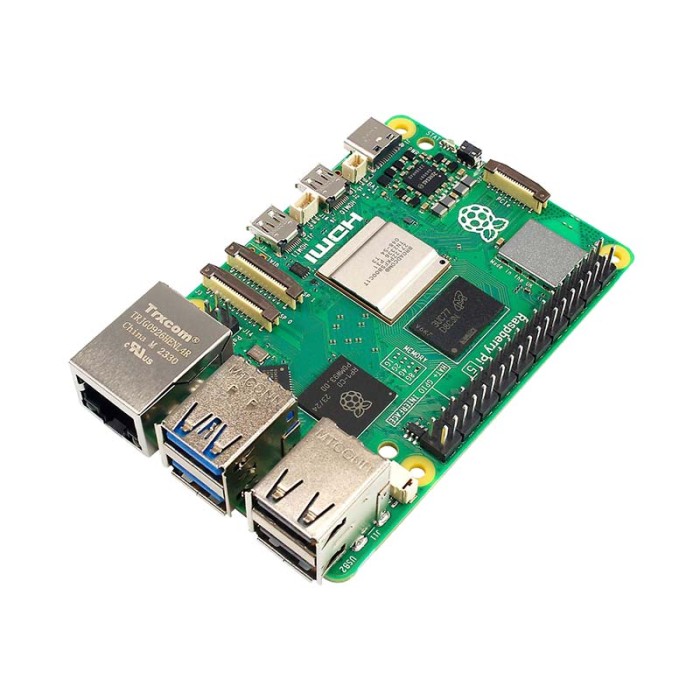
Raspberry Pi 5 - 16GB RAM
$439.0000
In stock
SKU
MIN-01-157
Volume discounts:
- +5 1 % $434.4000
- +10 2 % $432.1000
- +25 2 % $429.8000
- +50 3 % $427.5000
- +100 3 % $425.2000
Ships in 2-3 business days, then:
Free delivery in 12-15 days by Tracked Economic Shipping
Free delivery in 7-10 days by Express Shipping
More shipping info

Shop with confidence Learn More

Raspberry Pi 5 16GB Review
The Raspberry Pi 5 with 16GB RAM is a Broadcom BCM2712 single-board computer for advanced Linux, robotics, home-lab, NVMe, and local AI projects that genuinely need more memory. Its four Arm Cortex-A76 cores and 16GB LPDDR4X-4267 RAM support multi-service workloads and heavier desktop multitasking, but the extra memory offers little benefit for simple single-purpose builds.
Plan for the complete setup, not just the board. Sustained workloads need active cooling, and full USB and GPIO power requires a 27W USB-C PD supply. Buyers running Pi-hole, lightweight automation, basic media playback, or a small GPIO project will be better served by a lower-memory model.
Specifications of Raspberry Pi 5 - 16GB RAM
- Processor: Broadcom BCM2712
- CPU: Four Arm Cortex-A76 cores
- CPU frequency: 2.4GHz
- L2 cache: 512KB per core
- L3 cache: 2MB shared
- RAM: 16GB LPDDR4X-4267
- GPU: VideoCore VII
- GPU support: OpenGL ES 3.1
- GPU support: Vulkan 1.2
- Display outputs: 2x HDMI
- Display resolution: 4K@60Hz
- Display features: HDR
- Display features: CEC
- Storage: microSD card slot
- Storage mode: SDR104
- Wireless: 802.11ac
- Wireless: 2.4GHz / 5GHz
- Bluetooth: 5.0
- Ethernet: Gigabit Ethernet
- Ethernet feature: PoE+
- USB ports: 2x USB 3.0
- USB 3.0 speed: 5Gbps
- USB ports: 2x USB 2.0
- MIPI ports: 2x MIPI CSI/DSI
- Expansion: 1x PCIe 2.0 x1 lane
- Power input: 5V 5A
- Power input: USB-C
- Power feature: Power Delivery
- GPIO: 40-pin standard Raspberry Pi header
- Additional feature: Power button
- Additional feature: External battery support for RTC
- Controller: RP1 southbridge
The 16GB configuration is intended for large in-memory workloads, multiple Docker services, browser-heavy Linux use, local AI experiments, and developer multitasking. For general-purpose projects that do not need that headroom, the Raspberry Pi 5 with 8GB RAM is the more practical memory-capacity option.
For full operation, pair the board with an Official Raspberry Pi 5 27W USB-C Power Supply (EU Standard). More boards and memory configurations are available in the Raspberry Pi board range.
Raspberry Pi 5 16GB RAM and performance explained
The BCM2712 combines four Arm Cortex-A76 CPU cores at 2.4GHz with the RP1 southbridge, which handles much of the board’s I/O. In practical terms, the platform provides the CPU capacity and peripheral connectivity for Linux services, robotics control, development work, USB devices, cameras, displays, and networked projects on one board.
The defining feature is 16GB LPDDR4X-4267 RAM. Extra memory helps when several containers run together, browsers and development tools stay open, services hold data in memory, or local AI and RAG experiments need room for models, context, and vector data. Independent workload reports place 7B/8B-class local models within reach for batch inference and RAG experimentation, although this is not a high-speed chat workstation or a substitute for dedicated GPU hardware.
That RAM does not make every task faster. Pi-hole, a basic media server, retro gaming, light automation, and straightforward sensor projects rarely use enough memory to justify this configuration. For moderate-memory electronics, robotics, and automation work, the Raspberry Pi 5 with 4GB RAM is a need-based alternative.
| Hardware area | Why it matters |
|---|---|
| VideoCore VII GPU with OpenGL ES 3.1 and Vulkan 1.2 | Provides graphics support for Linux desktop, display, media, and visual project workloads. It is useful for graphics output, but it does not establish the board as a dedicated GPU-compute platform. |
| 2x HDMI, 4K@60Hz, HDR, and CEC | The two outputs support dual-display desktop, signage, and media setups. The board uses micro-HDMI connectors, so standard HDMI displays require a micro-HDMI-to-HDMI cable such as the Micro HDMI to HDMI Cable - 1m. |
| 2x USB 3.0 at 5Gbps and 2x USB 2.0 | Provides separate connections for storage, keyboards, mice, cameras, microcontrollers, and maker peripherals. USB 3.0 is the appropriate connection for faster external storage workflows. |
| Gigabit Ethernet, 802.11ac at 2.4GHz / 5GHz, and Bluetooth 5.0 | Supports wired services, dual-band Wi-Fi projects, and Bluetooth peripherals. Raspberry Pi OS supports the board’s standard graphics, Wi-Fi, and Bluetooth hardware. |
| 40-pin standard Raspberry Pi header | Connects the board to the established Raspberry Pi ecosystem of HATs, sensors, relays, motors, and automation hardware. This is the key interface for electronics and robotics projects. |
| 2x MIPI CSI/DSI | Supports compatible Raspberry Pi camera and display hardware, useful for vision, control-panel, and embedded-interface projects. |
| PCIe 2.0 x1 lane | Creates an expansion route for NVMe storage and other compatible hardware. It is exposed through an FPC connector, not a motherboard-style PCIe slot. |
The 40-pin header suits sensor and actuator work alongside Linux software. For practical wiring and software examples, see the Raspberry Pi GPIO Python guide.
Raspberry Pi 5 16GB power and cooling requirements
The specified input is 5V 5A through USB-C with Power Delivery. For full USB and GPIO power, use a 27W USB-C PD supply rather than assuming a USB-C phone charger will provide the required output.
A lower-output supply can restrict USB current, produce low-voltage warnings, and cause instability. The Official Raspberry Pi 5 27W USB-C Power Supply (EU Standard) is the matched power accessory for this requirement.
Active cooling is needed for sustained CPU and GPU workloads such as compilation, Docker stacks, server processing, NVMe-backed development, robotics processing, and local AI experiments. Without adequate active cooling, the board can throttle at 85°C. That reduces performance precisely when a long-running task needs it most.
A passive heatsink alone is not an equivalent solution for sustained heavy workloads. The Official Raspberry Pi 5 Active Cooler is the direct choice for sustained use; an actively cooled Raspberry Pi 5 case can help where the board also needs enclosure and airflow planning.
Fan noise is a real trade-off. An active cooler is quiet at idle but audible under load, with reports around 35–40 dB under load and higher reports in enclosed setups. Silent installations, quiet media centers, and noise-sensitive desktop locations need a considered case and airflow arrangement.
For legacy, lower-demand home-server, media-center, and IoT projects where Pi 5-level performance and PCIe are unnecessary, the Raspberry Pi 4 Model B - 8GB is a different fit.
Raspberry Pi 5 16GB NVMe and PCIe storage
The board has one PCIe 2.0 x1 lane, exposed through an FPC connector rather than a standard PCIe slot. An NVMe SSD cannot connect directly to the board as it would in a desktop PC.
NVMe storage requires a compatible PCIe-to-M.2 HAT and an NVMe SSD. The Raspberry Pi 5 PCIE to M.2 NVME SSD Hat provides the required interface hardware for that expansion route.
The microSD card slot with SDR104 remains the listed onboard storage path and is the straightforward option for standard boot and storage. NVMe is useful for buyers who need faster storage workflows, larger development environments, or storage better suited to sustained service use.
NVMe boot is not always plug-and-play. It can require an EEPROM update and configuration changes before the board will boot reliably from the installed drive. Start with a prepared operating system and follow a fuller Raspberry Pi OS installation guide rather than treating the NVMe drive as a direct drop-in replacement for microSD.
For a custom embedded Raspberry Pi design, the Compute Module 5 is a better fit when an industrial form factor, configurable eMMC up to 64GB, RAM options up to 16GB, and an M.2 M-Key slot are the primary requirements.
Raspberry Pi 5 16GB vs 8GB and alternative boards
The Raspberry Pi 5 16GB vs 8GB decision is mainly a memory decision. Choose 16GB for larger local AI experiments, more concurrent services, large in-memory workloads, and heavier Linux multitasking. The 8GB model remains sufficient for many home-lab stacks, Pi-hole installations, basic media servers, and general maker workloads.
Reported price history has been volatile: $120 at launch, $145 in December 2025, and approximately $305 in April 2026. No current store price is stated, so verify the current price before deciding whether the extra memory is justified for the intended workload.
| Board or approach | Choose it when |
|---|---|
| Raspberry Pi 5 with 16GB RAM | You need the largest memory capacity in this Pi 5 configuration for multi-service Docker use, large in-memory data, local AI experimentation, or demanding Linux multitasking. |
| Raspberry Pi 5 with 8GB RAM | Your project needs a Pi 5 platform but does not require 16GB memory. It is the sensible option for many general home-lab, media-server, Pi-hole, and maker workloads. |
| Raspberry Pi 4 Model B - 8GB | You are maintaining legacy projects or building a lighter home server, media center, or IoT system. It uses BCM2711 with Cortex-A72 cores at 1.5GHz, while the Pi 5 uses BCM2712 with Cortex-A76 cores at 2.4GHz and adds PCIe expansion. |
| Raspberry Pi 500 | You want a compact all-in-one keyboard computer for desktop use or education rather than a bare board for enclosure and GPIO integration. |
| Raspberry Pi 500+ with 16GB RAM | You need 16GB RAM in an all-in-one format with a mechanical keyboard, RGB lighting, and a pre-installed 256GB SSD. |
| Compute Module 5 | You are designing custom embedded hardware and need a compute-module form factor, configurable storage, and a different integration path. |
For a 16GB all-in-one desktop arrangement, the Raspberry Pi 500+ with 16GB RAM includes a mechanical keyboard, RGB lighting, and a pre-installed 256GB SSD. The Raspberry Pi 500 is the lower-memory all-in-one approach for compact desktop computing and education.
Some requirements call for a different platform rather than a direct replacement. For AI development, 8K media streaming, or high-end gaming on an RK3588S platform with a 6TOPS NPU, the Orange Pi 5 Pro is an adjacent single-board computer approach. For network-edge projects centered on triple Ethernet, including 2x 2.5G ports, the Nano Pi R6S with 8GB RAM is a different direction.
Dedicated AI acceleration is a separate requirement. The Jetson Orin Nano AI Dev Kit uses a 1024-core GPU with 32 tensor cores and lists 40 TOPS AI performance, making it an adjacent approach for AI robotics, drones, and intelligent-camera prototyping rather than a standard Raspberry Pi replacement.
Raspberry Pi 5 16GB limitations, setup, and accessories
This board supports Raspberry Pi OS and other Linux-based systems. Raspberry Pi OS is the direct starting point for first boot and hardware verification, while other Linux-based systems can suit users with a specific software stack or deployment requirement.
- Sustained loads need active cooling.
- Full operation needs a 27W USB-C PD supply.
- NVMe needs an M.2 HAT plus setup work.
- Standard HDMI displays need micro-HDMI cables.
- PoE+ requires a separate PoE+ HAT, so the bare board cannot be powered through Ethernet on its own.
Buy through authorized channels and avoid suspiciously cheap 16GB offers. Grey-market or reworked boards with swapped RAM have been reported to fail after firmware updates; official branding and retail packaging are useful checks. No long-term reliability dataset specific to this 16GB version is available.
Compatibility and setup requirements
| Area | Compatibility or requirement | Buyer implication |
|---|---|---|
| Operating systems | Raspberry Pi OS and other Linux-based systems | Raspberry Pi OS is the practical environment for initial verification and standard board support. |
| Power | 5V 5A USB-C Power Delivery; 27W USB-C PD for full USB and GPIO power | Use a compliant supply to avoid USB current limits, low-voltage warnings, and instability. |
| Cooling | Active cooling for sustained workloads | Plan active cooling for CPU/GPU-heavy services, Docker stacks, NVMe use, and local AI tasks. |
| Storage | microSD card slot with SDR104; PCIe 2.0 x1 expansion lane | Use microSD for standard boot storage, or use compatible PCIe-to-M.2 hardware for NVMe. |
| Display | 2x HDMI, clarified as micro-HDMI connectors; 4K@60Hz, HDR, and CEC | Standard HDMI monitors require micro-HDMI-to-HDMI cables. |
| Networking | Gigabit Ethernet; 802.11ac at 2.4GHz / 5GHz; Bluetooth 5.0 | Suitable for wired services, dual-band Wi-Fi deployments, and Bluetooth peripherals. |
| GPIO and MIPI | 40-pin standard Raspberry Pi header; 2x MIPI CSI/DSI | Supports Raspberry Pi-compatible sensors, HATs, cameras, displays, and automation hardware. |
| RTC | External battery support for RTC | An external RTC battery is required for backup; battery type and inclusion are not confirmed. |
Accessories to plan for
Required
- Official Raspberry Pi 5 27W USB-C Power Supply (EU Standard) for full USB and GPIO power.
- Official Raspberry Pi 5 Active Cooler for sustained CPU and GPU workloads.
- SanDisk Micro SD Memory Card - 32GB, 120MBps (class 10) when booting from microSD rather than NVMe.
Recommended
- Raspberry Pi 5 PCIE to M.2 NVME SSD Hat for NVMe storage expansion and an NVMe boot path.
- A micro-HDMI-to-HDMI cable for a standard monitor.
- Raspberry Pi 5 Metal Active Cooling Case where enclosure protection and managed airflow are both needed.
- Raspberry Pi 5 Official Case for a basic protective enclosure.
Optional
- A separate PoE+ HAT for Power-over-Ethernet installations.
- An external RTC battery for RTC backup.
- Sensors, HATs, cameras, displays, and automation boards for GPIO and MIPI projects.
- A keyboard and mouse for a local desktop setup.
- An Ethernet cable for wired networking.
First-boot verification
- Install the active cooler before sustained use.
- Insert a prepared microSD card, or install a compatible NVMe SSD through a PCIe-to-M.2 HAT.
- Connect a micro-HDMI display cable, keyboard, mouse, and optional Ethernet cable.
- Connect the 27W USB-C PD supply to the USB-C power input.
- Boot Raspberry Pi OS or another supported Linux-based system.
- Update the operating system and EEPROM before relying on NVMe boot.
- Confirm that the system detects 16GB RAM and that display, USB, network, and storage devices work.
A successful first test boots to Raspberry Pi OS, reports 16GB RAM, shows display output, accepts USB input devices, connects to the network, and detects the selected microSD or NVMe boot device. For operating-system choices, see these Raspberry Pi operating system options. For a fuller installation walkthrough, use the Raspberry Pi OS installation guide.
Common first-time mistakes include:
- Using an underpowered USB-C supply.
- Running sustained load without active cooling.
- Expecting a standard PCIe slot.
- Omitting the M.2 HAT for NVMe.
- Skipping NVMe EEPROM or configuration work.
- Assuming PoE+ works without its HAT.
- Buying a full-size HDMI cable instead of a micro-HDMI-to-HDMI cable.
For desktop computing and education with fewer separate parts, the Raspberry Pi 500 is a better fit as an integrated keyboard computer.
Raspberry Pi 5 16GB FAQ
Do I need a 27W power supply for Raspberry Pi 5 16GB?
Yes. Use a 27W USB-C PD supply for full USB and GPIO power. The board specifies 5V 5A USB-C Power Delivery, and lower-output supplies can cause USB current limits, low-voltage warnings, and instability.
Does Raspberry Pi 5 16GB need an active cooler?
Yes, active cooling is needed for sustained CPU, GPU, Docker, NVMe, server, and local AI workloads. Without adequate cooling, the board can throttle at 85°C, and the cooler is audible under load.
Is Raspberry Pi 5 16GB worth it over the 8GB version?
It is worth it when your workload needs larger local AI experiments, more concurrent services, heavy multitasking, or large in-memory data. For many Pi-hole, media-server, home-lab, and general maker projects, 8GB is sufficient.
Can Raspberry Pi 5 16GB boot from an NVMe SSD?
Yes, but NVMe boot requires a compatible M.2 HAT and NVMe SSD. The PCIe 2.0 x1 lane uses an FPC connector rather than a standard PCIe slot, and EEPROM updates or configuration work can be required.
Does Raspberry Pi 5 16GB have full-size HDMI ports?
No. The two HDMI outputs use micro-HDMI connectors. Use a Micro HDMI to HDMI Cable - 1m for a standard HDMI display; the outputs support 4K@60Hz, HDR, and CEC.
Does Raspberry Pi 5 16GB support PoE+ without extra hardware?
No, PoE+ requires a separate PoE+ HAT. The bare board does not provide Power-over-Ethernet by itself.
What is included with Raspberry Pi 5 16GB?
Package contents are not confirmed. Confirm separately whether power, cooling, storage, display cables, a case, an RTC battery, and a PoE+ HAT are included or required for your build.
Are there counterfeit Raspberry Pi 5 16GB boards?
Grey-market or reworked 16GB boards with swapped RAM have been reported and may fail after firmware updates. Buy through authorized channels and avoid unusually low-priced offers.
What should I choose for AI robotics instead of Raspberry Pi 5 16GB?
Choose an AI-focused platform if specialized acceleration matters more than Raspberry Pi ecosystem compatibility. The Jetson Orin Nano AI Dev Kit is an adjacent AI-development approach with 40 TOPS performance, a 1024-core GPU, 32 tensor cores, and dual M.2 Key M slots. For network-edge computing centered on multiple Ethernet connections rather than standard Raspberry Pi GPIO expansion, the Nano Pi R6S with 8GB RAM is another adjacent approach.
Purchase decision summary
Ideal for
- Multi-service Docker stacks, large in-memory work, and heavier Linux multitasking.
- Local AI experimentation, RAG projects, and small-model batch inference where 16GB memory is useful.
- Advanced robotics, GPIO projects, dual-display setups, and NVMe expansion.
- Buyers who will provide suitable power and active cooling.
Maybe for
- Desktop Raspberry Pi use, dual-display projects, media-oriented builds, and home servers that may benefit from more memory.
- Advanced maker projects that could also run well on an 8GB board.
Consider another option if
- Your build is Pi-hole, a basic media server, a retro console, simple automation, or a lightweight learning project.
- You need a silent fanless system or do not want to add a 27W USB-C PD supply and active cooling.
- You need specialized AI acceleration, multiple high-speed Ethernet ports, or a custom embedded module form factor.
Buying checklist
- ✓ My workload genuinely needs 16GB RAM rather than 4GB or 8GB.
- ✓ I have a 27W USB-C PD power supply compatible with the board’s 5V 5A USB-C PD requirement.
- ✓ I have active cooling for sustained CPU/GPU workloads.
- ✓ I know whether I will boot from microSD or NVMe.
- ✓ If using NVMe, I have a compatible PCIe-to-M.2 HAT and understand that setup may require EEPROM and configuration changes.
- ✓ I have the correct micro-HDMI-to-HDMI cable for my display.
- ✓ I understand that PoE+ needs a separate PoE+ HAT.
- ✓ I have confirmed whether a case, RTC battery, keyboard, mouse, storage, and cables are included or need separate purchase.
- ✓ I am buying from an authorized channel rather than an unusually cheap grey-market source.
- ✓ I have considered Raspberry Pi 5 with 8GB RAM if my project does not need 16GB.
| Processor (SoC) | Broadcom BCM2712 |
|---|---|
| CPU | 4x Arm Cortex-A76 cores @ 2.4GHz |
| Architecture | ARM Cortex-A76 |
| RAM | 16GB |
| RAM Type | LPDDR4X |
| Storage Support | microSD |
| GPU/VPU | VideoCore VII |
| Ethernet | 1 Gbps |
| Wi-Fi | WiFi 5 |
| Bluetooth | Bluetooth 5.0 |
| USB Ports | 2 × USB 3.0, 2 × USB 2.0 |
| Video Output | micro HDMI |
| Hardware Interfaces | CSI (Camera), DSI (Display) |
| GPIO Pins | 40-pin |
| Camera/Display | CSI (Camera), DSI (Display) |
| Power Input | 5V/5A via USB-C with Power Delivery (PD) support |
| PCIe | PCIe 2.0 |
| Dimensions (mm) | 85 x 56 mm |
| OS Support | Linux, Raspberry Pi OS |
| Weight (g) | 46 |
Write Your Own Review

Please complete your information below to login.
Sign In
Create New Account