
Product added to cart

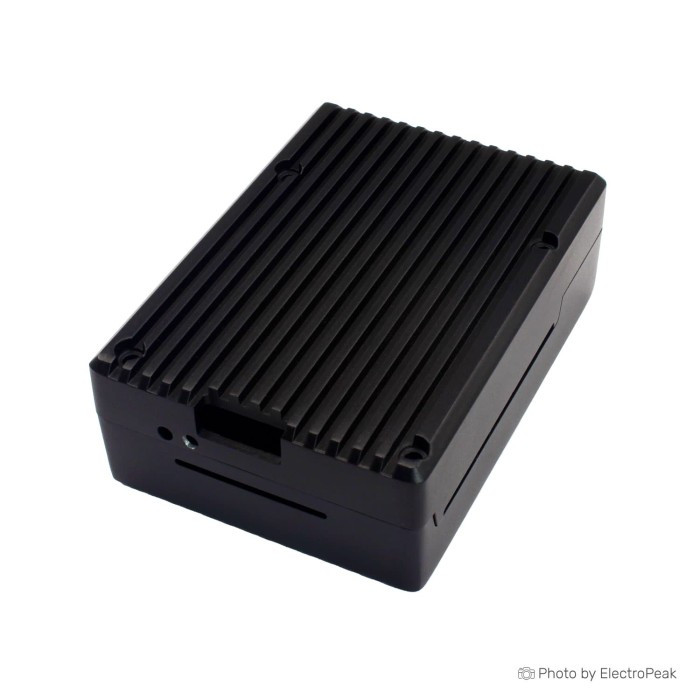
Raspberry Pi 5 Metal Active Cooling Case
$6.5000
In stock
SKU
DEV-27-002
Volume discounts:
- +25 5 % $6.1900
- +50 7 % $6.0400
- +100 9 % $5.8900
- +300 12 % $5.7300
- +500 14 % $5.5800
Ships in 2-3 business days, then:
Free delivery in 12-15 days by Tracked Economic Shipping on orders over $100.
Free delivery in 7-10 days by Express Shipping on orders over $300.
More shipping info

Shop with confidence Learn More
 Raspberry Pi 5 acrylic Shell Previous
Raspberry Pi 5 Metal Active Cooling Case Review
The Raspberry Pi 5 Metal Active Cooling Case is an aluminum enclosure made specifically for the Raspberry Pi 5 single-board computer. It combines an installed cooling fan, dedicated cutouts for all standard board connections, a reserved interface for GPIO ribbon cables, and an external power button. The compact enclosure adds physical rigidity and active airflow for desktop setups and standard SBC enclosures where heavy internal expansion is not required.
Choose this case if you want a metal housing with an installed fan and direct access to primary board connections without sourcing cooling hardware separately. Skip it if your build requires confirmed low-noise acoustics, verified fan-control data, or documented clearance for NVMe HATs and the official Raspberry Pi Active Cooler; those specifications are not supplied for this model. Seller descriptions call the fan powerful and quiet, but those are unquantified marketing statements rather than measured acoustic or airflow metrics.
Specifications of Raspberry Pi 5 Metal Active Cooling Case
- Compatibility: Compatible with Raspberry Pi 5 motherboard only
- Heat dissipation: Design with good heat dissipation
- Cooling design: Active cooling design, cooling fan installed
- Material: Constructed out of high quality aluminum material
- Port access: Easy access to all ports of Raspberry Pi 5
- Micro SD card access: Easy to install and insert the micro SD card
- GPIO cable interface: GPIO cable interface is reservered, support to install the GPIO cable
- Power button: With power button, easy to power on/off
To complete a running setup, this case needs a compatible board such as the Raspberry Pi 5 4GB, Raspberry Pi 5 8GB, or Raspberry Pi 5 16GB, plus a suitable power source. Among the available Raspberry Pi cases, the Raspberry Pi 5 Aluminum Case with Dual Fan is another all-metal listing option for buyers comparing direct aluminum alternatives.
Raspberry Pi 5 Metal Active Cooling Case Specifications Explained
An enclosure is more than its feature list: dimensions, materials, and cutouts affect daily use. This case combines an aluminum body with an installed cooling fan, placing it beyond the passive-only category. Aluminum provides structural protection and conducts heat away from internal pockets, while the top-mounted fan drives convective airflow across the circuit board.
| Listed Feature | Practical Consequence | Unresolved Specification |
|---|---|---|
| Compatible with Raspberry Pi 5 motherboard only | Cutouts, mounting posts, and board outlines match the Raspberry Pi 5 layout. It will not align with Raspberry Pi 4 Model B or earlier boards due to altered connector positions. | Internal clearance for hardware mounted to the top or bottom of the board is unstated. |
| Active cooling design, cooling fan installed | Provides continuous air movement over the SoC and power management components, reducing heat buildup in enclosed spaces. | Fan RPM, CFM airflow, acoustic noise level, connector type, and temperature-triggered PWM control are unlisted. |
| Constructed out of aluminum material | Offers impact protection and rigidity compared to thin plastic shells while aiding passive heat conduction. | Specific aluminum alloy grade, wall thickness, exterior finish, and overall case weight are not supplied. |
| Easy access to all ports of Raspberry Pi 5 | Leaves dual micro-HDMI ports, USB-C power, dual USB 3.0, dual USB 2.0, and Gigabit Ethernet exposed for standard cabling. | Clearance for oversized USB-C power shells, bulky display adapters, or right-angle cables is undocumented. |
| GPIO cable interface is reserved | Permits external wiring using a ribbon cable routed through the case cutout without removing the board. | Top-on clearance for rigid HATs, booster headers, or daughterboards is not provided. |
| With power button, easy to power on/off | Provides a case-mounted physical button to cycle power on the Raspberry Pi 5 without pulling the power cable. | Wiring implementation and whether the button triggers a graceful operating system shutdown are not detailed. |
Buyers who need verified, software-driven thermal regulation should consider the Raspberry Pi 5 Active Cooling ABS Shell, which documents a single PWM-controlled active temperature cooling fan. Clean power delivery also matters: running a Raspberry Pi 5 under active cooling workloads typically requires a dedicated source such as the Official Raspberry Pi 5 27W USB-C Power Supply to prevent undervoltage events under load.
Raspberry Pi 5 Metal Case Port, GPIO, and microSD Access
Physical access determines how easily a case fits into a workspace or embedded system. The enclosure has dedicated openings for all standard edge connectors: Ethernet, dual USB 3.0, dual USB 2.0, dual micro-HDMI, and the USB-C power input. These cutouts align with standard cable boots, though thick molded overmolds or right-angle connectors may require a clearance check against the outer aluminum frame.
For custom electronics, the chassis includes a reserved GPIO cable interface for routing standard ribbon cables to external breadboards or breakout systems. Do not assume that a reserved cable interface provides full clearance for rigid Raspberry Pi HATs. Full-sized HATs, sensor shields, and stacking headers sit directly above the board, where the metal lid and cooling fan reside. If your project depends on mounting a HAT directly onto the 40-pin header under a closed lid, this low-profile aluminum form factor does not document the required vertical clearance. For setups that need frequent internal header reconfiguration or stackable hardware, the Raspberry Pi 5 Official Case has a removable lid designed specifically for open GPIO cable access.
The specification states that the microSD card is easy to install and insert. It does not clarify whether you can extract the card entirely tool-free once the aluminum halves are screwed together, or whether swapping cards requires loosening the chassis. If your operating system is stored on a SanDisk Micro SD Memory Card and your workflow involves daily card removal between test systems, plan for the possibility that the card slot is easiest to service with the enclosure opened.
Raspberry Pi 5 Metal Active Cooling Case Limitations
What the manufacturer specifications leave unstated can determine whether this case fits a technical project. The case provides sturdy metal protection and an installed fan, but the documentation leaves several functional details open:
- Unspecified fan control and acoustics: The case includes an installed fan, but provides no data regarding voltage rating, connector type, RPM, CFM airflow, or PWM thermal management. If you require a near-silent environment for audio processing or a living-room media center, note that small fans running at fixed voltages can generate audible hum under load.
- Unverified internal expansion clearance: No dimensions are supplied for internal vertical height. As a result, fitment cannot be confirmed for bottom-mounted or top-mounted M.2 NVMe SSD expansion boards, PCIe ribbons, tall prototyping shields, or the official Raspberry Pi Active Cooler.
- Unknown thermal interface inclusion: The specifications do not indicate whether custom silicone thermal pads or heatsink shims are included in the package, or what their thickness should be to ensure proper heat transfer from the BCM2712 SoC to the chassis.
- Unverified shutdown logic: The integrated power button supports powering on and off, but its exact mechanism is undocumented. Do not assume it sends an ACPI shutdown signal to Linux without appropriate software configuration.
Across the broader market for generic aluminum enclosures, small variations in casting tolerances, screw threading, and fan bearing noise are common. These are broader design-family trade-offs, not verified defects of this specific unit. If your project requires documented acoustic thresholds or hybrid materials, the Argon NEO 5 Case is built from aluminum alloy and ABS, with passive cooling, an integrated fan, and a protective top cover screw.
Raspberry Pi 5 Metal Case vs Official Case and Other Pi 5 Enclosures
Choosing an enclosure means balancing structural strength, cooling architecture, and accessibility. The options below show how different Raspberry Pi 5 cases address these requirements using only their supplied technical specifications.
| Enclosure | Primary Material | Cooling Setup | Access and Expansion Highlights | Documented Best-Fit Focus |
|---|---|---|---|---|
| Raspberry Pi 5 Metal Active Cooling Case | Aluminum | Active cooling design, cooling fan installed | Reserved GPIO cable interface; external power button; easy port access | General-purpose metallic protection with pre-installed active airflow |
| Raspberry Pi 5 Official Case | ABS / Polycarbonate | 8000 RPM PWM fan with tachometer (2.79 CFM) and heatsink | Removable lid; stackable chassis; open top access | Stackable setups and projects requiring easy GPIO cable access |
| Raspberry Pi 5 Active Cooling ABS Shell | ABS Plastic | Single PWM-controlled active temperature cooling fan | Full perimeter port access with lightweight frame | Lightweight physical protection with active temperature-controlled cooling |
| Retroflag PS Pi Case | Molded Plastic | Passive venting (case format) | Side microSD slot; functional power and reset buttons; LED indicator | Retro console gaming and emulation builds |
| Argon NEO 5 Case | Aluminum Alloy and ABS | Passive heatsink cooling paired with built-in fan | Top cover screw for port protection; sliding cover | Combined passive and active cooling with port protection |
| Raspberry Pi 5 Aluminum Case with Dual Fan | Aluminum | Dual 30x30mm DC brushless cooling fans | Full metal armor profile; perimeter cutouts | Demanding workloads requiring high thermal dissipation and physical protection |
Need an all-metal chassis with dual fans? The Raspberry Pi 5 Aluminum Case with Dual Fan is an alternative listing with two 30mm fans. For modular laboratory benchwork with jumpers attached directly to pins, the Raspberry Pi 5 Official Case provides a removable lid. For gaming emulation builds where external storage-media access matters, the Retroflag PS Pi Case includes a dedicated side microSD slot alongside classic console aesthetics.
Raspberry Pi 5 Metal Active Cooling Case Accessories and Setup Check
A build around this enclosure needs a few core components. This is a bare protective chassis with an installed fan, so the computing core and power infrastructure must be supplied separately.
Required and Recommended Accessories
- Host Board: A standard Raspberry Pi 5 is required. Match the memory tier to your workloads: the Raspberry Pi 5 4GB for lightweight tasks, the Raspberry Pi 5 8GB for standard multitasking, or the Raspberry Pi 5 16GB for memory-intensive compiles and local containers.
- Power Supply: Raspberry Pi 5 boards draw up to 5A at 5V under full peripheral load. The Official Raspberry Pi 5 27W USB-C Power Supply provides the required current negotiation over USB Power Delivery.
- Boot Medium: An operating system card such as the SanDisk Micro SD Memory Card (32GB) provides standard non-volatile storage.
- Tools and Thermal Materials (Unlinked): A small electronics cross-head screwdriver is needed for the assembly screws. If thermal interface pads are not included in your packaging, source suitable thermal pads to ensure direct contact between the aluminum surface and the board chips.
- Cabling (Unlinked): If using the reserved interface, prepare a standard 40-pin GPIO ribbon cable before final assembly.
Assembly and First-Time Verification
- Unpack the enclosure and inspect the hardware. Check the alignment of the internal mounting posts and verify that the fan leads are intact.
- Prepare the Raspberry Pi 5 board. If applying thermal pads to the SoC and PMIC, ensure that protective plastic films are removed from both sides of each pad.
- Seat the board in the lower chassis half, aligning the dual micro-HDMI, USB-C, Ethernet, and USB ports with their matching cutouts.
- Connect the cooling fan cable to the board's designated fan header or power pins before securing the lid.
- If using a ribbon cable through the reserved GPIO cable interface, route and mate the header before closing the top cover.
- Fasten the case screws evenly in an alternating diagonal pattern to avoid tilting the internal board.
- Insert your prepared microSD card into the slot.
- Attach display cables, network, and the USB-C power supply. Press the case-mounted power button to initialize the board.
- Confirm that the board completes its boot sequence, output displays correctly, and the cooling fan spins freely without vibrating against internal components.
Raspberry Pi 5 Metal Case with Fan FAQ
Does the Raspberry Pi 5 Metal Active Cooling Case fit every Raspberry Pi?
No. It is compatible with the Raspberry Pi 5 motherboard only and will not fit Raspberry Pi 4, 3, or earlier generations because of changes in board component layouts, port positions, and mounting holes.
Does this Raspberry Pi 5 metal case include a fan?
Yes. The case uses an active cooling design with a cooling fan installed directly in the enclosure. Fan diameter, bearing type, RPM, and decibel noise levels are not specified.
Is the fan PWM-controlled or always on?
The fan-control method is not documented for this case. If your project requires confirmed dynamic temperature-triggered speed control, consider the Raspberry Pi 5 Active Cooling ABS Shell, which documents a single PWM-controlled active cooling fan.
Can I access all Raspberry Pi 5 ports while the case is assembled?
Yes, the housing has cutouts for easy access to the USB-C power port, micro-HDMI display outputs, USB ports, and Ethernet jack. Extremely thick cable jackets or specialty right-angle connectors may require a clearance check against the outer shell.
Can I use the GPIO header with this aluminum case?
Yes, but primarily through ribbon cables. The case has a reserved GPIO cable interface that passes a cable through the chassis. It does not provide documented vertical clearance for rigid add-on HATs or stacked shields with the lid closed.
Can I swap the microSD card without opening the case?
The specification states that the card is easy to install and insert, but does not confirm whether it can be extracted and swapped while the case is fully screwed together. If you need verified tool-free swapping, verify the opening clearance before final deployment.
Will an NVMe board, tall HAT, or the official Raspberry Pi Active Cooler fit inside?
Internal height and clearance for third-party NVMe boards, tall HATs, and the official heatsink-and-blower Active Cooler are not supplied. If your application relies on internal M.2 storage or large heatsinks, select an enclosure with documented dimensional clearances.
Does the power button provide a safe operating system shutdown?
The case has a power button for easy power on and off, but operating-system integration and safe-shutdown signaling are not detailed. Without explicit software configuration, treat it as a hardware power switch rather than an automated ACPI shutdown trigger.
Is this case the same product as the official Raspberry Pi Active Cooler?
No. This product is an aftermarket aluminum protective case containing an installed cooling fan. The official Raspberry Pi Active Cooler is an open-frame heatsink and blower unit designed by Raspberry Pi, and its fitment inside this metal chassis is unconfirmed.
Purchase Decision Summary
- Ideal for: Builders who want a rigid aluminum protective housing for a standalone Raspberry Pi 5 with a pre-fitted active cooling fan, edge port cutouts, a power button, and a pass-through slot for external GPIO ribbon cables.
- Maybe for: Home server, Pi-hole, MQTT broker, and desktop installations where the board runs in a standard environment and exact acoustic noise figures or internal board stacking are not required.
- Consider another option if: Your build requires verified PWM fan speed curves, quiet acoustic ratings, tool-free microSD extraction, internal NVMe drive sleds, or direct top-mounting of tall hardware HATs.
Buying Checklist
- Confirm that you are installing a Raspberry Pi 5 motherboard, as older models are not compatible.
- Confirm that you have a 5V/5A USB-C power supply, such as the Official Raspberry Pi 5 27W USB-C Power Supply, to support the Pi 5 and active cooling under load.
- Verify that your project does not require documented clearance for internal NVMe boards, PCIe adapters, or the official Active Cooler.
- Confirm whether your setup requires quiet acoustics, as specific fan decibel ratings and PWM control are unlisted.
- Ensure that you have a small precision screwdriver for chassis assembly and thermal pads if replacement is needed.
- Check that external GPIO projects use ribbon cable pass-through rather than rigid daughterboards under the closed lid.
Write Your Own Review

Please complete your information below to login.
Sign In
Create New Account