
Product added to cart

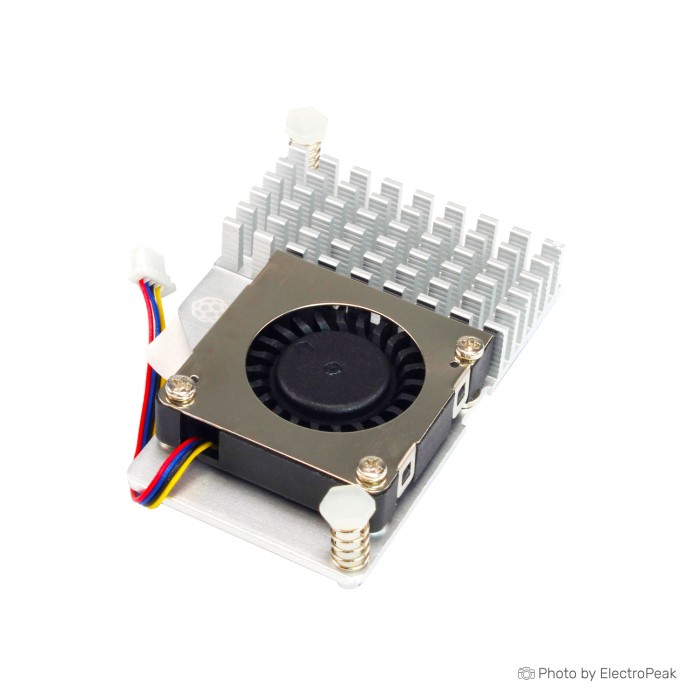
Official Raspberry Pi 5 Active Cooler
$8.5000
In stock
SKU
DEV-24-002
Volume discounts:
- +25 5 % $8.1100
- +50 7 % $7.9200
- +100 9 % $7.7300
- +300 11 % $7.5300
- +500 14 % $7.3400
Ships in 2-3 business days, then:
Free delivery in 12-15 days by Tracked Economic Shipping on orders over $100.
Free delivery in 7-10 days by Express Shipping on orders over $300.
More shipping info

Shop with confidence Learn More
 Official Optical Mouse For Raspberry Pi400/4B/3B+ Previous
Official Raspberry Pi 5 Active Cooler Review
The Official Raspberry Pi 5 Active Cooler is a dedicated heatsink-and-fan accessory built specifically for the Raspberry Pi 5. Powered directly from the board's four-pin fan header, it provides continuous active cooling for sustained, intensive processing. In typical retail channels, this official cooler sells in the $5–$6 USD price range, making it an accessible thermal option for home servers, media streaming, and continuous compute nodes. It suits demanding workloads, but not projects requiring absolute silence, frequent cooler removal, or enclosures with tightly constrained vertical clearances.
Specifications of Official Raspberry Pi 5 Active Cooler
- Compatibility: Raspberry Pi 5
- Input voltage: 5V DC
- Power source: Four-pin fan header on Raspberry Pi 5
- Fan speed control: Pulse width modulation (PWM) with tachometer
- Maximum airflow: 1.09 CFM
- Maximum fan speed: 8000 RPM +/- 15%
- Product material: Anodised aluminium
During continuous CPU-intensive tasks, an uncooled board can reach thermal-throttling thresholds near 85°C. Independent testing shows that this active cooler holds full-load operating temperatures around 59°C, preventing thermal downclocking. Its compact form mounts directly over the SoC, power management IC, and wireless module without occupying GPIO pins. At full speed, however, it produces an audible hum; the mounting push pins are not intended for repeated installation cycles, and the heatsink profile requires adequate enclosure space. You will need a compatible Raspberry Pi 5 board, available in 4GB, 8GB, or 16GB configurations. Other components are available in our selection of Raspberry Pi accessories.
Raspberry Pi 5 Active Cooler Specifications and Fan Control
The thermal assembly combines an extruded anodised aluminium heatsink with a low-profile radial blower. Pre-applied thermal pads let the heatsink contact key thermal hotspots on the board, while the blower exhausts air horizontally across the aluminium fins. The dedicated four-pin connector supplies 5V DC power directly, so no external wiring harnesses or breadboard connections are needed.
Fan operation uses pulse width modulation (PWM) with tachometer feedback. The official Raspberry Pi operating system firmware adjusts fan speed dynamically according to system temperature. At low temperatures—typically below approximately 50°C—the fan remains stationary. As processing loads rise, firmware increases fan speed proportionally to its maximum rated speed of 8000 RPM (+/- 15%), providing up to 1.09 CFM of airflow. Standard operation needs no manual scripting or software configuration.
Because the cooler relies exclusively on the dedicated 4-pin fan connector, the 40-pin GPIO expansion header remains completely clear for HATs and external sensors. It cannot serve as a general-purpose GPIO-driven fan for earlier boards or secondary hardware. For an integrated enclosure with active thermal regulation rather than an exposed board-mounted cooler, consider the ABS shell with PWM fan cooling.
Raspberry Pi 5 Active Cooler Installation and Compatibility
Compatibility is limited strictly to the Raspberry Pi 5. Its physical mounting holes and dedicated four-pin fan socket are unique to this generation, so the cooler cannot mount on a Raspberry Pi 4 Model B or earlier boards.
Mounting the assembly is straightforward, but careful handling is required:
- Ensure the Raspberry Pi 5 is completely powered down and disconnected from any power supply.
- Inspect the underside of the cooler and carefully peel away the protective transparent film covering the pre-applied thermal pads.
- Align the cooler's spring-loaded plastic push pins over the two dedicated diagonal mounting holes on the circuit board.
- Press both push pins downward simultaneously with even pressure until they click and expand securely through the underside of the PCB. Avoid pushing one pin completely before aligning the second, as uneven pressure can crack the plastic pins or tilt the heatsink.
- Align the keyed four-pin connector with the fan socket located between the USB ports and the GPIO header, then press it firmly into place. Do not force the plug if you feel resistance; check for bent pins before proceeding.
- Apply system power and observe the boot sequence.
No separate driver installation is required. One critical limitation applies: the active cooler is not designed for repeated removal and reinstallation. Pulling the push pins back through the PCB compresses the retention barbs, which can weaken or break the plastic. Detaching the heatsink also tears or contaminates the pre-applied thermal pads. For a fully enclosed system with a built-in power button and full external connector access, the metal Raspberry Pi 5 case with active fan provides a protective metal alternative for your Raspberry Pi 5 board.
Raspberry Pi 5 Active Cooler Limitations, Noise and Case Clearance
The active cooler handles sustained thermal dissipation effectively, but its design brings practical mechanical and acoustic trade-offs. Acoustic output follows fan speed directly. At idle, with the fan stopped or running at minimum RPM, the unit is virtually silent. Under sustained heavy computational load, the 8000 RPM blower produces a noticeable pitch of between 35 and 40 dB at typical desk distance. That noise floor may be intrusive in recording studios, quiet bedrooms, or silent audio setups, where passive thermal strategies are more appropriate.
Physical clearance is another constraint. The heatsink-and-fan structure adds roughly 15mm of vertical height above the board surface, while the retention push pins protrude several millimetres through the underside of the PCB. This underside protrusion conflicts with flat-bottomed cases or mounting plates that lack component-clearance cutouts. Enclosures need adequate top ventilation and height clearance. When pairing the cooler with an enclosed chassis such as the Raspberry Pi 5 enclosure, independently verify that internal clearances and airflow channels remain unobstructed.
Long-term maintenance also has uncertainties. Formal mean time between failures (MTBF) data is not published for the small blower assembly. Some community feedback reports noticeable bearing buzz or rattling after one to three months of continuous 24/7 operation in dusty environments. Bent header pins and firmware conflicts have also caused isolated fan-control issues. For heavy-duty server clusters that need rugged housing as well as cooling, the aluminum case with dual cooling fans offers a fully shielded alternative.
Raspberry Pi 5 Active Cooler vs Cooling Cases
The main choice for Raspberry Pi 5 cooling is between a bare-board active cooler and a complete cooling enclosure. The Official Active Cooler mounts directly to the PCB, directing airflow across the silicon while keeping top-side expansion headers accessible. It does not provide impact resistance, port shielding, or bottom-PCB protection.
| Product | Form Factor | Cooling Mechanism | Key Structural Features |
|---|---|---|---|
| Official Active Cooler | Board-mounted heatsink & fan | Single PWM blower (1.09 CFM, 8000 RPM) | Anodised aluminium, push-pin retention, 4-pin header powered |
| Raspberry Pi 5 Aluminum Case with Dual Fan | Full metal enclosure | Dual 30x30mm DC brushless fans | Heavy aluminium construction, 85x56x22mm dimensions |
| Raspberry Pi 5 Metal Case with Active Fan | Full metal enclosure | Single active cooling fan | Integrated power button, reserved GPIO ribbon cable slot |
| Raspberry Pi 5 ABS Shell with PWM Fan | Plastic snap-together shell | Temperature-controlled PWM fan | Lightweight ABS body, targeted ventilation ports |
Direct comparative thermal benchmarks and noise metrics for these variants are not officially documented. Choose the standalone active cooler for an open chassis, a robotics platform, or custom standoffs. Where dust, physical impacts, or handling risks are part of the environment, an integrated cooling case provides both physical housing and active airflow: the aluminum case with dual cooling fans, metal Raspberry Pi 5 case with active fan, or ABS shell with PWM fan cooling.
Raspberry Pi 5 Active Cooler Accessories and Power Requirements
The active cooler draws 5V DC power directly from the host board's four-pin fan socket, requiring no auxiliary power input or voltage regulator. The underlying computer still needs adequate system-level power delivery for full sustained CPU loads.
For an operational system, consider the following component hierarchy:
Required
- Raspberry Pi 5 Board: The cooler mounts exclusively to the Pi 5 layout. Select the memory capacity that matches your software workload: the Raspberry Pi 5 - 4GB RAM, Raspberry Pi 5 - 8GB RAM, or Raspberry Pi 5 - 16GB RAM.
Recommended
- Dedicated Power Supply: Sustained processing draws significant power. The Raspberry Pi 5 power supply provides clean 5.1V / 5A DC power via USB-C to prevent low-voltage warnings when the system and fan run at peak draw.
- Protective Enclosure: Verify cooler clearance carefully before housing the board. The Raspberry Pi 5 enclosure provides basic protection, though cooler fit must be verified independently.
Optional
- Replacement Thermal Pads: Standard non-conductive thermal pads cut to size are useful if the cooler must be detached and remounted on another board.
- Replacement Blower Fan: A standard 30×30×7mm 5V four-pin JST blower can serve as a direct swap if the original fan develops bearing wear over time.
- Needle-Nose Pliers: Helpful for gently compressing push-pin barbs from the board's underside if cooler removal becomes strictly necessary.
Raspberry Pi 5 Active Cooler FAQ
Does the Raspberry Pi 5 need the Official Active Cooler?
No. The Raspberry Pi 5 can boot and operate without it, but sustained workloads quickly cause thermal throttling without active cooling. Independent tests show full-load temperatures falling from approximately 85°C to 59°C with the cooler installed, making it essential for continuous high-CPU tasks.
Is the Raspberry Pi 5 Active Cooler loud?
The cooler is nearly silent at idle and low loads because the fan remains off or spins at low RPM. Under full operational load, it reaches up to 8000 RPM and produces an audible hum between 35 and 40 dB, which is noticeable in quiet environments.
Does the Raspberry Pi 5 Active Cooler need drivers or manual PWM setup?
No separate drivers or manual PWM configuration are required. The Raspberry Pi OS kernel automatically reads thermal telemetry and regulates fan speed through the onboard four-pin header.
Can I remove and reinstall the Official Raspberry Pi 5 Active Cooler?
Routine removal is not recommended. Its mounting mechanism uses soft plastic push pins that compress and fatigue when removed, while the pre-applied thermal pads tear easily and require clean-up and replacement before remounting.
Will the Raspberry Pi 5 Active Cooler fit inside my case?
It will not fit cases designed strictly for earlier boards or ultra-low-profile enclosures. The cooler adds roughly 15mm of height above the PCB, and its push pins protrude from the bottom; verify both vertical clearance and bottom standoff height before choosing a case.
Why is my Raspberry Pi 5 Active Cooler fan not spinning?
In most cases, a stationary fan is normal. Official firmware keeps the fan stopped when processor temperature is below approximately 50°C. If the system exceeds 65°C and the fan still does not spin, inspect the four-pin connector for bent pins and verify that system firmware is updated.
What is included with the Official Raspberry Pi 5 Active Cooler?
The product package consists of the active cooler assembly with the anodised aluminium heatsink, integrated blower fan, pre-installed thermal pads, and two spring-loaded push pins. The host computer board, power supply, and enclosure are not included.
Purchase Decision Summary
- Ideal for: Raspberry Pi 5 owners running media servers, home automation, compilation tasks, or continuous compute nodes who want plug-and-play thermal control through the official fan header.
- Maybe for: Desktop users who can tolerate a low hum during heavy processing loads and have an open frame or high-clearance case.
- Avoid if: You require a strictly silent passive system, plan to repeatedly move the heatsink between boards, or are building into a tightly constrained enclosure with no vertical clearance.
Buying Checklist
- Confirm that your host board is a Raspberry Pi 5 (earlier models lack the required mounting holes and fan header).
- Verify that your enclosure has at least 15mm of clearance above the SoC and standoff room for underside push pins.
- Ensure you have a high-output Raspberry Pi 5 power supply to support sustained board and fan operation.
- Plan to leave the cooler permanently installed once clicked into position.
- Check additional mounting needs or browse complementary parts in Raspberry Pi accessories.
Write Your Own Review

Please complete your information below to login.
Sign In
Create New Account