
Product added to cart

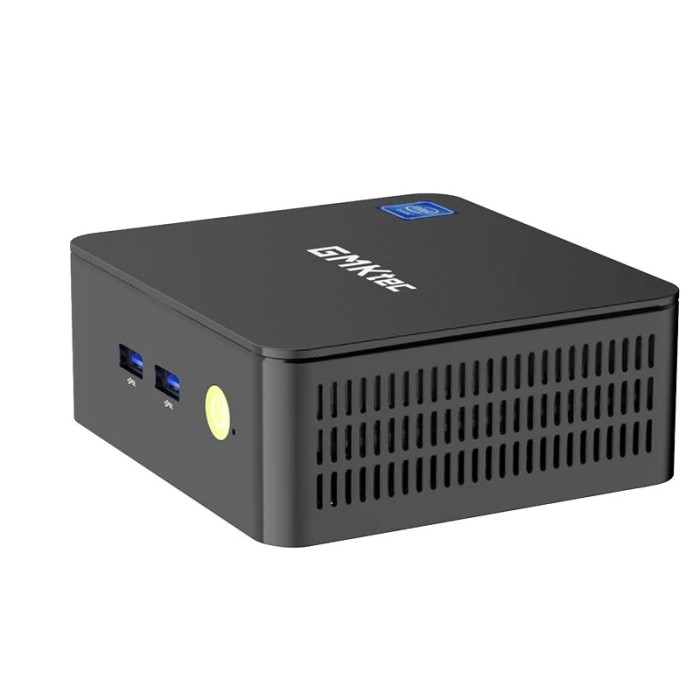
GMKtec G3, Intel N100 DDR4 mini PC
$459.0000
In stock
SKU
MIN-05-001
Volume discounts:
- +5 4 % $440.8500
- +10 6 % $431.7700
- +25 8 % $422.6900
- +50 10 % $413.6200
- +100 12 % $404.5400
Ships in 2-3 business days, then:
Free delivery in 12-15 days by Tracked Economic Shipping
Free delivery in 7-10 days by Express Shipping
More shipping info

Shop with confidence Learn More
GMKtec G3 Intel N100 Mini PC Review
The GMKtec G3 is a compact x86 desktop computer powered by the 12th-generation Intel Alder Lake N100 processor. With Windows 11 Pro pre-installed, DDR4 memory, and high-speed NVMe storage, it suits everyday office productivity, dual-screen workstations, and low-power home-server duties in our mini PC selection. It combines responsive quad-core processing with modern networking, including WiFi 6, Bluetooth 5.2, and 2.5Gbps Ethernet.
The quad-core architecture handles browser multitasking, 4K video playback, and lightweight containerization reliably, but its architectural boundaries are clear. The platform is not built for modern 3D gaming, professional video rendering, USB-C single-cable docking, or enterprise deployments without independent data backups.
Specifications of GMKtec G3 Intel N100 Mini PC
- Model: Intel Alder Lake N100
- CPU: Intel N100
- CPU speed: up to 3.40GHz
- CPU cores: 4 cores
- CPU threads: 4 threads
- Cache: 6MB
- Processor Graphics: Intel UHD Graphics
- Processor Graphics speed: up to 750MHz
- RAM: 8GB DDR4 3200 MT/s
- RAM form factor: SO-DIMM
- RAM expandable up to 32GB
- Storage: 256GB/512GB M.2 NVMe PCIe 3.0 SSD
- Storage supports up to 2TB
- Operating System: Windows 11 Pro (pre-installed)
- Operating System support: Linux
- Networking: WiFi 6 (802.11ax)
- Networking: Bluetooth 5.2
- Networking: Gigabit LAN (RJ45) 2.5Gbps
- Display: Dual HDMI 2.0 ports
- Display support: up to 4K@60Hz
- USB Ports: 4x USB 3.2 Gen 1 (5Gbps)
- Audio: 1x 3.5mm headphone jack
- Power: DC IN (5.5/2.5mm)
- Power: 12V/3A
- Dimensions: 114 x 106 x 42.5mm
- Weight: 361g
GMKtec G3 Intel N100 Performance and Limitations
The Intel N100 processor has 4 efficient cores and 4 threads, reaching clock speeds up to 3.40GHz and backed by a 6MB cache. For standard desktop work—running multiple browser tabs, streaming 4K media, editing office documents, using PrusaSlicer for 3D printing, and managing remote desktop connections—the system feels responsive and capable. Intel UHD Graphics running up to 750MHz provides dedicated hardware decoding for smooth media playback across dual 4K displays.
Do not confuse 4K display capability with gaming performance. The integrated GPU can drive two 4K 60Hz monitors for desktop workflows and handle older retro titles or PS2-era emulation at reduced resolutions, but it lacks the graphical compute required for modern AAA titles or heavy 3D rendering suites. For workloads requiring hardware pin access, robotics control, or the physical maker ecosystem rather than a standard x86 personal computer, evaluate the Raspberry Pi 5 (16GB RAM) as an alternative approach.
Thermal management relies on an internal active fan. During ordinary desktop loads and basic media playback, the system stays quiet enough for bedroom or office desks. Under prolonged CPU-intensive tasks, the cooling fan spins up to a clearly audible hum to keep temperatures stable. For home-lab or continuous utility use, hardware component brands vary across production batches, and independent reports have documented hardware failures under uninterrupted 24/7 loads. Regular automated data backups remain essential for any critical service.
GMKtec G3 DDR4 RAM and Storage Upgrade Options
The memory subsystem includes an 8GB DDR4 3200 MT/s SO-DIMM module and supports expansion up to 32GB. Its internal layout provides a single SO-DIMM slot. Upgrading memory means replacing the pre-installed module with a higher-capacity stick rather than adding a second one, so memory access remains strictly single-channel. DDR5 modules are physically and electrically incompatible with this motherboard.
Primary storage uses an M.2 NVMe PCIe 3.0 SSD, offered in 256GB or 512GB capacities with platform support for drives up to 2TB. The main drive slot accommodates standard M.2 2280 NVMe solid-state drives. Hardware teardowns also reveal a secondary internal M.2 2242 slot intended for SATA SSDs rather than NVMe drives. Because component configurations can change between manufacturing revisions, verify your specific physical unit before purchasing a secondary 2242 SATA drive.
| Component | Shipped Configuration | Supported Upgrade Path | Key Considerations |
|---|---|---|---|
| System RAM | 8GB DDR4 3200 MT/s SO-DIMM | Up to 32GB via 1x SO-DIMM | Single-slot design; runs in single-channel mode; DDR5 is not supported. |
| Primary Storage | 256GB or 512GB M.2 NVMe PCIe 3.0 | Up to 2TB M.2 2280 NVMe SSD | Fast PCIe 3.0 bus; contains the pre-installed operating system. |
| Secondary Storage | Unpopulated | Reported M.2 2242 SATA SSD slot | Accepts SATA protocol only, not NVMe; confirm physical slot before buying. |
GMKtec G3 Connectivity, Linux Compatibility, and Setup
Video output comes through two HDMI 2.0 ports capable of driving independent 4K monitors at 60Hz. Connect screens with standard full-size cables such as this HDMI Cable - 1.5m (Black). For networking, the unit provides WiFi 6 (802.11ax), Bluetooth 5.2, and an RJ45 Ethernet port supporting 2.5Gbps speeds. That offers substantial headroom over traditional 1Gbps ports when connected to multi-gig switches or local network-attached storage.
Four USB 3.2 Gen 1 ports provide 5Gbps transfer speeds, alongside a 3.5mm headphone jack. The system has no USB-C or Thunderbolt ports. If your setup depends on native USB-C monitor connections, single-cable hub docking, or an ARM-based architecture with multi-core performance and 8K display capability, consider the Orange Pi 5 Pro instead.
The unit boots into Windows 11 Pro out of the box and natively supports Linux distributions such as Ubuntu, Debian, or Proxmox VE. Before reinstalling Windows or installing a Linux distribution, export and back up your current device drivers—particularly for the wireless chipset, Bluetooth, 2.5GbE LAN, and Intel graphics—to an external flash drive. When running multiple high-draw external mechanical drives via USB, power them through an external power supply or powered hub to avoid overloading the mini PC's shared USB power rail.
GMKtec G3 Accessories and First Boot Checklist
Using the mini PC requires a display, video cable, input peripherals, and the appropriate 12V/3A power input. Before checkout, confirm whether optional mounting brackets or specific display cables are bundled with your selected package.
Peripheral Breakdown
- Required Display Link: Connect to any standard monitor or television using an HDMI Cable - 1.5m (Black).
- Required Input Controls: A dedicated keyboard and mouse are necessary during initial setup. A compact option such as the RT-MWK08 Mini Wireless Keyboard With Lithium Battery (Black) handles initial setup and media control without cluttering a workspace.
- Required Power Source: A 12V/3A DC power supply with a 5.5/2.5mm barrel plug.
- Recommended Network Cable: An RJ45 Ethernet cable connected to a 2.5GbE-capable switch ensures the fastest local transfer speeds.
- Recommended Driver Storage: A spare USB flash drive preserves factory driver backups before any system updates or OS reinstalls.
- Recommended Powered Hub: An externally powered USB 3.0 hub suits setups involving multiple bus-powered spinning disks.
- Optional Media Remote: For living-room setups, the Wireless USB Remote Control Mouse for PC provides convenient handheld navigation.
First Boot Procedure
- Connect the 12V/3A DC barrel power adapter to the DC IN jack.
- Attach your monitor to either HDMI 2.0 port, then plug in your keyboard and mouse receiver.
- Connect an Ethernet cable for reliable initial setup, or prepare your WiFi 6 network credentials.
- Power on the unit and complete the guided Windows 11 Pro user onboarding.
- Run Windows Update to ensure all hardware drivers and security definitions are current.
- Open Device Manager to verify that the graphics controller, 2.5GbE network adapter, wireless interface, and audio jack are recognized without warnings.
- Export the system drivers to external storage before attempting clean operating system installations.
GMKtec G3 Intel N100 Mini PC FAQ
Does the GMKtec G3 come with Windows 11 Pro, RAM, and an SSD?
Yes. The system comes pre-installed with Windows 11 Pro, 8GB of DDR4 memory, and an M.2 NVMe solid-state drive in either 256GB or 512GB capacity. Verify the exact storage size selected in your order before finalizing your purchase.
Is the GMKtec G3 Ethernet port Gigabit or 2.5 Gigabit?
The Ethernet port is a 2.5Gbps RJ45 connection. It remains fully compatible with standard 10/100/1000Mbps networks while allowing up to 2.5Gbps throughput when paired with matching high-speed switches or routers.
Can the GMKtec G3 run two 4K monitors at 60Hz?
Yes, the dual HDMI 2.0 ports can drive two independent 4K monitors simultaneously at 60Hz. This applies to desktop computing, video streaming, and office applications, not high-performance 3D gaming.
Does the GMKtec G3 have USB-C?
No, the GMKtec G3 does not feature any USB-C ports. All external USB connectivity is provided through its four USB 3.2 Gen 1 (5Gbps) ports.
Can I upgrade the GMKtec G3 RAM?
Yes, system RAM can be upgraded up to 32GB using a single DDR4 3200 MT/s SO-DIMM module. The board has only one memory slot, so upgrading requires replacing the pre-installed 8GB module, and memory runs in single-channel mode.
Can I install a second SSD in the GMKtec G3?
The chassis includes a secondary M.2 2242 slot, but it operates over the SATA protocol rather than NVMe. Confirm your hardware revision visually before purchasing a secondary drive, and ensure any added drive uses the M.2 2242 SATA form factor.
Can the GMKtec G3 run Linux or Proxmox?
Yes, the x86 architecture natively supports Linux distributions, including Ubuntu and Debian, along with lightweight Proxmox VE hypervisor setups. Back up factory Windows drivers before formatting, and configure wired Ethernet during your initial installation.
Is the GMKtec G3 good for gaming?
The system suits light retro emulation and older PC games at reduced resolutions, but it is not intended for modern AAA gaming. The integrated Intel UHD Graphics core is optimized for video decoding and desktop workloads rather than heavy 3D rendering.
Is the GMKtec G3 silent?
No, the unit uses an active internal cooling fan. It runs very quietly during basic web browsing and document editing, but the fan accelerates and becomes audible when the processor faces continuous, heavy computation.
What power adapter does the GMKtec G3 use?
The mini PC uses a 12V/3A DC power supply fitted with a standard 5.5/2.5mm barrel plug. Any replacement power source must supply 12V with center-positive polarity, match the barrel dimensions, and deliver at least 3A of current.
Can I use external hard drives with the GMKtec G3 USB ports?
Yes, standard USB flash drives and single external portable hard drives work normally. For multiple mechanical external hard drives connected simultaneously, use an externally powered USB hub to prevent exceeding the mini PC's shared port power budget.
Can I control the GMKtec G3 as a media center from the couch?
Yes, pairing the PC with a handheld controller such as the Wireless USB Remote Control Mouse for PC allows convenient navigation across media players and browser interfaces without requiring a desk.
GMKtec G3 Intel N100 Mini PC Buying Decision
| Ideal For | Maybe For | Avoid If |
|---|---|---|
|
|
|
Pre-Purchase Verification Checklist
- Verify that your selected order option includes your required storage capacity (256GB or 512GB).
- Confirm that your monitors use HDMI inputs, or source appropriate HDMI-to-DVI/DisplayPort adapters.
- Confirm that you do not require USB-C display alt-mode or USB-C power delivery docking.
- Ensure your planned memory upgrades use DDR4 3200 MT/s SO-DIMM modules, not DDR5.
- Plan to use an externally powered hub if connecting multiple bus-powered spinning hard drives.
- Ensure you have a USB thumb drive ready to back up pre-installed drivers before modifying system partitions.
- Check the rest of our mini PC catalog if your project requires different hardware interfaces or processor families.
| Processor (SoC) | Intel N100 |
|---|---|
| CPU | Intel N100, up to 3.40GHz, 4 cores/4 threads, 6MB Cache |
| Architecture | x86 |
| RAM | 8GB |
| RAM Type | DDR4 |
| Storage Support | NVMe |
| Storage Capacity | 256GB/512GB |
| GPU/VPU | Intel UHD Graphics |
| Ethernet | 2.5 Gbps |
| Wi-Fi | WiFi 6 |
| Bluetooth | Bluetooth 5.2 |
| USB Ports | 4x USB 3.2 Gen 1 (5Gbps) |
| Video Output | HDMI |
| Hardware Interfaces | 1x 3.5mm headphone jack |
| Camera/Display | No |
| Power Input | DC IN (5.5/2.5mm), 12V/3A |
| PCIe | PCIe 3.0 |
| Dimensions (mm) | 114 x 106 x 42.5mm |
| OS Support | Linux, Windows 11 Pro |
| Power Consumption | 6W TDP |
| Weight (g) | 361g |
Write Your Own Review

Please complete your information below to login.
Sign In
Create New Account