
Product added to cart

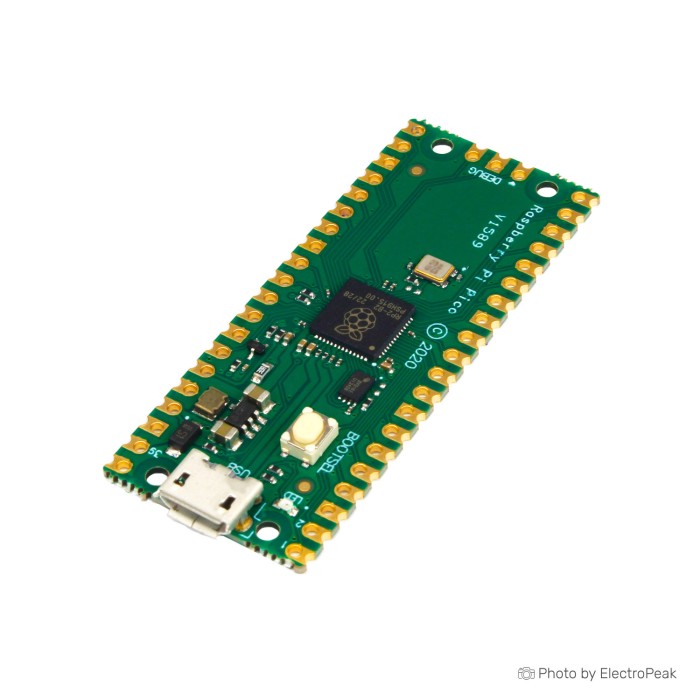
Raspberry Pi Pico
$9.2500
In stock
SKU
MIN-01-128-G
Volume discounts:
- +25 2 % $9.0200
- +50 4 % $8.9000
- +100 5 % $8.7800
- +300 6 % $8.6700
- +500 8 % $8.5500
Product Variations:

Add an Accessory:


Ships in 2-3 business days, then:
Free delivery in 12-15 days by Tracked Economic Shipping on orders over $100.
Free delivery in 7-10 days by Express Shipping on orders over $300.
More shipping info

Shop with confidence Learn More
 Raspberry Pi Zero WH Previous
Raspberry Pi Pico RP2040 Board Review
The Raspberry Pi Pico is an RP2040 microcontroller board for embedded systems, electronics projects, and custom control hardware. It is not a Linux single-board computer: it does not run Raspberry Pi OS, desktop software, HDMI displays, or standard computer USB ports.
This compact Raspberry Pi Pico RP2040 board combines a dual-core Cortex-M0+ processor running at up to 133 MHz with 2MB flash, 264KB SRAM, 26 multifunction GPIO pins, and USB programming in a 21 mm x 51 mm format. It has no onboard Wi-Fi or Bluetooth, uses 3.3 V GPIO logic, and needs external driver hardware for motors, relays, servos, solenoids, and high-current LEDs. Browse related Raspberry Pi boards when you need a different form factor or capability.
Specifications of Raspberry Pi Pico
- Microcontroller: RP2040 Dual-Core ARM Cortex-M0+ processor
- Clock Speed: Up to 133 MHz
- Flash Memory: 2MB onboard flash memory for program storage
- RAM: 264KB of SRAM
- GPIO Pins: 26 multifunction GPIO pins, including 3 analogue inputs, 2 x UART, 2 x SPI controllers, 2 x I2C controllers, 16 x PWM channels
- USB Connectivity: USB 1.1 support for data transfer, programming, and power supply
- Form Factor: Compact board with GPIO pins and USB connector
- Power Supply: Typically powered through USB or external power source
- Dimensions: 21 mm x 51 mm form factor
- Programming: Drag-and-drop programming using mass storage over USB
- Power Modes: Low-power sleep and dormant modes
- Clock: Accurate on-chip clock
- Sensor: Temperature sensor
- Libraries: Accelerated integer and floating-point libraries on-chip
Raspberry Pi Pico Specifications and GPIO Explained
The RP2040’s two Cortex-M0+ cores, up to 133 MHz clock speed, 2MB flash, and 264KB SRAM suit embedded logic, responsive control panels, sensor handling, USB peripherals, and timing-sensitive I/O. The clock figure is a maximum rated/configurable speed, not a promise that every workload runs at that speed under every condition. The accelerated integer and floating-point libraries support software development, but this is not a conventional hardware floating-point unit.
Its 26 multifunction GPIO pins can be assigned to three exposed 12-bit analogue inputs, two UART interfaces, two SPI controllers, two I2C controllers, and 16 PWM channels. One board can combine sensors, displays, encoders, buttons, serial modules, and PWM-controlled circuits, subject to pin planning. The 26 GPIO figure is not the total physical pin count: the official standard board uses a 40-pin edge arrangement, with power, ground, and special-function pins alongside GPIO.
| Capability | Why it matters |
|---|---|
| Eight PIO state machines | PIO, programmable I/O hardware, handles tightly timed custom interfaces without making the main program manage every signal transition. It is useful for NeoPixel/WS2812 LEDs, display interfaces, custom serial protocols, and VGA-style output. |
| Three exposed 12-bit ADC inputs | These inputs allow analogue sensor reading. Resolution does not by itself establish accuracy, linearity, calibration, or noise performance for precision measurement. |
| USB 1.1 | USB supplies power, transfers firmware, and supports USB communication. Drag-and-drop mass-storage programming makes initial firmware installation straightforward. |
| 21 mm x 51 mm format | The compact board fits many enclosures and carrier designs. Official standard boards use 2.54 mm pitch castellated edges, which can also support carrier-board integration. |
| Low-power sleep and dormant modes | These modes are useful for embedded controllers that spend time waiting for an input or scheduled event, although exact current consumption depends on the finished circuit and firmware. |
GPIO operates at 3.3 V logic. Plan connected peripherals accordingly, especially where a module exposes 5 V digital signals. The official standard Pico uses micro-USB, but verify the supplied board’s connector, layout, header state, and manufacturer source before designing around those physical details.
For external power, the supported input range is 1.8–5.5 V DC through the appropriate power path. VSYS and USB VBUS are not interchangeable: VBUS is the USB 5 V connection and should not be treated as a general external-voltage input. Raspberry Pi states that Pico 1 series production continues through at least January 2036, which supports repeat builds and long-lived embedded designs.
Projects needing more program or data storage may suit the RP2040-One with 4MB Flash. For substantially more on-board storage and battery-oriented hardware, use the RP2040-Plus with 16MB Flash. A Raspberry Pi Pico Expansion Board simplifies breakout-style access to Pico connections.
For a practical project direction, see this Raspberry Pi Pico oscilloscope project.
Raspberry Pi Pico Limitations and 3.3 V GPIO
The standard Raspberry Pi Pico has no onboard Wi-Fi or Bluetooth. It also does not run Linux and has no onboard rechargeable-battery charger. Connected projects need an external radio module, while rechargeable portable builds need separate charging, protection, regulation, and power-management planning.
Raspberry Pi Pico GPIO uses 3.3 V logic and is intended for signalling. A 5 V module may need a level shifter. Motors, relays, servos, solenoids, and high-current LEDs need a suitable transistor, MOSFET, relay module, or motor driver with a separate regulated supply. Connect the Pico ground and external-power ground together so control signals have a common reference.
For low-voltage prototypes, a Breadboard Jumper Wire Kit - 140 Pieces provides connections between the board and compatible modules. Do not use GPIO pins as the power source for load hardware.
Standard Pico boards normally have unsoldered headers, but the supplied board’s header configuration is not confirmed. The on-chip temperature sensor measures RP2040 internal temperature and is affected by chip self-heating and board conditions, so it is not a precision ambient thermometer. Its three exposed 12-bit ADC inputs suit ordinary analogue interfacing, but measurement-critical designs should validate the complete circuit or use an external ADC.
USB-sensitive host or device applications require current RP2040 SDK guidance, errata review, and testing on the exact system. This concerns specialised USB deployments rather than normal UF2 programming. For integrated wireless, the Rapberry Pi Pico W with Wireless adds 2.4GHz single-band 802.11n wireless. Portable projects needing a lithium battery recharge/discharge header can use the RP2040-Plus with 16MB Flash.
Raspberry Pi Pico vs Pico H, Pico W and RP2040 Variants
These boards address different build requirements rather than forming a simple performance ranking. The supplied standard-Pico board does not confirm its price, supplied header configuration, package contents, or authenticity, so a price or package comparison cannot be made.
| Board | Choose it when | Key consideration |
|---|---|---|
| Raspberry Pi Pico H with pre-soldered headers | You want the same Pico platform ready for breadboard wiring without soldering headers. | It includes a custom-designed 40-pin header and a 3-pin JTAG connector already pre-soldered. |
| Rapberry Pi Pico W with Wireless | Your project needs integrated 2.4GHz wireless. | Wireless is limited to the 2.4GHz band. |
| RP2040-Zero Mini with USB-C | Space and USB-C are priorities. | It provides 29 multi-function GPIO pins, with 20 via the edge pinout and the others through solder points. |
| RP2040-Tiny with FPC USB Adapter | You need an ultra-small RP2040 design with a relocated USB connection. | Programming and USB connectivity require its FPC cable and adapter-board arrangement. |
| RP2040-Plus with 16MB Flash | Your design needs 16MB flash, microSD storage, USB-C, or a lithium battery recharge/discharge header. | It is aimed at storage-heavy and battery-oriented designs. |
| RP2040-One with 4MB Flash | You need 4MB flash, USB-C, and 29 multifunction GPIO pins. | It offers additional storage for larger programs or data sets. |
Browse the wider range of Raspberry Pi boards for other controller and computer formats.
Raspberry Pi Pico Accessories and Project Compatibility
A data-capable micro-USB cable and a USB-capable computer are required for normal initial programming, and neither is confirmed as included. Standard breadboard use also normally needs soldered headers or a carrier board. A half-size or larger breadboard is more suitable than many mini breadboards because of the Pico’s width.
Required for a working project
- Micro-USB data cable: Needed for USB power, firmware installation, and USB communication.
- USB-capable computer: Needed for initial programming and normal development.
- Programming environment and firmware: Use MicroPython UF2, the Pico SDK and C/C++ toolchain, or another supported environment.
- Headers or a carrier: Standard Pico boards normally need these for conventional breadboard use; inclusion is not confirmed.
- Project-specific components: Sensors, LEDs, resistors, supplies, and driver circuits depend on the build.
Recommended for prototyping
- 830 points Breadboard, 5.4x16.5x0.85cm: A larger breadboard workspace for the Pico’s width and project wiring.
- Breadboard Jumper Wire Kit - 140 Pieces: Low-voltage prototype wiring.
- Raspberry Pi Pico Expansion Board: A structured Pico-specific connection format when direct wiring becomes inconvenient.
- Level shifter: Needed where a module uses 5 V logic.
- External load hardware: Use suitable drivers, flyback protection, and regulated power for motors, relays, servos, and high-current LEDs.
- Debug probe: SWD debugging requires a Raspberry Pi Debug Probe or another Pico configured as a debug probe.
Optional additions
- 1.14inch LCD Shield for Raspberry Pi Pico: Adds compact visual output without selecting a display-integrated board.
- External ADC: Useful where analogue measurement accuracy is critical.
- Battery-management hardware: Rechargeable builds need an external charger, protection, regulator, and power-management circuit.
- Enclosure or strain relief: Helps protect the exposed PCB and USB connection.
For display-first portable interfaces, an RP2040 with 0.96-inch LCD takes a different approach with an integrated 0.96-inch 160x80 IPS LCD. Interactive designs needing display and motion sensing can use the RP2040 with Round LCD and IMU, which includes a 1.28-inch round 240x240 IPS LCD and accelerometer/gyroscope sensor.
For another hands-on use case, this Raspberry Pi Pico oscilloscope project shows how the board can be used in an electronics build.
Raspberry Pi Pico MicroPython Setup and BOOTSEL Test
The first power-on test is simple: install the standard Raspberry Pi Pico MicroPython UF2, connect through Thonny, and run a basic LED or GPIO test before adding external hardware. Use a data-capable micro-USB cable. Disconnect other power sources before entering BOOTSEL mode.
- Hold the BOOTSEL button while connecting the Pi Pico to USB.
- Release BOOTSEL when the RPI-RP2 removable drive appears.
- Copy the standard Raspberry Pi Pico MicroPython UF2 file to RPI-RP2.
- Allow the board to reboot after the UF2 transfer completes.
- Open Thonny, select the Pico/MicroPython interpreter, and access the USB serial REPL.
- Run a simple onboard LED or basic GPIO test. The expected result is a responsive MicroPython connection and the selected output changing state.
C/C++ development uses the Pico SDK, compiler toolchain, CMake, and UF2 output, so it requires more setup than MicroPython. Arduino IDE support is available through community-maintained RP2040/Pico cores. Use the full guides for Thonny MicroPython setup or Raspberry Pi Pico Arduino IDE programming.
Most first-use problems come from a charge-only cable, Pico W or Pico 2 firmware selected for a standard Pico, not holding BOOTSEL during USB connection, expecting serial operation while still in RPI-RP2 mode, selecting the wrong interpreter, or incorrect external wiring. Avoid connecting 5 V logic directly to GPIO, attaching high-current loads to GPIO, or using poorly managed multiple power sources.
Raspberry Pi Pico FAQ and Buying Checklist
Does Raspberry Pi Pico have Wi-Fi or Bluetooth?
No. The standard Raspberry Pi Pico has no onboard Wi-Fi or Bluetooth; the Rapberry Pi Pico W with Wireless is the supplied option for integrated 2.4GHz 802.11n wireless.
Is Raspberry Pi Pico a Linux computer?
No. Raspberry Pi Pico is a microcontroller board for embedded systems and does not run Linux, Raspberry Pi OS, or desktop software.
Does this Raspberry Pi Pico come with headers installed?
The supplied header configuration is not confirmed. Standard Raspberry Pi Pico boards normally have unsoldered headers; choose the Raspberry Pi Pico H with pre-soldered headers when you need a headed Pico board.
What USB cable does Raspberry Pi Pico use?
The official standard Pico uses micro-USB. Use a data-capable micro-USB cable for programming and communication; cable inclusion is not stated.
Can Raspberry Pi Pico be programmed with Python?
Yes. It supports USB mass-storage firmware installation and MicroPython development through Thonny or another compatible tool.
Can Raspberry Pi Pico use Arduino IDE?
Yes. Arduino IDE support is available through community-maintained RP2040/Pico cores, while MicroPython and C/C++ are the primary Raspberry Pi development paths.
Are Raspberry Pi Pico GPIO pins 5 V tolerant?
No. Raspberry Pi Pico GPIO uses 3.3 V logic, so 5 V interfaces need suitable level shifting.
Can Raspberry Pi Pico directly power a motor, relay, or servo?
No. GPIO pins are logic-level control outputs; use a suitable driver circuit, external supply, and common ground.
Can Raspberry Pi Pico run from a battery?
Yes, with the correct external power design. It supports 1.8–5.5 V DC through the appropriate input path but has no onboard rechargeable-battery charging.
How many analogue inputs does Raspberry Pi Pico have?
It has three exposed 12-bit ADC inputs within its 26 multifunction GPIO pins.
Is Raspberry Pi Pico suitable for precision analogue measurement?
Not without validating the complete measurement circuit. The three 12-bit ADC inputs provide resolution, but precision work must account for accuracy, noise, linearity, and calibration or use an external ADC.
Can Raspberry Pi Pico fit on a mini breadboard?
Not reliably. The board is too wide for many mini breadboards, so use a half-size or larger breadboard, breakout, or carrier.
How can I tell whether this is an official Raspberry Pi Pico?
Check product photos for Raspberry Pi branding, a Raspberry Pi Pico board marking, RP2040 marking, the standard 21 mm x 51 mm layout, micro-USB connector, non-wireless layout, and header state. The supplied information does not confirm authenticity, actual board markings, package contents, or manufacturer source.
Is Pico still relevant alongside newer variants?
Yes, for local embedded control where 2MB flash, 264KB SRAM, USB programming, and 3.3 V GPIO meet the design needs. Choose an RP2040-One with 4MB Flash where additional flash is required.
Purchase decision
- Ideal for: Embedded control with MicroPython or C/C++, 3.3 V sensors and interfaces, USB devices, PIO-based timing-sensitive work, education, compact controllers, and projects that do not need onboard wireless.
- Maybe for: Beginners willing to learn basic wiring and solder headers or use a carrier; robotics and LED work with proper drivers and separate power; portable projects with external battery management; analogue projects with validated measurement performance.
- Avoid if: You need Wi-Fi or Bluetooth, Linux, HDMI, standard USB computer ports, confirmed pre-soldered headers, 5 V GPIO, direct load power, integrated LiPo charging, precision ADC performance without external conversion, or confirmed USB-C hardware.
Buying checklist
- ✓ Confirm whether the project needs Wi-Fi or Bluetooth.
- ✓ Confirm that a microcontroller board, not a Linux Raspberry Pi computer, is required.
- ✓ Confirm that standard unsoldered headers are acceptable.
- ✓ Confirm that a data-capable micro-USB cable is available.
- ✓ Confirm that the breadboard is half-size or larger, or plan to use a carrier.
- ✓ Confirm that connected modules use 3.3 V logic or that level shifting is available.
- ✓ Confirm that motors, relays, servos, and high-current LEDs have drivers and separate power supplies.
- ✓ Confirm that 2MB flash and 264KB SRAM meet the project requirement.
- ✓ Confirm whether a display needs the LCD shield or a display-integrated approach.
- ✓ Confirm that rechargeable projects include external charging, protection, regulation, and power management.
- ✓ Confirm actual photos, package contents, authenticity, header state, warranty, and price before purchase.
A Raspberry Pi Pico Expansion Board can provide a more structured connection setup. For an advanced application after confirming project fit, explore this Pico voice-recognition project.
Write Your Own Review

Please complete your information below to login.
Sign In
Create New Account