
Product added to cart

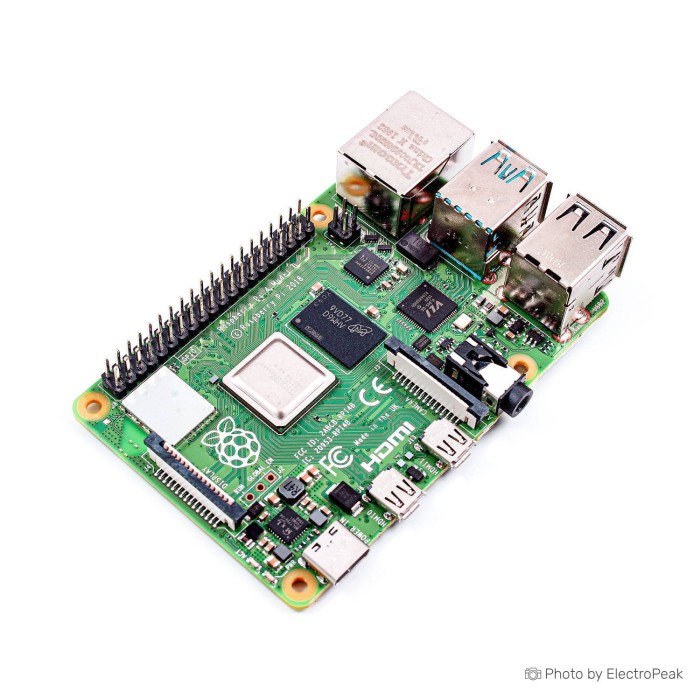
Raspberry Pi 4 Model B - 2G RAM
$119.0000
In stock
SKU
MIN-01-092
Volume discounts:
- +5 5 % $113.2000
- +10 7 % $110.3000
- +25 10 % $107.4000
- +50 12 % $104.5000
- +100 15 % $101.6000
Product Variations: View out of stock variants


Add an Accessory:

-
 USB to Type-C Sync and Charge Cable - 1m (Black)$4.9500
 - USB to Type-C Power Cable - with ON/OFF Switch$0.7500


View more


Ships in 2-3 business days, then:
Free delivery in 12-15 days by Tracked Economic Shipping
Free delivery in 7-10 days by Express Shipping on orders over $300.
More shipping info

Shop with confidence Learn More
 Raspberry Pi 3 B+ Development Board Previous
Raspberry Pi 4 Model B 2GB Review
The Raspberry Pi 4 Model B - 2GB RAM is a Linux single-board computer for electronics, robotics, automation, desktop-style computing, media, and lightweight networked projects. Its GPIO, Gigabit Ethernet, dual-band Wi-Fi, and USB 3.0 make it a practical base for connected builds. With 2GB RAM, it is better suited to maker work and modest services than heavy multitasking or compute-intensive workloads.
This is a bare-board format, not a complete desktop package. Browse other Raspberry Pi boards if your project needs a different form factor or platform.
Specifications of Raspberry Pi 4 Model B - 2GB RAM
- Version: 1.2
- Processor: 4-core 64-bit ARM Cortex-A72 processor
- ARM processor manufacturer: ARM processor manufacturer
- Processor model: Cirtex A-72 processor model
- Processor frequency: 1.5 GHz processor frequency
- Input voltage: 5V DC input voltage
- Input current: 3A input current
- RAM: 2 GB RAM
- Bluetooth: Bluetooth 5
- Hardware decode: 4kp60 hardware decode of HEVC video
- USB 3.0 ports: Two USB 3.0 ports
- USB 2.0 ports: Two USB 2.0 ports
- USB-C port: USB C port
- Video playback: H.265 video playback
- Wireless: Dual-band 802.11ac wireless
- Ethernet: Gigabit Ethernet
- Graphics processor: VideoCore VI graphics processor
- Graphics API: OpenGL ES 3.x support
- HDMI port: HDMI port
- Weight: 46 grams
Raspberry Pi 4 Model B 2GB Specifications Explained
This Raspberry Pi 4 2GB single-board computer uses a quad-core, 64-bit Cortex-A72 CPU platform. The listed processor frequency is 1.5 GHz, enough for Linux learning, Python development, GPIO control, dashboards, modest web services, and a lightweight desktop. The “Cirtex” wording in the specifications refers to the Cortex-A72 CPU core.
The main trade-off is the 2GB RAM ceiling. It suits a small number of lightweight services, limited containers, education, and everyday electronics projects. Memory-heavy browser sessions, larger databases, virtual machines, intensive compilation, and many concurrent containers need more headroom.
| Specification | Why it matters |
|---|---|
| 2GB RAM | Fits lightweight desktop use, GPIO applications, and modest network services. It becomes the limiting resource before the processor for memory-intensive workloads. |
| Gigabit Ethernet and dual-band 802.11ac Wi-Fi | Provides wired networking for stable appliances and 2.4 GHz or 5 GHz wireless for projects where running Ethernet is impractical. Bluetooth 5 supports suitable wireless peripherals and devices. |
| Two USB 3.0 and two USB 2.0 ports | Allows a mix of storage, keyboard, mouse, cameras, and other peripherals. USB 3.0 is useful for external SSDs, though USB and Ethernet share system I/O bandwidth, so their headline speeds are not simultaneous guaranteed throughput. |
| VideoCore VI graphics and HEVC decode | Supports desktop graphics and H.265/HEVC media playback up to the stated 4Kp60 decode capability. Actual playback depends on the operating system, codec pipeline, display configuration, and application software. |
| Dual-display and 4K-focused output | Useful for workstation, dashboard, signage, and media applications. It does not guarantee dual 4K60 playback in every cable, monitor, operating-system, or codec configuration. |
For a desktop-style setup with the computer built into the keyboard, the Raspberry Pi 400 Keyboard Board is the more suitable format. It has an integrated keyboard, 4GB RAM, a listed 1.8GHz clock speed, and a horizontal GPIO header rather than this board’s bare single-board format.
Raspberry Pi 4 Model B 2GB Setup, Power and First Boot
A working system needs more than the board. Normal full use calls for a good-quality 5V/3A USB-C supply, boot storage, an operating-system image, and—when using a local desktop—a micro-HDMI display connection plus keyboard and mouse. Supplied accessories, storage, operating system, case, and peripherals are not confirmed.
Use the USB-C connector as the normal power input. It is not a general peripheral-data or display connector; local display output uses the micro-HDMI ports. A 5V/3A Raspberry Pi 4 power supply, a SanDisk 32GB microSD card, and a micro-HDMI-to-HDMI display cable cover the main hardware requirements for a local first boot.
Required accessories
- Stable 5V/3A power: A 5V/3A Raspberry Pi 4 power supply helps prevent undervoltage warnings, USB disconnects, and unreliable booting.
- Boot storage: A SanDisk 32GB microSD card provides storage for the operating system and files. MicroSD is the normal boot-storage path.
- Operating system: Raspberry Pi OS or another compatible operating-system image is required.
- Local display connection: A Micro HDMI to HDMI Cable - 1m connects the board to a standard HDMI monitor.
- Keyboard and mouse: These are needed for a local graphical setup; no matched products are supplied here.
Recommended accessories
- Cooling and protection: Continuous server, compilation, or media workloads benefit from a ventilated case or active cooling.
- Reliable write-heavy storage: Use a high-endurance microSD card or USB 3 SSD for logs, databases, and automation services.
- Wired networking: An Ethernet cable is useful for fixed home-server and appliance installations.
- GPIO header pins: Add these if needed when the board does not have a fitted header; fitted-header status is not confirmed.
Quick first boot
- Inspect the board and confirm the connector layout.
- Prepare a microSD card with Raspberry Pi OS using Raspberry Pi Imager.
- Insert the microSD card.
- Connect a micro-HDMI display, keyboard, and mouse for local use, or configure network access for a headless setup.
- Connect the 5V/3A USB-C supply.
- Complete first-boot setup, then update the operating system and firmware.
- Check for undervoltage warnings, display issues, and temperature concerns during initial use.
A successful basic test boots to the Raspberry Pi OS desktop or reaches the board through the configured network connection. Confirm that the system reports 2GB RAM, the display works through micro-HDMI, and Ethernet or Wi-Fi networking is available. For operating-system choices after the hardware is in place, see 13 Best Raspberry Pi OS For Any Project [Updated 2024].
Raspberry Pi 4 Model B 2GB Display, Media and Connectivity
The board has two micro-HDMI outputs, although the specifications broadly describe HDMI support. Standard full-size HDMI cables do not fit directly, so use a micro-HDMI-to-HDMI cable or adapter. The board supports two monitors, but actual simultaneous display modes depend on operating-system configuration, display capabilities, cable quality, and available bandwidth.
HEVC hardware decode up to 4Kp60 and H.265 playback suit media-center, signage, and display projects with a compatible software stack. These specifications describe decode capability, not unrestricted 4K playback across every player, codec path, display, and dual-screen arrangement.
Gigabit Ethernet works well for fixed network appliances, file access, and media streaming, while dual-band 802.11ac Wi-Fi supports both 2.4 GHz and 5 GHz networks. Bluetooth 5 adds wireless peripheral connectivity. External SSD storage is practical through USB 3.0, but a NAS or file-server build should account for shared USB and Ethernet system bandwidth rather than expecting each interface to deliver its maximum rate at the same time.
For an existing full-size HDMI monitor, the Micro HDMI to HDMI Cable - 1m provides the correct connector format. The Raspberry Pi 3 Model B suits legacy or lower-demand projects where 1GB RAM, 10/100 Ethernet, no 4K video, and no USB 3.0 are acceptable.
Raspberry Pi 4 Model B 2GB Projects, GPIO and Linux Uses
Raspberry Pi 4 Model B family roles include a desktop Linux computer, media center, robotics controller, electronics project computer, and educational platform for Linux, Python, networking, and embedded computing. Its established software, documentation, HAT, and community ecosystem reduce setup risk for projects that need a Linux computer alongside physical I/O.
Home servers for Pi-hole-style DNS, VPN, monitoring, dashboards, and lightweight web services are category-level uses that fit when storage and memory use are planned carefully. A Home Assistant-style hub, limited Docker host, sensor gateway, camera or weather-monitoring build, USB SSD file server, digital-signage system, 3D-printer controller, and retro-gaming system are also capability-based uses rather than guaranteed applications of this exact board.
GPIO work needs voltage discipline. The standard 40-pin GPIO ecosystem uses 3.3V logic, so 5V logic signals must not be connected directly to GPIO inputs; use a suitable level shifter where required. The presence of a factory-fitted GPIO header is not confirmed, so verify this before selecting HATs or jumper-wire connections. For practical pin and Python guidance, see Raspberry Pi GPIO Pins: A Python Guide to Input and Output Control.
Optional project hardware
- Electronics builds: Breadboards, jumper wires, sensors, HATs, and 3.3V/5V level shifters may be required; no matched products are supplied here.
- Camera projects: Use a compatible camera module and ribbon cable.
- Display projects: DSI displays need compatible hardware and a suitable DSI cable.
- PoE installations: Use a PoE HAT or compatible PoE hardware.
- High-current USB peripherals: A powered USB hub may be necessary.
The NanoPi M1 with 512MB RAM takes a different approach when a compact embedded board with a 64x50mm footprint, onboard microphone, and IR receiver matters more than Raspberry Pi 4-class memory and networking.
Raspberry Pi 4 Model B 2GB Limitations and Common Mistakes
The 2GB RAM limit is the main workload constraint. Avoid this configuration for heavy browser multitasking, large container sets, databases with substantial memory needs, virtual machines, intensive compilation, AI workloads, guaranteed high-throughput NAS performance, or hard real-time control.
Sustained CPU or GPU work can cause thermal throttling, particularly in enclosed cases or warm environments. Light workloads can operate without extra cooling, but continuous server use, compiling, demanding media tasks, or high ambient temperatures call for a ventilated enclosure, heatsink, or fan. The Raspberry Pi 4 aluminum case with dual cooling fans provides enclosure and active-cooling hardware for these situations.
Power quality matters. A weak supply can lead to boot failure, undervoltage warnings, instability, or USB disconnects. Early Pi 4 boards also had compatibility issues with some e-marked USB-C cables; this is revision-dependent and cannot be assessed because the exact board revision is not confirmed.
Do not assume a bare board includes storage, a power supply, cable, case, operating system, keyboard, mouse, or cooling hardware. Onboard storage is not established, and low-end microSD cards are a poor choice for write-heavy logs or databases. USB SSD boot is supported with suitable EEPROM firmware and configuration, but it should be validated with the intended operating-system image.
The listed “Version 1.2” does not identify a verified Raspberry Pi hardware revision. Board authenticity, condition, exact revision, GPIO-header installation, warranty, provenance, included accessories, built-in power switch, and reset button are not confirmed. GPIO powering also requires correct 5V/GND wiring and bypasses ordinary protection, so it is not a casual substitute for USB-C power.
For a different platform where PCIe Gen2 expansion or 6K video decoding is the central requirement, the Orange Pi 3 H6 is an alternative approach. It uses a different ecosystem, and onboard eMMC may be empty depending on configuration.
Raspberry Pi 4 Model B 2GB vs Raspberry Pi 5, Pi 400 and Pi 3
Raspberry Pi 5 is substantially faster and has newer I/O with NVMe-oriented options, making it the performance-focused choice for more demanding workloads. Raspberry Pi 4 remains appropriate for established Pi 4 projects, GPIO work, lightweight services, lower-power deployments, and existing Pi 4 accessory ecosystems. Neither is universally the right board; the decision depends on workload, peripherals, and deployment requirements.
The Raspberry Pi 400 Keyboard Board follows a desktop-oriented path. It integrates the computer into a keyboard, has 4GB RAM, a listed 1.8GHz clock speed, and a horizontal 40-pin GPIO header. Its form factor better suits desktop learning and keyboard-integrated computing, while this Pi 4 board fits custom enclosures and embedded installations.
The Raspberry Pi 3 Model B suits simpler legacy or lower-demand builds. It has 1GB LPDDR2 RAM and 10/100 Ethernet, and it lacks the Pi 4’s 4K video and USB 3.0 support. Choose it where those limits are acceptable rather than treating it as a direct performance replacement.
Other Raspberry Pi boards cover different deployment styles, memory tiers, and generations.
Raspberry Pi 4 Model B 2GB FAQ
Does Raspberry Pi 4 Model B - 2GB RAM include a power supply?
No power supply is confirmed. Use a good-quality 5V/3A Raspberry Pi 4 power supply for normal full use.
Does this Raspberry Pi 4 2GB board include a microSD card or operating system?
Neither inclusion is confirmed. MicroSD is the normal boot storage, and Raspberry Pi OS can be prepared with Raspberry Pi Imager.
Does Raspberry Pi 4 use micro-HDMI or mini-HDMI?
It uses micro-HDMI, not mini-HDMI. A standard HDMI display needs a Micro HDMI to HDMI Cable - 1m or suitable adapter.
Is the Raspberry Pi 4 USB-C port for video or data?
No. Treat USB-C as the normal power input; display output uses the two micro-HDMI ports.
Can Raspberry Pi 4 Model B 2GB run two 4K monitors?
It supports two-monitor connection and 4K media output, but simultaneous display modes depend on the operating system, display configuration, cables, and software. Do not assume every setup provides unrestricted dual-4K60 playback.
Is 2GB RAM enough for Raspberry Pi 4 desktop use?
Yes, for lightweight desktop work, education, GPIO projects, modest services, and limited containers. Heavy browser multitasking, databases, virtual machines, and intensive compilation need more memory headroom.
Does Raspberry Pi 4 Model B 2GB need a heatsink or fan?
Not necessarily for light use, but sustained CPU or GPU loads can throttle. Use cooling for servers, compilation, intensive media work, sealed cases, or warm environments.
Can Raspberry Pi 4 2GB boot from a USB SSD?
Yes. USB boot is supported through the EEPROM bootloader with suitable firmware and configuration. Confirm current firmware and operating-system support rather than relying on an old image.
Can I connect 5V sensors directly to Raspberry Pi 4 GPIO?
No. GPIO uses 3.3V logic, so use level shifting when a sensor outputs 5V logic. See Raspberry Pi GPIO Pins: A Python Guide to Input and Output Control before wiring a hardware project.
Are GPIO header pins included and fitted?
This is not confirmed. Verify before ordering if your HAT or electronics project requires a fitted 40-pin header.
Which Raspberry Pi 4 revision will I receive?
The listed Version 1.2 does not confirm the exact Raspberry Pi hardware revision. Request a board photograph or software-reported revision when deployment consistency matters.
Is Raspberry Pi 4 Model B 2GB better than Raspberry Pi 5?
No single board is better for every project. Raspberry Pi 5 is substantially faster with newer I/O, while this Pi 4 is appropriate for established Pi 4 accessories, GPIO work, lightweight services, and lower-power uses.
Where can I compare Raspberry Pi operating-system options?
13 Best Raspberry Pi OS For Any Project [Updated 2024] outlines operating-system choices after you have confirmed the hardware and storage requirements.
Purchase Decision Summary
Ideal for
- Linux learning, Python, GPIO projects, robotics, and home automation.
- Lightweight home services, dashboards, Pi-hole-style network services, media projects, and compact desktop systems.
- Buyers who need Raspberry Pi 4 connectivity and ecosystem support in a bare single-board format.
Maybe for
- Limited Docker services, Home Assistant-style hubs, USB SSD storage, dual-display use, media centers, retro gaming, and lightweight server projects.
- These applications need realistic planning for storage quality, power supply, cooling, and the 2GB RAM limit.
Consider another option if
- You need more than 2GB RAM, heavy multitasking, many containers, virtual machines, intensive compilation, AI workloads, or hard real-time control.
- You require verified board revision, confirmed GPIO-header installation, guaranteed high-throughput NAS performance, or a complete computer bundle with accessories included.
Buying Checklist
- ✓ Confirm that 2GB RAM matches the intended workload.
- ✓ Confirm that the project needs a Linux single-board computer rather than a microcontroller.
- ✓ Add a good-quality 5V/3A USB-C power supply.
- ✓ Add boot storage and plan the operating system.
- ✓ Add a micro-HDMI cable or adapter for local display use.
- ✓ Add a Raspberry Pi 4-compatible case and cooling for sustained workloads.
- ✓ Confirm whether the GPIO header is factory-fitted if HATs or jumper wires are required.
- ✓ Confirm exact board revision, provenance, warranty, and included accessories if deployment consistency matters.
- ✓ Plan reliable storage for write-heavy server or automation workloads.
- ✓ Avoid applying 5V logic directly to GPIO.
- ✓ Compare the full system requirement: board, power, storage, cable, cooling, case, and peripherals.
| Processor (SoC) | Broadcom BCM2711 |
|---|---|
| CPU | Quad-core Cortex-A72 (ARM v8) 64-bit SoC @ 1.5GHz |
| Architecture | ARM Cortex-A72 |
| RAM | 2GB |
| RAM Type | LPDDR4 |
| Storage Support | microSD |
| GPU/VPU | VideoCore VI |
| Ethernet | 1 Gbps |
| Wi-Fi | WiFi 5 |
| Bluetooth | Bluetooth 5.0 |
| USB Ports | 2 x USB 3.0 ports; 2 x USB 2.0 ports |
| Video Output | micro HDMI |
| Hardware Interfaces | CSI (Camera), I2C, SPI, UART, DSI (Display) |
| GPIO Pins | Standard 40-pin GPIO header |
| Camera/Display | CSI (Camera), DSI (Display) |
| Power Input | 5V DC via USB-C (minimum 3A) |
| Dimensions (mm) | 85 x 56 mm |
| OS Support | Ubuntu, Raspberry Pi OS, Debian |
| Weight (g) | 46 |
Write Your Own Review

Please complete your information below to login.
Sign In
Create New Account