
Product added to cart

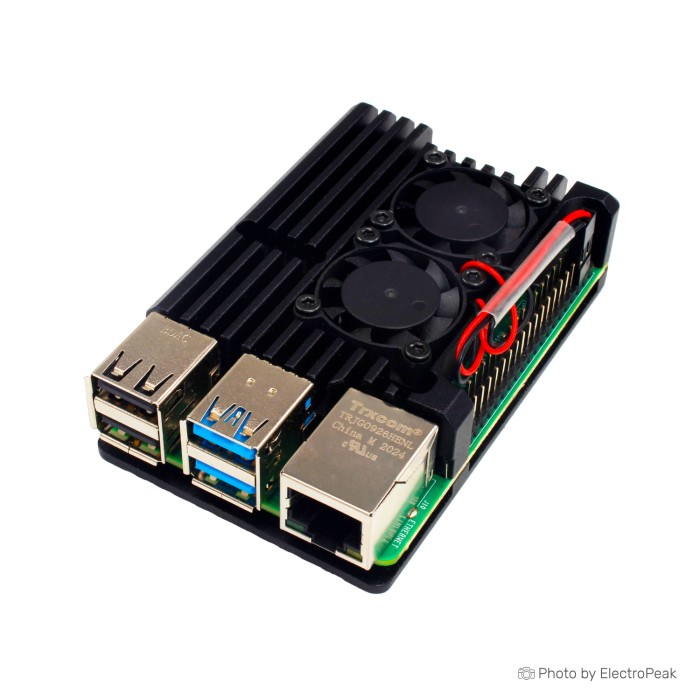
Raspberry Pi 4 Aluminum Metal Case with Dual Cooling Fan
$5.9500
In stock
SKU
MIN-01-114
Volume discounts:
- +25 5 % $5.6800
- +50 7 % $5.5500
- +100 9 % $5.4200
- +300 11 % $5.2800
- +500 13 % $5.1500
Ships in 2-3 business days, then:
Free delivery in 12-15 days by Tracked Economic Shipping on orders over $100.
Free delivery in 7-10 days by Express Shipping on orders over $300.
More shipping info

Shop with confidence Learn More
 Raspberry pi 4 ABS Case with Fan and Heatsink Previous
Raspberry Pi 4 Aluminum Metal Case with Dual Cooling Fan Specifications
This aluminum-alloy enclosure is made for the Raspberry Pi 4 Model B, combining a rigid metal shell with two 5V cooling fans, included thermal silica, assembly screws, and a screwdriver for approximately $5.25. It suits sustained computing tasks such as media playback, local network servers, and compiling, where passive heat dissipation alone may allow thermal throttling. If your project requires alternate materials or a passive design, compare other Raspberry Pi case styles in our catalog.
Specifications of Raspberry Pi 4 Aluminum Metal Case with Dual Cooling Fan
- Size: 88x56x24mm
- Weight: 28g
- Color: Black
- Fan size: 30x30x7mm (2 pcs)
- Material: Aluminum alloy
- Compatibility: Raspberry Pi 4 Model B
- Fan voltage: 5V
- Fan current: 0.16A
- Fan noise: 13dB
- Fan speed: 6000 RPM
- Assembly screw: 1 set
- Thermal silica: 1 set
- Screwdriver: 1 pcs
Raspberry Pi 4 Aluminum Case Cooling and Fit Explained
At 88x56x24mm and 28g, this black aluminum enclosure provides close-fitting protection without adding unnecessary bulk to desktop or embedded installations. Its dual 30x30x7mm fans run at 5V, draw 0.16A, and spin at 6000 RPM to maintain airflow across the board surface. Together with the metal shell and included thermal silica material, they create a passive-conduction and active-exhaust cooling arrangement. This setup assists heat dissipation under sustained loads, though actual operating temperatures vary with ambient room conditions, processing demands, and airflow access.
The cut-outs align with the physical layout of the Raspberry Pi 4 Model B. They provide external access to the USB-C power port, twin micro-HDMI display outputs, 3.5mm audio jack, dual USB 3.0 ports, dual USB 2.0 ports, Gigabit Ethernet, and the microSD card slot for storage changes. Physical compatibility covers all RAM configurations of this form factor, whether you are using a 2GB Raspberry Pi 4 Model B board or a higher-capacity option such as the Raspberry Pi 4 Model B 8GB board.
Physical support is strictly limited to the Raspberry Pi 4 Model B. Older generations such as the Raspberry Pi 3 reverse the Ethernet and USB positions, while the Raspberry Pi 5 changes the power circuitry, display connectors, and mounting points. For an installation based on an older board generation, the Raspberry Pi 3 and Pi 4 fan-supported acrylic enclosure provides cross-generation mounting holes.
Raspberry Pi 4 Metal Case with Fan Limitations
The enclosure provides sturdy mechanical protection, but several functional trade-offs need consideration before deployment. Fan noise is rated at 13dB, yet twin 30mm fans running at 6000 RPM from a continuous 5V supply produce a perceptible hum that may not suit bedrooms, recording spaces, or silent home-theater setups. The case includes no hardware or software for temperature-triggered fan curves. Unless you modify it with external switching hardware, the fans run constantly whenever the board receives power.
Internal thermal contact also warrants realistic expectations. Two heatsinks and a set of thermal silica are supplied, so thermal conduction does not simultaneously interface with every major surface component: CPU, RAM, and USB/LAN controller. Side openings clear standard interface cables, but vertical clearance above the 40-pin GPIO header is constrained. Full-sized Hardware Attached on Top (HAT) boards, Power over Ethernet (PoE) add-ons, and flat flexible ribbon cables for official cameras or displays do not have documented passthrough routing. If your build depends on dedicated camera or display ribbons, the Raspberry Pi 4 case for camera and display ribbon cables provides explicit cut-outs for flexible flat cabling.
RF attenuation also deserves consideration. Solid aluminum structures naturally attenuate 2.4GHz and 5GHz Wi-Fi and Bluetooth signals more than bare boards or plastic shells. In areas with weak wireless coverage, a wired Gigabit Ethernet connection helps avoid connectivity drops.
Raspberry Pi 4 Aluminum Case Accessories and Installation Check
The package includes the aluminum enclosure parts, two 30x30x7mm cooling fans, assembly screws, thermal silica material, and a small screwdriver. The host computer board, power supply, and operating system storage are not included and must be sourced separately.
Required Accessories
- Raspberry Pi 4 Model B: The enclosure requires a host board, such as the entry-level Raspberry Pi 4 Model B board, the mid-tier Raspberry Pi 4 Model B board with 4GB, or the high-memory Raspberry Pi 4 Model B 8GB board.
- Power Supply: Reliable operation requires a dedicated 5V/3A Raspberry Pi 4 power supply that can deliver clean current to both the computer and the active fans.
- Storage: You also need an operating system drive, such as a reliable Raspberry Pi boot microSD card.
- Fan Power Interface: Connect the 5V fan leads to appropriate 5V and ground pins on the 40-pin GPIO header.
Recommended and Optional Accessories
- Low-Profile Micro-HDMI Cables: Slim connector housings help prevent strain against the metal case cut-outs.
- GPIO Jumper Extensions: These are useful for tapping power leads without obstructing the remaining GPIO pins.
- External Fan Controller: This is helpful when your application requires the fans to shut off below specific thermal thresholds.
Assembly and Verification Sequence
- Inspect the aluminum casing halves, dual fans, thermal silica, and screws to ensure all components are present and undamaged.
- Dry-fit your Raspberry Pi 4 Model B inside the bottom chassis to verify that the USB, Ethernet, and power ports seat smoothly in their corresponding cut-outs.
- Peel the protective film from the thermal silica pads and position them over the primary processor surfaces according to the package directions.
- Fasten the cooling fans to the top metal shell using the supplied hardware, ensuring the fan labels and airflow orientation direct exhaust away from the board.
- Lower the top shell over the board and align the screw standoffs. Tighten the assembly screws evenly in an alternating diagonal pattern to avoid applying uneven pressure to the circuit board.
- Connect the fan power leads to the board's 5V (Pin 4) and Ground (Pin 6) header positions.
- Insert your prepared microSD card, attach the display and network cables, and power up the board using the USB-C power supply. Confirm that both fan impellers rotate freely without contacting the aluminum shell.
Raspberry Pi 4 Aluminum Case vs Fan-Supported Cases
Your enclosure choice depends on whether metallic heat dissipation, ribbon cable passthrough, multi-board compatibility, or silent passive running matters most. The comparison below shows how this aluminum dual-fan model differs from alternative enclosures in our catalog.
| Feature / Specification | Raspberry Pi 4 Aluminum Dual Fan Case | Clear Acrylic Case with Fan Mount | Black Acrylic Case with Fan Mount | 9-Layer Acrylic Case | ABS Case with Fan and Heatsinks |
|---|---|---|---|---|---|
| Material | Aluminum alloy | Clear acrylic | Solid black acrylic | 9-layer layered acrylic | Two-piece snap ABS |
| Board Compatibility | Raspberry Pi 4 Model B | Raspberry Pi 3 and Pi 4 | Raspberry Pi 4 Model B | Raspberry Pi 4 (1GB, 2GB, 4GB) | Raspberry Pi 4B |
| Fans Included | 2 pcs (30x30x7mm, 5V) | None (fan mount supported) | None (fan mount supported) | None (fan mount supported) | 1 pc (5V, 13dB) |
| Heatsinks Included | 2 heatsinks + thermal silica | None | None | None | 3 heatsinks (2 Al, 1 Cu) |
| Ribbon Cable Cut-Outs | Not specified | Open edge access | Standard slot | Dedicated CSI/DSI cut-outs | Standard slot |
| Included Tools / Pads | Screwdriver, assembly screws | Assembly screws | Assembly screws | Assembly hardware | 4 anti-slip pads |
For installations needing minimal RF interference or multi-board flexibility, the Raspberry Pi 3 and Pi 4 fan-supported acrylic enclosure accommodates older Pi 3 boards. The black acrylic Pi 4 enclosure with fan support suits builds that prefer a uniform dark appearance with passive ventilation or custom fan additions. For camera or display modules that must route through the chassis, the Raspberry Pi 4 case for camera and display ribbon cables provides dedicated access slots. The ABS Pi 4 case with fan and heatsinks takes a different approach with an all-in-one plastic snap-together design, three heatsinks, and anti-slip feet.
Raspberry Pi 4 Aluminum Case FAQ
Does this case include a Raspberry Pi 4 board?
No. The package includes the aluminum-alloy case, dual cooling fans, thermal silica, assembly screws, and a screwdriver. The host computer board must be purchased separately.
Will this case fit my Raspberry Pi 4 Model B 2GB, 4GB, or 8GB?
Yes, it fits all standard Raspberry Pi 4 Model B RAM configurations. The physical board layout, port positions, and component heights are uniform across the 2GB, 4GB, and 8GB models, so the enclosure mounts securely to each one.
Will this Raspberry Pi 4 aluminum case fit a Pi 3, Pi 400, or Pi 5?
No. It is engineered exclusively for the Raspberry Pi 4 Model B. The Raspberry Pi 3 uses an inverted Ethernet/USB configuration, the Pi 5 has updated port locations and power connectors, and the Pi 400 is an integrated keyboard unit.
Are the two fans temperature-controlled?
No. The included fans are standard two-wire 5V units that run continuously when connected to power. Dynamic temperature control requires a separate switching circuit or software-controlled fan controller.
How loud is the Raspberry Pi 4 dual-fan metal case?
The fans carry a manufacturer noise rating of 13dB. Twin 30mm fans spinning at 6000 RPM still produce a perceptible high-pitched airflow sound that can be audible in quiet home or office environments.
Can I use GPIO, HATs, PoE hardware, or CSI/DSI ribbon cables with this case?
Standard lateral ports remain accessible, but clearance above the board is restricted. Full-size HATs, PoE expansion modules, and flexible camera or display ribbon cables do not have guaranteed clearances inside this closed shell.
Can I remove the microSD card without opening the Raspberry Pi 4 metal case?
Yes. The case chassis has an edge cut-out that allows the microSD card to be inserted and removed without disassembling the aluminum housing.
What power supply do I need with this Raspberry Pi 4 case?
Use an official or high-grade 5V/3A Raspberry Pi 4 power supply with a USB-C connector. The 5V fans draw operating current directly from the board's power rail, so adequate supply overhead is essential.
Does this case have a power button or safe-shutdown feature?
No. The enclosure has no integrated power switch or safe-shutdown controller. Board power must be cycled at the wall outlet, with an inline cable switch, or through software commands.
Raspberry Pi 4 Aluminum Case Review: Should You Buy It?
At approximately $5.25, this aluminum dual-fan enclosure is an affordable way to combine physical protection with active cooling for the Raspberry Pi 4 Model B. It suits users running prolonged CPU workloads who need active airflow across the board surface.
Purchase Decision Summary
- Ideal for: Raspberry Pi 4 Model B owners running continuous computational tasks, such as lightweight servers, media encoders, or emulation consoles, who want a metal shell and out-of-the-box active fan cooling.
- Maybe for: General desktop hobbyists who do not mind constant low-level fan noise and have no immediate plans to stack large expansion HATs onto the GPIO header.
- Avoid if: You need an enclosure for a Raspberry Pi 3 or Pi 5, require dedicated CSI/DSI ribbon cable pass-throughs, rely on full-sized PoE/HAT hardware, demand silent operation, or need verified long-range Wi-Fi performance through a metal barrier.
Pre-Purchase Verification Checklist
- Confirm that your board is specifically a Raspberry Pi 4 Model B.
- Verify that you have a compatible USB-C power source capable of supplying 5V at 3A.
- Ensure you have a suitable operating system drive, such as a microSD card.
- Verify that your project does not require internal clearance for camera ribbons, display cables, or top-mounted HATs.
- Confirm that continuous fan noise is acceptable for your operating environment.
- Ensure you are comfortable peeling thermal silica pads, securing small assembly screws, and seating fan jumper leads onto GPIO pins.
For builds requiring camera access or multi-model flexibility, consider the Raspberry Pi 3 and Pi 4 fan-supported acrylic enclosure, the dedicated Raspberry Pi 4 case for camera and display ribbon cables, or the snap-together ABS Pi 4 case with fan and heatsinks. For other layouts, see our complete selection of other Raspberry Pi case styles.
| Weight (g) | 28 |
|---|
Write Your Own Review

Please complete your information below to login.
Sign In
Create New Account