
Product added to cart

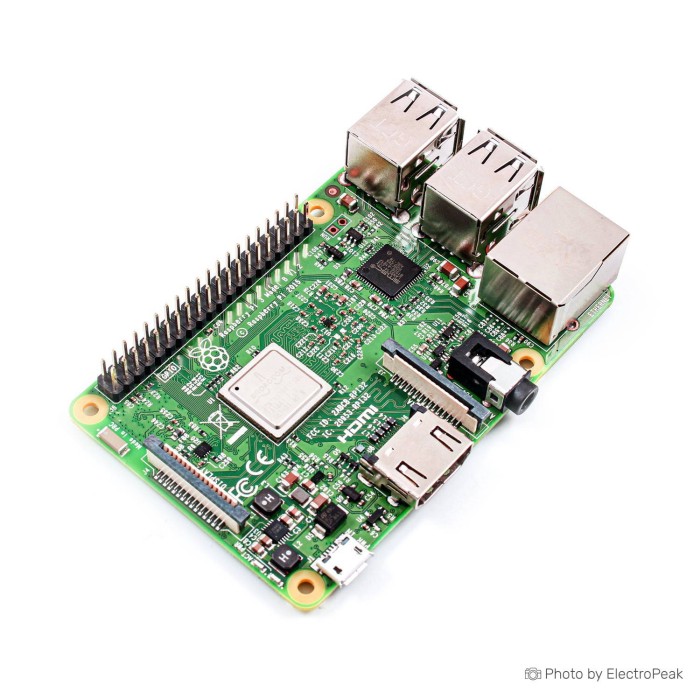
Raspberry Pi 3 Model B (Element 14)
$48.9500
Out of stock
SKU
MIN-01-029
Volume discounts:
- +10 4 % $46.7500
- +25 6 % $46.0200
- +50 7 % $45.2900
- +100 9 % $44.5600
- +300 10 % $43.8200
Product Variations: View out of stock variants


Add an Accessory:
View all accessories 


Shop with confidence Learn More
 Raspberry Pi Zero v1.3 Development Board Previous
Raspberry Pi 3 Model B review
The Raspberry Pi 3 Model B is a compact Linux single-board computer for electronics, robotics, learning, prototyping, embedded applications, and light server work. Its quad-core ARM processor brings onboard 2.4GHz Wi-Fi, Bluetooth, GPIO, HDMI, camera and display interfaces, four USB ports, and Ethernet into the standard Raspberry Pi board format.
It remains a practical board for light Linux use, automation, GPIO projects, and education. Its 1GB memory, 100 Mbps Ethernet, 2.4GHz-only Wi-Fi, and USB 2.0 ports make it less suitable for heavy desktop work, high-throughput storage, or demanding network workloads. Element 14 is distributor branding, not a separate Raspberry Pi hardware version; production is expected to continue until at least January 2028.
Buyers comfortable with a near-new used-condition board can consider the Raspberry Pi 3 Model B (Used), which uses the same platform, making condition rather than capability the deciding factor. Browse other Raspberry Pi single-board computers if your project calls for a different performance or size tier.
Specifications of Raspberry Pi 3 Model B (Element 14)
- SoC: Broadcom BCM2837 SoC
- CPU architecture: ARM Cortex-A53
- CPU frequency: 1.2GHz
- CPU cores: Four-core
- GPU: Broadcom VideoCore IV
- Memory: 1GB LPDDR2
- Listed frequency: 900 MHz
- Ethernet speed: Ethernet 10/100
- Wireless standard: Wireless 802.11n
- Wireless band: 2.4GHz
- Bluetooth: Bluetooth 4.1 Classic
- Bluetooth Low Energy: Bluetooth Low Energy (BLE)
- Storage support: microSD support
- GPIO: 40-pin GPIO header
- Video output: HDMI
- Analog output: 3.5mm analog audio and video jack
- USB: 4× USB 2.0
- Ethernet: Ethernet
- Camera interface: CSI (Serial Camera Interface)
- Display interface: DSI (Display Serial Interface)
- Power: 5 volts
- Weight: 41.2 grams
- Dimensions: 86.9mm x 58.5mm x 19.1mm
Raspberry Pi 3 Model B specifications explained
The BCM2837 SoC, four-core ARM Cortex-A53 processor at 1.2GHz, and 1GB LPDDR2 memory handle Linux learning, programming, lightweight services, and hardware control. They are not intended for demanding browser sessions, large multi-container deployments, or desktop-style multitasking.
| Specification | Practical consequence | Trade-off |
|---|---|---|
| 1.2GHz four-core ARM Cortex-A53 and 1GB LPDDR2 | Handles light Linux computing, coding exercises, GPIO control, Pi-hole, MQTT, and modest automation services. | 1GB RAM limits heavier desktop software and multiple demanding containers. |
| 4× USB 2.0 | Connect a keyboard, mouse, storage device, adapter, or other common peripherals without immediately needing a hub. | USB 2.0 does not provide USB 3.0 transfer capability. |
| HDMI and 3.5mm analog audio and video jack | HDMI supports a direct monitor or TV connection, while the 3.5mm jack provides analog audio and video output. | This board is not intended for heavy 4K media workflows. |
| CSI and DSI interfaces | CSI connects compatible camera modules; DSI connects compatible display hardware for integrated projects. | Each camera or display should be checked for model-specific fit and support. |
| Wireless 802.11n at 2.4GHz and Ethernet 10/100 | Provides onboard wireless networking and wired 100 Mbps Ethernet for remote access, automation, and modest services. | There is no stated 5GHz Wi-Fi support, and Ethernet is not Gigabit. |
| Bluetooth 4.1 Classic and BLE | Supports wireless peripherals and Bluetooth Low Energy projects without a separate USB adapter. | Projects needing newer Bluetooth requirements should verify their device compatibility. |
| 40-pin GPIO header | The standard Raspberry Pi GPIO layout supports sensors, HATs, motors, and electronics expansion. | GPIO signal pins use 3.3V logic and are not 5V tolerant. |
| 86.9mm x 58.5mm x 19.1mm | The compact board format suits bench projects, robotics, and standard Raspberry Pi-style integrations. | Confirm third-party enclosure and accessory fit before ordering. |
For hardware projects, the standard GPIO layout is a useful starting point, but voltage and pin assignments still matter. This Raspberry Pi GPIO programming guide covers practical Python input and output control.
For space-constrained wireless builds, consider the Raspberry Pi Zero W with 512MB RAM. Its 65x30x5mm body is much smaller, but it uses a 1GHz single-core processor, has 512MB RAM, and requires adapters for mini HDMI and its dual micro USB ports.
Raspberry Pi 3 Model B power, storage and GPIO requirements
The board specification is 5 volts. A stable 5V, 2.5A micro-USB power supply is recommended for reliable operation, and the 5V 2.5A Power Adapter with Micro USB On/Off Switch Cable for Raspberry Pi 3 matches that requirement.
A supply with adequate current capacity does not force excess current into the board. The Raspberry Pi draws the current it needs, while a quality supply and suitable cable help prevent voltage drop. Poor-quality supplies and thin micro-USB cables can contribute to boot failures, random reboots, USB peripheral issues, and microSD-card corruption.
The operating system and data use microSD media; no onboard storage is stated. A reputable Class 10 card such as the SanDisk Micro SD Memory Card - 16GB (class 10), 48Mbps provides the required boot medium for Raspberry Pi OS and project files.
GPIO uses 3.3V logic; do not apply 5V directly to GPIO pins. Use a suitable logic level shifter where a sensor or module uses 5V logic signals.
A minimum practical first boot requires a prepared microSD card, stable power, and either an HDMI display with USB keyboard and mouse or a planned headless network setup. For projects centered on 4GB onboard eMMC flash, LCD, JTAG, ADC, and industrial-style I/O, the BeagleBone Black Rev C is a different development-board approach rather than a direct Raspberry Pi replacement.
Use the guide to install Raspberry Pi OS on a microSD card for the full imaging and setup process.
Raspberry Pi 3 Model B limitations and power considerations
Ethernet 10/100 means 100 Mbps wired networking, while Wireless 802.11n operates at 2.4GHz. This is sufficient for light network services and remote administration, but it is not the right platform for Gigabit file transfers, high-throughput NAS use, or installations that require 5GHz Wi-Fi.
The 1GB LPDDR2 memory sets a clear workload boundary. Modern browser use, heavier desktop work, and multiple containers can become constrained, especially when services compete for memory.
Under sustained heavy CPU or GPU load, thermal throttling can occur around 80–85°C. A heatsink or fan is not mandatory for light use, but cooling helps in enclosed cases and sustained workloads. The 3Pcs Aluminum Heat Sink for Raspberry Pi is a suitable complementary cooling option.
Power quality and microSD-card quality are closely tied to common reliability symptoms. If a board does not boot consistently, reboots unexpectedly, or loses access to USB peripherals, first check it with a reliable image, reputable card, stable supply, and appropriate cable.
Choose another board if you need
- Gigabit Ethernet or USB 3.0 for faster storage and network transfers.
- More than 1GB RAM for heavier desktop work or multiple demanding containers.
- 5GHz Wi-Fi.
- Dual 4K display output or heavy 4K media work.
- Native 5V-tolerant GPIO.
- Higher-throughput storage or networking.
For these requirements, the Raspberry Pi 4 Model B with 2GB RAM has a 1.5GHz quad-core Cortex-A72 processor, 2GB RAM, USB 3.0, Gigabit Ethernet, and dual 4K displays through micro-HDMI. It uses USB-C power and micro-HDMI connections, so plan for those accessories.
Raspberry Pi 3 Model B vs Raspberry Pi 4 and Raspberry Pi Zero W
These three boards address different project constraints rather than forming a simple upgrade path. The Pi 3 Model B suits standard-form-factor GPIO and light Linux work; the Pi 4 Model B with 2GB RAM targets higher performance and faster connectivity; the Pi Zero W with 512MB RAM prioritizes physical size.
| Board | Processor and memory | Connectivity and ports | Best fit |
|---|---|---|---|
| Raspberry Pi 3 Model B | 1.2GHz quad-core Cortex-A53, 1GB LPDDR2 | 4× USB 2.0, Ethernet 10/100, 2.4GHz Wireless 802.11n, Bluetooth 4.1 Classic and BLE | Light Linux, learning, standard-form-factor GPIO, robotics, and modest network services. |
| Raspberry Pi 4 Model B with 2GB RAM | 1.5GHz quad-core Cortex-A72, 2GB RAM | USB 3.0, Gigabit Ethernet, dual 4K displays through micro-HDMI, USB-C power | Heavier desktop work, higher-throughput networking, USB storage, and dual-display projects. |
| Raspberry Pi Zero W with 512MB RAM | 1GHz single-core processor, 512MB RAM | Mini HDMI and dual micro USB ports | Compact wireless builds where 65x30x5mm dimensions matter more than standard ports and quad-core performance. |
Choose the Pi 3 Model B for a conventional Raspberry Pi layout with four USB ports and broad GPIO-oriented project support. Choose the Raspberry Pi 4 Model B with 2GB RAM when faster networking, USB 3.0, more memory, or dual 4K displays are central requirements. Choose the Raspberry Pi Zero W with 512MB RAM when a compact wireless installation matters more than performance and full-size ports.
The Raspberry Pi 3 Model B (Used) remains the same Pi 3 Model B platform in near-new used condition. The choice comes down to condition, not a different specification tier.
Raspberry Pi 3 Model B accessories and first boot
A working setup needs operating-system storage, stable power, and a way to complete initial configuration. Use a microSD card for the operating system and data, connect stable 5V, 2.5A micro-USB power, then choose either local HDMI setup with USB keyboard and mouse or a planned headless network workflow.
Required
- SanDisk Micro SD Memory Card - 16GB (class 10), 48Mbps: operating-system and data storage.
- 5V 2.5A Power Adapter with Micro USB On/Off Switch Cable for Raspberry Pi 3: stable board power.
- For local setup: an HDMI display and suitable HDMI cable, plus a USB keyboard and mouse. These are not needed if you are configuring the board headlessly.
Recommended
- Raspberry Pi 3 Case (White/Pink): physical protection and a cleaner installation.
- 3Pcs Aluminum Heat Sink for Raspberry Pi: useful for sustained workloads or enclosed cases.
- Ethernet cable: useful where wired networking is preferable to Wi-Fi.
Optional
- Powered USB hub: useful for multiple or high-draw USB peripherals.
- Logic level shifter: needed for safe GPIO connection to 5V logic modules.
- Compatible CSI camera module: for project-specific visual input.
- Compatible DSI display: for an integrated project display.
First-boot check
- Write a Raspberry Pi OS image to a reputable microSD card.
- Insert the card into the Raspberry Pi 3 Model B.
- Connect HDMI and USB peripherals for local setup, or prepare the headless networking workflow.
- Connect Ethernet if your project requires wired networking.
- Connect stable power with a 2.5A-capable micro-USB adapter.
- Confirm that the board reaches the Raspberry Pi OS installer or desktop environment.
For a headless setup, enable SSH and configure networking during the imaging process or setup workflow. Raspberry Pi OS includes Wi-Fi and Bluetooth drivers.
No display or boot commonly points to power quality or microSD preparation. A non-flashing green LED can indicate a microSD detection or image issue, while USB problems can result from peripheral power demand. Follow the full Raspberry Pi OS installation guide for detailed steps.
Raspberry Pi 3 Model B FAQ
Is the Raspberry Pi 3 Model B Ethernet port Gigabit?
No. It has Ethernet 10/100, meaning 100 Mbps Ethernet rather than Gigabit Ethernet. Its wireless connection is also 2.4GHz Wireless 802.11n, not dual-band Wi-Fi.
What power supply does the Raspberry Pi 3 Model B need?
Use a stable 5V, 2.5A micro-USB power supply. A 3A-capable supply does not force excess current into the board; it provides available capacity while the board draws what it needs. The 5V 2.5A Power Adapter with Micro USB On/Off Switch Cable for Raspberry Pi 3 matches this requirement.
Do I need a microSD card for Raspberry Pi 3 Model B?
Yes. The board uses a microSD card for operating-system and data storage, and no onboard storage is stated. Use a reputable Class 10 card to reduce avoidable boot and corruption problems.
Can I connect 5V sensors directly to Raspberry Pi 3 Model B GPIO?
No. GPIO uses 3.3V logic; do not apply 5V directly to GPIO signal pins. Use a suitable logic level shifter for 5V logic devices, then use the GPIO pin control and Python projects guide to develop the interface safely.
Does Raspberry Pi 3 Model B need a heatsink?
No, a heatsink is not required for light workloads. Under sustained heavy load, thermal throttling can occur around 80–85°C, so heatsinks or airflow are useful in enclosed cases and sustained CPU or GPU projects.
What is the difference between Raspberry Pi 3 Model B and Raspberry Pi 3 Model B+?
The Raspberry Pi 3 Model B has a 1.2GHz quad-core processor, 100 Mbps Ethernet, 2.4GHz 802.11n Wi-Fi, and Bluetooth 4.1/BLE. Raspberry Pi 3 Model B+ uses a 1.4GHz processor, Gigabit Ethernet, dual-band 802.11ac Wi-Fi, Bluetooth 4.2, an improved thermal PCB, and PoE HAT support.
Is Raspberry Pi 3 Model B still suitable for Linux and home-server projects?
Yes, for Linux learning, GPIO projects, Pi-hole, light home automation, MQTT, low-traffic services, and lightweight media builds. Its 1GB memory, 100 Mbps Ethernet, 2.4GHz Wi-Fi, and USB 2.0 ports limit heavy desktop, NAS, high-throughput, and multi-container use.
Does “Element 14” mean this is a different Raspberry Pi 3 Model B version?
No. Element14 is an authorized distributor, and this is the standard Raspberry Pi 3 Model B platform rather than an Element14-only hardware model. The exact stocked board revision is not stated.
Which board should I choose for more performance or a smaller build?
Choose the Raspberry Pi 4 Model B with 2GB RAM for more memory, USB 3.0, Gigabit Ethernet, and dual 4K display requirements. For compact wireless projects with lower compute needs, choose the Raspberry Pi Zero W with 512MB RAM.
Purchase decision summary
Ideal for
Linux learning, electronics education, GPIO projects, robotics, basic home automation, Pi-hole, MQTT, lightweight services, CSI camera projects, DSI display projects, and compact standard-form-factor Raspberry Pi builds.
Maybe for
Lightweight media playback, low-traffic web hosting, small ARM container services, retro-gaming builds within performance limits, and modest network appliances where 100 Mbps Ethernet and 2.4GHz Wi-Fi are acceptable.
Consider another option if
You need Gigabit Ethernet, 5GHz Wi-Fi, USB 3.0, dual 4K displays, more than 1GB RAM, heavy modern desktop use, high-throughput storage, sustained high-load passive operation, onboard flash storage, or direct 5V GPIO logic.
Buying checklist
- ✓ Confirm that 1GB LPDDR2 RAM and a 1.2GHz quad-core Cortex-A53 are sufficient for the intended software.
- ✓ Confirm that Ethernet 10/100 is adequate; do not assume Gigabit Ethernet.
- ✓ Confirm that 2.4GHz Wireless 802.11n is adequate; do not assume 5GHz Wi-Fi.
- ✓ Add a stable 5V, 2.5A micro-USB power supply.
- ✓ Add a reputable microSD card for the operating system and data.
- ✓ Decide between HDMI plus USB keyboard and mouse or a headless network workflow.
- ✓ Check whether the project requires HDMI, CSI camera, DSI display, 3.5mm analog output, Bluetooth, or four USB ports.
- ✓ Confirm that every GPIO device uses 3.3V logic or has suitable level shifting.
- ✓ Add cooling if the board will operate under sustained load or inside a restrictive enclosure.
- ✓ Choose Raspberry Pi 4 Model B with 2GB RAM if the project needs more RAM, Gigabit Ethernet, USB 3.0, dual 4K displays, or more desktop-like performance.
- ✓ Choose Raspberry Pi Zero W with 512MB RAM if compact 65x30x5mm dimensions matter more than standard ports and quad-core performance.
| Processor (SoC) | Broadcom BCM2837 |
|---|---|
| CPU | Quad-core ARM Cortex-A53 @ 1.2GHz |
| Architecture | ARM Cortex-A53 |
| RAM | 1GB |
| RAM Type | LPDDR2 SDRAM |
| Storage Support | microSD |
| GPU/VPU | Broadcom VideoCore IV |
| NPU (TOPS) | No |
| Ethernet | 100 Mbps |
| Wi-Fi | WiFi 4 |
| Bluetooth | Bluetooth 4.1 |
| USB Ports | 4× USB 2.0 |
| Video Output | HDMI |
| Hardware Interfaces | CSI (Camera), I2C, SPI, UART, DSI (Display) |
| GPIO Pins | 40-pin GPIO header |
| Camera/Display | CSI (Camera), DSI (Display) |
| Power Input | 5V DC via microUSB |
| PCIe | No |
| Dimensions (mm) | 86.9mm x 58.5mm x 19.1mm |
| OS Support | Linux, Ubuntu, Raspberry Pi OS, Windows IoT |
| Weight (g) | 41.2 |
Write Your Own Review
Please complete your information below to login.
Sign In
Create New Account