
Product added to cart

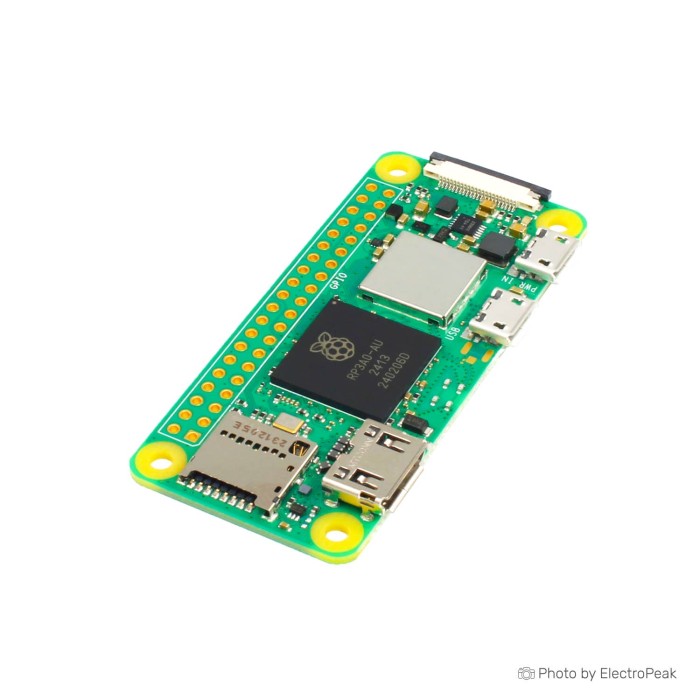
Raspberry Pi Zero 2W
SAVE
As low as $102.8500
In stock
Only %1 left
SKU
DEV-21-001
Ships in 2-3 business days, then:
Free delivery in 12-15 days by Tracked Economic Shipping
Free delivery in 7-10 days by Express Shipping on orders over $300.
More shipping info

Shop with confidence Learn More
 Raspberry Pi 4B SUPERPi Case with joystick Previous
Raspberry Pi Zero 2W Board Review
The Raspberry Pi Zero 2 W is a 65x30mm Linux computer for compact GPIO, camera, wireless, and headless projects. Its 1GHz quad-core 64-bit Arm Cortex-A53 CPU, 512MB RAM, 2.4GHz Wi-Fi, and Bluetooth 4.2/BLE make it a practical upgrade from earlier Zero boards while retaining the compact Zero-family footprint.
It suits embedded services, sensors, compact robots, and lightweight camera builds rather than desktop work. Choose a larger board if you need 5GHz Wi-Fi, onboard Ethernet, more memory, several native USB ports, or a responsive browser and media desktop.
Specifications of Raspberry Pi Zero 2W
- Processor: BCM2710A1, 1GHz quad-core 64-bit Arm Cortex-A53 CPU
- GPU: VideoCore IV GPU, OpenGL ES 1.1, 2.0
- RAM: 512MB LPDDR2 SDRAM
- WiFi: 2.4GHz 802.11 b/g/n wireless LAN
- Bluetooth: Bluetooth 4.2, Bluetooth Low Energy (BLE), with onboard antenna
- Display output: Mini HDMI port, supports PAL and NTSC standard, supports HDMI (1.3 and 1.4), 640 × 350 to 1920 × 1200 pixels
- Camera Input: CSI-2 camera connector
- USB: micro USB On-The-Go (OTG) connector, supports USB HUB expansion
- GPIO: HAT-compatible 40-pin header footprint (unpopulated)
- Power supply: Micro USB power
- Dimension: 65x30mm
A normal setup needs bootable storage. Add a SanDisk 32GB Class 10 microSD card for Raspberry Pi OS; a microSD card is not confirmed as included. For lower-demand wireless Zero-family projects where the older processor is sufficient, the Raspberry Pi Zero W remains a compact older option. Browse Raspberry Pi single-board computers for other form factors.
Raspberry Pi Zero 2W Specifications and Performance Limits
The quad-core Cortex-A53 processor is a substantial improvement over the original Raspberry Pi Zero for Linux services, scripts, and multi-process embedded work. The BCM2710A1 name describes the CPU silicon; RP3A0 is the system-in-package containing BCM2710A1-class silicon on this board.
Memory is the main boundary. With 512MB LPDDR2 SDRAM, the board can run Raspberry Pi OS and focused applications, but browser-heavy desktops, video-heavy workloads, large containers, compilation, and local machine-learning tasks become constrained quickly. The VideoCore IV GPU supports the stated OpenGL ES versions, but it does not make the Zero 2 W a desktop-class media machine.
| Specification | Why it matters |
|---|---|
| 1GHz quad-core 64-bit Arm Cortex-A53 CPU | Handles lightweight Linux services and parallel background tasks more comfortably than the original Zero, while remaining intended for compact embedded workloads. |
| 512MB LPDDR2 SDRAM | Limits memory-intensive browsers, desktop applications, containers, and large builds. Plan one focused job rather than many concurrent services. |
| 65x30mm dimensions | Fits space-constrained enclosures, camera rigs, and many Zero-family mounting arrangements, subject to case clearance checks. |
| Mini HDMI display output | Provides the normal display connection. Composite PAL/NTSC video is available through solder test points, not through the mini HDMI connector. |
Production is planned through at least January 2030, helping where a design needs repeat builds or replacement boards. Raspberry Pi also provides hardware, compliance, and product documentation for integration planning.
For desktop-like use, 2GB RAM, Gigabit Ethernet, USB 3.0, or dual 4K display requirements, the Raspberry Pi 4 Model B (2GB RAM) is a better fit.
Raspberry Pi Zero 2W WiFi, GPIO and Hardware Compatibility
The Pi Zero 2 W WiFi board supports 2.4GHz 802.11 b/g/n networks only. It will not join a 5GHz-only network. Bluetooth 4.2 and Bluetooth Low Energy are available through the onboard antenna, but Bluetooth 5-specific features are not stated.
There is no onboard Ethernet or normal external antenna connector. Wired networking and expanded USB connectivity share the single micro-USB OTG/data port, so installations with several peripherals need a hub. Use the Waveshare Ethernet / USB HUB HAT for Raspberry Pi Zero where wired networking and extra USB connections are needed.
| Area | Compatibility and limitation |
|---|---|
| Operating system | Raspberry Pi OS is the primary supported operating system. Use a current image that explicitly supports Raspberry Pi Zero 2 W. |
| Wi-Fi | 2.4GHz 802.11 b/g/n only. A 5GHz-only network is not compatible. |
| Ethernet | No onboard Ethernet. Use a USB Ethernet adapter or compatible Ethernet/USB hub through the OTG/data path. |
| USB peripherals | The micro-USB OTG/data port supports USB expansion. Standard USB-A devices need a micro-USB OTG adapter; several devices need a hub. |
| GPIO and HATs | The 40-pin HAT-compatible footprint is unpopulated. GPIO uses 3.3V logic; do not connect external 5V logic directly to GPIO. |
| Camera | The CSI-2 connector uses the Zero-family 22-pin format. Compatible Raspberry Pi cameras need the correct cable or adapter. |
| Display | Mini HDMI is the normal display connector. A mini-HDMI cable or adapter is required for display use. |
| Storage and boot | A microSD slot is provided. A bootable microSD card is normally required, and network boot is not supported. |
The header footprint accepts a conventional header after soldering, allowing HAT and pHAT projects to use the familiar Raspberry Pi pin layout. Before wiring sensors or drivers, review Raspberry Pi GPIO setup and Python control. Need 1GB RAM, four USB 2.0 ports, and 10/100 Ethernet on the board? Use the Raspberry Pi 3 Model B instead.
Raspberry Pi Zero 2W Power, Heat and Setup Limits
The board takes power through its dedicated micro-USB power port and normally boots from a microSD card. Use a stable 5V supply and a good cable, especially with Wi-Fi, a camera, a display, or USB peripherals attached. The 5V/2.5A supply recommendation describes available supply capacity, not the board’s fixed current draw.
One test setup measured approximately 280mA at idle and 580mA under stress. Actual demand changes with workload and connected hardware, so allow current headroom rather than sizing a supply around those measurements alone.
Heat rises under sustained CPU work. Throttling can occur near the documented 85°C thermal limit, and a sealed case can make that easier to reach. Check that a case clears any heatsink and provides enough airflow for the expected workload. One demanding-workload lockup report exists, but verify power quality, storage, operating-system updates, heat, and workload before treating a stability problem as a board fault.
Quick start
- Write a current Raspberry Pi OS image to a microSD card with Raspberry Pi Imager on another computer.
- For a Raspberry Pi Zero 2 W headless setup, set Wi-Fi, username, password, locale, and SSH options before writing the card.
- Insert the microSD card, then connect the stable 5V supply to the dedicated power port.
- For local configuration, connect a display through mini HDMI and a keyboard through a micro-USB OTG adapter. For headless use, connect through SSH after it joins the 2.4GHz network.
- Fit a 40-pin header before using plug-in GPIO HATs, and use the correct Zero-family 22-pin cable before connecting a camera.
A correctly written card and stable power produce normal boot activity. A configured headless board joins the 2.4GHz Wi-Fi network and accepts SSH; a local setup produces output through mini HDMI. Common errors include powering through the OTG/data port, selecting a 5GHz-only network, omitting the microSD card, using a standard HDMI cable without an adapter, and expecting installed GPIO pins. See the guide to prepare and boot a Raspberry Pi OS microSD card for the full process.
For interruption-sensitive or portable projects, add a UPS-Lite for Raspberry Pi Zero. The Raspberry Pi Zero v1.3 is another compact Zero-family choice for extremely light projects without built-in networking where the older 1GHz ARM11 platform is sufficient.
Raspberry Pi Zero 2W vs Raspberry Pi Zero W and Raspberry Pi 4
The Zero 2 W is the compact choice when physical size and Zero-family mounting matter, but it is not the right answer for every Raspberry Pi workload. Compare memory, networking, USB count, cooling, and available power before choosing.
| Board | Choose it when | Key trade-off |
|---|---|---|
| Raspberry Pi Zero 2 W | You need a 65x30mm Linux board with quad-core processing, 512MB RAM, 2.4GHz Wi-Fi, Bluetooth, camera support, and GPIO capability. | It has one OTG/data port, no onboard Ethernet, 2.4GHz Wi-Fi only, and an unpopulated GPIO footprint. |
| Raspberry Pi Zero W | You have a very light, power-sensitive wireless Zero-family project where the older processor is adequate. | It is from the older Zero family and has lower CPU capability than the Zero 2 W. |
| Raspberry Pi 3 Model B | You need 1GB RAM, four USB 2.0 ports, and 10/100 Ethernet on the board. | It uses a full-size board format rather than the 65x30mm Zero footprint. |
| Raspberry Pi 4 Model B (2GB RAM) | You need 2GB RAM, Gigabit Ethernet, USB 3.0, or dual 4K displays. | It is physically larger and suited to higher-capacity setups than compact embedded installations. |
| Raspberry Pi 5 (4GB RAM) | You need 4GB RAM, 2.4GHz Cortex-A76 processing, PCIe, RTC, or an onboard power button. | It requires a 5V/5A Power Delivery supply and has higher power and cooling needs. |
Choose the Zero 2 W for small, focused Linux applications. For high-performance automation and electronics projects that can provide 5V/5A Power Delivery, the Raspberry Pi 5 (4GB RAM) is the appropriate larger-board option.
Raspberry Pi Zero 2W Camera, GPIO and Headless Project Uses
The Raspberry Pi Zero 2W board fits existing Raspberry Pi Zero and Zero W projects that need more CPU capability while retaining the same compact form factor. GPIO HAT and pHAT builds, compact robots, USB gadget projects, sensor hubs, and low-rate environmental monitoring align with its interfaces and size.
Camera projects use the CSI-2 connector, but the Zero-family 22-pin connection needs the correct cable. Pair a compatible camera with the Raspberry Pi Zero Camera Flat Cable with 22-pin connector; do not assume a standard camera ribbon will fit.
Headless home automation gateways, Bluetooth sensor bridges, lightweight MQTT or HTTP services, controlled-volume Pi-hole or DNS appliances, and time-lapse cameras are capability-based uses. Their suitability depends on storage quality, network conditions, memory use, and the specific software configuration. Klipper and OctoPrint can be suitable in controlled configurations, but camera streaming, plugins, printer workload, storage, and power quality affect the result.
One review ran a tested PlayStation 1 title in RetroPie without observed slowdown; that does not guarantee performance for every emulator or game. Another camera-based test ran TensorFlow Lite people detection at approximately 1.75fps, useful as a reference point rather than a local AI performance promise. For help selecting software, see the guide to choosing a Raspberry Pi operating system.
If 10/100M Ethernet is the primary requirement and integrated Bluetooth is not required, the Orange Pi Zero H3 takes a different compact Ethernet-focused approach.
Raspberry Pi Zero 2W Accessories and Enclosure Requirements
Package contents are not confirmed. Treat this as a board purchase and verify the exact package before ordering, particularly where a project needs storage, power hardware, headers, cables, or an enclosure immediately.
Required
- Bootable operating-system storage: A SanDisk 32GB Class 10 microSD card provides the boot medium for a normal Raspberry Pi OS setup.
- Stable 5V micro-USB power supply and cable: Use a supply with adequate current headroom for the board, workload, and connected peripherals.
- Host computer and card reader: Needed to write the Raspberry Pi OS image to the microSD card.
Recommended
- Wired Ethernet and expanded USB: The Waveshare Ethernet / USB HUB HAT for Raspberry Pi Zero adds connectivity through the available expansion path.
- Protective enclosure: A Raspberry Pi Zero 2W aluminum alloy shell provides physical protection and enclosure mounting.
- Mini-HDMI cable or adapter: Required for local display setup because the board uses mini HDMI rather than standard HDMI.
- Micro-USB OTG adapter or cable: Needed for standard USB peripherals such as a keyboard.
- 40-pin header or solderless header: Needed for conventional GPIO wiring and plug-in HAT use.
- Powered USB hub: Useful when several or power-hungry USB devices share the OTG/data port.
Optional
- Camera connection: Use the Zero-family camera cable described above with a compatible camera.
- Camera module: A Raspberry Pi Zero 5MP Camera HAT is an optional addition for camera projects.
- Backup power: UPS-Lite is useful for portable or interruption-sensitive installations.
- RS485 or CAN interface: Add an industrial interface HAT where the project requires those buses.
- Cooling: Use a heatsink or active cooling for sustained loads or restrictive enclosures.
Buyers who specifically need pre-soldered 40-pin GPIO headers and are choosing the older Zero W family can use the Raspberry Pi Zero WH with pre-soldered headers.
Raspberry Pi Zero 2W FAQ and Buying Checklist
Does the Raspberry Pi Zero 2 W support 5GHz Wi-Fi?
No. It supports 2.4GHz 802.11 b/g/n Wi-Fi only, so a 5GHz-only network is not compatible.
Does the Raspberry Pi Zero 2 W come with GPIO pins installed?
No. The board has a HAT-compatible 40-pin header footprint that is unpopulated, so a header must be soldered or otherwise fitted before conventional HAT use.
Does the Raspberry Pi Zero 2 W include a microSD card?
It is not confirmed as included. A normal Raspberry Pi OS setup requires bootable microSD storage, so add one unless the package explicitly states that it is included.
Does the Raspberry Pi Zero 2 W have Ethernet?
No. Wired networking requires a USB Ethernet adapter or compatible Ethernet/USB hub through the OTG/data path.
Can I connect standard USB devices?
Yes, through the micro-USB OTG/data connector. A micro-USB OTG adapter is required for USB-A peripherals, and several devices require a hub.
Do I need a special camera cable for Raspberry Pi Zero 2 W?
Yes. The CSI-2 camera connector uses the Zero-family 22-pin format, so use the correct cable or adapter for a compatible Raspberry Pi camera.
Is Raspberry Pi Zero 2 W suitable as a desktop computer?
Only for light desktop use. Its 512MB RAM, limited I/O, and compact thermal limits make browser-heavy, video-heavy, and multi-application work slow; embedded and headless work are more suitable.
How much power does Raspberry Pi Zero 2 W use?
It depends on workload and peripherals. One test measured approximately 280mA idle and 580mA under stress; use a stable 5V supply with current headroom for Wi-Fi, camera, display, and USB devices.
Does Raspberry Pi Zero 2 W need a heatsink?
Not always. Light workloads may not need extra cooling, but sustained CPU work, overclocking, and poorly ventilated enclosures can benefit from a heatsink or active cooling.
Can Raspberry Pi Zero 2 W network boot?
No. Network boot is not supported.
Is Raspberry Pi Zero 2 W the same as Raspberry Pi Zero WH?
No. Raspberry Pi Zero WH is an older Zero W-family board with pre-soldered headers, while the Raspberry Pi Zero 2 W is the newer quad-core board with an unpopulated header footprint in its standard configuration.
Purchase decision
- Ideal for: Compact Linux appliances, headless automation, GPIO and HAT projects, 2.4GHz Wi-Fi and Bluetooth projects, lightweight camera builds, compact robots, existing Zero or Zero W upgrades, and controlled low-power embedded applications.
- Maybe for: Klipper, OctoPrint, RetroPie, lightweight servers, Pi-hole, camera streaming, and computer-vision experiments where memory, heat, storage, networking, and workload remain within the board’s limits.
- Avoid if: You need 5GHz Wi-Fi, onboard Ethernet, multiple native USB ports, more than 512MB RAM, network boot, high-performance local AI, sustained high CPU load in a sealed enclosure, or desktop-class browser and media use.
Buying checklist
- ✓ Confirm that 2.4GHz Wi-Fi is available where the board will run.
- ✓ Confirm that 512MB RAM is sufficient for the intended operating system and application.
- ✓ Confirm whether Ethernet is required and whether the single OTG/data path can be shared.
- ✓ Confirm whether you need a 40-pin header installed before using GPIO or HATs.
- ✓ Add a bootable microSD card if the package does not explicitly include one.
- ✓ Add a stable 5V micro-USB power supply and cable.
- ✓ Add a mini-HDMI cable or adapter for display use.
- ✓ Add a micro-USB OTG adapter or hub for USB peripherals.
- ✓ Add the correct 22-pin Zero camera cable for camera projects.
- ✓ Check enclosure clearance and cooling for sustained workloads.
- ✓ Confirm package contents, warranty, authenticity, and board revision if they matter to the project.
For projects where 10/100M Ethernet matters more than HDMI output, the NanoPi NEO H3 is an ultra-compact Ethernet-focused embedded approach. For RS485 or CAN projects, pair the board with a Waveshare RSD485/CAN HAT for Raspberry Pi Zero. You can also compare Raspberry Pi board formats and performance tiers before choosing.
| Processor (SoC) | BCM2710A1 |
|---|---|
| CPU | 1GHz quad-core 64-bit Arm Cortex-A53 |
| Architecture | ARM Cortex-A53 |
| RAM | 512MB |
| RAM Type | LPDDR2 SDRAM |
| Storage Support | microSD |
| GPU/VPU | VideoCore IV GPU |
| Ethernet | No |
| Wi-Fi | WiFi 4 |
| Bluetooth | Bluetooth 4.2 |
| USB Ports | micro USB On-The-Go (OTG), supports USB HUB expansion |
| Video Output | Mini HDMI |
| Hardware Interfaces | CSI (Camera), I2C, SPI, UART |
| GPIO Pins | 40 pin |
| Camera/Display | CSI (Camera) |
| Power Input | Micro USB power (5V 2.5A) |
| PCIe | No |
| Dimensions (mm) | 65x30mm |
| OS Support | Linux, Raspberry Pi OS |
| Weight (g) | 13g |
Write Your Own Review

Please complete your information below to login.
Sign In
Create New Account