
Product added to cart

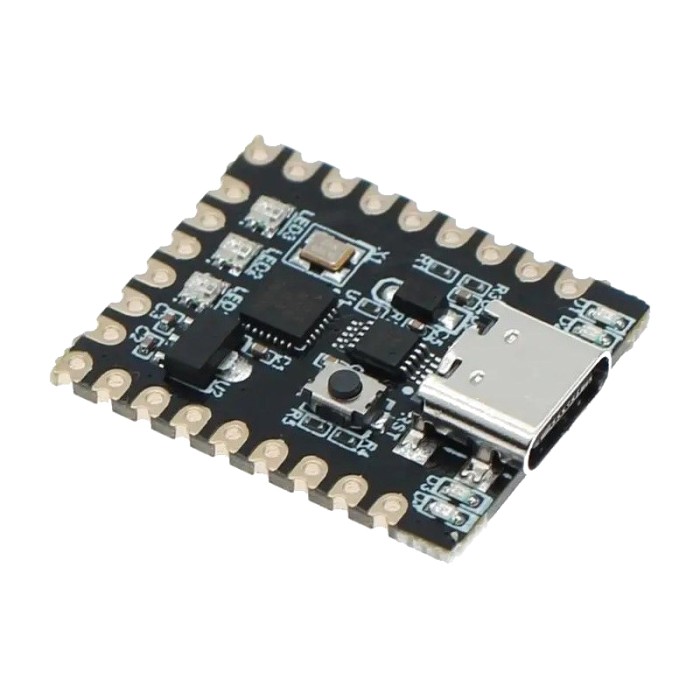
Arduino Nano SuperMini Type-C (CH340)
$3.9500
In stock
SKU
ARD-01-066
Volume discounts:
- +25 4 % $3.7900
- +100 6 % $3.7200
- +300 8 % $3.6400
- +500 10 % $3.5600
- +1000 12 % $3.4800
Ships in 2-3 business days, then:
Free delivery in 12-15 days by Tracked Economic Shipping on orders over $100.
Free delivery in 7-10 days by Express Shipping on orders over $300.
More shipping info

Shop with confidence Learn More
 Arduino Leonardo ATmega32u4 Mini Previous
Arduino Nano SuperMini Type-C (CH340) review and specifications
The Arduino Nano SuperMini Type-C (CH340) is a compact ATmega328P-based board built around the familiar Nano workflow. It suits small Arduino projects, breadboard prototyping, classroom practice, and simple embedded builds where you want classic Nano behavior in a board with USB-C.
The trade-off is clear: USB-C is convenient, but the CH340 USB interface can require extra setup on some computers, especially Windows. If you want a similar Type-C option in the same family, the Nano CH340G with Type-C USB is another option. If you are still comparing board families, the wider Arduino Boards range is the right place to look.
Specifications of Arduino Nano SuperMini Type-C (CH340)
- Microcontroller: ATmega328P
- Clock Speed: 16MHz
- Flash Memory: 32 KB (ATmega328) or which 2 KB used by bootloader
- SRAM: 2 KB (ATmega328)
- EEPROM: 1 KB (ATmega328)
- USB Interface: Type-C USB connector powered by the CH340 chip for fast and reliable communication.
- Operating Voltage: 5V
- Input Voltage (recommended): 7-12 V
- Digital I/O Pins: 14 (3/5/6/9/11 Support PWM)
- Analog Inputs: 6 (A0-A5)
- DC Current per I/O Pin: 40 mA
- Dimensions: Compact size similar to the classic Arduino Nano, suitable for embedded projects and prototyping.
The basic picture is simple: this is a Nano-class 5V ATmega328P board with USB-C and CH340. Setup expectations, pin-detail caveats, and power-use limits are covered below.
Arduino Nano SuperMini Type-C (CH340) specifications explained
This board stays in the classic Arduino Nano category. That matters because it works best for mainstream microcontroller jobs: reading sensors, handling buttons, blinking LEDs, talking to small modules over UART, I2C, or SPI, and driving control signals for relays or external driver stages.
Its limits are classic Nano limits. You are not buying built-in wireless, large memory reserves, or the headroom needed for heavier display stacks, web interfaces, or more complex multitasking firmware.
| Specification | What it means in practice |
|---|---|
| ATmega328P at 16MHz | This is the standard Nano-class MCU and clock speed used by a large number of Arduino examples and libraries. It is a good fit for established Arduino projects, but not for workloads that need much higher processing speed. |
| 32 KB flash, 2 KB SRAM, 1 KB EEPROM | Flash holds your program, SRAM handles variables while the sketch runs, and EEPROM keeps small amounts of data after power-off. In practice, this is enough for many simple and mid-sized sketches, but memory can get tight once you add multiple libraries, large buffers, or more advanced interfaces. |
| Operating Voltage: 5V | The board uses 5V logic, which matches many traditional Arduino sensors and modules. It also means you need to be careful with 3.3V-only peripherals, because some parts cannot safely accept 5V logic without level shifting. |
| Input Voltage (recommended): 7-12 V | You can power the board from more than USB in installed projects, which is useful when the board is not tethered to a computer. That range should not be treated as a promise that the regulator will stay cool under every load, especially if you power extra peripherals from the board. |
| 14 digital I/O pins | This is enough for many small controllers, sensor nodes, and teaching projects. Once you start combining several sensors, a display, serial devices, and multiple outputs, pin count becomes the first real constraint. |
| 6 analog inputs (A0-A5) | The specified analog input count suits common sensor-reading jobs such as potentiometers, analog voltage measurement, and basic data logging. If your design depends on additional analog channels beyond A0-A5, do not assume they are present on this board. |
| PWM support on 3/5/6/9/11 | These listed PWM-capable pins are the ones to use for dimming LEDs, servo-style control timing, or speed control through an external driver stage. If your project specifically needs PWM on another pin, especially pin 10, verify before committing. |
| Compact Nano-style form factor | The small footprint makes it practical for breadboard work and tight enclosures. It is a sensible replacement path for many older Nano-style builds where physical size matters. |
For simple data logging, sensor inputs, relay control, small displays, and educational exercises, this spec set is still practical. If your project really needs built-in wireless, much more memory, or a faster platform, the Nano ESP32 with S3 Chip is the more appropriate move.
Arduino Nano SuperMini Type-C (CH340) compatibility and quick start
This board fits the standard Arduino IDE workflow. Select Arduino Nano, connect over USB-C, and start with a simple Blink upload to confirm that the USB connection, driver, and port settings are correct.
The two most common first-run problems are the USB connection path and the CH340 interface. A charge-only cable can power the board without giving your computer a data link, and some Windows systems need the CH340 driver before the board appears correctly.
| Area | What to expect |
|---|---|
| Arduino IDE | Compatible with Arduino IDE; select Arduino Nano. |
| USB interface | USB Type-C connector with CH340 USB interface. |
| Windows | CH340 driver may be required. |
| macOS | CH340 support is commonly available, but no product-specific macOS instructions are supplied. |
| Linux | CH340 support is commonly available, but no product-specific Linux instructions are supplied. |
| Upload troubleshooting | If uploads fail, try the alternate Nano bootloader or processor option used by some clones. |
| Logic voltage | 5V logic board. |
| Input voltage | Recommended input voltage is 7-12 V. |
| Peripheral caution | 3.3V-only peripherals may need level shifting. |
| USB cable | Use a data-capable USB-C cable for programming, not a charge-only cable. |
| Libraries | Intended for the standard ATmega328P Arduino library ecosystem. |
| Unknowns | Exact A6/A7 exposure, exact PWM mapping beyond the listed pins, exact CH340 sub-variant, and exact bootloader version are not supplied. |
Quick start
- Install the Arduino IDE. If you need it, follow How to Install Arduino IDE on Windows & MAC.
- Connect the board with a data-capable USB-A to USB Type-C Data Power Cable.
- If your computer does not recognize the board, install the CH340 driver. The guide How to Install CH340 Driver on Windows covers the usual Windows process.
- In Arduino IDE, choose Arduino Nano and select the detected serial port.
- Upload the Blink example.
- If the upload fails, retry using the alternate Nano bootloader or processor option commonly needed on some clones.
A successful first test is easy to spot: after the upload completes, the onboard indicator LED should blink. If the board powers up but is not detected, the usual causes are a charge-only USB-C cable, a missing CH340 driver on Windows, the wrong serial port, or the need to retry with the alternate Nano bootloader setting.
If you want a supplied Type-C Nano alternative built around a different USB-serial chip, the Arduino Nano Clone with Type-C uses FT232RL instead of CH340.
Arduino Nano SuperMini Type-C (CH340) limitations and setup gotchas
This board is best treated as a generic Nano-compatible module rather than a heavily documented official platform. That does not make it unusable. It means you should buy it with realistic expectations about setup guides, traceable revisions, and pinout detail.
Pin information is one area where caution matters. The stated specification is 6 analog inputs on A0-A5 and PWM support on 3/5/6/9/11, but broader Nano-family references do not always agree on edge cases such as extra analog-only pins or PWM mapping. For this board, plan around the stated values unless you can verify your exact requirement before use.
The CH340 interface is another practical consideration. It is common and well supported by community knowledge, but Windows users are more likely to run into manual driver setup than with some other USB-serial solutions, and upload failures can sometimes come down to selecting the alternate Nano bootloader option.
Power assumptions also deserve care. The board operates at 5V logic, so 3.3V-only peripherals may need level shifting. The listed 40 mA per I/O pin figure should be treated as a limit from the MCU context, not as a sensible continuous operating target for normal design work.
One more point: clone-family boards can vary in smaller implementation details such as supporting parts and documentation depth. If your project depends on tightly verified batch consistency or complete product-specific documentation, the Arduino Nano Clone with FT232RL is another Nano-family option to consider, but this board remains a reasonable fit for many standard ATmega328P jobs when you understand the setup and documentation trade-offs.
Arduino Nano Type-C clone alternatives in the ElectroPeak range
The main choice between these Nano-family boards is not raw MCU performance. It comes down to connector preference, USB-serial chip preference, and whether you want to stay in the classic ATmega328P Nano class or move to a more capable wireless platform.
- This board: USB-C plus CH340. A practical fit if you want a modern connector and are comfortable with possible CH340 setup on Windows.
- Nano CH340G with Mini USB: the same Nano family with CH340G, for projects where you prefer or already stock Mini USB cables.
- Nano CH340G with Micro USB: another CH340G Nano-family option for builds standardized on Micro USB.
- Nano CH340G with Type-C USB: a supplied Type-C CH340G alternative in the same family if you want a comparable USB-C Nano listing.
- Arduino Nano Clone with Type-C: still a Type-C Nano, but this one is aimed at buyers who want FT232RL instead of CH340.
- Nano ESP32 with S3 Chip: not a direct substitute, but the better move if your project really needs built-in WiFi/Bluetooth, much more flash, or a faster and more modern platform.
There is no universal winner across these boards from the data provided here. If your project is a standard Nano-class controller and USB-C matters, this board stays on target. If your cable ecosystem points to Mini USB or Micro USB, or if you want FT232RL instead of CH340, one of the other Nano variants will make more sense.
Arduino Nano SuperMini Type-C (CH340) accessories and buying checklist
Most first-order problems with boards like this are not board faults. They come from missing a data cable, lacking basic prototyping hardware, or pairing a 5V board with peripherals that expect 3.3V logic.
Required
- USB-A to USB Type-C Data Power Cable for power and programming if you do not already have a data-capable cable.
- CH340 driver on Windows if your computer does not recognize the board.
Recommended
- 400 Points Half Size Breadboard - 5.5x8.5cm for first tests and breadboard prototyping.
- Breadboard Jumper Wire Pack - 65 Pieces for sensor and module connections.
- Arduino IDE installed and ready before the board arrives.
- A level shifter if your project uses 3.3V-only peripherals.
Optional
- An external driver or transistor stage for motors, relays, or other heavier loads.
- An external regulated 5V supply or buck regulator for projects with meaningful peripheral current draw.
Buying checklist
- ✓ I want an ATmega328P Nano-class board, not an ESP32-class wireless board.
- ✓ USB-C is the connector I want.
- ✓ I am okay with a CH340-based board and possible driver setup on Windows.
- ✓ My project fits a 5V board.
- ✓ The listed 14 digital I/O, 6 analog inputs, and stated PWM support meet my project needs.
- ✓ I have a data-capable USB-C cable, or I am adding one.
- ✓ I have breadboard and jumper gear if this is for prototyping.
- ✓ I do not need official Arduino manufacturing, traceable revisions, or guaranteed advanced pinout clarification beyond the stated specs.
Purchase decision summary
- Ideal for: Buyers who want a compact ATmega328P Nano-style board with USB-C, standard Arduino IDE workflow, and enough I/O for classic small projects.
- Maybe for: Beginners who are comfortable following a CH340 driver guide and basic Arduino setup steps.
- Consider another option if: You need guaranteed official documentation, minimal driver friction, fully clarified pin-detail edge cases, or built-in wireless and much more headroom than an ATmega328P Nano offers.
Arduino Nano SuperMini Type-C (CH340) FAQ
Does this board need a driver on Windows?
It may. The board uses a CH340 USB interface, and Windows systems commonly need the CH340 driver when the board is not detected. If needed, use the CH340 driver installation guide.
Which board should I select in Arduino IDE for this Nano clone?
Select Arduino Nano. If uploads fail, try the alternate Nano bootloader or processor option that some clones require.
What kind of USB-C cable do I need?
You need a data-capable USB-C cable for programming and power. A charge-only cable can power the board without creating a usable data connection, so the matched option is the USB-A to USB Type-C Data Power Cable.
Is this a 5V board?
Yes, it is a 5V board. That suits standard 5V Arduino-style work, but 3.3V-only peripherals may need level shifting.
How many analog inputs and PWM pins does it have?
The stated specification is 6 analog inputs on A0-A5 and PWM support on 3/5/6/9/11. If your project depends on A6/A7 or PWM behavior beyond those listed pins, treat the stated values as the specification and verify against your design before ordering.
Can I power it from something other than USB?
Yes. The stated operating voltage is 5V, and the recommended input voltage is 7-12 V.
Is this the right Nano if I want Type-C but not CH340?
No. In that case, the Arduino Nano Clone with Type-C is the better fit, because it uses FT232RL.
When should I choose something beyond an ATmega328P Nano?
Choose a different platform when you need built-in WiFi or Bluetooth, much more memory, or significantly more processing headroom. For that kind of project, the Nano ESP32 with S3 Chip is the relevant step up.
Are accessories included?
Included accessories and header details are not specified. Do not assume a cable is included.
Where can I find help if this is my first Arduino board?
The fastest starting point is to install the IDE, confirm the driver if needed, and upload Blink. If you are still deciding among board types, the broader Arduino Boards category is a useful reference, and the Arduino IDE installation guide covers the software setup.
| MCU/SoC | ATmega328P |
|---|---|
| Product Family | Arduino |
| Architecture | AVR |
| CPU Cores | 1 |
| Clock Speed (MHz) | 16MHz |
| Flash | 32 KB |
| SRAM | 2 KB |
| EEPROM | 1 KB |
| GPIO Pins | 14 |
| SPI interface Pins | 1 |
| I2C interface Pins | 1 |
| UART interface Pins | 1 |
| USB Ports | Type-C |
| CAN Bus Support | No |
| Ethernet Support | No |
| ADC Channels | 6 |
| DAC Channels | 0 |
| PWM Channels | 3, 5, 6, 9, 11 |
| Timers Count | 3 |
| Operating Voltage (V) | 5V |
| GPIO Voltage (V) | 5V |
| GPIO Current (mA) | 40mA |
| Wireless | No |
| Form Factor | mini |
| IDE Support | Arduino IDE, PlatformIO |
| Input Voltage (V) | 7-12V |
| Antenna Type | No |
| Bluetooth Ver. | No |
Write Your Own Review

Please complete your information below to login.
Sign In
Create New Account