
Product added to cart

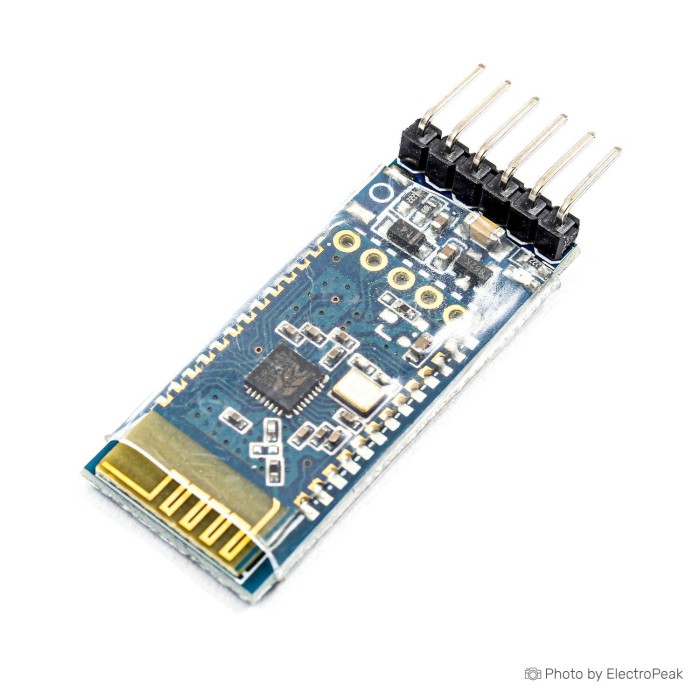
SPP-C Bluetooth to Serial Adapter Module
SAVE $0.4000
$1.4000 $1.8000
In stock
SKU
COM-02-029
Ships in 2-3 business days, then:
Free delivery in 12-15 days by Tracked Economic Shipping on orders over $100.
Free delivery in 7-10 days by Express Shipping on orders over $300.
More shipping info

Shop with confidence Learn More
 TDA7492P Bluetooth Digital Amplifier Audio Receiver Module Previous
SPP-C Bluetooth to Serial Adapter Module Review
At $1.50, the SPP-C Bluetooth to Serial Adapter Module is a straightforward UART-to-Bluetooth Classic serial bridge for replacing physical serial cables in electronics projects. It uses the standard Bluetooth Serial Port Profile (SPP) to create two-way serial links between microcontrollers and Android smartphones, Windows PCs, or Linux systems. It is not compatible with iOS devices, does not support Bluetooth Low Energy (BLE), cannot act as a Bluetooth master, and is not suited to projects that require strict firmware uniformity.
For designers working within standard UART communication parameters, this board provides a compact drop-in bridge between an embedded hardware serial port and a remote Bluetooth master. Among Bluetooth modules for UART and wireless projects, its protocol constraints are the key check for compatibility with your hardware stack.
Specifications of SPP-C Bluetooth to Serial Adapter Module
- Board version: v1.35
- Operating frequency: 2.4-2.48 GHz
- Bluetooth specification: V3+EDR
- Bluetooth version: 3
- Host interface: UART
- Supply voltage: 3.3/5 V DC
- Operating temperature: 40- to 150+ degrees Celsius
- Dimensions: 27x13x2 mm
- Weight: 5 g
- Bluetooth communication type: SPP serial protocol
- Default baud rate: 9600
SPP-C Bluetooth serial module specifications explained
The SPP-C module bridges a standard hardware UART to an over-the-air RF serial link. Rather than using modern BLE GATT attributes, it uses Bluetooth Classic SPP to emulate an unformatted RS-232 serial cable. Data transfer is transparent: bytes sent to the module TX pin appear in terminal software on the connected computer or phone, while incoming wireless bytes appear directly on the RX line at the configured baud rate.
At 27x13x2 mm and 5 g, the module uses an onboard meandering PCB trace antenna, eliminating external antenna wiring. Its default communication rate is 9600 baud, matching typical microcontroller serial defaults for dependable baseline operation. For tight enclosures using surface-mount wireless hardware, compare its footprint with an equivalent compact surface-mount serial module during board-layout planning.
| Specification | Listed Value | Why It Matters |
|---|---|---|
| Host Interface | UART | Connects directly to microcontroller hardware serial pins (TX/RX) without complex protocol libraries. |
| Communication Protocol | SPP Serial Protocol | Provides transparent byte streaming compatible with virtual COM ports and Bluetooth terminal applications. |
| Bluetooth Specification | V3+EDR / Version 3 | Operates on Bluetooth Classic; does not offer BLE GATT profiles or Apple iOS compatibility. |
| Default Baud Rate | 9600 | Ensures immediate communication with standard microcontroller sketches before any configuration commands are sent. |
| Form Factor | 27x13x2 mm, 5 g | Keeps profile low enough for small sensor nodes, robotics chassis, and handheld instrumentation. |
| RF Antenna | Internal PCB RF Antenna | Self-contained design requires no external coaxial leads or external matching components. |
SPP-C Bluetooth serial module limitations and compatibility
The primary architectural constraint of the SPP-C family is its fixed slave role. It cannot scan for other wireless devices, initiate pairings, or link to another slave module as a wireless point-to-point bridge. Projects that need two microcontrollers to communicate directly or require master-side connection initiation need a master-capable Bluetooth serial module instead.
Operating system support depends entirely on Bluetooth Classic SPP. Android devices, Windows PCs, and Linux machines handle standard SPP through Bluetooth terminal apps or virtual COM ports. Apple iOS and iPadOS devices, by contrast, do not support Bluetooth Classic SPP without proprietary MFi program authentication. For an iPhone or iPad user interface, use a BLE serial module with 3.3 V and 5 V support or a dual-mode SPP and BLE module for cross-platform compatibility.
Electrical interfacing requires care with supply voltage and logic levels. Although the nominal voltage is stated as 3.3/5 V DC, bare JDY-31 and SPP-C surface-mount modules run natively at 1.8 V to 3.6 V; only versions mounted on a carrier baseplate include an onboard low-dropout regulator to handle 5 V input. Regardless of supply voltage, the UART RX and TX lines operate strictly at 3.3 V logic. Connecting a 5 V microcontroller TX pin directly to the module RX line can cause latch-up or permanent damage. Use a resistive voltage divider or active level shifter on the transmit line, and power prototype circuits from a regulated source such as 3.3 V breadboard power.
SPP-C is an unbranded market designation shared across multiple silicon and firmware revisions, predominantly from the Beken BK3231S family running JDY-31 firmware. The v1.35 notation is a firmware revision string rather than a standardized hardware standard. AT command behavior and factory defaults can vary between production runs, so issue an identification command when the module arrives. The module family has no documented CE, FCC, or ISED formal certifications, making it more appropriate for prototyping, education, and personal hobby projects than commercial product integration.
| Interface / Subsystem | Compatibility Status | Integration Notes |
|---|---|---|
| Host Microcontrollers | Compatible (UART) | Requires TX/RX connection; 5 V MCU transmit lines require level shifting down to 3.3 V. |
| Android OS | Supported | Pairs using standard Bluetooth settings; works with standard Bluetooth serial terminal apps. |
| Windows & Linux | Supported | Recognized as a Bluetooth serial device; binds to virtual COM ports for software access. |
| Apple iOS / iPadOS | Not Supported | Bluetooth Classic SPP is restricted on iOS; requires BLE hardware instead. |
| Network Role | Slave Only | Cannot initiate outgoing connections; waits for incoming connections from master devices. |
| Supply Voltage | 3.3 V (Bare) / 5 V (Baseplate) | Bare boards require 1.8–3.6 V DC; carrier boards accept 5 V through an onboard regulator. |
| I/O Logic Level | 3.3 V TTL | Not 5 V tolerant on the RX pin; requires voltage division when paired with 5 V boards. |
SPP-C Bluetooth serial module setup and AT commands
Configuration requires an external serial connection with no active wireless Bluetooth link. Once Bluetooth is paired and connected, the module enters transparent data pass-through mode and sends all incoming serial bytes to the remote device instead of interpreting them as commands. Disconnect any active wireless session before configuring it.
Connect the module to your computer through a 3.3 V USB-to-TTL UART converter or a standard USB-to-TTL serial converter. Connect converter ground to module ground, module TX to converter RX, and converter TX to module RX using a 3.3 V logic level. Set the serial terminal utility to 9600 baud, 8 data bits, no parity, and 1 stop bit.
- Set the terminal to send both carriage return and line feed characters (CRLF /
rn) with every transmission. - Send the uppercase string
AT+VERSIONas a single transmission. Do not type commands character-by-character, as the internal command parser will time out between keystrokes. - Confirm that the module returns its identification string, typically identifying JDY-31 or SPP-C firmware. Unlike HC-05 modules, a bare
ATstring often produces no response on this firmware family. - Adjust parameters as needed: send
AT+NAME<NewName>to modify the advertised Bluetooth identifier, orAT+PIN<1234>to set the pairing passkey. - Set the baud rate with
AT+BAUD<value>if higher throughput is required. After changing the baud rate, cycle power to the module and reconnect terminal software at the newly selected speed.
For detailed wiring diagrams, code samples, and step-by-step microcontroller connection sequences, consult the comprehensive Arduino wiring and serial test guide.
SPP-C Bluetooth serial module accessories and wiring needs
Operating and configuring the module requires supporting hardware for correct logic levels, reliable power distribution, and serial interfacing during initial setup.
Required Equipment
- USB-to-TTL Serial Converter: Needed for initial configuration and firmware identification through a PC serial console. The CP2102 USB to TTL UART Serial Convertor Module provides selectable 3.3 V logic suited to module safety.
- 3.3 V Logic Level Shifting: A 5 V microcontroller driving the module RX pin needs a dedicated level-shifter board or a simple two-resistor voltage divider (e.g., 1kΩ and 2kΩ) to prevent overvoltage damage.
- Regulated Power Source: Use a stable 3.3 V DC rail capable of supplying up to 50 mA during peak RF transmission.
- Bluetooth Master Device: Use an Android smartphone, tablet, or a Windows or Linux computer equipped with Bluetooth hardware to establish the master-side link.
Recommended Prototyping Hardware
- Breadboard Power Module: The Breadboard Power Supply Module - 3.3V/5V mounts directly onto standard breadboard rails to provide dedicated 3.3 V power.
- Solderless Breadboard: A breadboard prototype setup provides clean routing for test circuits, indicator LEDs, and resistor dividers.
- Interconnect Wires: Premium jumper wires for UART connections simplify routing between USB adapters, development boards, and module pins.
- Terminal Software: Use a computer serial terminal that supports batch string transmission with CRLF line endings, alongside an Android Bluetooth serial terminal app for over-the-air communication checks.
Optional Additions
- Status Indication LED: An external low-current LED wired to the STATE pin, where it is broken out on carrier boards, visually differentiates pairing search mode from an active serial connection.
- Hardware Enable Switching: External control wiring tied to the EN pin can toggle sleep modes or reset the transceiver through microcontroller GPIO.
SPP-C Bluetooth serial module FAQ
Is the SPP-C Bluetooth serial module the same as an HC-05?
No. The SPP-C uses a different command set and operates strictly in slave mode, while the HC-05 Master/Slave Module can be dynamically configured as either a master or slave device. For an alternative slave-only Bluetooth Classic drop-in, consider the HC-06 Bluetooth serial alternative or the HC-06-compatible serial module.
Does the SPP-C Bluetooth serial module work with iPhone or iPad?
No. iOS devices do not support Bluetooth Classic Serial Port Profile connections without specialized Apple MFi licensing. For projects requiring iOS communication, use a BLE-based option such as the AT-09 CC2541 BLE 4.0 Module or a dual-mode SPP and BLE module. For location tracking rather than data streaming, use a dedicated BLE beacon and proximity broadcasting node. Standalone systems running custom firmware on the radio itself call for a programmable BLE module for custom embedded designs.
Can two SPP-C Bluetooth serial modules communicate with each other?
No. Two SPP-C modules cannot form a direct link because both units operate exclusively as Bluetooth slave devices. A Bluetooth connection requires one device to act as a master and initiate inquiry, pairing, and connection procedures.
Can I power the SPP-C module from 5 V?
Only if the specific board includes a 5 V carrier baseplate with an integrated linear regulator. Bare SMD modules run strictly on 1.8 V to 3.6 V DC. In all cases, the UART receive pin (RX) requires 3.3 V logic levels and must not be exposed directly to 5 V microcontroller signals.
What baud rate does the SPP-C Bluetooth serial module use by default?
The module uses 9600 baud by default, configured for 8 data bits, no parity bit, and 1 stop bit (9600 8-N-1).
Why does the SPP-C module not answer my AT commands?
The internal command parser requires uppercase commands sent as a complete, unified string terminated with both carriage return and line feed (rn). A bare AT command is unsupported on many JDY-31 firmware versions; use AT+VERSION instead. Also verify that no remote Bluetooth device is connected to the module.
Is the SPP-C Bluetooth serial module BLE?
No. The module implements Bluetooth Classic 3.0 / V3+EDR using the Serial Port Profile (SPP). It does not broadcast Bluetooth Low Energy advertising packets or expose GATT services.
What Bluetooth name and PIN should I expect?
Most units running JDY-31 firmware broadcast the device name JDY-31-SPP and use 1234 as the factory pairing PIN. Older variations may advertise as SPP-CA. Send AT+VERSION through a wired serial terminal to confirm the exact firmware variant on your hardware.
Why does Windows create two Bluetooth COM ports?
Windows allocates both an incoming and an outgoing virtual serial port when pairing an SPP device. Select the outgoing COM port number when connecting terminal software or host applications to the module.
For other architectures, protocols, and transceiver formats, browse other Bluetooth module types.
Purchase Decision Summary
Ideal for: Makers, students, and engineers seeking an inexpensive ($1.50) wireless UART pass-through link between microcontrollers and Android devices, Windows PCs, or Linux systems using standard Bluetooth Classic SPP.
Maybe for: 5 V microcontroller builds such as standard Arduino boards, provided you include a 3.3 V power rail and suitable voltage-divider resistors on the module receive line.
Consider another option if: Your application requires communication with iPhones or iPads, bidirectional microcontroller-to-microcontroller bridging, low-energy battery operation via BLE, or certified, tightly standardized hardware for mass production.
Buying Checklist
- Your host platform is Android, Windows, or Linux (not iOS or iPadOS).
- Your software architecture relies on transparent byte streaming (SPP) rather than BLE GATT services.
- The module will operate as a slave responding to incoming master connection requests.
- Your embedded board provides accessible hardware UART TX, RX, and GND lines.
- You have confirmed whether your unit requires regulated 3.3 V input or includes a 5 V baseplate.
- You have resistors or a level shifter ready to protect the 3.3 V RX line from 5 V MCU outputs.
- You have a 3.3 V USB-to-TTL serial adapter available for initial configuration.
- Your initial terminal software setup is prepared for 9600 baud with CRLF enabled.
- Your project does not depend on formal CE, FCC, or ISED laboratory certifications.
| Interface Type | UART |
|---|---|
| Operating Voltage (V) | 3.3V/5V |
| Operating Temp (°C) | -40 to +150 °C |
| Dimensions (mm) | 27x13x2 mm |
| Mounting Type | THT |
| Connector | Pin Header |
| Wireless Protocol | Bluetooth Classic |
| Frequency Band | 2.4GHz |
| RF Modulation | GFSK |
| TX Power (dBm) | Class 2 |
| SIM Slots | 0 |
| Weight (g) | 5 |
| Chipset | SPP-C |
| Modes | SPP serial protocol |
| Input Voltage (V) | 3.3V-5V |
| Antenna Type | Internal Antenna |
| Application | robots, Alarm and security systems, Bluetooth printer, Computers and peripherals, Industrial control, Inspection equipment, Microcontroller projects, Remote control and monitoring, Serial cable replacement, Smart home control, Tablets and mobile phones, Wireless mouse and keyboard, Industrial equipment control, Smart appliances, Smart building automation, System data transmission, Wireless car diagnostic devices, Wireless data transfer, Wireless game consoles (joysticks) |
| Baud Rate | 9600 |
Write Your Own Review

Please complete your information below to login.
Sign In
Create New Account