
Product added to cart

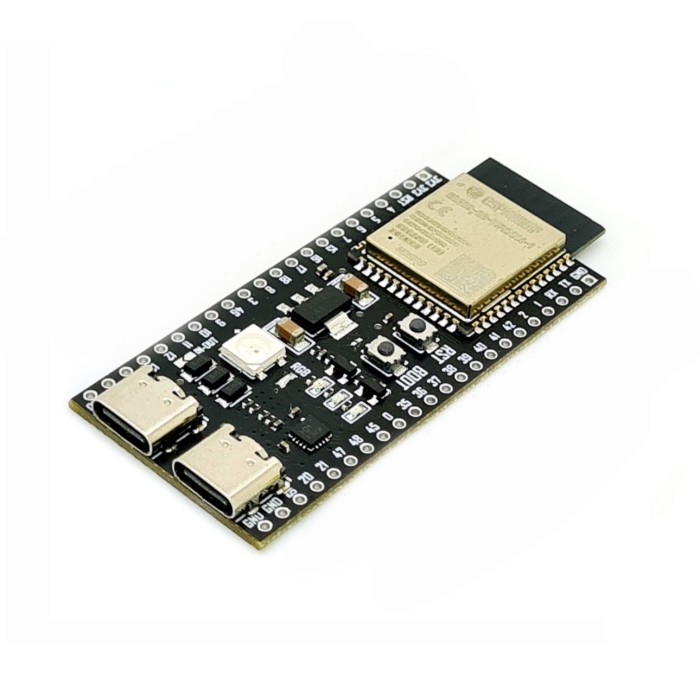
ESP32-S3 WROOM-1 Development Board
$5.9500
In stock
SKU
COM-03-090
Volume discounts:
- +25 2 % $5.8400
- +50 3 % $5.7900
- +100 4 % $5.7300
- +300 5 % $5.6800
- +500 6 % $5.6200
Add an Accessory:


Ships in 2-3 business days, then:
Free delivery in 12-15 days by Tracked Economic Shipping on orders over $100.
Free delivery in 7-10 days by Express Shipping on orders over $300.
More shipping info

Shop with confidence Learn More
 80W Electric Soldering System Previous
ESP32-S3 WROOM-1 Development Board specifications and first-use checks
This ESP32-S3 development board is built around the ESP32-S3-WROOM-1-N8R2 module for general-purpose prototyping. It gives you Wi‑Fi, Bluetooth LE, USB, PSRAM, and broad header access on a board meant for jumper-wire work and breadboard use.
It suits makers and embedded developers building sensor nodes, control systems, USB experiments, and display-driven prototypes that need more memory and I/O than simpler ESP32 boards. The honest trade-off is board-level confidence: the ESP32-S3 platform itself is clear, but some carrier-board details such as exact pin mapping and USB routing still need verification if your project depends on them.
If you are comparing options across the ESP32 family, this board fits best as a flexible ESP32-S3 prototyping platform rather than a fully documented reference board.
Specifications of ESP32-S3 WROOM-1 Development Board
- Processor: Dual-core XTensa LX7
- CPU frequency: 240MHz
- Internal SRAM: 512KB
- SPI Flash: 8MB
- PSRAM: 2MB
- Wi-Fi: 2.4GHz
- Wi-Fi standard: 802.11 b/g/n
- Bluetooth: Bluetooth 5.0
- GPIOs: 45 programmable GPIOs
- Interfaces: 4 x SPI
- Interfaces: 2 x I2C
- Interfaces: 2 x I2S
- Interfaces: 3 x UART
- Interfaces: 1 x USB OTG
- RGB LED: One WS2812 RGB LED
- RGB LED pin: IO48
- Security: 4096 bit OTP
- Security: AES
- Security: SHA
- Security: RSA
- Security: ECC
- Security: RNG
- Security: Secure boot
- Security: Flash encryption
- Board size: 64x27mm
- Supply voltage: 5V via USB
- Circuit voltage: 3.0 to 3.6V
ESP32-S3 WROOM-1 Development Board features and limits
The N8R2 memory configuration is a main reason to choose this board. The 8MB Flash gives you room for larger firmware, filesystem storage, web assets, and OTA updates, while the 2MB PSRAM helps with frame buffers, display work, larger networking stacks, and memory-hungry libraries that are awkward on smaller ESP32 variants.
The dual-core XTensa LX7 running at 240MHz fits connected control tasks, sensor processing, user interfaces, and mixed workloads where one task handles communications while another manages local logic. It is still a microcontroller board, not a Linux-class computer. Even so, it has enough headroom for more complex ESP32 projects than entry-level options.
Wireless support covers 2.4GHz Wi‑Fi and Bluetooth LE. That works well for telemetry, BLE control, provisioning, and local wireless links, but it is not the right choice if your project specifically requires Bluetooth Classic.
GPIO access is broad in concept, and most I/O pins are broken out on headers on both sides of the board. That is useful for prototyping with sensors, serial devices, displays, and control signals. One buying caution matters here: the stated 45 programmable GPIOs should not be read as 45 freely usable external pins; exact usable I/O still depends on the carrier-board routing and a confirmed pinout.
USB is another practical reason to pick ESP32-S3 hardware. This board is stated to provide dual Type-C USB connectors, one USB OTG interface, and a CP2102 virtual USB port for debugging and firmware upgrade. In practical terms, that means you may have both a USB-to-UART path for straightforward flashing and serial monitoring, plus native USB capability for ESP32-S3 USB-device or OTG experiments, though the exact role of each connector on this carrier board should be verified during first use.
The onboard WS2812 RGB LED helps with a quick power-up check and simple demos because you can test code without wiring an external LED first. The catch is the stated LED pin is IO48, and board-level LED mapping can vary by revision on related ESP32-S3 hardware, so an LED example failing is not enough on its own to diagnose the board as faulty.
Physically, the 64x27mm board size and headered layout suit bench work better than highly compact designs. It is intended for jumper wires or breadboard mounting, so it fits the common workflow of trying sensors, displays, and serial modules before committing to a custom PCB.
The main weakness is documentation confidence rather than core silicon capability. The ESP32-S3-WROOM-1-N8R2 module is a real and well-supported platform, but this board appears to be a generic third-party carrier rather than a clearly identified official Espressif DevKit, so buyers who need guaranteed revision-specific documentation, validated pin tables, or exact USB routing should plan to verify those details themselves.
If your project needs more onboard memory and tighter integration for camera, voice, or AI-style work, the ESP32-S3-EYE with 2MP Camera is the better fit.
ESP32-S3 WROOM-1 USB, drivers, and setup basics
Start with a known data-capable USB-C cable, not a charge-only cable. If you need one, the USB to Type-C Sync and Charge Cable - 1m (Black) covers power, flashing, and serial setup.
This board is stated to have dual Type-C connectors, a CP2102 virtual USB port, and USB OTG support. In buyer terms, that means one USB path is meant for the familiar serial upload and debug workflow, while another may expose the ESP32-S3 native USB function for USB-device or OTG work. For the first connection, use the connector intended for programming and serial access first, then switch only if the board does not enumerate.
If your computer does not detect the serial interface automatically, a CP210x driver may be needed. That applies only to the USB-to-UART path associated with the stated CP2102 bridge.
Board setup is straightforward once the connection path is correct. Install ESP32 board support in your IDE, select an ESP32-S3 family target, connect the board, confirm that a serial or USB device appears on the host, and upload a simple test sketch.
For Arduino users, Installing the ESP32 Board in Arduino IDE (Windows, Mac OS X, Linux) covers the board package setup, and Getting Started with the ESP32 Development Board is a useful follow-up once the board is detected.
A sensible first test is basic serial output or a simple LED example. Expect successful USB detection and a clean upload. If you test the onboard RGB LED, be ready to confirm the actual LED GPIO if the default example does not respond.
- Use the correct USB-C port, since the board is stated to have more than one USB path.
- Avoid a charge-only cable and start with a known data-capable USB-C cable.
- Select an ESP32-S3 board profile, not a non-S3 target.
- Install a CP210x driver if the stated CP2102 USB-UART path is not detected automatically.
- If auto-download does not engage, retry with BOOT/RESET sequencing using the onboard buttons.
ESP32-S3 WROOM-1 power, compatibility, and accessory needs
Power input and logic level are easy to mix up on ESP32 boards. This board takes 5V via USB for power, but its circuit voltage is 3.0 to 3.6V, so treat it as a 3.3V logic platform. That matters when you connect sensors, modules, displays, or control lines: do not assume the GPIOs are 5V-tolerant.
At the toolchain level, the board fits the normal ESP32-S3 ecosystem. It is suitable for Arduino IDE, ESP-IDF, PlatformIO, and MicroPython-style workflows at the ESP32-S3 family level, with the usual requirement that you select an ESP32-S3-compatible target and appropriate memory settings.
USB support needs one more practical distinction. The board is stated to provide dual Type-C USB connectors, a CP2102 virtual USB port, and one USB OTG interface, so both simple serial development and native USB work are part of the expected use case. Native USB features still depend on the actual connector routing on this carrier board.
For external hardware, low-power 3.3V devices are the easy match. 5V peripherals may need level shifting, and motors, relays, or long LED strips should use separate drivers and their own regulated power supply rather than drawing load through GPIO lines.
The board is intended for prototyping, so a few accessories make the first session much easier.
Compatibility summary
| Area | Summary |
|---|---|
| Hardware logic level | 3.3V logic domain; circuit voltage is 3.0 to 3.6V |
| Power input | 5V via USB |
| Wireless | Wi‑Fi 2.4GHz, 802.11 b/g/n; Bluetooth LE use |
| USB | Dual Type-C USB connectors, 1 x USB OTG, and CP2102 virtual USB port are stated |
| Serial/driver | CP210x driver may be needed depending on OS if the CP2102 USB-UART path is used |
| Development environments | Arduino IDE, ESP-IDF, PlatformIO, and MicroPython-style use at the ESP32-S3 family level |
| Breadboard/prototyping | Most I/O are exposed on headers for jumper-wire connections or breadboard mounting |
| 5V peripherals | No direct 5V logic assumption; level shifting may be needed |
| High-current loads | Use external drivers and separate power supplies for motors, relays, and LED strips |
| Native USB use | USB OTG is supported at the ESP32-S3 level; exact carrier-board routing should be verified |
If your design needs a much smaller ESP32-S3 board, the XIAO ESP32S3 Sense with OV2640 is a better fit.
Accessories
Required
- USB to Type-C Sync and Charge Cable - 1m (Black) for power, flashing, and serial setup
- Computer with an ESP32-S3-compatible software environment
Recommended
- 830 points Breadboard, 5.4x16.5x0.85cm for solderless wiring and quick interface testing
- Breadboard Jumper Wire Kit - 140 Pieces for GPIO, UART, I2C, and sensor connections
- 5V-to-3.3V level shifting when working with 5V peripherals
- Separate regulated power for motors, relays, or long LED strips
Optional
- A second known-good USB-C data cable for troubleshooting difficult upload or detection issues
- A confirmed pinout or schematic reference for carrier-board mapping before exact pin planning
For broader browsing within the same platform family, see the ESP32 category.
ESP32-S3 WROOM-1 board alternatives for camera, display, and compact builds
This board makes sense when you want a general-purpose ESP32-S3 prototyping board with headers, Wi‑Fi, Bluetooth LE, USB, and PSRAM. If your project already points to a more specialized layout, a different board can save time and wiring.
For camera-centric builds, the ESP32-S3 CAM is the more direct choice. It is aimed at camera projects and is positioned for high I/O density around that use case.
Heavier AI, voice, or camera processing calls for a different starting point. The ESP32-S3-EYE with 2MP Camera adds an integrated camera, LCD, microphone, and 8MB Octal PSRAM, which is more suitable for those workloads.
If you want built-in user interface hardware, the ESP32-S3 with 1.69-inch Touch Display is the better fit than adding a screen separately. It already includes the display and touch layer, which reduces wiring and enclosure complexity.
Where size matters more than full header access, the XIAO ESP32S3 Sense with OV2640 is the compact option. Its 21 x 17.5mm footprint and camera-ready design suit wearable or space-limited builds, with the trade-off of fewer available GPIOs.
If you are browsing nearby ESP32-S3 options rather than replacing this board outright, the Waveshare ESP32-S3R8 Nano form factor is another same-platform route with a different form factor and memory configuration.
Some projects are better served by a different family entirely. If your real need is lower complexity or a different performance profile, the ESP32-C3 RISC-V is the adjacent option. If the job is really Zigbee, Thread, or Matter rather than Wi‑Fi, the ESP32-H2 with Zigbee/Matter support is the more relevant path.
ESP32-S3 WROOM-1 board FAQ
Does this board have 8MB Flash and 2MB PSRAM?
Yes. This board is specified with the ESP32-S3-WROOM-1-N8R2 module, which means 8MB SPI Flash and 2MB SPI PSRAM. If exact module provenance matters for your project, inspect the module marking on the delivered board.
Is the Bluetooth on this board Bluetooth Classic or Bluetooth LE?
It should be treated as Bluetooth LE. Do not choose this board for Bluetooth Classic-only use cases such as projects that specifically depend on Classic profiles.
Does the board really give me 45 usable GPIOs?
No, not as a planning assumption. The board is specified as having 45 programmable GPIOs, but that should not be treated as 45 freely usable external lines; exact usable pins depend on the carrier-board mapping and should be confirmed from an actual pinout.
Which USB-C port should I use for programming?
Start with the port intended for serial flashing and debugging. The board is also stated to support USB OTG, so the other connector may be tied to native USB functions depending on the board routing.
Do I need a CP2102 driver?
Possibly. This board is stated to provide a CP2102 virtual USB port, so if your operating system does not recognize it automatically, a CP210x driver may be needed.
Is the onboard RGB LED on IO48?
IO48 is the stated LED pin. If an LED example does not work, confirm the actual board mapping before assuming there is a hardware fault, because LED pin assignments can vary across related ESP32-S3 board revisions.
Can I use 5V logic devices directly with this board?
No, not as a safe default. The board is powered from 5V over USB, but its circuit voltage is 3.0 to 3.6V, so use it as a 3.3V logic platform and add level shifting where required.
Will it work with Arduino IDE?
Yes. ESP32-S3 family support is available in the Arduino ecosystem; select an ESP32-S3-compatible target and the correct memory-related settings. If you need setup help, Installing the ESP32 Board in Arduino IDE (Windows, Mac OS X, Linux) covers the process.
Is this an official Espressif DevKitC-1 board?
No clear evidence supports that. This board should be treated as a third-party carrier board built around an ESP32-S3-WROOM-1 module rather than an identified official Espressif DevKitC-1.
Does it have an external antenna connector?
No external antenna connector is indicated here. If your project needs an external antenna, WROOM-1U-type hardware is the more appropriate direction.
Is there anything unresolved I should know before ordering?
Yes. Board-level details such as exact USB connector routing, confirmed GPIO mapping, exact RGB LED pin behavior on this revision, and carrier-board revision documentation are still worth checking if your project depends on them closely.
Purchase decision summary
Ideal for: ESP32-S3 prototyping with Wi‑Fi, Bluetooth LE, USB, and modest PSRAM headroom; makers who are comfortable verifying board details when needed; sensor, robotics, display, and USB experiments on a general-purpose headered board.
Maybe for: buyers who want a breadboard-friendly ESP32-S3 board and can tolerate thin carrier-board documentation; projects that may later move to a camera, display, or compact ESP32-S3 variant.
Consider another option if: you need Bluetooth Classic, guaranteed official-board documentation, revision consistency, validated pin mapping, an external antenna connector, or the simplest possible beginner experience with no USB-path ambiguity.
Buying checklist
- ✓ Confirm you want ESP32-S3, not ESP32-C3, ESP32-H2, or classic ESP32
- ✓ Confirm N8R2 is the memory variant you want: 8MB Flash + 2MB PSRAM
- ✓ Confirm Bluetooth LE is enough for your project
- ✓ Confirm you are comfortable with 3.3V logic-level hardware
- ✓ Confirm you have a USB-C data cable
- ✓ Confirm you can use an ESP32-S3-compatible IDE or toolchain
- ✓ Confirm you do not need official Espressif DevKit-level documentation
- ✓ Confirm your project does not require an external antenna connector
- ✓ If the onboard RGB LED matters, be ready to verify the actual LED GPIO
- ✓ If exact GPIO planning matters, wait for a confirmed pinout or inspect the board first
| MCU/SoC | ESP32-S3-WROOM-1-N8R2 |
|---|---|
| Product Family | ESP32 |
| Architecture | Tensilica Xtensa LX7 |
| CPU Cores | dual-core |
| Clock Speed (MHz) | 240MHz |
| Flash | 8 MByte(64Mbit) |
| SRAM | 512 KByte |
| External Memory | 2MB PSRAM |
| GPIO Pins | 45 |
| SPI interface Pins | 4 |
| I2C interface Pins | 2 |
| UART interface Pins | 3 |
| USB Ports | Dual Type-C USB connectors |
| Operating Voltage (V) | 3.3V |
| GPIO Voltage (V) | 3.3V |
| Wireless | Wi-Fi, Bluetooth LE |
| Form Factor | 64x27mm |
| IDE Support | MicroPython, Arduino, ESP-IDF |
| Input Voltage (V) | 5V via USB |
| Antenna Type | Internal Antenna |
| Bluetooth Ver. | 5 |
Write Your Own Review

Please complete your information below to login.
Sign In
Create New Account