
Product added to cart

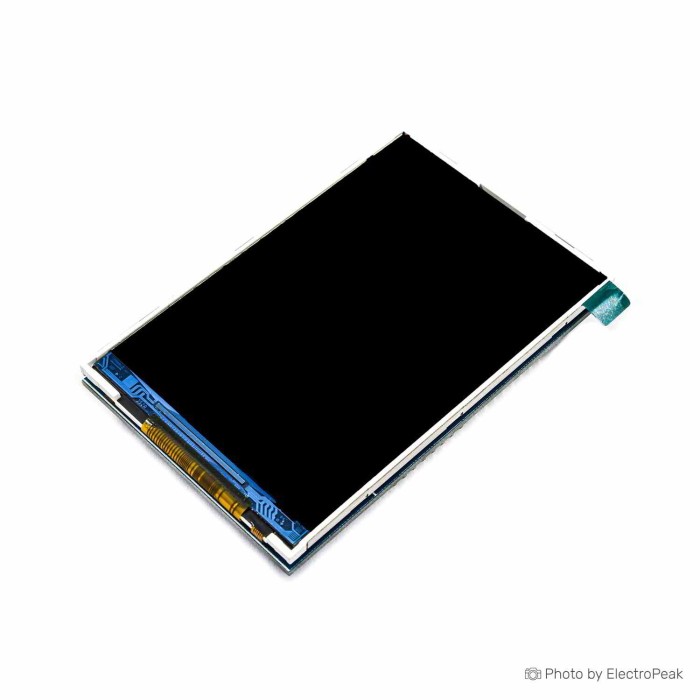
3.5 inch TFT 320x480 LCD Display Shield for Arduino Uno/Mega
$9.2500
In stock
SKU
LCD-01-080
Volume discounts:
- +25 4 % $8.8800
- +50 6 % $8.7000
- +100 8 % $8.5100
- +300 10 % $8.3300
- +500 12 % $8.1400
Ships in 2-3 business days, then:
Free delivery in 12-15 days by Tracked Economic Shipping on orders over $100.
Free delivery in 7-10 days by Express Shipping on orders over $300.
More shipping info

Shop with confidence Learn More
 Waveshare 4 inch 800x480 IPS HDMI LCD Previous
3.5 Inch TFT LCD Shield for Arduino Uno/Mega Review
This 3.5 inch TFT LCD Shield gives Arduino Uno and Mega projects a direct-mount color display with 320x480 pixels and an ILI9486 driver chip. Its onboard SD card slot can store display assets or project data, while the backlight is specified as always on and connected to 3.3V.
It suits builders who need a larger color shield and are comfortable checking display-library configuration. It is not the safe choice for projects that require confirmed touch input, controlled backlight dimming, or verified 5V-safe SD-card signaling. Browse related Arduino display shields if your project needs a different interface or form factor.
Specifications of 3.5 Inch TFT 320x480 LCD Display Shield For Arduino Uno/Mega - ILI9486
- Display size: 3.5 inch
- Resolution: 320x480 pixels
- Display technology: TFT
- Driver chip: ILI9486
- Compatible boards: Arduino UNO, Mega, and other Arduino boards with similar pin arrangement
- Communication: SPI
- Backlight: always on
- Backlight connection: 3.3V
- Storage: onboard SD card slot
- Module pins: 20 pins
- 5V: module power supply - 5 V
- 3V: module power supply - 3.3 V
- GND: ground
- LCD_RST: LCD bus reset signal, low level reset
- LCD_CS: LCD bus chip select signal, low level enable
- LCD_RS: LCD bus command/data selection signal, low level: command, high level: data
- LCD_WR: LCD bus write signal
- LCD_RD: LCD bus read signal
- LCD_D0 to LCD_D7: LCD 8-bit data bits
- SD_SS: SD card SPI bus chip select signal, low level enable
- SD_DI: SD card SPI bus MOSI signal
- SD_DO: SD card SPI bus MOSI signal
- SD_SCK: SD card SPI bus clock signal
3.5 Inch TFT LCD Shield Specifications Explained
A 3.5-inch, 320x480 display provides room for color gauges, sensor dashboards, menus, icons, and bitmap-oriented screens. TFT is the specified display technology; no brightness, viewing-angle, or color-depth figures are specified.
The ILI9486 driver chip determines how the display initializes. Code and library configuration must match that controller, so examples written for a different controller should not be assumed to work unchanged.
| Specification | Why it matters |
|---|---|
| ILI9486 driver chip | The controller selection affects initialization and library setup. A display-ID or register-read test is useful before adapting a graphics project. |
| Communication: SPI | The published specification states SPI, but the LCD_D0 to LCD_D7 signals identify a wider 8-bit LCD data bus. For this shield family, the LCD path is commonly handled as 8-bit parallel, while the separately named SD signals are SPI. |
| LCD_D0 to LCD_D7 | A wider LCD bus can use more Arduino pins than a dedicated SPI display approach. Plan pin use carefully before adding buttons, sensors, or other peripherals. |
| Onboard SD card slot | The slot can support stored images or data. Its level-shift design is not documented, so do not assume the microSD interface is safe for 5V Arduino SPI signals without checking the physical board. |
| Always-on backlight, connected to 3.3V | This limits projects that need display dimming, night-use adjustment, or low-power backlight control. Board revisions can vary, so inspect the actual board documentation or silkscreen before designing around PWM control. |
If preserving Arduino pins matters more than display area, the Waveshare 2.8" LCD with SPI is a better fit for projects that need a dedicated SPI interface and minimal pin use.
ILI9486 TFT Shield Compatibility and First Test
The shield is specified for Arduino UNO, Mega, and other Arduino boards with similar pin arrangement. Uno and Mega are the best-documented community use cases. Other Arduino-family boards can need different pin mapping and library configuration, even where the headers appear compatible.
For an Uno or Mega first test, MCUFRIEND_kbv is the common route for related parallel ILI9486 shields. Arduino_GFX is used for some board configurations that require a different setup. Do not treat the Adafruit_GFX and Adafruit_ILI9486 recommendation as the primary route for this Uno/Mega shield family without confirming the actual interface and controller configuration.
First-run check
- Mount the shield squarely on a compatible Arduino Uno or Mega.
- Select the connected board in the Arduino IDE.
- Install MCUFRIEND_kbv for Uno/Mega testing, or use Arduino_GFX where the board configuration requires it.
- Run a display-ID or register-read example.
- Run a simple graphics test and confirm visible text or graphics.
- Insert a FAT32-formatted microSD card only when testing SD storage, then configure the correct SD chip-select setting.
A usable detected display configuration followed by visible graphics is the expected result. Do not expect one guaranteed fixed ID value. A white screen is commonly a setup diagnostic rather than proof of a defective display: check the library, selected board, display configuration, pin setup, and shield seating.
For a fuller walkthrough, use this 3.5-inch TFT shield setup guide. An Arduino Uno R3 (Clone) or Arduino Mega 2560 R3 provides the intended host board, and a USB A to USB B Cable for Arduino Uno/Mega provides the programming connection when needed.
3.5 Inch Arduino LCD Shield Limitations and Setup Issues
Touch capability is not stated. Do not buy this 3.5 inch Arduino LCD shield for touch input unless the actual board or product photos explicitly confirm touch hardware and the required pins.
The always-on, 3.3V-connected backlight is a practical limit for battery projects and designs that need brightness control. Generic shield revisions can differ in driver identity, header arrangement, and backlight circuitry, so confirm physical markings before relying on an undocumented control pin or an assumed controller ID.
Common setup checks
- White screen: Verify shield alignment, the selected Arduino board, library choice, display-ID or register-read result, and board-specific configuration.
- SD card not detected: Check the SD chip-select setting, FAT32 formatting, card contacts, and the shield’s electrical design. SD level shifting is not confirmed for this board.
- Library mismatch: Do not assume an ILI9341, ILI9481, ILI9488, or other controller example will initialize an ILI9486-configured display correctly.
- Handling: Take care in static-electricity environments while mounting or inspecting the shield.
For a standard Arduino board project that requires an explicitly stated touchscreen, the 2.4" TFT LCD for UNO/Mega is the more appropriate variant.
3.5 Inch TFT LCD Shield vs Arduino Touch and SPI Display Options
This shield suits projects that value a 3.5-inch, 320x480 color display in an Uno/Mega shield form factor. The choice changes when touch input, lower pin use, text-only output, or GIGA-specific hardware is the primary requirement.
| Display approach | Choose it when | Key distinction |
|---|---|---|
| This 3.5 inch TFT LCD Shield | You need a direct-mount Uno/Mega color display with 320x480 pixels and an onboard SD card slot. | It lists an ILI9486 controller and an always-on backlight. Touch and SD voltage protection are not confirmed. |
| Waveshare 2.8" LCD with SPI | You need resistive touch, a dedicated low-pin-count SPI connection, or programmable backlight adjustment. | It has a 2.8-inch, 320x240 display and includes a Micro SD slot. |
| 2.4" TFT LCD for UNO/Mega | You need an explicitly stated integrated resistive touchscreen on a standard Arduino board. | It uses an 8-bit parallel interface plus four control lines, has 18-bit color, an onboard 3.3V LDO regulator, and stated high pin use. |
| 1602 LCD with Keypad | You only need simple text menus and physical-button navigation. | This is a different approach: two lines of 16 characters, five navigation buttons, a reset button, manual contrast adjustment, and a blue backlight. |
| Arduino GIGA Display Shield | Your Arduino GIGA R1 WiFi project requires a larger, higher-resolution touch display with integrated hardware. | It uses a 3.97-inch, 480x800 five-point-touch display and is compatible only with Arduino GIGA R1 WiFi. |
A touch TFT display guide can help when comparing touch-display variants; it does not confirm touch capability on this board.
Arduino Uno/Mega TFT Shield Accessories and SD Card Requirements
A compatible Arduino Uno or Mega is required to use the shield as intended. A USB A-to-B cable is also needed to program a compatible Uno or Mega when you do not already have one.
Required
- Arduino Uno R3 (Clone) for Uno-based projects.
- Arduino Mega 2560 R3 for Mega-based projects.
- USB A to USB B Cable for Arduino Uno/Mega for programming and power connection.
Recommended for SD storage
- A microSD card if the project will store images or data.
- FAT32 formatting for the initial SD-card test.
- A logic level shifter when SD-card reliability is critical on a 5V system and the shield’s voltage protection cannot be verified.
- A multimeter for checking voltage, continuity, and header seating during troubleshooting.
Optional for finished installations
- Standoffs or an enclosure to protect the Arduino-and-shield assembly.
- An external backlight-control circuit for a hardware-modification project, after confirming the actual board revision and circuit arrangement.
3.5 Inch TFT LCD Shield FAQ and Buying Checklist
Will this 3.5 inch TFT LCD shield work with Arduino Uno and Mega?
Yes, Arduino UNO and Mega are specified as compatible boards. They are also the best-documented community setups, but the library and configuration still need to match the selected board and display controller.
Is this an SPI TFT display shield?
The specification states SPI communication, but the published LCD_D0 to LCD_D7 signals identify an 8-bit LCD data bus, while the SD signals are explicitly labeled SPI. Treat it as a shield that needs interface-aware library setup, not as an SPI-only TFT display.
Does this Arduino 3.5 inch LCD shield include touch?
Touch capability is not stated. Confirm touch hardware and pins on the actual board before ordering it for an interactive touch interface.
Which library should I use with the ILI9486 display?
MCUFRIEND_kbv is the common Uno/Mega first-test route for related parallel ILI9486 shields. Arduino_GFX suits some alternative board configurations; use a display-ID or register-read test to guide configuration.
Why does a 3.5 inch Arduino TFT shield show a white screen?
A white screen commonly points to configuration rather than a failed display. Check board selection, shield seating, library choice, display-ID configuration, and board-specific pin mapping.
Can I use the onboard SD card slot with a 5V Arduino Uno?
Only after verifying SD voltage protection on the actual board or adding external level shifting where needed. The SD slot is present, but its level-shift implementation is not documented.
Can I dim the backlight?
Do not assume dimming is available. The backlight is specified as always on and connected to 3.3V, while controllable backlight hardware is not confirmed for this board.
How does this compare with an ILI9481 shield?
This board is specified with an ILI9486 driver chip. ILI9481, ILI9488, and other controllers can appear on visually similar generic shields, so software written for another controller may not initialize this display correctly.
Purchase decision
- Ideal for: Arduino Uno or Mega projects needing a direct-mount 3.5-inch color TFT display, 320x480 resolution, an ILI9486-listed controller, and an onboard SD card slot.
- Maybe for: Makers comfortable selecting libraries, running a display-ID test, checking board-specific setup, and verifying SD-card electrical behavior before using a 5V Arduino system.
- Avoid if: The project requires confirmed touch input, a documented dimmable backlight, known current consumption, verified 5V-safe microSD signaling, exact physical dimensions, or a low-pin-count SPI display design.
Buying checklist
- ✓ My target board is an Arduino Uno or Mega, or I am prepared to configure another board type.
- ✓ I need a 3.5-inch TFT with 320x480 pixels rather than a smaller display.
- ✓ I understand that the listing specifies ILI9486 and I will use a matching library and configuration.
- ✓ I do not require touch input unless I verify that the actual board includes touch hardware.
- ✓ I accept the always-on backlight or have independently confirmed a suitable backlight-control option.
- ✓ I have an Arduino board and a USB A-to-B programming cable.
- ✓ I have a microSD card only if I intend to use SD storage.
- ✓ I will verify SD voltage safety or add level shifting before relying on the SD slot with a 5V system.
- ✓ I do not need unprovided dimensions, current-draw data, or guaranteed batch-identical board revisions before purchase.
For compatible host boards, pair the shield with an Arduino Uno R3 (Clone) or an Arduino Mega 2560 R3. For other form factors, browse the Arduino Shields category.
| Platform | Arduino Mega, Arduino Uno |
|---|---|
| Display Size | 3.5 inch |
| Display Size Range | 3.5 inch to 6.9 inch |
| Display Resolution | 320x480 |
| Display Driver | ILI9486 |
| Display Interface | Shield, SPI |
| Display Color Type | Full Color |
| Backlight Type | White LED |
| Operating Voltage (V) | 3.3V, 5V |
| Pins | 20 |
Write Your Own Review

Please complete your information below to login.
Sign In
Create New Account