
Product added to cart

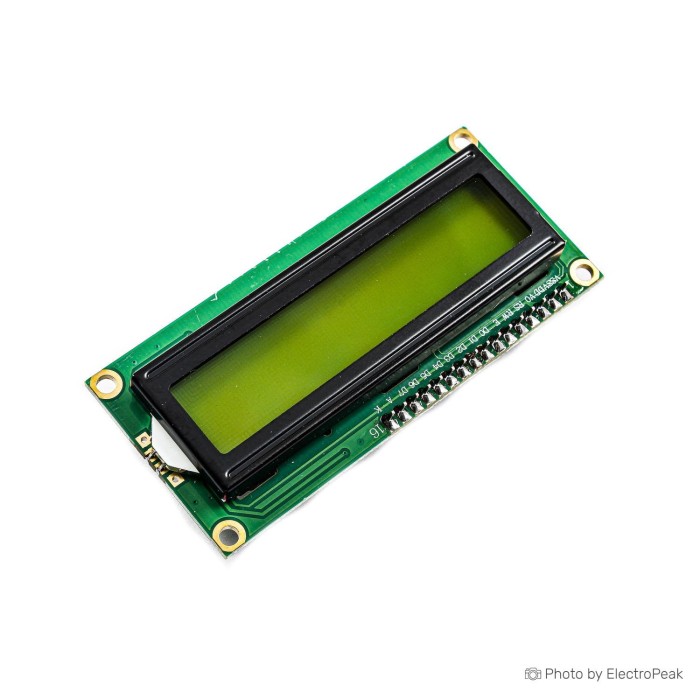
1602 16x2 LCD Display with I2C/IIC interface
SAVE
As low as $1.5000
In stock
Only %1 left
SKU
LCD-01-017
Ships in 2-3 business days, then:
Free delivery in 12-15 days by Tracked Economic Shipping on orders over $100.
Free delivery in 7-10 days by Express Shipping on orders over $300.
More shipping info

Shop with confidence Learn More
 1602 16x2 Character LCD Display Module Previous
1602 I2C LCD Module Review
This 1602 I2C LCD module is a 5V character display for showing short readings, status messages, menus, and error codes. Its two lines of 16 characters suit sensor dashboards, simple embedded interfaces, and first LCD projects.
The IIC/I2C/TWI interface communicates through two digital pins, compared with six pins required by the standard interface. Power and ground are still required, so a first connection uses four wires in total. An onboard potentiometer adjusts display contrast.
This is a text display, not a graphical interface. It shows 32 character positions at once, so it is not the right format for charts, icons, detailed menus, or high-information dashboards. For other formats, browse LCD display modules.
Specifications of 1602 16x2 LCD Display with I2C/IIC interface
- Input Voltage: 5V DC
- Display Model: 1602
- LCD Display Dimensions: 64.5 × 16 mm
- Product Dimensions: 80 × 35 × 9 mm
- Displayable Characters: 2 lines - 16 characters
- Contrast: High
- Internal LCD Controller: HD44780
- Backlight: Blue or Green (optional)
Choose this module when a compact text readout is enough and available GPIO pins matter. It fits temperature, humidity, time, voltage, battery, RSSI, and system-state readouts, along with simple text interfaces in copiers, fax machines, laser printers, industrial test equipment, and routers.
Need more visible text while retaining an integrated I2C interface? The 2004 I2C Character LCD - Green Backlight provides a 20x4 character layout. For graphical output rather than fixed character positions, the 0.96" I2C OLED - Yellow/Blue takes a different approach, with 128x64 graphic output and self-emitting pixels rather than a backlight.
For a first test, the Arduino Uno R3 (Clone) provides an Arduino-compatible controller with accessible I2C connections and a 5V supply.
1602 I2C LCD Module Specifications Explained
The “1602” format means 16 characters across by 2 lines, for 32 visible character positions. That is enough for compact messages such as “Temp: 24.6 C” or “System Ready.” Long labels and multi-item menus need to scroll or be shortened.
| Specification | Why it matters |
|---|---|
| 2 lines - 16 characters | The display is intended for short alphanumeric output. It does not provide a pixel-addressable graphics area for charts, icons, or images. |
| 64.5 × 16 mm LCD Display Dimensions | This is the visible LCD area, not the total board footprint. Use it when planning the window in an enclosure or front panel. |
| 80 × 35 × 9 mm Product Dimensions | This is the listed overall product size for initial fit planning. Generic 1602 I2C modules can vary in thickness and layout, so verify the received unit before final enclosure fabrication. |
| HD44780 Internal LCD Controller | HD44780 is the character-LCD controller family supported by common LCD libraries. It is designed for writing characters to fixed positions rather than drawing arbitrary graphics. |
| 5V DC Input Voltage | The display requires a 5V supply for reliable contrast. A lit backlight alone does not confirm that the LCD is receiving suitable display power. |
| High Contrast | Readable text still depends on setting the onboard contrast potentiometer correctly and on the selected backlight variant. |
| Blue or Green (optional) Backlight | Blue or green is offered as an option, but the current color-selection process and exact text/background combination are not specified. Do not assume one module can switch between both colors. |
Use the full 80 × 35 × 9 mm dimensions for preliminary mechanical planning, not the 64.5 × 16 mm visible area. Leave final panel cutouts, standoffs, and depth-critical enclosure work until the module is in hand.
For two lines with wider text, the 20x2 Character LCD - Blue Backlight provides 20 characters per row. If the project does not need an I2C-equipped module, the 1602 16x2 Character LCD provides the standard 16x2 character format.
1602 I2C LCD Module Setup and Compatibility
Initial wiring is straightforward: connect VCC to 5V, GND to GND, SDA to SDA, and SCL to SCL. The I2C interface conserves digital pins, but the display still needs the 5V power connection and ground.
| Area | Compatibility and setup notes |
|---|---|
| Display supply | Input Voltage: 5V DC. Use a 5V display supply for readable contrast. |
| Interface | IIC/I2C/TWI using SDA and SCL for communication. |
| First-test wiring | VCC, GND, SDA, and SCL. |
| Arduino | Suitable for Arduino projects with I2C connections and a 5V display supply. |
| ESP32 and STM32 | I2C can be used in these project environments, provided board pin mapping and voltage design are checked. |
| Raspberry Pi | I2C can be used in Raspberry Pi projects when power and logic-level design are verified. |
| Libraries | LiquidCrystal_I2C and hd44780 are common library options for the HD44780 I2C LCD family. |
| I2C address | The exact address is not specified. Common addresses for this module family are 0x27 and 0x3F; scan the I2C bus before configuring the test sketch. |
Quick first test
- Connect VCC to 5V, GND to GND, SDA to SDA, and SCL to SCL.
- Install an HD44780 I2C LCD library such as LiquidCrystal_I2C or hd44780 in the selected development environment.
- Run an I2C scanner and record the detected module address.
- Upload a basic text-display example configured with that address.
- Turn the onboard contrast potentiometer until the characters become visible.
The expected result is test text across the two 16-character lines after the contrast is adjusted. Use an Arduino IDE or the equivalent environment for the selected controller; no separate display-specific driver requirement is specified.
Setup warning: The listed display input is 5V DC. Supplying the display from 3.3V can leave the backlight illuminated while text remains faint or invisible, so this module should not be treated as a native 3.3V display.
Common first-use mistakes include swapping SDA and SCL, assuming the address is 0x27 without scanning, using a sketch set for another address, and diagnosing the module before adjusting contrast. For a fuller walkthrough, use the Arduino I2C LCD wiring guide. The broader character LCD module guide helps when comparing 0802, 1602, 2002, and 2004 formats.
What to add for a first test
- Required: Male/Female Jumper Wires 40 - 10/20/30 cm for the VCC, GND, SDA, and SCL connections.
- Required: A 5V power source for the display.
- Required: An I2C-capable controller, such as the Arduino Uno R3 (Clone).
- Recommended: A SYB-500 Breadboard - 200x240x8.5mm for solderless wiring and verification.
- Recommended: An I2C scanner sketch to identify the actual address before loading the final display sketch.
- Recommended: A multimeter for checking the 5V supply during troubleshooting.
- Optional: A level shifter where the controller-side I2C logic needs voltage translation.
- Optional: An enclosure for permanent installation after the physical module has been measured.
For more display space while retaining an integrated I2C connection, the 2004 I2C Character LCD - Green Backlight provides a 20x4 character layout.
1602 I2C LCD Module Limitations and Troubleshooting
A backlight that turns on with no visible text does not automatically indicate a faulty module. Adjust the contrast potentiometer first, confirm VCC is connected to 5V, and scan the I2C bus instead of assuming the address.
Common symptoms
| Symptom | Check first |
|---|---|
| Backlight on, no text | Adjust the contrast potentiometer, confirm the 5V display supply, and verify the detected I2C address. |
| Scanner does not find the module | Check VCC, GND, SDA, and SCL wiring, including whether SDA and SCL were swapped. |
| Example sketch does not work | Use the address found by the scanner. Common family addresses are 0x27 and 0x3F, but the installed address is not specified. |
| Backlight works at 3.3V but text is unreadable | Use the listed 5V DC display supply. Backlight illumination is not proof of reliable LCD contrast. |
The backpack IC fitted to the current module is not specified. PCF8574-family backpacks are common in this LCD family, which helps explain why common addresses can differ, but the exact chip and address must be identified from the individual module rather than assumed.
The blue-or-green backlight wording does not confirm a user-switchable color function. These colors are commonly fixed module variants, so confirm the available option before ordering if appearance matters.
Generic commodity modules can differ in backpack chip, jumper arrangement, PCB layout, and thickness between batches. Occasional family-level reports of soldering or assembly variation exist, but many apparent faults are resolved by correcting the address or contrast setting. This module is not intended for graphics, charts, dense dashboards, or revision-controlled production designs that require a guaranteed fixed I2C address and tightly controlled mechanical details.
For text-heavy screens, the 2004 20x4 Character LCD gives four lines of text. The 2004 I2C Character LCD - Green Backlight adds four-line capacity with an integrated I2C interface. For graphics rather than character cells, use the 0.96" I2C OLED - Yellow/Blue.
1602 I2C LCD Module vs 2004 LCD and OLED Displays
The format decision comes down to how much text must be visible at one time and whether the interface needs characters or graphics. This 1602 I2C module is the compact option for short text output and limited GPIO use.
| Display approach | Format | Choose it when |
|---|---|---|
| 1602 I2C LCD module | 16 characters by 2 lines | Short readings, status messages, error codes, or simple menus are enough and I2C pin savings are useful. |
| 20x2 character LCD | 20 characters by 2 lines | Each row needs to be wider than 16 characters while a two-line layout remains sufficient. |
| 2004 character LCD | 20 characters by 4 lines | The project needs substantially more visible text for menus, settings, or multiple sensor readings. |
| 0.96" I2C OLED | 128x64 graphic OLED | The interface needs graphics, icons, or higher-resolution visual output rather than fixed character positions. |
The standard 1602 16x2 Character LCD suits projects that need the standard 16x2 character format rather than an I2C-equipped module. For wider two-line text, the 20x2 Character LCD - Blue Backlight provides 20 characters per row.
The 2004 20x4 Character LCD provides a 20x4 layout and is HD44780-compatible; its I2C interface status is not specified. The 2004 I2C Character LCD - Green Backlight provides a 20x4 format with an integrated I2C interface. The 0.96" I2C OLED - Yellow/Blue is the alternative approach for graphic output, using self-emitting pixels with no backlight.
1602 I2C LCD Module FAQ and Buying Decision
What is the I2C address of this 1602 I2C LCD module?
The exact I2C address is not specified. Common addresses for this generic module family are 0x27 and 0x3F, so run an I2C scanner and use the detected address in the display test sketch.
Can this 1602 I2C LCD module run from 3.3V?
No, the listed input voltage is 5V DC. Use a 5V display supply for readable contrast, then confirm controller-side I2C voltage compatibility separately for a 3.3V microcontroller design.
Why is the backlight on but no text appears?
Adjust the onboard contrast potentiometer first, then scan for the actual I2C address and confirm VCC is connected to 5V. Incorrect contrast or an address mismatch commonly causes this symptom.
Is the blue or green backlight switchable on one module?
That is not confirmed. “Blue or Green (optional)” does not state that one module can switch colors; these are commonly fixed module variants, so confirm the available option before ordering when color matters.
What are the actual dimensions?
The LCD Display Dimensions are 64.5 × 16 mm, while the Product Dimensions are 80 × 35 × 9 mm. Use the product dimensions for preliminary fit planning and verify the received module before final enclosure fabrication.
Are jumper wires, a breadboard, or an Arduino included?
Included items are not specified. A first test needs jumper wires, an I2C-capable controller, and a 5V supply; the Male/Female Jumper Wires 40 - 10/20/30 cm provide the required four-wire connection.
Should I buy this 16x2 I2C LCD or a 20x4 LCD?
Choose this module for short readings and compact text. Choose the 2004 I2C Character LCD - Green Backlight when the interface needs 20 characters per row and four rows while retaining integrated I2C.
Should I choose an OLED instead?
Choose an OLED when the project needs graphics, icons, or higher-resolution visual output. The 0.96" I2C OLED - Yellow/Blue uses a 128x64 graphic OLED display rather than two fixed text lines.
Purchase decision
- Recommended for: 5V Arduino-style projects that need short text output, visible sensor readings, status messages, or simple menus while conserving digital pins through I2C.
- Maybe for: ESP32, STM32, and Raspberry Pi projects with correct I2C wiring and a 5V display-power design; enclosure projects that can verify the received module before final fabrication.
- Consider another option if: The project needs graphics, charts, more than 32 visible characters, a guaranteed fixed I2C address, tightly controlled batch consistency, or native 3.3V display supply operation.
Pre-purchase checklist
- ✓ Confirm that 2 lines of 16 characters are enough for the intended messages.
- ✓ Confirm that the project provides the listed 5V DC display input.
- ✓ Confirm that the controller has accessible SDA and SCL connections.
- ✓ Plan for VCC, GND, SDA, and SCL wiring.
- ✓ Add jumper wires if none are already available.
- ✓ Be prepared to run an I2C scanner before loading the final sketch.
- ✓ Confirm the required backlight color before ordering if appearance matters.
- ✓ Use 80 × 35 × 9 mm for initial space planning and verify the received module before final enclosure work.
- ✓ Choose a 2004 I2C character LCD if the interface needs four lines of text.
- ✓ Choose a graphical OLED if the interface needs icons, graphics, or higher-resolution output.
| Model | 1602 |
|---|---|
| Platform | Arduino Mega, Arduino Uno, Arduino Nano |
| Display Size Range | 2 inch to 3.49 inch |
| Display Resolution | 16x2 |
| Display Driver | HD44780 |
| Display Interface | I2C |
| Display Color Type | Monochrome |
| Touchscreen Type | None |
| Backlight Type | LED |
| Operating Voltage (V) | 5V |
| Pins | 4 |
| Dimensions (mm) | 64.5x16mm |
Write Your Own Review

Please complete your information below to login.
Sign In
Create New Account