
Product added to cart

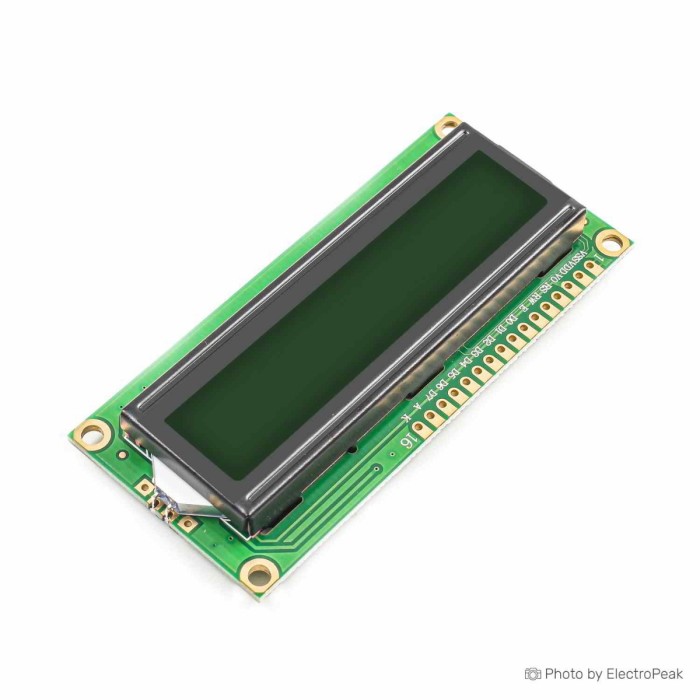
1602 16x2 Character LCD Display Module
SAVE
As low as $0.9500
In stock
Only %1 left
SKU
LCD-01-022
Ships in 2-3 business days, then:
Free delivery in 12-15 days by Tracked Economic Shipping on orders over $100.
Free delivery in 7-10 days by Express Shipping on orders over $300.
More shipping info

Shop with confidence Learn More
 2004 20x4 Character LCD Display Module Previous
1602 LCD Display Overview
This 1602 LCD Display is a 5V, 16x2 character module for short text, numbers, status messages, counters, and simple embedded interfaces. At approximately $0.90, it suits Arduino, electronics, and robotics projects that can use a parallel LCD connection and need only two lines of alphanumeric output.
This is not an I2C display, a graphical display, or a documented production-grade module. A green/blue backlight option is listed; confirm the selected color before ordering.
Specifications of 1602 16x2 Character LCD Display Module
- Display format: 16x2
- Module dimensions: 80x36x12 mm
- Display area: 64.5x16 mm
- Character size: 2.96x5.56 mm
- LCD backlight type: Green/Blue (optional)
- Controller: HD44780
- Supply voltage: 5V DC
- Operating temperature: 30- to 70+ degrees Celsius
- Display type: Character-type LCD (Liquid Crystal Display)
- Display size: 16 characters per row, 2 rows (16x2)
- Character set: Standard ASCII characters and symbols
- Interface: HD44780 controller or compatible controller
- Contrast adjustment: Potentiometer connection to the corresponding pin
- Power supply: DC power supply
- Character color: Black
- Input voltage: 5V
- Dimension: 36mm x 80mm x 10mm
- Weight: 30 gm
1602 LCD 16x2 Module Specifications Explained
A 16x2 format provides 16 character positions across two rows, for 32 visible characters at one time. It works well for temperature and voltage readouts, counters, short menu labels, relay states, and compact status panels. Longer messages need abbreviations, scrolling, or multiple display screens.
This is a character-type LCD, so it displays text, numbers, and built-in character symbols rather than arbitrary pixels. It is not intended for images, freely positioned interface elements, or general graphics. The listed standard ASCII characters and symbols should not be treated as unrestricted Unicode or arbitrary font support: HD44780-compatible displays use a built-in character ROM, and the exact ROM on this module is not supplied.
The module is listed for a 5V DC supply. That supply voltage does not establish that 3.3V GPIO signals from an ESP32, Raspberry Pi, RP2040, or similar controller will be accepted directly; verify logic-level compatibility before connection.
The listed green/blue backlight improves visibility in an installed project, but brightness, viewing angle, current requirement, and resistor arrangement are not supplied. For physical design, treat the approximately 80 × 36 mm footprint as preliminary: the published dimensions conflict on module height, so confirm the received board before finalizing an enclosure.
Need more room for menus or several sensor values at once? The 2004 20x4 LCD Module provides four rows and 80 visible character positions. To keep two rows while allowing longer messages, the 20x2 LCD with Blue Backlight provides 20 characters per row.
For pixel graphics, flexible layouts, or graphic UI elements instead of fixed character cells, use a different approach: the 0.96" OLED with SSD1306 Driver, a 128x64 I2C graphic display.
1602 LCD Parallel Interface and Arduino Compatibility
This 1602 LCD 16x2 module is the bare parallel form; I2C is not listed. A standard HD44780-compatible LCD connection uses power, ground, a contrast connection, control pins, and data pins. It takes more GPIO and wiring than an I2C-equipped version.
Common 4-bit operation uses RS, E, and D4–D7. R/W is commonly connected to ground for write-only operation. This reduces the data connection from eight pins to four while retaining the control and power connections required by a parallel display.
Arduino’s LiquidCrystal library supports HD44780-compatible displays in 4-bit and 8-bit modes. No operating-system driver or product firmware is required; the microcontroller code initializes and controls the LCD. For an Arduino project, an Arduino Uno R3 (Clone) provides a suitable controller platform with enough GPIO for the common parallel setup.
Use LiquidCrystal for this bare parallel module. I2C libraries, I2C addresses, SDA, and SCL wiring apply only after a compatible I2C backpack has been fitted. For full connection details, use this Arduino character LCD wiring and LiquidCrystal setup guide.
If reduced GPIO use and simpler serial wiring matter more than learning the parallel interface, choose the 1602 LCD with I2C Interface. It has a built-in I2C/IIC/TWI interface and reduces required microcontroller pins from six to two. An existing compatible display can also pair with an I2C/IIC Serial Interface Board Module for 1602/2004 LCD to add an I2C interface.
Direct 3.3V GPIO compatibility is not supplied and must not be assumed. When a compact character display with supplied 3.3V to 5V DC support is needed, the 0802 8x2 Character LCD is a better fit if its smaller 8x2 format is sufficient.
1602 LCD Limitations and Setup Considerations
A lit backlight does not confirm that the display is receiving valid data. A blank screen is commonly caused by an incorrect contrast setting, missing V0/VO wiring, swapped control pins, incorrect D4–D7 mapping, or use of an I2C example with a parallel LCD.
Contrast adjustment requires a potentiometer connection to the corresponding pin. Where no onboard potentiometer is fitted, the standard HD44780-family arrangement is a 10 kΩ potentiometer between 5V and ground, with its wiper connected to V0/VO. An onboard or included potentiometer is not confirmed, so plan for an external one unless package contents are verified.
The parallel interface and its GPIO demand are structural trade-offs, not defects. They make the module useful for learning conventional character-LCD wiring, repair work, and prototypes with enough pins available. They are less convenient where pin count or cable routing is tight. The 1602 LCD with I2C Interface is a better fit when an onboard contrast potentiometer and reduced GPIO use are required; a compatible module can also be paired with an I2C/IIC Serial Interface Board Module for 1602/2004 LCD.
Exact backlight current and the onboard resistor arrangement are not supplied. Inspect the received PCB or provide appropriate current limiting before directly connecting the LED backlight pins. Pin-header fitment is also not confirmed, so a pin header may be needed before breadboard use.
Enclosure work needs extra care because the published height values conflict and mounting-hole locations are not supplied. Verify the received module’s height and mounting details before committing to a panel or enclosure. Where available space is especially limited, the 0802 8x2 Character LCD provides a smaller character-display format.
No OEM, PCB revision, exact controller marking, current specification, or batch documentation is supplied. Generic modules can vary in component fitment, including regulators, resistor arrangements, and reset or interface details; that is a traceability limitation rather than a documented defect. The listed operating-temperature line is malformed and should not be used for outdoor, industrial, vibration, or environmental qualification.
This remains a fixed-grid character display. HD44780-compatible modules support only limited custom characters at the family level, so they are not suitable for unrestricted Arabic, Cyrillic, Unicode, arbitrary fonts, or complex icons.
1602 LCD vs I2C and Larger Character Displays
The right display depends mainly on interface wiring, visible text capacity, available space, and supply requirements.
| Display approach | Choose it when | Key difference |
|---|---|---|
| This 1602 LCD Display | You need simple 5V, two-line text output and have GPIO available. | Bare HD44780-compatible parallel format with 16 characters across two rows. |
| 1602 LCD with I2C Interface | You need built-in I2C/IIC/TWI wiring and reduced microcontroller pin use. | Reduces required microcontroller pins from six to two and includes an onboard contrast potentiometer. |
| 2004 20x4 LCD Module | Your interface needs four rows or more than 32 visible characters. | Provides 20 characters across four rows, for 80 visible characters total. |
| 20x2 LCD with Blue Backlight | Two rows are enough, but each line needs more room. | Provides 20 characters per row and has a blue-backlight, white-text presentation. |
| 0802 8x2 Character LCD | Space is tight and brief character output is enough. | Uses an ultra-compact 8x2 format and has supplied 3.3V to 5V DC support. |
For pixel graphics and an I2C connection, the 0.96" OLED with SSD1306 Driver is an alternative approach. Its 128x64 pixel display and SSD1306 driver support graphic layouts rather than a fixed character grid; check its onboard voltage regulator before connection.
Choose this model for low-cost, simple 5V parallel text output. Choose a variant when the project’s wiring, text capacity, size, or supply requirements change.
1602 LCD Setup and First Test
First, confirm that the received board is the bare parallel LCD form and does not already have an I2C backpack. Setup is straightforward once the interface type, contrast circuit, and pin mapping are correct.
- Connect VSS to ground and VDD to the listed 5V supply. The controller and LCD must share a common ground.
- When no fitted potentiometer is present, connect a 10 kΩ potentiometer between 5V and ground, with its wiper connected to V0/VO.
- Use a standard 4-bit connection with RS, E, and D4–D7. Connect R/W to ground for write-only operation.
- Confirm the received board’s backlight current-limiting arrangement before connecting the LED backlight, or provide suitable external current limiting.
- Initialize the display with Arduino LiquidCrystal code using lcd.begin(16, 2), then print a short Hello World message.
Readable text should appear on the two-line display after the contrast control is adjusted. If the backlight is on but no text appears, check the contrast position, V0/VO wiring, pin order, RS and E connections, D4–D7 mapping, R/W grounding, 5V supply, and the selected library. I2C examples do not apply unless an I2C backpack is fitted.
For a first test, pair the module with an Arduino Uno R3 (Clone), a SYB-500 Breadboard, and Male/Female Jumper Wires. You will also need a 5V supply, a 10 kΩ contrast potentiometer if one is not fitted, and HD44780-compatible initialization code.
A fuller Arduino character LCD wiring guide covers the family’s wiring and LiquidCrystal setup in more detail.
1602 LCD FAQ and Buying Checklist
Is this 1602 LCD I2C?
No. This is the bare parallel LCD form, and I2C is not listed. Use Arduino LiquidCrystal for the parallel module; I2C libraries apply only after fitting a compatible backpack. For a four-wire I2C connection with reduced pin use, choose the 1602 LCD with I2C Interface.
Does this 1602 LCD include a contrast potentiometer?
That is not confirmed. Contrast adjustment uses a potentiometer connection, but an onboard or included potentiometer is not specified. Plan for an external 10 kΩ potentiometer unless package contents are confirmed.
Can I use this 1602 LCD with an Arduino Uno?
Yes. An Arduino Uno can control an HD44780-compatible display with the LiquidCrystal library in 4-bit or 8-bit mode. The bare parallel module needs multiple digital connections, 5V power, common ground, and contrast wiring.
Can I connect this 1602 LCD directly to an ESP32, Raspberry Pi, or another 3.3V board?
Direct connection should not be assumed. The display is listed for 5V, while direct 3.3V GPIO compatibility is not supplied; verify input-high thresholds and use level shifting or another display approach where required.
Why is the LCD backlight on but no text appears?
Check contrast first, then V0/VO wiring, RS and E wiring, D4–D7 pin order, R/W grounding, 5V power, and the library/interface selection. A glowing backlight confirms only that the backlight is powered, not that LCD communication is working.
Do I need a resistor for the LCD backlight?
Inspect the received PCB or provide appropriate current limiting before direct LED connection. Exact backlight current and onboard resistor fitment are not supplied.
Can this 1602 LCD display graphics, images, Unicode, Arabic, Cyrillic, or arbitrary fonts?
No. It is a character LCD rather than a general graphic display. It uses a built-in character ROM with limited custom-character capability, and the exact ROM is not supplied. For pixel graphics, flexible layouts, or icons, use the 0.96" OLED with SSD1306 Driver.
Are jumper wires, pin headers, a resistor, and a potentiometer included?
These package contents are not confirmed. Plan for connection wiring, a contrast potentiometer, and appropriate backlight handling; a pin header may also be required.
What are the exact dimensions and operating-temperature limits?
The published dimensions contain conflicting height values, and the operating-temperature entry is malformed. Verify the received module or obtain a mechanical drawing before enclosure design or environmental qualification.
Is 16x2 enough for my interface?
It is enough for two short text lines, numeric readings, labels, and status messages. If the interface needs more than 32 visible characters, the 2004 20x4 LCD Module provides four rows and 80 visible characters.
Ideal for
Arduino and 5V microcontroller projects needing low-cost, two-line text or numeric output with enough GPIO for a parallel HD44780-compatible LCD.
Maybe for
Students learning parallel display wiring, repair projects matching a standard 1602-style module, and prototypes where dimensions, included parts, and backlight details can be checked before final integration.
Avoid if
You need I2C out of the box, only have unverified 3.3V GPIO, need graphics or multilingual font flexibility, need more than 32 visible characters, require published current and backlight data, or need a traceable production component.
Buying checklist
- ✓ Confirm that a bare parallel LCD is required rather than I2C.
- ✓ Confirm that the controller has GPIO available for RS, E, and D4–D7 wiring.
- ✓ Confirm access to a 5V supply and common ground.
- ✓ Confirm the selected green or blue backlight option.
- ✓ Plan for a 10 kΩ contrast potentiometer unless one is confirmed as fitted or included.
- ✓ Plan for jumper wires and, if needed, a pin header and breadboard.
- ✓ Confirm that 16 characters by 2 rows is enough for the interface.
- ✓ Verify 3.3V GPIO compatibility before using ESP32, Raspberry Pi, RP2040, or similar controllers.
- ✓ Confirm backlight resistor and current handling from the received PCB before direct LED connection.
- ✓ Verify the received module’s dimensions before committing to an enclosure.
- ✓ Confirm package contents because header, wires, resistor, and potentiometer inclusion are not supplied.
An I2C/IIC Serial Interface Board Module for 1602/2004 LCD is optional when a compatible character LCD needs an added I2C/IIC serial interface.
| Model | 1602 |
|---|---|
| Platform | Arduino Mega, Arduino Uno, Arduino Nano, Raspberry Pi 3, Raspberry Pi 4, Raspberry Pi 5 |
| Display Size Range | 2 inch to 3.49 inch |
| Display Resolution | 16x2 |
| Display Driver | HD44780 |
| Display Interface | Parallel |
| Panle Type | TN |
| Display Color Type | Monochrome |
| Touchscreen Type | None |
| Backlight Type | None |
| Operating Temp (°C) | -30 to +70 |
| Operating Voltage (V) | 5V |
| Pins | 16 |
| Dimensions (mm) | 80x36x12 mm |
Write Your Own Review

Please complete your information below to login.
Sign In
Create New Account