
Product added to cart

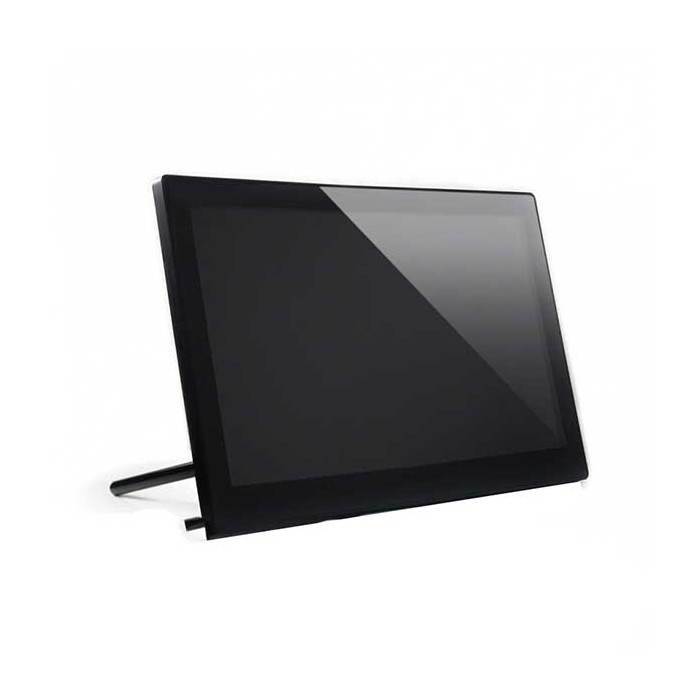
Waveshare 13.3 inch 1920x1080 IPS HDMI LCD Type H With Case
$160.0000
In stock
SKU
LCD-01-093
Volume discounts:
- +5 3 % $154.6300
- +10 5 % $151.9400
- +25 7 % $149.2500
- +50 8 % $146.5700
- +100 10 % $143.8800
Ships in 2-3 business days, then:
Free delivery in 12-15 days by Tracked Economic Shipping
Free delivery in 7-10 days by Express Shipping on orders over $300.
More shipping info

Shop with confidence Learn More
 Waveshare 3.5 inch Raspberry Pi TFT LCD Type C SPI with Resistive Touch Previous
Waveshare 13.3 inch HDMI LCD review
The Waveshare 13.3 inch IPS HDMI Capacitive Touch Display (Type H) is a 13.3-inch 1920x1080 desktop display in an ABS housing. Built for single-board computers, desktop workstations, and gaming consoles, it accepts HDMI or VGA video, routes touch events through Micro USB, and provides audio through internal stereo speakers or a headphone jack. It suits fixed test benches, control dashboards, and kiosk builds where an enclosed panel avoids mounting bare driver boards. It requires separate cables for video, touch, and dedicated DC power, so it is not a single-cable USB-C portable monitor. Its brightness rating is also not documented in the listing specifications.
For builders comparing enclosed options across our range of LCD displays, the raw technical specifications offer a clear reference for size, resolution, and core connectivity.
Specifications of Waveshare 13.3 inch 1920x1080 IPS HDMI LCD Type H With Case
- Panel Type: IPS
- Resolution: 1920x1080 pixels
- Size: 13.3 inches
- Viewing Angle: 178 degrees
- Touch Type: Capacitive, 10-point multi-touch
- Touch Panel Material: Strengthened glass
- Video Interface: HDMI / VGA
- Touch Output Interface: Micro USB
- Audio Output: Hi-Fi speaker and 3.5mm audio jack
- Body Material: ABS
- Supported OS: Windows 7/8/8.1/10
- Compatible Devices: Raspberry Pi, Jetson Nano, PCs, PS4, Xbox, Switch
Waveshare 13.3 inch HDMI LCD specifications and compatibility
The IPS panel provides a 178-degree horizontal and vertical viewing angle. This wide viewing cone keeps colors and contrast stable when the screen is mounted in an operator kiosk, positioned off-center on a workbench, or viewed alongside a colleague. Running 1920x1080 pixels across a 13.3-inch diagonal produces crisp text for Linux terminals, software IDEs, and user interfaces without taking up excessive desk depth.
The capacitive digitizer uses strengthened glass across the front surface and supports up to 10-point multi-touch interaction. Video enters through HDMI or VGA. While the listing specifies VGA support, manufacturer documentation confirms that a VGA signal requires an external Mini HDMI-to-VGA adapter rather than a full-size D-sub port on the housing. For a reliable video feed from an HDMI-equipped host, a standard HDMI video cable handles full 1080p output cleanly.
Audio is handled by integrated Hi-Fi speakers or through a standard 3.5mm stereo jack. Touch data travels separately through the dedicated Micro USB interface on the panel housing. The listing documents support for Windows 7, 8, 8.1, and 10, while manufacturer documentation also verifies Windows 11 compatibility. Verified compatible devices include Raspberry Pi, Jetson Nano, PCs, PS4, Xbox, and Nintendo Switch. Need a smaller footprint? The smaller 11.6-inch Type H display provides a more compact enclosed option.
| Specification / Feature | Documented Value | Why It Matters |
|---|---|---|
| Display Panel & Angles | IPS, 178° viewing angle | Prevents color inversion and contrast wash-out when viewed from an angle in kiosks or side-car desk positions. |
| Resolution & Size | 1920x1080 on 13.3" panel | Delivers sharp Full HD scaling for development dashboards, coding windows, and 1080p console feeds. |
| Touch Technology | Capacitive 10-point, glass front | Enables responsive gestures; hardened glass adds scratch resistance during public or workshop use. |
| Touch Communication | Micro USB connection | Transmits digitizer data directly as a USB HID device, keeping video signaling and touch coordinates on isolated buses. |
| Video Input Routing | HDMI / VGA (via adapter) | Native HDMI connects standard SBCs and consoles; legacy VGA operation requires an intermediate Mini HDMI-to-VGA adapter. |
| Audio Capabilities | Stereo speakers + 3.5mm jack | Outputs basic system alarms or console game audio without requiring separate powered desk speakers. |
| Luminance / Brightness | Not specified | No official nit or cd/m² rating is published; best reserved for controlled indoor lighting rather than high-ambient settings. |
Waveshare 13.3 inch touch monitor setup and power
Setting up this 13.3-inch touch monitor requires three separate connections: display power, video signaling, and USB touch output. Unlike portable laptop monitors that draw operating power over USB-C, manufacturer documentation specifies dedicated 12V/1A DC power for this display. Powering the panel directly from single-board computer GPIO pins or standard 5V USB ports will prevent proper initialization. A dedicated supply such as a compatible 12V display power adapter supports steady operation without power droop.
The current product listing does not include a verified package-contents breakdown, so verify your available cabling before deployment. You need an HDMI cable for video and a standard USB-A-to-Micro-B cable to connect the host computer to the screen's Micro USB touch port.
- Connect an external 12V power supply to the display's DC barrel jack.
- Connect an HDMI cable from your Raspberry Pi, Jetson Nano, PC, or console to the monitor's video input. If connecting an analog VGA source, attach a Mini HDMI-to-VGA adapter between the cable and the display.
- Connect a USB-A-to-Micro-B cable between a USB port on your host system and the Micro USB touch port on the display enclosure.
- Power on your host system. The monitor will detect the incoming video stream and display the desktop or boot sequence.
- Test capacitive touch response by tapping an interface icon. On Windows, calibrate touch coordinates within tablet settings if your cursor offsets slightly.
In isolated Raspberry Pi configurations, community feedback indicates that touch input occasionally fails to register on first boot. Reseating the Micro USB touch lead in another USB port on the Pi, or confirming that the USB controller handles HID inputs cleanly without power contention, typically resolves the issue.
Waveshare 13.3 inch HDMI LCD limitations and revision check
A few technical limitations should shape your buying decision. The display has no authoritative brightness rating in its technical specifications. Without documented luminance data, it should not be specified for high-glare environments, bright sunlit retail windows, or outdoor installations.
Physical dimensions and bare weight are not standardized in the listing data, partly because manufacturing hardware varies across revisions. The current product listing specifies an ABS body material, which corresponds to the V1 hardware revision documented by the manufacturer. That V1 revision uses a fixed 75° rear stand. Manufacturer documentation for the revised V2 release instead specifies a polycarbonate case, a 60° stand angle, and CE and HDMI Adopter certifications. If your enclosure design requires exact millimeter clearances or strict adherence to a specific housing revision, check current warehouse inventory before finalizing a bulk purchase.
For an integrated home-automation console or voice dashboard rather than a passive external HDMI monitor, an integrated smart mirror and CM4 dashboard offers an all-in-one computing setup built specifically for wall and desk automation.
Waveshare 13.3 inch HDMI LCD vs other Type H displays
Waveshare offers several enclosed displays in the Type H family, letting you choose screen size and features around the available installation space.
| Model | Screen Size | Case & Stand Style | Video Inputs | Key Differentiating Features |
|---|---|---|---|---|
| Waveshare 11.6" Type H LCD | 11.6 inches | ABS enclosure | Dual HDMI / VGA inputs | Optically bonded panel; supports 10-point touch on Windows, single-point touch on Raspberry Pi OS. |
| Waveshare 13.3" Type H LCD (This unit) | 13.3 inches | ABS enclosure (V1 documented 75° stand) | HDMI / VGA (via adapter) | 1080p IPS panel, 10-point capacitive touch, internal speakers, compact Full HD visual area. |
| Waveshare 15.6" Type H LCD | 15.6 inches | ABS enclosure with 55° adjustable stand | Dual HDMI / VGA inputs | Expansive desktop viewing area, integrated IR remote control support, 12V/1A external power. |
For a broad, full-format desktop interface for multi-window development or gaming, the larger 15.6-inch Type H display adds screen real estate and an integrated 55° adjustable kickstand. Buyers seeking an embedded open-frame panel should distinguish this cased monitor from bare module kits such as the 13.3" FHD IPS Touch Display with Driver Board. That un-cased option uses a bare raw panel, an exposed RTD2550 driver board, and delicate ribbon cables for direct integration into custom chassis rather than use as a finished desktop monitor.
Waveshare 13.3 inch HDMI LCD accessories and mounting
Deploying this monitor requires a small set of supporting hardware, depending on whether it will sit on a desktop, be bolted into an equipment rack, or mount to an arm.
- Video Cabling: Use an HDMI source outputting up to 1080p. While an HDMI lead may accompany the display, a verified 4K/60Hz-rated HDMI video cable prevents signal instability over extended runs.
- Display Power: Dedicated 12V DC power is mandatory. An external wall adapter meeting the documented 12V/1A standard is required to illuminate the panel and run internal logic.
- Touch Interface Cable: A standard USB-A-to-Micro-B cable connects the display's Micro USB touch port to an open USB port on your host PC, Raspberry Pi, or Jetson Nano.
- VGA Adapter Hardware: For an older motherboard or legacy industrial computer running analog VGA, an external Mini HDMI-to-VGA adapter is required to convert the video signal.
- Chassis Mounting: Manufacturer documentation notes 100×100mm M4 mounting holes on the rear of the enclosure, allowing integration with standard VESA-pattern articulated arms or fixed wall brackets. Verify your unit's screw pitch before final assembly.
- Desktop Positioning: If the built-in rear kickstand tilt does not suit your viewing height, placing the display on an adjustable desktop display stand provides flexible tilt and height control.
- Audio Output: If the built-in stereo speakers do not provide the volume or acoustic isolation your workspace requires, connect external speakers or headphones through the 3.3mm audio jack.
Waveshare 13.3 inch HDMI LCD FAQ and buying checklist
Does the Waveshare 13.3 inch HDMI LCD work with Raspberry Pi?
Yes, the display is fully compatible with Raspberry Pi boards. HDMI carries the 1080p video stream, while a separate USB-A-to-Micro-B cable routes touch input to the Pi's USB ports. In rare cases where touch input is not recognized on boot, community testing indicates that reseating the USB cable or verifying USB controller settings resolves the issue.
Does the Waveshare 13.3 inch touch monitor work with Windows 11?
Yes. Although the listing details Windows 7, 8, 8.1, and 10, manufacturer documentation confirms Windows 11 support. Touch interaction operates natively through the standard Windows USB HID driver, though basic screen calibration in Windows Tablet Settings may help align edge gestures.
Can I power the Waveshare 13.3 inch HDMI LCD from USB or Raspberry Pi GPIO?
No, the display cannot be powered from USB or GPIO headers. Manufacturer documentation specifies a dedicated 12V/1A external DC power input. The Micro USB port on the housing is exclusively wired for touch input communication, not for supplying operating current to the screen.
Does this display have a built-in VGA port?
No, the housing has no native full-size 15-pin D-sub VGA connector. Although the display logic supports VGA signaling, manufacturer documentation states that a VGA source requires an external Mini HDMI-to-VGA adapter.
What is the difference between the Waveshare 13.3 inch Type H display and the 11.6-inch or 15.6-inch Type H versions?
Screen size, physical enclosure layout, and stand styles vary across the range. The 13.3-inch model balances portability with a comfortable 1080p desktop workspace. The smaller 11.6-inch Type H display uses optical panel bonding for a tighter footprint, while the larger 15.6-inch version adds an adjustable 55° stand and integrated IR remote control support.
Is this the ABS V1 version or the polycarbonate V2 version?
The product listing specifies ABS body material, matching the manufacturer's V1 hardware definition. Waveshare also produces a V2 model with a polycarbonate case and a 60° stand. If your installation requires a specific housing polymer or stand angle, confirm current warehouse stock before placing an order.
Are the power adapter, HDMI cable, USB touch cable, and stand included?
Package contents are not verified in the current listing data. While Waveshare production bundles typically include basic connection cables, a stand, and a power brick, confirm the exact in-box accessories with support before checkout so you have all needed leads on hand.
For a supplemental power source in a dedicated bench setup, an additional 12V power adapter provides ample current overhead, provided its connector size and center-pin polarity match the screen's DC barrel input.
Purchase decision summary
- Ideal for: Developers, system integrators, and hobbyists who want an enclosed 1080p IPS touch display for a Raspberry Pi, Jetson Nano, desktop PC, or gaming console in a fixed desk or kiosk setup.
- Maybe for: Enclosure builds using 100×100mm M4 mounts, provided you can supply external 12V power and verify shipped hardware revision details in advance.
- Avoid if: You need a single-cable USB-C portable monitor, require high-brightness visibility for outdoor direct sunlight, or must have native VGA input without an external adapter.
Buying checklist
- Confirm your host device provides standard HDMI video output.
- Ensure an open USB-A port is available on your host computer to transmit capacitive touch data.
- Verify that your setup has access to a dedicated 12V DC power outlet.
- Source a Mini HDMI-to-VGA adapter if you plan to connect legacy analog video equipment.
- Confirm with the seller whether display cables, touch leads, and power supplies are included in the current package.
- Verify housing material and stand angle requirements if your installation relies strictly on V1 (ABS, 75°) or V2 (polycarbonate, 60°) enclosure geometry.
- If your project demands a more compact footprint, evaluate alternative LCD displays such as the 11.6-inch variant before ordering.
| Model | 13.3inch HDMI LCD (H) |
|---|---|
| Platform | Raspberry Pi 3, Raspberry Pi 4, Raspberry Pi 5, Jetson Nano, Computers, Game Consoles (PS4, XBOX, Switch) |
| Display Size | 13.3in |
| Display Size Range | 10.1 inch and larger |
| Display Resolution | 1920x1080 |
| Display Driver | Internal Driver |
| Display Interface | HDMI, VGA |
| Panle Type | IPS |
| Display Color Type | Full Color |
| Touchscreen Type | Capacitive |
| Backlight Type | White LED |
| Viewing Angle (°) | 178 degrees |
| Operating Voltage (V) | 12V |
Write Your Own Review

Please complete your information below to login.
Sign In
Create New Account