
Product added to cart

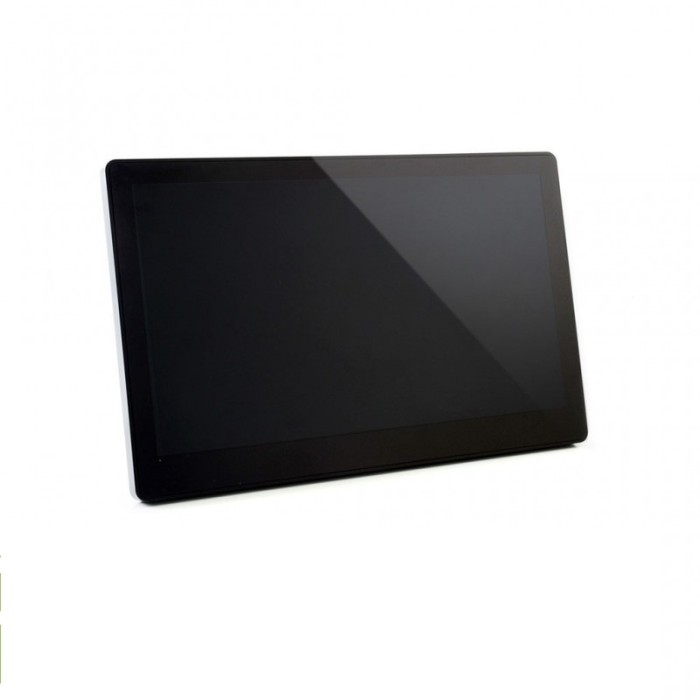
Waveshare 11.6 inch IPS HDMI Touch LCD Type H with Case
$159.0000
In stock
SKU
LCD-01-107
Volume discounts:
- +5 3 % $154.4000
- +10 4 % $152.1000
- +25 6 % $149.8000
- +50 7 % $147.5000
- +100 9 % $145.2000
Ships in 2-3 business days, then:
Free delivery in 12-15 days by Tracked Economic Shipping
Free delivery in 7-10 days by Express Shipping on orders over $300.
More shipping info

Shop with confidence Learn More
 Waveshare 15.6 inch 1920x1080 IPS HDMI LCD Type H With Case Previous
Waveshare 11.6 inch HDMI Touch LCD review
The Waveshare 11.6 inch IPS HDMI Touch LCD Type H with Case is a Full HD 1920x1080 IPS capacitive display in an integrated ABS enclosure for Raspberry Pi, Jetson Nano, PCs, and gaming consoles. It uses HDMI for video, a dedicated Micro USB touch interface, integrated audio output, and documented mounting provisions. It suits mounted desktop setups, interactive kiosks, and maker test benches—not single-cable portable setups or standalone media playback.
Unlike bare panels that require custom frames, this version includes a 75-degree tilt stand and 75x75 mm M4 mounting holes for immediate bench or chassis installation. It needs an external 12V power source alongside the HDMI and USB touch connections, so it is a fixed-station monitor rather than a USB-powered travel accessory. Pricing is currently unlisted for this model. For other form factors and resolutions, see our LCD display category.
Specifications of Waveshare 11.6 inch IPS HDMI Touch LCD Type H with Case
- Panel Type: IPS with Optical Bonding
- Resolution: 1920x1080 pixels
- Size: 11.6 inches
- Viewing Angle: 178 degrees
- Touch Type: Capacitive, 10-point (Windows), 1-point (Raspberry Pi)
- Touch Panel Material: Strengthened glass
- Video Interface: HDMI / VGA
- Touch Output Interface: Micro USB
- Audio Output: Hi-Fi speaker and 3.5mm audio jack
- Media Playback via USB: Supports MP4, AVI, RMVB, etc.
- Body Material: ABS
- Menu: Multilingual OSD settings
- Supported OS: Windows 7/8/8.1/10/11, Raspberry Pi OS, Ubuntu, WIN10 IoT
- Compatible Devices: Raspberry Pi (3, 4, Zero), Jetson Nano, PCs, PS4, Xbox, Switch
Waveshare 11.6 inch HDMI Touch LCD specifications explained
For an embedded display, interface and panel choices matter as much as the headline numbers. The table below shows how the key hardware specifications affect bench builds and user interfaces.
| Specification | Technical Value | Operational Impact and Trade-offs |
|---|---|---|
| Resolution & Size | 1920x1080 pixels on 11.6 inches | Delivers crisp text rendering and high information density without visual pixelation. Dense user interfaces may require desktop scaling on smaller operating system targets to keep UI buttons easily touchable. |
| Panel Technology | IPS with Optical Bonding, 178° viewing angle | Maintains consistent color fidelity and contrast across steep side and top angles, which is vital when the screen is mounted inside an off-axis console or industrial kiosk. Optical bonding minimizes internal reflections between the touch layer and LCD. |
| Touch Technology | Capacitive with strengthened glass | Provides responsive finger tracking and scratch resistance for regular physical interaction. It is designed for bare-finger input rather than non-conductive styluses or heavy industrial work gloves. |
| Interface Separation | HDMI video with Micro USB touch | Separates visual signals from touch data. Video is transmitted over standard HDMI cabling, while touch input registers through a secondary USB connection to the host. |
| Audio Subsystem | Integrated Hi-Fi speaker and 3.5mm jack | Extracts digital audio directly from the HDMI stream. This eliminates external sound cards on single-board computers, though the 3.5mm jack serves strictly as an audio output rather than an auxiliary microphone or line input. |
| Display Enclosure | ABS plastic body | Protects internal driver boards and ribbon cables from accidental benchtop shorts, eliminating the need to design or 3D-print a custom enclosure. |
| OSD Menu | Multilingual on-screen display | Enables onboard push-button adjustments for brightness, contrast, and color balance directly on the hardware without altering host software configuration files. |
One specification needs clarification. Although the specification list notes USB media playback for formats such as MP4 and AVI, technical documentation defines the Micro USB port strictly as the host touch interface. The display lacks an onboard standalone media decoder board. Your connected host computer must render and transmit video.
Waveshare 11.6 inch HDMI Touch LCD compatibility and power requirements
Installation depends on matching host hardware, video interfaces, and independent power rails. Standard single-board computers cannot supply the current required to drive this display directly from their onboard USB headers.
| Subsystem | Documented Requirement | Host Integration Notes |
|---|---|---|
| Host Hardware | Raspberry Pi (3, 4, Zero), Jetson Nano, PCs, PS4, Xbox, Switch | Requires a full-size HDMI connection on standard PCs and consoles, or appropriate micro/mini HDMI adapters when connecting to a Raspberry Pi 4 or Raspberry Pi Zero. |
| Operating Systems | Windows 7/8/8.1/10/11, Raspberry Pi OS, Ubuntu, WIN10 IoT | Windows and Raspberry Pi touch inputs operate without driver installation. Windows supports up to 10-point touch, while current specifications list single-point touch on Raspberry Pi. |
| Primary Power Input | 12V / 1A DC via 3.5x1.35 mm barrel jack | Requires dedicated main power. The panel cannot boot or operate from USB bus power, USB-C power delivery, or an HDMI signal line. |
| Touch Power & Data | 5V / ~80mA via Micro USB | Draws minimal current from the host USB port solely to power the capacitive touch controller and transmit touch coordinate packets. |
| Video Input | HDMI / VGA | Full HDMI signals run natively. Connecting via VGA requires a separate Mini-HDMI-to-VGA adapter cable; there is no native 15-pin D-sub VGA connector on the chassis. |
For standard desktop graphics cards, verify the connection sequence. Certain PC graphics drivers fail to negotiate HDMI hot-plug handshakes when the screen is powered on after the computer boots. A system restart may be required to detect the native 1920x1080 panel timing. For reliable video signaling, use a high-bandwidth HDMI cable for host video output.
Waveshare 11.6 inch HDMI Touch LCD limitations and setup notes
This display has clear integration boundaries. Addressing them before installation helps prevent downtime, unsuitable enclosure mounting, and communication errors across your test benches.
- No single-cable USB-C operation: This unit does not feature a DisplayPort Alt Mode USB-C port. Setup always requires separate lines for 12V main power, HDMI video, and Micro USB touch.
- Adapter required for VGA sources: Although the internal controller supports VGA video, the with-case enclosure exposes HDMI ports. A Mini-HDMI-to-VGA conversion cable is necessary for legacy industrial equipment.
- No standalone USB media decoding: Do not order this unit as a looping retail signage screen that reads video directly from a thumb drive. The USB port routes touch data directly to a host operating system.
- Windows multi-monitor touch mapping: Alongside a primary desktop monitor, Windows may initially route touch gestures from this secondary screen to your main display. Open Windows Control Panel, navigate to Tablet PC Settings, and run the screen touch configuration wizard to correct the assignment.
- Raspberry Pi display scaling: If a connected single-board computer does not read EDID data over HDMI properly, declare manual display timing parameters such as
hdmi_group=2andhdmi_mode=82in your Raspberry Pi configuration file to lock output at 1920x1080 at 60Hz.
Waveshare 11.6 inch HDMI Touch LCD vs Type B and Type H display options
Physical space, touch technology, resolution, and mounting needs determine which Waveshare touch display fits a build. The table below compares the 11.6-inch Type H with case against other options in the same manufacturer line.
| Model | Screen Size & Resolution | Touch Interface | Enclosure & Mounting | Application Fit |
|---|---|---|---|---|
| Waveshare 11.6" Type H with Case | 11.6", 1920x1080 IPS | Capacitive, 10-point (Windows), 1-point (Pi) | ABS case, 75° stand, 75x75 mm M4 VESA | Compact Full HD monitoring, benchtop diagnostics, and interactive kiosks needing high pixel density. |
| Waveshare 10.1" Type B with Case | 10.1", 1280x800 IPS | Capacitive, 10-point | Black acrylic case, 30°/45° tilt stand | Choose the smaller 10.1-inch capacitive-touch display when lower graphical overhead and a multi-angle acrylic chassis matter more than the 11.6-inch Full HD format. |
| Waveshare 10.1" Resistive LCD | 10.1", 1024x600 IPS | Resistive, single-point | Open frame (no enclosure) | For custom cabinetry or dirty workshops, the resistive-touch display option works with stylus pens or heavy work gloves; touch is disabled on PCs. |
| Waveshare 13.3" Type H with Case | 13.3", 1920x1080 IPS | Capacitive, 10-point | ABS enclosure, built-in sound | The larger 13.3-inch Full HD display provides more screen real estate when 1080p desktop user interface elements need to be easier to select. |
| Waveshare 15.6" Type H with Case | 15.6", 1920x1080 IPS | Capacitive, 10-point | ABS case, 55° stand, IR remote | The larger 15.6-inch display with listed remote features suits fixed control rooms and media testing installations that require remote OSD access. |
Waveshare 11.6 inch HDMI Touch LCD accessories and first connection
Current website data does not list package contents such as included cables or a power supply. Source the required connection hardware before deployment to avoid startup delays.
Required Hardware
- 12V DC Main Power Supply: The V2 hardware requires an external 12V/1A power adapter terminated with a 3.5x1.35 mm DC barrel plug. Standard 12V supplies exist, but verify connector compatibility for a 12V power adapter (2A) or a higher-current 12V power adapter (3A) before connecting either, as barrel pin dimensions vary.
- HDMI Cable: Required to transmit digital video and embedded audio from your single-board computer or PC. Use a tested HDMI cable for host video output. Raspberry Pi 4 and Zero models also require their respective micro-to-standard HDMI adapters.
- Micro USB Cable: Connects the display's touch port to a standard USB Type-A or Type-C port on your host system for digitized touch data.
Recommended & Optional Hardware
- Mini-HDMI to VGA Adapter Cable: Needed only when connecting legacy computing equipment without native HDMI output.
- VESA Mount Hardware: Use standard 75x75 mm M4 screws with an articulating monitor arm or wall bracket for permanent installations.
- Secondary Desk Stand: The ABS enclosure includes an integrated 75-degree rear tilt foot. An adjustable optional desktop positioning support can be used when variable viewing angles are required on your workbench.
- Audio Output: Use standard 3.5mm headphones or powered desktop speakers if the internal speakers do not suit your workspace acoustic needs.
First-Time Connection Sequence
- Seat the 12V power supply barrel connector firmly in the display's power socket, then connect it to mains electricity.
- Attach a Micro USB cable from the display's touch port to an available USB port on your host computer or Raspberry Pi.
- Connect the HDMI cable from your host video output to the display's HDMI input port.
- Power on your host computer. If the operating system does not register the display, reboot the host with all cables seated so the graphics chip can read the panel's EDID handshake.
- Verify touch operation by tapping interface icons. On Windows, run the Tablet PC Settings utility if touch coordinates trigger on an adjacent monitor.
Waveshare 11.6 inch HDMI Touch LCD FAQ
Does the Waveshare 11.6 inch HDMI Touch LCD need touch drivers?
No manual driver installation is required for touch operation on Windows or Raspberry Pi OS. The internal capacitive controller enumerates as a standard HID digitizer through the Micro USB cable.
Can the Waveshare 11.6 inch HDMI Touch LCD run from HDMI, USB, or USB-C power alone?
No. The display cannot run from bus power. Manufacturer documentation states that the hardware requires a 12V/1A main power supply through its 3.5x1.35 mm DC input, while the USB port draws approximately 80mA strictly for touch signaling.
Does the Waveshare 11.6 inch HDMI Touch LCD have a built-in VGA port?
No native VGA socket is built into the chassis. Although the display processor supports VGA video signals, it requires a separate Mini-HDMI-to-VGA cable adapter.
Is touch input sent through HDMI on the Waveshare 11.6 inch HDMI Touch LCD?
No. HDMI cables carry only digital video and audio signals. Touch input coordinates travel exclusively through the secondary Micro USB connection to your host system.
Does the Waveshare 11.6 inch HDMI Touch LCD play videos directly from a USB flash drive?
No, the display does not function as an autonomous media player. Despite the USB media playback note on the specification sheet, manufacturer technical documentation confirms that the USB port is designated for touch output, requiring an active host computer to drive playback.
Will the Waveshare 11.6 inch HDMI Touch LCD work with Raspberry Pi 4 and Jetson Nano?
Yes, both single-board computers are supported. You need an adapter to connect the micro-HDMI port on the Raspberry Pi 4 to the full-size HDMI port on the display enclosure, along with an available USB port for touch input.
What touch behavior does the Waveshare 11.6 inch HDMI Touch LCD provide?
The display specifications state 10-point capacitive touch capability under Windows operating systems and single-point touch operation on Raspberry Pi systems.
Is a power adapter included with the Waveshare 11.6 inch HDMI Touch LCD Type H with Case?
Current catalog data does not detail package contents. Secure an appropriate 12V/1A DC adapter with a 3.5x1.35 mm plug before your hardware arrives.
Should I choose the 13.3-inch or 15.6-inch Type H display instead?
Select the larger 13.3-inch Full HD display or the larger 15.6-inch display with listed remote features when your installation needs larger touch targets at 1080p resolution. For industrial applications requiring glove-compatible input, consider the resistive-touch display option instead.
Purchase decision summary
Ideal for: Developers, system integrators, and maker bench builders using Raspberry Pi, Jetson Nano, mini-PCs, or game consoles who need an enclosed 11.6-inch 1080p IPS touch display with HDMI video, separate USB touch, onboard speakers, and standard 75x75 mm VESA mounting.
Maybe for: Legacy industrial systems with VGA outputs that can accommodate an external Mini-HDMI-to-VGA adapter, or multi-display Windows setups where users are comfortable configuring touch screen assignments in Windows settings.
Consider another option if: You need single-cable USB-C power and video delivery, confirmed standalone media playback from flash drives without an external computer, native D-sub VGA ports, or an open-frame resistive panel designed for heavy industrial glove operation.
Buying checklist
- Confirm that the 11.6-inch physical screen footprint fits your available cabinet opening or desktop space.
- Verify that your host system supports an HDMI video output at 1920x1080 resolution.
- Ensure your host computer has an available USB port to receive touch data from the display.
- Source an external 12V/1A DC power supply equipped with a 3.5x1.35 mm barrel connector.
- Obtain necessary video adapters if interfacing with micro-HDMI boards like the Raspberry Pi 4 or Raspberry Pi Zero.
- Procure a Mini-HDMI-to-VGA adapter cable if you plan to connect legacy VGA equipment.
- Confirm your software environment functions as expected with single-point touch on Raspberry Pi or 10-point touch on Windows.
- Check that a 75x75 mm M4 VESA mount is available if you plan to mount the display to an articulated arm or enclosure wall.
- Ensure you are pairing this screen with an external computer rather than attempting to decode video directly from a USB flash drive.
| Model | Type H |
|---|---|
| Platform | Raspberry Pi 3, Raspberry Pi 4, Raspberry Pi 5 |
| Display Size | 11.6 |
| Display Size Range | 10.1 inch and larger |
| Display Resolution | 1920x1080 |
| Display Interface | HDMI |
| Panle Type | IPS |
| Display Color Type | Full Color |
| Touchscreen Type | Capacitive |
| Backlight Type | LED |
| Viewing Angle (°) | 178° |
| Operating Voltage (V) | 12V |
Write Your Own Review

Please complete your information below to login.
Sign In
Create New Account