
Product added to cart

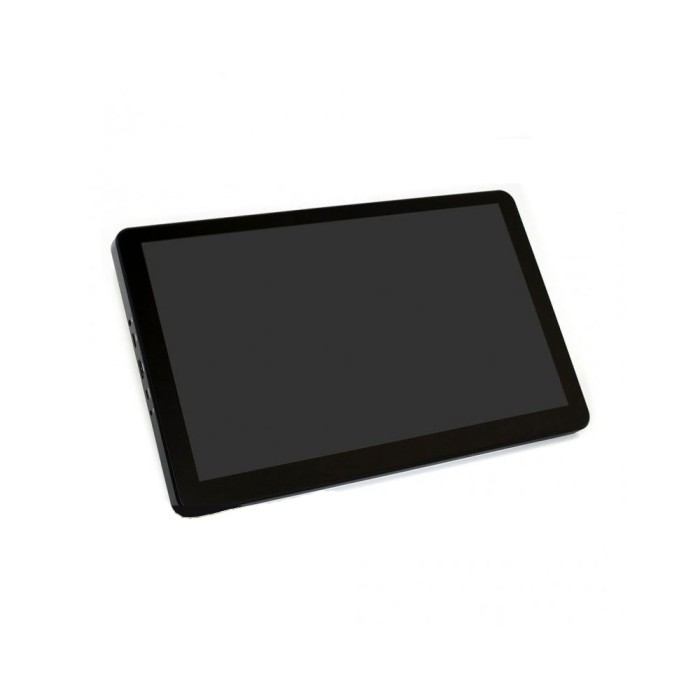
Waveshare 15.6 inch 1920x1080 IPS HDMI LCD Type H With Case
$159.0000
In stock
SKU
LCD-01-094
Volume discounts:
- +5 10 % $143.2500
- +10 15 % $135.3700
- +25 20 % $127.5000
- +50 20 % $127.2000
Ships in 2-3 business days, then:
Free delivery in 12-15 days by Tracked Economic Shipping
Free delivery in 7-10 days by Express Shipping on orders over $300.
More shipping info

Shop with confidence Learn More
 iTEAD NX8048T070 7inch Nextion HMI Touch LCD Display Previous
Waveshare 15.6 inch HDMI LCD Review and Specifications
The Waveshare 15.6 Inch IPS HDMI LCD Type H With Case is a 1920x1080 IPS color monitor with 10-point capacitive touch, an ABS enclosure, integrated speakers, and a 12V 1A power input. It suits desktop, kiosk, and interactive embedded builds, connecting to host systems through a standard HDMI video line and a dedicated Micro USB link for touch data. It works well in fixed Raspberry Pi, Jetson Nano, Windows PC, and gaming console setups, but it is not intended for projects that require single-cable USB-C video and power, native full-size VGA sockets, or standalone USB media playback without an active host.
For related display modules and alternate screen form factors, see our selection of LCD displays.
Specifications of Waveshare 15.6 Inch IPS HDMI LCD Type H With Case
- Product type: HDMI LCD display
- Size: 15.6 inch
- Resolution: 1920x1080
- Panel type: IPS
- Touch type: Capacitive
- Touch points: 10 point
- Touch panel material: Toughened glass
- Horizontal viewing angle: 178 degree
- Video interface: HDMI/VGA
- Touch output interface: Micro USB
- Power input: 12V 1A
- Audio output: Hi-Fi speakers and 3.5 mm audio jack
- Body material: ABS
- Stand: 55 degree
- OSD: Multi-language
- Supported Windows systems: 10/8.1/8/7
- Supported boards: Raspberry Pi 3, Raspberry Pi 4, Raspberry Pi Zero, Jetson Nano
- Supported game consoles: Microsoft XBOX360, Sony PS4, Nintendo Switch
Waveshare 15.6 inch HDMI LCD Specifications Explained
A 15.6-inch diagonal panel with 1920x1080 native resolution provides sharp text and ample workspace for desktop interfaces, kiosk dashboards, machine HMIs, and media displays. The in-plane switching (IPS) panel maintains consistent color reproduction and readability across wide angles, supported by its 178-degree horizontal viewing-angle rating. The screen remains readable from off-axis positions when wall-mounted or placed on a workbench.
The touch interface uses a 10-point capacitive digitizer behind toughened glass. Capacitive sensing supports multi-touch gestures such as pinch-to-zoom and multi-finger rotation without the physical actuation pressure required by resistive screens. The front glass layer protects the underlying panel from everyday contact wear in exposed installations. Touch tracking does not run over the HDMI cable, however; touch signals require a separate Micro USB data connection directly to the host system.
For audio, the monitor includes built-in Hi-Fi speakers and a 3.5 mm stereo audio jack for external headphones or powered amplifiers. Brightness, contrast, and color balance are managed through a multi-language on-screen display (OSD), accessed using physical buttons on the board or an infrared remote control receiver. An IR remote handset is not confirmed to be included in the box. The monitor sits in an ABS protective case with a rear stand that supports an angle up to 55 degrees. Secondary distributor sources note rear VESA mounting capability, but the baseline specifications do not confirm mounting hole patterns or pitch details. For a more compact touchscreen footprint with similar Type H features, consider the Waveshare 11.6-inch Touch LCD (Type H). If you need viewing angles beyond the integrated 55-degree back leg, a dedicated Tablet Laptop Stand provides supplemental positioning support.
Waveshare 15.6 inch HDMI LCD Compatibility and Power Requirements
This monitor uses three separate functional paths: digital video, USB touch data, and external DC power. Video connects through HDMI or VGA. The display does not have a standard bulky 15-pin D-sub VGA connector; manufacturer technical documentation indicates that VGA signals use a Mini-HDMI-to-VGA adapter cable. Touch communication relies entirely on the Micro USB touch port connected to an active USB port on the host.
| Interface / Host | Supported Standards | Hardware & Configuration Requirements |
|---|---|---|
| Video Input | HDMI, VGA | Standard HDMI cable for digital video. VGA requires a separate Mini-HDMI-to-VGA adapter or cable. |
| Touch Data | Capacitive (10-point) | Requires dedicated Micro USB connection between monitor and host. Does not pass through HDMI. |
| Power Input | 12V 1A | Requires a dedicated 12V supply. Adapter sizing is rated at 12V 1A; typical display draw is approximately 12V 0.6A, plus 5V 80mA via USB for touch. |
| Windows PCs | Windows 10 / 8.1 / 8 / 7 | Touch functions register automatically upon connecting the Micro USB data lead. |
| Single-Board Computers | Raspberry Pi 3, 4, Zero; Jetson Nano | Connect via HDMI and USB. Raspberry Pi OS setups often require setting manual HDMI timings in config.txt for full 1080p output. |
| Game Consoles | Microsoft Xbox 360, Sony PS4, Nintendo Switch | Operates as an HDMI audio/video monitor; touch is not supported by standard console interfaces. |
Standard Raspberry Pi OS builds generally require specific HDMI timing definitions in the system configuration file to prevent the board from negotiating down to a lower fallback resolution. Custom Linux builds or specialized embedded kernels may require compiling or enabling hid-multitouch kernel support for correct touch-event registration. For a portable 1080p display with reversible USB-C connectivity rather than a powered touchscreen monitor, consider the non-touch 15.6-inch Full HD Portable Monitor.
Waveshare 15.6 inch HDMI LCD Touch Setup and Quick Start
Getting the display running means connecting the power, video, and touch paths in sequence. Keep the host turned off or idle during initial cabling so the display handshake is detected correctly.
- Connect the external 12V 1A DC power supply to the monitor's barrel power jack.
- Connect an HDMI cable from the video output of your host computer, Raspberry Pi, or console to the monitor's HDMI port. Use an HDMI to HDMI Cable 4K60Hz if you do not already have a spare cable.
- Plug a Micro USB cable into the monitor's touch port and connect the other end to an available full-size USB port on the host system.
- Power up the host device. Confirm that the display panel illuminates and shows a crisp 1920x1080 image.
- Test capacitive interaction by tapping and dragging across a touch-aware user interface. On Windows 10, 8.1, 8, and 7, touch coordinates register automatically without manual driver installations.
- If the image needs framing adjustments, contrast changes, or audio-level modifications, use the integrated buttons along the enclosure edge to navigate the multi-language OSD.
Common startup faults involve omitted cables or incorrect output modes. If the panel stays black or shows an "Out of Range" notification on a Raspberry Pi, verify that the operating-system configuration includes the manufacturer's recommended HDMI timing lines. If video is crisp but finger input does not register, make sure the Micro USB cable is a data cable rather than a charge-only wire and that it connects to a data-capable USB port on the host. Detailed configuration scripts and operating-system-specific timing lines are available in the Waveshare setup documentation.
Waveshare 15.6 inch HDMI LCD Limitations and Buyer Mistakes
Account for these practical installation constraints before purchasing to avoid setup mismatches on your bench:
- VGA Connectivity: The display lists HDMI/VGA support, but it does not have an onboard 15-pin D-sub VGA connector. Driving this panel with analog VGA requires a specialized Mini-HDMI-to-VGA adapter cable, which is not included in the standard hardware package.
- Multi-Cable Cabling Overhead: Display and touch operation requires three distinct cables: DC 12V power, HDMI video, and Micro USB touch. It cannot receive power or video over a single USB-C cable. For a lightweight dual Type-C display without touch input, consider the 14-inch Full HD Portable Monitor instead.
- Host Dependency: This unit is an external monitor driven by an HDMI video source. It does not function as a standalone multimedia player or digital photo frame that plays MP4 or AVI video directly from USB thumb drives without a host computer.
- Fixed-Angle Stand: The integrated rear stand opens to an angle of 55 degrees from horizontal. It is not an articulating arm, and manufacturer guidance cautions against mounting structures that stress the rear hinge below roughly 75 degrees in certain vertical orientations.
- Custom Linux Configurations: Standard Windows desktop platforms detect the HID digitizer automatically, but custom Linux distributions, stripped-down kiosk kernels, and real-time controller environments often lack the necessary
hid-multitouchkernel modules out of the box. Driver configuration is required to enable touch. - Testing Data: Independent long-term component teardowns, panel revision tracking, and lab-grade thermal degradation analyses for this specific enclosed model are limited. Treat component lifespans according to standard maker-grade display expectations.
Waveshare 15.6 inch HDMI LCD vs Portable and Type H Displays
Your choice depends on whether the project prioritizes multi-touch interaction, legacy connectivity, or single-cable portability. The table below compares this model with related Type H touchscreen options and non-touch portable displays using documented product data.
| Model | Display Size & Type | Touch Capability | Video Inputs | Distinguishing Characteristics |
|---|---|---|---|---|
| Waveshare 15.6-inch Type H (This Model) | 15.6" IPS (1920x1080) | 10-point capacitive (toughened glass) | HDMI, VGA (via adapter) | ABS protective case, built-in 55° stand, speakers, 12V 1A DC input. |
| Raspberry Pi 15.6-Inch FullHD Monitor | 15.6" IPS (1920x1080) | 10-point capacitive (toughened glass) | HDMI, VGA (via adapter) | Identical product under an alternate listing; useful availability alternative. |
| Waveshare 13.3-inch Touch LCD (Type H) | 13.3" IPS (1920x1080) | 10-point capacitive | HDMI, VGA | Same Type H design and touch capabilities in a slightly smaller 13.3" physical enclosure. |
| Waveshare 11.6-inch Touch LCD (Type H) | 11.6" IPS (1920x1080) | 10-point (Windows) / 1-point (Raspberry Pi) | HDMI, VGA | Optically bonded compact panel; note touch is single-point under Raspberry Pi OS. |
| 15.6-inch Full HD Portable Monitor | 15.6" IPS (1920x1080) | Non-touch | Dual Type-C, Mini HDMI | Slim 370x225x13mm profile designed for portable laptop use; no touch input. |
| 14-inch Full HD Portable Monitor | 14.0" IPS (1920x1080) | Non-touch | Dual Type-C, Mini HDMI | Compact 322x204x13mm profile with modern Type-C connectivity; no touch input. |
Waveshare 15.6 inch HDMI LCD Accessories and Connection Requirements
The baseline product listing does not explicitly enumerate packaged cables or adapters. Have the essential connection hardware ready before installation.
- Required — 12V 1A DC Power Supply: The monitor requires an external 12V power supply. Barrel jack dimensions and center-pin polarities vary across generic supplies, so verify your supply's plug specifications before connecting. Standalone replacement adapters such as 12V 2A or 12V 3A wall plugs should only be used after confirming connector dimensions and polarity.
- Required — Host Video Cable: An HDMI-to-HDMI link is required to transmit video from standard PC, Jetson Nano, and console ports. The HDMI to HDMI Cable 4K60Hz provides an uncompressed digital video link for full 1080p display performance. Raspberry Pi 4 and Zero models require micro-HDMI or mini-HDMI adapter leads (unlinked).
- Required for Touch — Micro USB Data Cable: The capacitive touchscreen requires a dedicated Micro USB to Type-A (or Type-C) cable between the display and the host system.
- Required for VGA Operation — Mini-HDMI to VGA Adapter: Legacy analog outputs require a specialized Mini-HDMI-to-VGA adapter cable, since standard VGA cables cannot plug directly into the chassis.
- Optional — Supplemental Mounting Stand: For steeper angles or desk heights beyond what the integrated 55-degree back leg allows, an adjustable Tablet Laptop Stand provides flexible workstation positioning.
Waveshare 15.6 inch HDMI LCD FAQ
Does the Waveshare 15.6 inch HDMI LCD need a touch driver on Windows?
No. Windows automatically detects the touch interface without third-party driver installations. Once the separate Micro USB cable connects the monitor to a Windows 10, 8.1, 8, or 7 computer, the operating system treats the panel as a standard 10-point HID multi-touch input device.
Will the Waveshare 15.6 inch HDMI LCD work with Raspberry Pi?
Yes, it supports Raspberry Pi 4, Raspberry Pi 3, and Raspberry Pi Zero boards. Supply video over HDMI, connect a Micro USB cable to a USB port on the Raspberry Pi for touch signals, and set the appropriate 1920x1080 HDMI timings in the boot configuration file for proper scaling.
Can I connect a VGA source directly to the Waveshare 15.6 inch HDMI LCD?
No, a standard 15-pin VGA cable cannot plug directly into the housing. Although the internal processing electronics support VGA video decoding, that mode requires an external Mini-HDMI-to-VGA adapter or cable, which is not included.
What power supply does the Waveshare 15.6 inch HDMI LCD use?
The display specifies a 12V 1A DC power supply input. Manufacturer documentation identifies 12V 1A as the recommended external adapter sizing, while average operational draw sits near 12V 0.6A. Verify plug diameter and positive center-pin polarity before connecting any third-party 12V wall supply.
Does the Waveshare 15.6 inch HDMI LCD play MP4 or AVI files directly from USB?
No. This display functions strictly as an active monitor driven by an external host over HDMI. It does not include an onboard media-player engine for decoding video files directly from standalone USB flash drives.
Does the Waveshare 15.6 inch HDMI LCD include speakers?
Yes, the display has internal Hi-Fi stereo speakers that receive audio over the incoming HDMI stream. A 3.5 mm analog audio port along the frame also supports external speakers or headphones.
Why might touch not work on a Linux system?
Touch failures on Linux are almost always caused by a missing Micro USB connection or an omitted kernel module. Make sure the Micro USB touch port connects to a live USB data port on the host, and confirm that the custom Linux distribution or kernel image has the hid-multitouch driver module compiled and active.
What is included with the Waveshare 15.6 inch HDMI LCD?
The unit includes the 15.6-inch panel inside its protective ABS case with an integrated 55-degree kickstand. Current baseline data does not guarantee inclusion of auxiliary cables, wall power bricks, or IR remote controls, so plan to source your 12V power supply and HDMI connection cables separately.
Waveshare 15.6 inch HDMI LCD Buying Checklist
Check your system setup against these points before finalizing your order:
- Ideal for: Raspberry Pi, Jetson Nano, Windows PC, and gaming console setups requiring an enclosed 15.6-inch 1080p IPS display with responsive 10-point capacitive touch, built-in speakers, and an integrated desktop stand.
- Maybe for: Kiosk, home-assistant dashboard, and secondary desktop monitoring setups where routing three separate cables (12V DC power, HDMI video, and Micro USB touch) is acceptable.
- Consider another option if: You need single-cable USB-C video/power delivery, a native 15-pin D-sub VGA port, standalone USB thumb-drive media decoding, or a display guaranteed to work on custom embedded Linux builds without manual driver checks.
Pre-Purchase Verification Steps:
- Confirm that your host provides standard HDMI output or that you have an appropriate display adapter on hand.
- Ensure an open USB port is available on your host for the Micro USB touch data link.
- Prepare an external 12V 1A DC power source with the correct connector dimensions and polarity.
- If connecting through legacy VGA, source a dedicated Mini-HDMI-to-VGA adapter cable.
- Verify that your physical enclosure or mounting space accommodates a 15.6-inch footprint and 16:9 aspect ratio.
- If you need a smaller desktop touchscreen footprint, check the 13.3-inch or 11.6-inch Type H models.
- If you need lightweight USB-C connectivity for a portable laptop workspace and do not need touch interaction, choose the 15.6-inch Full HD Portable Monitor.
- For specialized single-board computer projects requiring an alternative high-luminance panel rather than a standard 1080p IPS monitor, consider the Waveshare 10.4-inch QLED Touch Display as an alternative approach featuring 600 cd/m² output.
| Model | Type H |
|---|---|
| Platform | Raspberry Pi 3, Raspberry Pi 4, Raspberry Pi 5 |
| Display Size | 15.6 |
| Display Size Range | 10.1 inch and larger |
| Display Resolution | 1920x1080 |
| Display Interface | HDMI |
| Panle Type | IPS |
| Display Color Type | Full Color |
| Touchscreen Type | Capacitive |
| Backlight Type | White LED |
| Viewing Angle (°) | 178° |
| Operating Voltage (V) | 12V |
Write Your Own Review

Please complete your information below to login.
Sign In
Create New Account