
Product added to cart

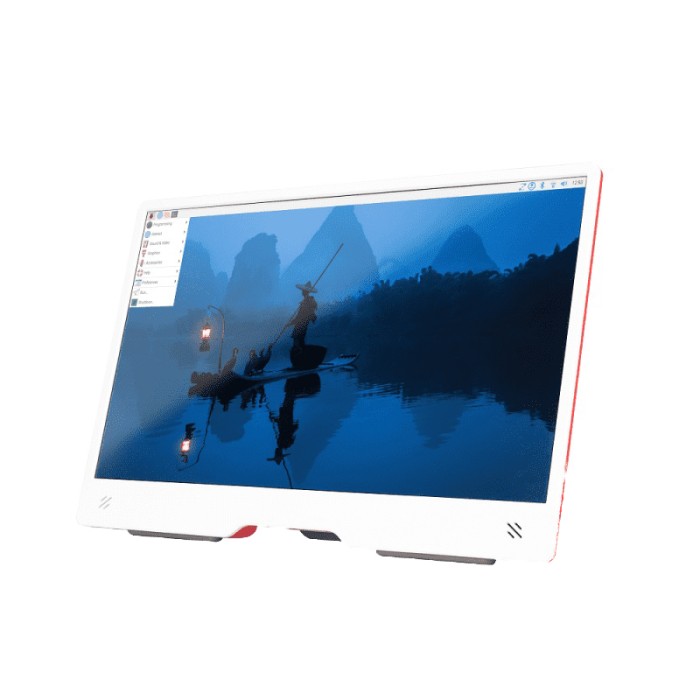
Raspberry Pi Monitor 15.6-Inch FullHD IPS
$189.0000
In stock
SKU
LCD-01-325
Volume discounts:
- +5 4 % $181.5900
- +10 6 % $177.8900
- +25 8 % $174.1900
- +50 10 % $170.4800
- +100 12 % $166.7800
Ships in 2-3 business days, then:
Free delivery in 12-15 days by Tracked Economic Shipping
Free delivery in 7-10 days by Express Shipping on orders over $300.
More shipping info

Shop with confidence Learn More
 4inch TFT LCD Module - SPI, 8 Pin, ST7796S Driver Previous
The Raspberry Pi Monitor 15.6-Inch Full HD IPS is a 15.6-inch display with Full HD resolution and IPS LCD technology. It includes an anti-glare coating for the panel and offers 16.2M colors with 250 nits typical brightness. The monitor also features integrated speakers, multiple audio output options, and USB-C power input. With an integrated angle-adjustable stand and mounting support, it is designed as a practical monitor for electronics, robotics, and display-based projects.
Features of Raspberry Pi Monitor 15.6-Inch Full HD IPS
- 15.6-inch IPS display
- Full HD 1920 x 1080 resolution
- Anti-glare coating
- Integrated 1.2W speakers
- Angle-adjustable stand
- VESA 100 x 100 mounting
Specifications of Raspberry Pi Monitor 15.6-Inch Full HD IPS
- Screen size: 15.6 inches
- Aspect ratio: 16:9
- Panel type: IPS LCD with anti-glare coating
- Resolution: 1920 x 1080 Full HD
- Color depth: 16.2M colors
- Brightness: 250 nits (typical)
- Speakers: 2 x 1.2W integrated speakers
- Audio out: 3.5mm stereo headphone jack
- Sample rates supported: 44.1KHz
- Sample rates supported: 96KHz
- Input voltage: 5VDC via USB-C port
- Power consumption: 1.5A at 5V
- Power option: Powered via Raspberry Pi USB port (max 60% brightness, 50% volume)
- Power option: Powered via separate power supply (max 100% brightness, 100% volume)
- HDMI: Standard HDMI port (1.4 compliant)
- Audio out: 3.5mm headphone jack
- Power: USB-C
- Stand: Integrated angle-adjustable stand
- Mounting options: VESA 100 x 100 and screw mounting
- Control: Volume and brightness buttons located on the back of the monitor
- Dimensions: 360 x 237 x 20 mm
- Production lifetime: Guaranteed production until at least January 2034
How to Use Raspberry Pi Monitor 15.6-Inch Full HD IPS
- Connect the monitor using the available HDMI and USB-C interfaces.
- Select the preferred power option and adjust brightness or volume as needed.
- Use the integrated stand or choose the mounting option that fits your setup.
More Info
- Designed for Raspberry Pi and other devices.
- Volume and brightness buttons are located on the back of the monitor.
| Model | Raspberry Pi 15.6-inch Monitor |
|---|---|
| Platform | Raspberry Pi 3, Raspberry Pi 4, Raspberry Pi 5 |
| Display Size | 15.6 inches |
| Display Size Range | 10.1 inch and larger |
| Display Resolution | 1920 x 1080 Full HD |
| Display Interface | HDMI, USB-C |
| Panle Type | IPS |
| Display Color Type | Full Color |
| Touchscreen Type | None |
| Backlight Type | White LED |
| Viewing Angle (°) | 178° |
| Operating Voltage (V) | 5V |
| Dimensions (mm) | 360 x 237 x 20 mm |
Write Your Own Review

Please complete your information below to login.
Sign In
Create New Account