
Product added to cart

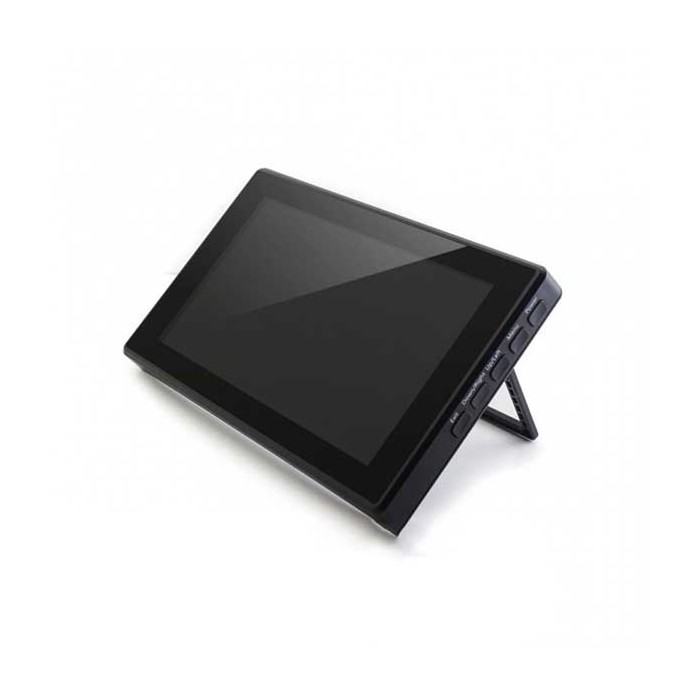
Waveshare 7 inch 1024x600 IPS HDMI LCD Type H With Case
$55.9500
In stock
SKU
LCD-01-092
Volume discounts:
- +5 3 % $54.0700
- +10 5 % $53.1300
- +25 7 % $52.1900
- +50 8 % $51.2500
- +100 10 % $50.3100
Ships in 2-3 business days, then:
Free delivery in 12-15 days by Tracked Economic Shipping on orders over $100.
Free delivery in 7-10 days by Express Shipping on orders over $300.
More shipping info

Shop with confidence Learn More
 Waveshare 13.3 inch 1920x1080 IPS HDMI LCD Type H With Case Previous
Waveshare 7 inch HDMI LCD Type H review
The Waveshare 7 inch HDMI LCD Type H is an enclosed touch monitor for single-board computers, benchtop development, and embedded control panels. It combines an IPS panel, capacitive multi-touch, standard HDMI input, and a built-in stand in an all-in-one visual interface that avoids custom 3D-printed brackets or exposed wiring. It suits makers and prototypers who need a durable desktop screen with wide viewing angles.
The main limitation is its native 1024x600 resolution. While the internal display controller accepts input signals up to 1920x1080, it downscales them to fit the physical pixel grid. This is not a native Full HD screen. That distinction matters for text-heavy programming sessions and dense user interfaces. For dedicated dashboards, secondary telemetry monitors, and project terminals, 1024x600 provides clear rendering at arm's reach.
Host support centers on HDMI-capable platforms. The display works out of the box with standard Raspberry Pi OS, Ubuntu, Kali, and Retropie builds, along with Windows PCs and Jetson Nano boards. Unlike Raspberry Pi DSI displays, which connect directly to the board's ribbon cable connector and GPU bus, this unit uses standard external video and USB cables. You can move it between a PC, a micro-PC, and various development boards without changing hardware wiring. Waveshare offers several similarly named models, so do not confuse this Type H display with lower-resolution Type B units or alternate Type C revisions.
Practical uses where this hardware performs reliably include:
- Raspberry Pi desktop: A compact workstation monitor for coding, terminal monitoring, and basic web navigation.
- Retro-gaming screen: A portable setup paired with Retropie, using low-latency HDMI input and integrated 3.5mm audio.
- Jetson Nano development display: A dedicated GUI display for field testing AI models and edge robotics without hauling a standard office monitor.
- Compact kiosk and HMI: An enclosed hardware touch interface for workshop machinery, 3D printer controllers, or smart-home automation dashboards.
For other form factors or display protocols, review our broader selection of 7-inch LCD and touchscreen displays to compare sizes, mounting types, and interface options.
Specifications of Waveshare 7 inch 1024x600 IPS HDMI LCD Type H With Case
- Display Type: IPS
- Screen Size: 7 inches
- Resolution: 1024x600 (adjustable up to 1920x1080)
- Touch Panel: Capacitive touch, tempered glass (6H hardness, case version only)
- Touch Support: Yes
- Supported OS: Raspberry Pi OS, Ubuntu, Kali, Retropie
- Ports: HDMI, VGA, 3.5mm audio jack (cables sold separately)
- Tilt Adjustment: 30° to 50°
- Case Material: Plexiglass
- Settings: Multi-language OSD, brightness, language control
- Buttons: Power, Menu (OK), Up/Left, Down/Right, Exit (Return)
Waveshare 7 inch HDMI LCD Type H specifications explained
The physical specifications directly affect how the panel works in day-to-day use. Its 1024x600 resolution provides a widescreen 16:9-adjacent aspect ratio suited to terminal windows, dashboard widgets, and industrial HMIs. When a host feeds the display at 1920x1080, the scaler compresses the frame. This lets high-resolution host outputs display without an out-of-range error, though small fonts and single-pixel UI borders will show downscaling artifacts. For the sharpest text, configure the host operating system to output a native 1024x600 signal.
Panel type matters on a bench. The IPS (In-Plane Switching) panel maintains color accuracy and contrast across wide horizontal and vertical angles. Unlike TN panels, which can invert colors or darken when viewed from above or below, this screen remains readable when laid flat on a bench or viewed off-axis in a kiosk housing.
The touch layer uses capacitive sensing rather than resistive film, detecting light finger contact without physical pressure. The glass on this cased model has a 6H surface hardness rating, helping prevent everyday scratches from dust, fingernails, or workbench handling. Touch data travels through a secondary USB connection to the host system and supports multi-touch gestures where the operating system does.
Its physical construction is aimed at desktop stability. The clear plexiglass enclosure protects the rear driver boards and includes an integrated stand. Although the listing specifies tilt adjustment from 30° to 50°, the stand uses two distinct mechanical rest positions at 30 degrees and 50 degrees rather than a continuous friction hinge. Side-panel on-screen display (OSD) controls—Power, Menu, Up/Left, Down/Right, and Exit—provide direct hardware-level adjustment of brightness, contrast, and interface language independently of the operating system.
For larger text, wider dashboard visibility, or more distance between the operator and the screen, the larger 10.1-inch HDMI touch display offers an alternative form factor.
Waveshare 7 inch HDMI LCD Type H compatibility and setup
Connecting this display means separating video output from touch data. Video travels over standard HDMI, while touch coordinates return to the host computer through a Micro-USB cable. Manufacturer documentation identifies two Micro-USB ports: one for Touch, which also supplies operational logic power under light loads, and a second Power Only port for setups that need supplemental current.
Operating system support depends on the platform:
| Platform / Host | Video Interface | Touch Interface | Configuration Requirements |
|---|---|---|---|
| Raspberry Pi OS | HDMI | Micro-USB | Requires setting native 1024x600 timing parameters in config.txt for clean edge-to-edge scaling. |
| Ubuntu / Kali | HDMI | Micro-USB | Supported out of the box; set system display resolution to 1024x600. |
| Retropie | HDMI | None (controller) | Standard HDMI video output; touch is unused in typical emulation frontends. |
| Windows 7 / 8 / 10 / 11 | HDMI | Micro-USB | Plug-and-play HID touch recognition; multi-monitor setups may require calibration in Tablet PC settings. |
| Jetson Nano | HDMI | Micro-USB | Standard Ubuntu desktop integration via USB HID. |
| Game Consoles (PS4, Switch, Xbox) | HDMI | Not supported | Operates strictly as an audio/video monitor; game consoles do not accept USB touch digitizer data. |
| VGA Sources | Special mini-HDMI adapter | Micro-USB | Requires Waveshare's specific mini-HDMI-to-VGA adapter board; standard VGA cables do not connect directly. |
When using this monitor beside a primary desktop screen on a Windows PC, touch gestures can occasionally register on the main monitor instead of the 7-inch panel. Open the Windows Control Panel, go to "Tablet PC Settings," select "Setup," and follow the on-screen prompt to map touch input directly to the Waveshare screen.
For audio, sound carried over HDMI passes to the onboard 3.5mm stereo headphone jack. Manufacturer documentation also identifies a 4-pin speaker header on the board circuit, though external speakers and wiring are not included. If your host does not include a video patch lead, pair it with an HDMI cable for the video connection.
Waveshare 7 inch HDMI LCD Type H limitations and power requirements
Stable electrical power is essential for reliable operation. The display runs from a 5V supply through its Micro-USB inputs. A host computer's USB port frequently provides enough power for the logic and screen at lower brightness levels. If the USB host port droops below 5V under load, however, the panel can show backlight flickering, intermittent black screens, or random touch dropouts. Raspberry Pi power supply warnings or high CPU workloads can also starve the screen. In these cases, connect an external, regulated 5V/2A power supply to the display's secondary Power Only Micro-USB port.
Do not connect higher-voltage supplies to this board. Specifically, do not use a 12V adapter under any circumstances: feeding 12V into the 5V Micro-USB power lines will destroy the display's driver circuitry instantly.
Raspberry Pi users should expect some configuration work. Windows detects the display and configures touch automatically, while Raspberry Pi OS often defaults to generic HDMI timings that can leave black bars around the perimeter or make text look fuzzy. Edit the system's config.txt file to add custom HDMI timings, specifying a framebuffer width of 1024, height of 600, and standard 60Hz refresh rates.
For mechanical integration, the included plexiglass housing is designed for bench and desk setups. It does not include VESA mounting patterns such as 75x75mm or 100x100mm, so it is unsuited to standard monitor arms without custom clamping. While the display controller supports VGA signaling, the housing has no full-size 15-pin D-sub port; VGA signals must pass through Waveshare's proprietary adapter hardware.
Waveshare Type H vs Type B and 10.1 inch HDMI displays
Waveshare produces several displays with similar footprints and naming conventions. Compare the options carefully so you do not end up with a panel technology or resolution that does not suit your project.
| Feature | Waveshare 7" Type H (This Model) | Waveshare 7" Type B | Waveshare 10.1" Type H with Case |
|---|---|---|---|
| Screen Size | 7.0 inches | 7.0 inches | 10.1 inches |
| Native Resolution | 1024x600 (scales up to 1080p) | 800x480 | 1024x600 |
| Panel Technology | IPS (wide viewing angles) | Non-IPS (standard viewing angles) | IPS / Wide viewing angle |
| Touch Technology | Capacitive, 6H tempered glass | Capacitive (up to 5-point on Win) | Capacitive (single-point) |
| Stand / Enclosure | Plexiglass case (30° / 50° positions) | Open frame / bare board | Polycarbonate case (fixed 45° stand) |
| Video Inputs | HDMI, VGA (via adapter) | HDMI | HDMI, VGA, AV |
When budget matters more than screen clarity and your software uses simple, high-contrast buttons, the lower-resolution 7-inch Type B display is a functional fallback. Its 800x480 non-IPS panel has tighter viewing angles and noticeably less canvas space for modern desktop operating systems.
For installations where operators view data from several feet away, the larger 10.1-inch HDMI touch display spreads the same 1024x600 pixel resolution across a larger area. That provides larger physical touch targets and easier legibility, with the trade-offs of a larger desktop footprint and single-point touch support.
Waveshare 7 inch HDMI LCD Type H accessories and connections
Because cables are sold separately, confirm that you have the necessary interconnects before setting up your workstation.
Required Accessories
- HDMI video cable: Connects the host computer or Raspberry Pi to the display. This HDMI video cable works with full-size HDMI host ports; Raspberry Pi 4 and 5 boards require a micro-HDMI adapter on the host end.
- Micro-USB data cable: Sends capacitive touch coordinates to the host system. Use a data-capable cable, not a charge-only wire.
- 5V power source: Use a powered USB 3.0 host port or an external 5V power supply capable of providing stable voltage to prevent display flicker.
Recommended Accessories
- External 5V/2A power supply: Recommended when powering the screen from a low-current USB port or an overloaded Raspberry Pi board.
- Waveshare mini-HDMI-to-VGA adapter: Required only for legacy computing equipment that outputs analog VGA video.
- MicroSD card with Raspberry Pi OS: A fresh operating system installation supports clean configuration of display output parameters.
Optional Accessories
- 3.5mm headphones or powered desktop speakers: Plug into the onboard audio jack to route HDMI sound output.
- External 4-pin internal speakers: For builders planning to integrate internal speaker modules directly with the secondary audio header.
Waveshare 7 inch HDMI LCD Type H FAQ
Is this a native 1920x1080 display?
No. The native panel resolution is 1024x600. The internal scaler accepts video signals up to 1920x1080 and downscales them to fit the panel, but it does not provide true 1080p pixel density.
Does the Waveshare 7 inch HDMI LCD Type H work with Raspberry Pi?
Yes. It supports Raspberry Pi boards running Raspberry Pi OS, Ubuntu, Kali, and Retropie. Video connects through HDMI, touch through USB, and clean image scaling may require custom 1024x600 timing parameters in the board's config.txt file.
Do I need drivers for the Waveshare 7 inch HDMI LCD Type H?
No standalone display drivers are required. Windows detects video and capacitive touch natively through standard HID protocols, while Linux distributions require resolution and timing adjustments rather than driver installations.
Why does a Waveshare 7 inch HDMI LCD flicker or lose touch input?
Flickering and touch dropouts are almost always caused by voltage sag. If the host USB port cannot deliver sufficient current, connect a dedicated, stable 5V external power source to the display's secondary Power Only Micro-USB port.
Can I connect this Waveshare Type H display to VGA?
Yes, but not with a standard VGA cable alone. Manufacturer documentation specifies that VGA input requires Waveshare's specialized mini-HDMI-to-VGA adapter board to feed the display controller.
Does touch work on PS4, Switch, or Xbox 360?
No. Touch input is not supported on gaming consoles. When connected to a console, the display works solely as an HDMI video and audio monitor.
What is the difference between Waveshare Type H, Type B, Type C, and DSI displays?
The Type H model reviewed here is an IPS, 1024x600 HDMI monitor with a case. Type B uses a lower-resolution 800x480 non-IPS panel, Type C has a different interface layout, and DSI displays connect exclusively to Raspberry Pi ribbon cable headers instead of HDMI.
Are HDMI and USB cables included?
No. Cables are sold separately. Supply an HDMI cable suited to your host device and a data-capable Micro-USB cable for the touch interface.
To compare alternate form factors, resolutions, or communication buses, browse our full collection of other LCD display options.
Purchase decision summary
- Suited to: Prototypers, developers, and makers using Raspberry Pi, Jetson Nano, or mini-PCs who need an enclosed, tilt-adjustable 7-inch IPS touch monitor with HDMI video input.
- Possible fit for: Secondary PC monitor users who are comfortable configuring multi-display touch settings in Windows, or bench technicians needing a portable HDMI test display.
- Choose another option if: You require true 1080p native resolution, single-cable USB-C video and power delivery, VESA arm mounting, or a plug-and-play Raspberry Pi setup that requires zero configuration file editing.
Buying checklist
- Confirm that 1024x600 resolution fits your software interface requirements.
- Verify that your host device has an available HDMI output port (or appropriate adapter).
- Ensure you have an available USB port on your host for touch data transmission.
- Prepare a stable 5V power source (do not connect 12V power to this display).
- Source a standard HDMI cable and a data-capable Micro-USB cable.
- Be prepared to modify Raspberry Pi
config.txtsettings to set native 1024x600 display timing. - If using VGA hardware, verify you have the required mini-HDMI-to-VGA adapter.
- Verify that you are ordering the Type H model rather than the 800x480 Type B or DSI-based panels.
| Model | 7inch HDMI LCD (H) |
|---|---|
| Platform | Raspberry Pi 3, Raspberry Pi 4, Raspberry Pi 5, Kali, Retropie, Ubuntu |
| Display Size | 7 inch |
| Display Size Range | 7 inch to 10 inch |
| Display Resolution | 1024x600 |
| Display Interface | HDMI, VGA |
| Panle Type | IPS |
| Display Color Type | Full Color |
| Touchscreen Type | Capacitive |
| Backlight Type | LED |
| Viewing Angle (°) | 170° |
| Operating Voltage (V) | 5V |
Write Your Own Review

Please complete your information below to login.
Sign In
Create New Account