
Product added to cart

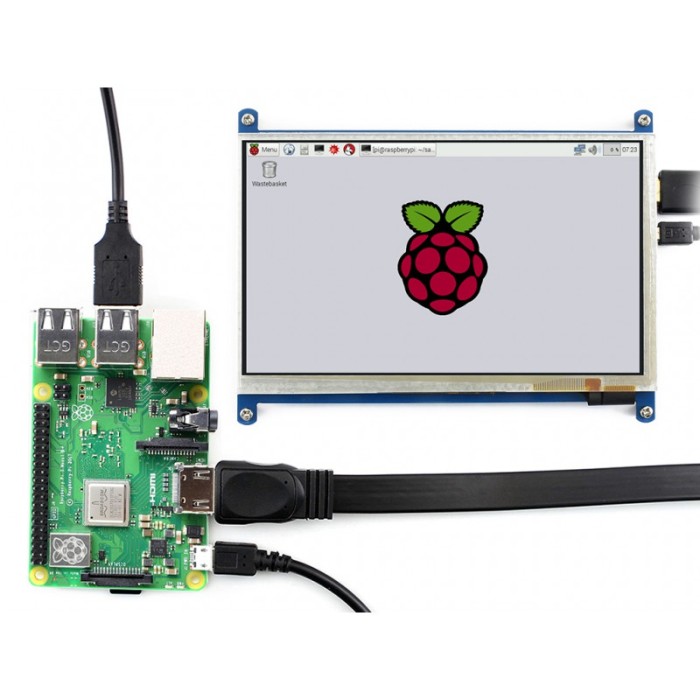
Waveshare 7 inch 800x480 HDMI LCD Type B
$47.2500
In stock
SKU
LCD-01-042
Volume discounts:
- +10 4 % $45.3100
- +25 6 % $44.3400
- +50 8 % $43.3700
- +100 10 % $42.4000
- +300 12 % $41.4300
Ships in 2-3 business days, then:
Free delivery in 12-15 days by Tracked Economic Shipping on orders over $100.
Free delivery in 7-10 days by Express Shipping on orders over $300.
More shipping info

Shop with confidence Learn More
 1602 LCD Keypad Shield for Raspberry Pi Previous
About the Waveshare 7 inch HDMI LCD Type B
The Waveshare 7 inch HDMI LCD Type B is an 800×480 display that combines standard HDMI video input with capacitive USB touch sensing. It is a compact, self-contained screen for single-board computers and compact desktop installations, avoiding the bulk of a standard desktop monitor and eliminating the need for a separate display controller board. Video runs over standard HDMI, while touch data travels independently through a USB connection.
This display fits dedicated control surfaces, retro-gaming setups, network media players, and secondary Windows status panels where an 800×480 interface provides sufficient workspace. It is compatible with Raspberry Pi without third-party kernel drivers, but native-resolution operation requires timing parameters in the operating system configuration file. The panel is a standard non-IPS TFT screen and performs best when viewed directly from the front. If your project requires wide off-axis viewing angles or higher display density, other models in the LCD display category are better aligned with your requirements.
Within the Waveshare hardware lineup, display names identify specific hardware configurations. The Type B designation identifies this 800×480 non-IPS capacitive model, distinguishing it from the higher-resolution 1024×600 IPS Type C and the multi-input Type H screens. Verify these core specifications before installation to ensure the panel fits your physical and software constraints.
Specifications of Waveshare 7 inch 800x480 HDMI LCD Type B
- Resolution: 800×480 pixels
- Display Interface: HDMI
- Touch Type: Capacitive touch
- Touch Interface: USB
- IPS: No
- Power Supply: 5V/2A (preferably external adapter)
- Compatible with: Raspberry Pi (driver-free)
- Supported OS: Raspbian, Ubuntu, Windows 10 IoT, Windows 7/8/10
- Touch Points in Windows: Up to 5-point touch
- Backlight Control: Yes
- Stylus: Not included
Specifications of Waveshare 7 inch HDMI LCD Type B explained
A display's core hardware figures govern interface design, enclosure layout, and power budgets. Each specification brings practical trade-offs during project integration.
| Specification | Hardware Value | Why It Matters in Practice |
|---|---|---|
| Resolution | 800×480 pixels | Provides a 5:3 widescreen workspace suitable for custom touch dashboards, button grids, and media navigation. Fine system fonts and dense desktop windows will feel cramped compared to higher-resolution panels. |
| Display Interface | HDMI | Standard digital video input works across Raspberry Pi boards, mini-PCs, and standard graphics cards without specialized ribbon cables or proprietary display bridges. |
| Touch Technology | Capacitive (USB) | Registers finger touches smoothly without the physical pressure required by resistive overlays. A dedicated USB connection feeds touch data directly to the host operating system. |
| Panel Technology | Non-IPS TFT | Optimized for direct, head-on viewing. Color shift and contrast loss occur when viewed from steep horizontal or vertical angles, making mounting orientation important. |
| Touch Points in Windows | Up to 5-point touch | Permits standard operating system gestures such as pinch-to-zoom and multi-finger taps under Windows 7, 8, and 10 without supplemental touch utility software. |
| Power Supply | 5V/2A (external preferred) | Display backlights draw substantial current. Operating directly from a host board's downstream USB port can introduce voltage drops, making an external power feed advisable. |
| Backlight Control | Integrated switch | Allows manual power reduction via an onboard hardware switch. Direct software dimming via pulse-width modulation on a Raspberry Pi requires dedicated hardware modification. |
| Stylus | Not included | The capacitive digitizer is tuned for finger operation; standard passive plastic styluses designed for resistive screens are not compatible and will not register. |
Where a 7-inch footprint is too large for a compact enclosure, the smaller 5-inch resistive-touch option provides the same 800×480 pixel grid in a tighter space. The trade-off is capacitive multi-touch for stylus-driven resistive accuracy.
Waveshare 7 inch HDMI LCD Type B Raspberry Pi and Windows setup
Proper video timing and power distribution must be established before putting this display into regular service. The display needs two separate host connections: HDMI to transmit digital video and USB to relay digitizer touch coordinates.
On Raspberry Pi OS (formerly Raspbian), the hardware is driver-free: no third-party touchscreen kernel modules need to be compiled. The Raspberry Pi video output pipeline does not automatically negotiate 800×480 native resolution over standard HDMI EDID handshakes. To prevent letterboxing, stretching, or a blank signal, append the following timing parameters to the boot configuration file (config.txt):
max_usb_current=1
hdmi_group=2
hdmi_mode=87
hdmi_cvt 800 480 60 6 0 0 0
hdmi_drive=1
The display supports Raspbian, Ubuntu, Windows 10 IoT, and Windows 7, 8, and 10. Touch behavior depends on the operating system environment. Windows systems support multi-touch gestures up to 5 points, while Raspberry Pi environments, including standard Linux distributions and Windows 10 IoT, operate in single-point touch mode. When using the display as a secondary monitor on a Windows workstation, use the Windows Tablet PC Settings control panel to associate the USB touch digitizer with the secondary screen rather than the primary desktop monitor.
Where your host computer lacks a direct board-to-board HDMI bridge or requires chassis routing, use a standard HDMI video cable to bridge the signal cleanly. During testing, confirm that the physical backlight toggle switch on the rear board is set to the active position. An unpowered backlight can mimic a missing video feed.
Waveshare 7 inch HDMI LCD Type B limitations and Type C comparison
Selecting an embedded monitor means balancing display clarity, viewing angles, input flexibility, and enclosure constraints. The Type B is intentionally an entry-tier 800×480 non-IPS display. Projects with demanding visual requirements should weigh its specific constraints against alternative models.
| Model | Resolution | Panel Type | Viewing Angle | Touch Type | Inputs & Extra Features |
|---|---|---|---|---|---|
| Waveshare 7" Type B | 800×480 | TFT (Non-IPS) | Head-on focus | Capacitive (up to 5-pt Win) | HDMI video, USB touch |
| Waveshare 7" Type C | 1024×600 | IPS | 170° | Capacitive multi-touch | HDMI video, USB touch |
| Waveshare 7" Type H with Case | 1024×600 | IPS | Wide-angle | Capacitive (6H glass) | HDMI, VGA, 3.5 mm audio, OSD, case |
| Waveshare 5" Type B with Case | 800×480 | TFT | 160° | Resistive (single-point) | HDMI video, USB touch, case included |
| Innolux AT070TN92 | 800×480 | TFT bare panel | Varies | None (bare glass) | 50-pin parallel RGB (no controller) |
Where interface density or color consistency from oblique angles is critical, the 1024×600 IPS alternative provides higher pixel density and an expanded 170° viewing cone. For industrial or multimedia installations that need analog legacy input, physical audio pass-through, and front-panel menu controls, the IPS display with VGA, audio, and case packages those capabilities in a scratch-resistant tempered glass housing.
For projects limited by mechanical dimensions rather than resolution, the compact 5-inch display with included stand case keeps the same 800×480 pixel count with a stylus-compatible resistive overlay. Engineers designing custom carrier boards without HDMI overhead should consider a bare 50-pin RGB panel for custom hardware. It connects directly to native microcontrollers or dedicated parallel display ICs rather than using an HDMI transceiver.
Waveshare 7 inch HDMI LCD Type B power, cables and accessories
Stable embedded LCD operation depends heavily on clean power delivery. The Type B requires a 5V/2A power supply, preferably from an independent external adapter. Powering both the logic board and the high-draw LED backlight solely through a host computer's USB port often causes voltage sag, leading to intermittent touch dropouts, backlight flickering, or Raspberry Pi under-voltage warnings.
Because peripheral inclusions vary, confirm that you have all necessary interconnects before installation:
- Required: Use an external 5V/2A power supply to isolate screen illumination draw from your compute board.
- Required: Connect an HDMI-to-HDMI cable to feed the primary digital video signal from the host.
- Required: Use a USB Type-A to Micro-B data cable to connect the capacitive touch controller to your host device.
- Recommended: For bench testing or desk-bound status displays without custom mounting, an adjustable display stand keeps the non-IPS panel pointed squarely at your normal line of sight.
- Alternative Housing: If you prefer an integrated enclosure over bare circuit mounting, the Type B display with included bicolor case and stand angles provides the exact same screen with dual-angle (45°/60°) acrylic framing.
Waveshare 7 inch HDMI LCD Type B FAQ
Does the Waveshare 7 inch HDMI LCD Type B work with Raspberry Pi 4 without configuration?
No. It requires configuration in your operating system boot files. The display is driver-free and needs no proprietary kernel modules, but native 800×480 output on Raspberry Pi OS requires manually adding custom HDMI timing parameters to config.txt.
Can the Waveshare 7 inch HDMI LCD Type B run from USB power alone?
It can operate in low-draw states, but an external supply is strongly recommended. The display specification calls for 5V at 2A. Drawing power entirely from a single host USB port frequently causes screen flickering, touch disconnections, or system instability.
Why is touch not working on the Waveshare 7 inch HDMI LCD Type B?
Touch data requires a separate USB connection. HDMI carries display video only; the onboard USB touch port must connect to an active USB port on the host computer for the capacitive digitizer to communicate.
Is the Waveshare 7 inch HDMI LCD Type B an IPS screen?
No, this model uses a standard non-IPS TFT panel. Colors and brightness remain accurate when viewed face-on, but contrast shifts off-axis. If your application demands wide-angle viewing, choose the 1024×600 IPS alternative instead.
Does the Waveshare 7 inch HDMI LCD Type B support five-finger touch?
Multi-touch up to 5 points is supported under Windows 7, 8, and 10. Under Linux and Raspberry Pi environments, including Ubuntu, Kali, and Windows 10 IoT, the touch digitizer operates in single-point mode.
Can Raspberry Pi software control the Waveshare 7 inch HDMI LCD Type B backlight?
Not natively out of the box. The display includes an onboard hardware switch that toggles the backlight on or off. Controlling backlight brightness through software via Raspberry Pi PWM requires soldering a hardware connection to GPIO 18.
What is the difference between the Waveshare 7 inch HDMI LCD Type B and Type C?
The primary differences are panel technology and native resolution. The Type B uses an 800×480 non-IPS TFT panel, while the Type C features a 1024×600 IPS panel with 170° viewing angles and higher interface density.
Waveshare 7 inch HDMI LCD Type B buying decision
Evaluate your interface requirements against the hardware profile below to confirm that this screen fits your project goals:
- Ideal for: Dedicated appliance interfaces, retro-emulation stations, network audio controllers, and stationary secondary Windows monitors where an 800×480 resolution provides enough layout space and the display is viewed head-on.
- Maybe for: Builders comfortable modifying
config.txton Raspberry Pi installations and routing a separate external 5V/2A power supply to avoid USB power instability. - Consider another option if: You need wide off-axis viewing angles, higher desktop density, built-in sound output, or legacy video connectors. Choose the 1024×600 IPS alternative for improved color consistency, or the IPS display with VGA, audio, and case for a comprehensive hardware suite.
Pre-Purchase Verification Checklist
- Your host hardware provides an active HDMI output port.
- An open USB port is available on the host to process capacitive touch data.
- A dedicated 5V/2A power source is available to run the display reliably.
- The 800×480 resolution provides sufficient canvas area for your interface assets.
- A direct head-on viewing position is acceptable for your mounting location.
- You are prepared to configure
config.txtwhen deploying on a Raspberry Pi. - You have confirmed whether mounting hardware, HDMI cabling, or a stand must be sourced separately.
| Model | 7inch HDMI LCD (B) |
|---|---|
| Platform | Raspberry Pi 3, Raspberry Pi 4, Raspberry Pi 5 |
| Display Size | 7 |
| Display Size Range | 7 inch to 10 inch |
| Display Resolution | 800x480 |
| Display Interface | HDMI |
| Panle Type | TN |
| Display Color Type | Full Color |
| Touchscreen Type | Capacitive |
| Backlight Type | White LED |
| Operating Voltage (V) | 5V |
Write Your Own Review

Please complete your information below to login.
Sign In
Create New Account