
Product added to cart

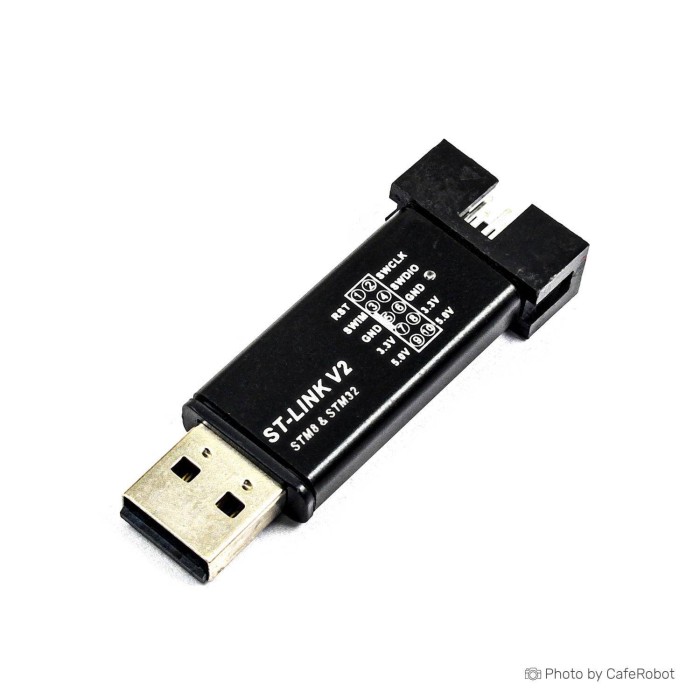
ST-Link V2 Programmer for STM8 & STM32
SAVE
As low as $2.0100
In stock
Only %1 left
SKU
PRO-01-045
Ships in 2-3 business days, then:
Free delivery in 12-15 days by Tracked Economic Shipping on orders over $100.
Free delivery in 7-10 days by Express Shipping on orders over $300.
More shipping info

Shop with confidence Learn More

ST-Link V2 SWD Programmer Review
This compact ST-Link V2 programmer and debugger is built for STM32 and STM8 microcontroller development. It handles basic in-circuit flash programming and real-time debugging over a USB 2.0 connection, with an aluminum-style portable shell and laser-marked pin definitions. Included DuPont wires connect directly to standard 2.54 mm target headers.
This unbranded clone-family device suits hobbyist benches, students, and prototype testing on boards such as the STM32F103C8T6 ARM Minimum System Development Board. It is not intended for commercial production lines, dependable toolchain firmware updates, exposed full JTAG operations, or Serial Wire Output (SWO) trace capture. Browse other dedicated debug hardware in our programmers and debuggers catalog, or see our guide to getting started with STM32F103C8T6 for initial board bring-up.
Specifications of ST-Link V2 Programmer for STM8 & STM32 - USB, 3.3V, 5V
- Supported protocols: SWD (Serial Wire Debug), JTAG (Joint Test Action Group)
- USB interface: USB 2.0
- Supported chips: STM32, STM8
- Operating voltage: 3.3 V, 5 V
- Compatible software: ST-Link Utility, STM32CubeProgrammer, IAR, KEIL, TASKING
- Debug speed: up to 4 Mbps
- Dimensions: 43 x 17 x 7 mm
- Connection: 4-pin SWD connector
- Internal resettable fuse: 500 mA
- Software support: ST-LINK Utility 2.0 and above
- Software support: STVD 4.2.1 and above
- Software support: STVP 3.2.3 and above
- Software support: IAR EWARM V6.20 and above
- Software support: IAR EWSTM8 V1.30 and above
- Software support: KEIL RVMDK V4.21 and above
ST-Link V2 SWD Programmer Specifications and Pinout
The 43 x 17 x 7 mm aluminum enclosure has the footprint of a USB thumb drive, making it easy to keep on a bench or carry for mobile troubleshooting. Although the technical specifications list both SWD and JTAG protocol support alongside a 4-pin SWD connector, STM32 targets connect in practice through Serial Wire Debug. Debug transfer speed is rated up to 4 Mbps. Actual flashing performance depends heavily on the target chip family, cable length, and selected software utility.
Always follow the laser-engraved labels on your physical unit when wiring it. Pin order can vary across manufacturing batches, so do not connect a target from an assumed pinout. The unit provides 3.3 V and 5 V power pins protected by an internal 500 mA resettable fuse. That fuse protects the host computer's USB port from dead shorts; it does not guarantee a sustained 500 mA supply to your target board. Power targets independently when they require substantial current for peripherals or displays, then connect only the ground and signal pins.
For custom breadboard setups or longer target runs, keep additional jumper wires available so you can route connections cleanly without straining the included DuPont cable. Need a standard 20-pin keyed connection for bench work? The ST-Link V2 with a standard 20-pin JTAG connector provides ribbon cable headers and wider target voltage translation. Standard SWD wiring is also shown in our tutorial on programming an STM32 Blue Pill.
ST-Link V2 Clone Limitations: Firmware, JTAG and SWO
This programmer is an unbranded clone-family unit, not an official STMicroelectronics hardware probe. It offers an accessible starting point for flashing microcontrollers, but several hardware limitations should shape the purchase decision:
- Firmware upgrades: Official software tools such as STM32CubeProgrammer regularly prompt users to upgrade probe firmware. Attempting an automatic firmware update on clone-family hardware can fail or permanently brick the internal microcontroller. Leave the shipped firmware intact.
- IDE debug integration: Newer STM32CubeIDE releases can reject clone probes or block interactive step-by-step debugging sessions based on firmware signatures. By contrast, standalone utilities such as STM32CubeProgrammer consistently handle basic memory read, write, and erase tasks.
- Physical JTAG access: Despite the JTAG protocol support listed in the specifications, the compact connector does not expose the full set of JTAG boundary-scan pins. SWD is the intended interface on this hardware.
- No SWO trace: Serial Wire Output (SWO) is not routed to the physical header. Real-time trace features including Instrumentation Trace Macrocell (ITM) printf debugging and hardware event tracking are unsupported.
- Hardware variance: Internal microcontroller models and internal PCB layouts can vary between manufacturing batches, resulting in different indicator LED behaviors (red/blue versus red/green).
For verified toolchain compatibility, USB Type-C connectivity, hardware Virtual COM port (VCP) capabilities, or SWD speeds up to 24 MHz, choose the ST-Link V3MINIE for higher-speed STM32 development. Multi-wire bench setups call for dedicated cabled interfaces; browse our wider range of programmers and debuggers.
ST-Link V2 STM8 and STM32 Software Compatibility
The programmer supports both 8-bit STM8 and 32-bit STM32 development workflows through standard toolchains. Software compatibility maps to particular tasks and interfaces:
| MCU Target Family | Supported Connection | Compatible Software & Minimum Versions | Operational Notes |
|---|---|---|---|
| STM32 (Cortex-M) | SWD (SWCLK, SWDIO, GND) |
STM32CubeProgrammer ST-LINK Utility 2.0+ KEIL RVMDK V4.21+ IAR EWARM V6.20+ TASKING |
STM32CubeProgrammer is the recommended environment for reliable memory flashing and register inspection. |
| STM8 | SWIM |
STVD 4.2.1+ STVP 3.2.3+ IAR EWSTM8 V1.30+ |
Suitable for low-level memory programming, option byte configuration, and source debugging in legacy STM8 environments. |
On Windows workstations, some operating system versions require manual installation of the ST-LINK USB driver when the probe appears as an unrecognized USB device in Device Manager. For ARM Cortex development outside the STM ecosystem, or native Segger utility workflows without STM8 support, consider J-Link-compatible ARM debugging with the j-Link OB probe.
Target power handling also determines the wiring arrangement. The probe delivers 3.3 V and 5 V rails directly from host USB power, which is convenient for bare development boards such as the STM32F103C8T6 target board. For full software-environment setup details, follow our step-by-step tutorial on programming an STM32 Blue Pill.
ST-Link V2 Programmer Setup Check for STM32 Boards
Before starting software development, run this quick hardware detection check in STM32CubeProgrammer to confirm that the programmer is working:
- Insert the programmer into an available computer USB port. Confirm that the shell LED illuminates.
- Inspect the laser-marked pinout table on the metal shell to identify SWCLK, SWDIO, GND, and 3.3V.
- Use the included DuPont wires to connect the probe pins directly to the matching header pins on your STM32 target board. Maintain a common ground connection.
- Place your target board on an 830 points breadboard test setup to prevent accidental shorts against work surfaces during power-up.
- Launch STM32CubeProgrammer. Select ST-LINK from the connection interface dropdown on the right panel.
- Click Connect. The software should populate the target memory table and display the device ID, flash size, and core architecture.
If the software reports a "No target detected" error, check that SWCLK and SWDIO are not swapped, confirm the ground wire is firmly seated, and ensure the target board is receiving adequate operating voltage. Do not click prompts offering to upgrade the ST-Link firmware. For more hardware background, read our complete guide to getting started with STM32F103C8T6.
ST-Link V2 vs ST-Link V3MINIE and JTAG Programmer
The right in-circuit probe depends on your target microcontroller architecture, physical header geometry, and debugging complexity. The table below compares the available debuggers:
| Feature / Specification | ST-Link V2 (This Unit) | Waveshare ST-LINK V2 Mini | ST-Link V2 with JTAG | ST-Link V3MINIE | j-Link OB ARM Debugger |
|---|---|---|---|---|---|
| Target MCUs | STM32, STM8 | STM32, STM8 | STM32, STM8 | STM32, STM8 | ARM MCUs |
| Supported Interfaces | SWD, JTAG (listed) | SWD, SWIM | SWD, JTAG, SWIM | SWD, JTAG | SWD, JTAG |
| Debug Connector | 4-pin SWD header | Compact pin header | 20-pin 2.54 mm JTAG | 1.27 mm STDC14 | 4-pin header |
| Max SWD Clock | Up to 4 Mbps | Standard ST-Link V2 | Standard ST-Link V2 | Up to 24 MHz | Standard J-Link OB |
| Virtual COM Port | No | No | No | Yes (up to 15 Mbps) | No |
| Target Voltage Range | 3.3 V, 5 V | 3.3 V, 5 V | 1.65 V to 5.5 V | 1.65 V to 3.60 V | 3.3 V output |
| Host Connection | USB 2.0 | USB 2.0 | USB Mini-B | USB Type-C | USB Micro-B |
For an exact alternative with dedicated documentation, the Waveshare compact ST-Link V2 option offers identical SWIM and SWD support in an established module format. Bench systems using standard keyed ribbon cables should use the ST-Link V2 with a standard 20-pin JTAG connector. Engineers working with advanced STM32 devices who need drag-and-drop flash programming and high clock speeds can move to the ST-Link V3MINIE. Where the toolchain relies on Segger software for ARM targets without STM8 requirements, the j-Link OB ARM Debugger provides compatible hardware debugging.
ST-Link V2 Programmer FAQ
Is this a genuine ST-LINK/V2?
No. This is an unbranded clone-family programmer and debugger compatible with ST-LINK V2 software protocols. It provides functional flashing and debugging for hobbyist and educational work, but it is not manufactured by STMicroelectronics and carries no official factory support.
Will this ST-Link V2 work with STM32CubeProgrammer and STM32CubeIDE?
Yes for STM32CubeProgrammer, with caveats for STM32CubeIDE. Flashing and device memory management work reliably in STM32CubeProgrammer, while recent STM32CubeIDE versions may reject clone hardware during interactive debugging sessions.
Does this ST-Link V2 provide full JTAG debugging?
No. The physical connection is limited to the accessible header pins intended for SWD use. Although JTAG protocol communication is listed in the software specifications, full 20-pin JTAG signal lines are not broken out on this compact dongle.
Can this programmer be used for STM8 boards?
Yes, it supports STM8 microcontrollers. Standard STM8 toolchains include STVD (version 4.2.1 and above), STVP (version 3.2.3 and above), and IAR EWSTM8 (version V1.30 and above).
Does the ST-Link V2 include wires and a USB cable?
The package includes a 4-pin female-to-female DuPont wire set. A separate USB extension cable is not included because the device is built into a direct-plug USB housing.
Can I update the firmware on this ST-Link V2 clone?
You should not attempt a firmware update. Official firmware upgrade utilities can fail to verify clone hardware signatures, which can permanently disable the programmer.
Why is my STM32 target not detected?
Detection failures commonly result from inverted SWCLK and SWDIO lines, poor ground continuity, or insufficient target board power. Check the laser markings on the metal shell to confirm pin positions, and make sure your computer has the proper ST-LINK drivers installed.
Does this ST-Link V2 support SWO or ITM trace output?
No, this programmer does not break out an SWO pin. Real-time ITM tracing and hardware profiling are not supported on this device.
When should I choose ST-Link V3MINIE instead?
Select the ST-Link V3MINIE for higher-speed STM32 development when you need high-speed USB Type-C connectivity, up to 24 MHz SWD frequencies, an onboard Virtual COM port, or broad low-voltage target support down to 1.65 V.
Purchase Decision Summary
- Ideal for: Hobbyists, students, and makers needing an inexpensive SWD tool to flash STM32 Blue Pill boards, program STM8 microcontrollers, or run basic breakpoint debugging on custom prototypes.
- Maybe for: Embedded developers comfortable cross-checking shell pinouts with a multimeter and working within standalone programming utilities like STM32CubeProgrammer.
- Consider another option if: You need guaranteed firmware update paths, modern STM32CubeIDE live debug support, SWO tracing, a 20-pin JTAG header, or non-STM architectures like AVR, PIC, or Nuvoton chips.
Buying Checklist
- Target board uses an STM32 or STM8 microcontroller with accessible SWD or SWIM pins.
- Basic memory flashing and run-stop debugging satisfy your project requirements without needing SWO/ITM trace logs.
- You have verified that the shell pinout markings must be read directly off the delivered unit.
- You have an available USB host port or standard USB extension cable.
- You have compatible target hardware ready, such as an STM32F103C8T6 target board.
- Extra jumper wires, like a jumper wire assortment, are on hand if custom wiring distances are required.
| Interface Type | USB, JTAG, SWD |
|---|---|
| Operating Voltage (V) | 3.3V, 5V |
| Dimensions (mm) | 43x17x7 |
| Interface Category | USB 2.0 |
| Chipset | STM32, STM8 |
| Voltage Range | 3.3V, 5V |
| Protocols | JTAG, SWD |
| Conversion Type | Converter |
Write Your Own Review

Please complete your information below to login.
Sign In
Create New Account