
Product added to cart

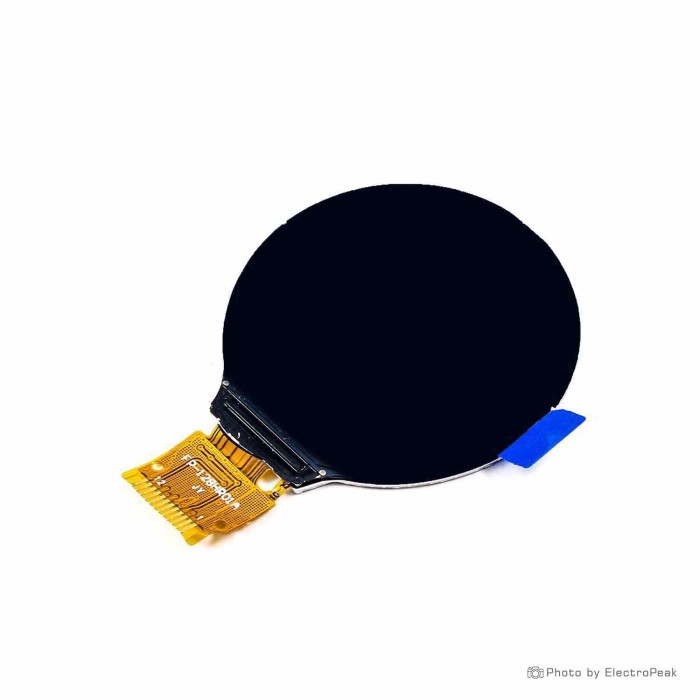
1.28inch TFT LCD - SPI, 12 Pin, GC9A01 Driver
$2.7500
In stock
SKU
LCD-01-151
Volume discounts:
- +25 4 % $2.6500
- +100 6 % $2.5900
- +300 8 % $2.5400
- +500 9 % $2.4900
- +1000 11 % $2.4400
Ships in 2-3 business days, then:
Free delivery in 12-15 days by Tracked Economic Shipping on orders over $100.
Free delivery in 7-10 days by Express Shipping on orders over $300.
More shipping info

Shop with confidence Learn More
 1.3inch TFT LCD - SPI/Parallel, 24 Pin, ST7789V Driver Previous
1.28 Inch TFT LCD GC9A01 Review
This 1.28 inch TFT LCD is a 240 × 240 circular GC9A01 display for makers building compact color interfaces, dials, gauges, and wearable-style projects with 3.3 V SPI hardware. Its fine-pitch ribbon cable requires more connection planning than a standard development display with pre-soldered header pins. It suits projects needing a circular graphic interface on 3.3 V logic, but not projects requiring touch interaction or direct connection to 5 V development boards. For a different form factor, resolution, or interface type, browse our other LCD display options.
Specifications of 1.28inch TFT LCD - SPI, 12 Pin, GC9A01 Driver
- Type: TFT & IPS LCD
- Size: 1.28 inches (circular)
- Resolution: 240 × 240 pixels
- Driver Chip: GC9A01
- Display Area: 32.4 mm diameter
- Interface: 4-wire SPI
- Number of Pins: 12 pins
- Pin Distance: 0.7 mm (flat cable)
- Working Voltage: 3.3 V
- Working Current: 20 mA
- Backlight Type: LED
- Working Temperature: -20°C to +70°C
1.28 Inch Round SPI LCD Specifications Explained
A round display must match your electrical constraints, physical dimensions, and driver architecture. The table below explains the listed specifications of this 1.28 inch TFT LCD and what they mean for your design.
| Specification | Listed Value | Why It Matters |
|---|---|---|
| Active Area & Form Factor | 1.28 inches (circular), 32.4 mm diameter | The 32.4 mm measurement refers strictly to the active circular graphic area. When designing enclosures, bezels, or 3D-printed mounts, account for the outer glass borders and PCB margins rather than relying solely on the active diameter. |
| Resolution | 240 × 240 pixels | A 240 × 240 grid provides crisp rendering for radial needle gauges, circular progress bars, icons, and small text elements across a 32.4 mm viewable area. |
| Controller & Interface | GC9A01, 4-wire SPI | The internal GC9A01 controller communicates over a standard 4-wire SPI bus (clock, data, chip select, and data/command). This bus requires four microcontroller I/O pins, leaving pins available for other sensors. |
| Physical Connector | 12 pins, 0.7 mm pitch flat cable | The display terminates in a 0.7 mm pitch flexible printed circuit (FPC). You cannot plug this cable directly into a breadboard; using standard jumper wiring after FPC breakout conversion requires a matching 12-pin breakout adapter or custom PCB footprint. |
| Operating Voltage | 3.3 V | Power and logic inputs must stay at 3.3 V. Supplying power or logic signals at 5 V risks damaging the driver silicon. |
| Operating Current & Backlight | 20 mA, LED | The listed current is 20 mA with an integrated LED backlight. This distinguishes the panel from self-emissive OLED panels. Generic GC9A01 modules can exhibit varying power draws depending on backlight brightness, so verify the current of your final build on a bench supply before calculating battery runtime. |
| Operating Temperature | -20°C to +70°C | The wide thermal range supports reliable deployment in outdoor enclosures, automotive instrument dashboards, and unconditioned environments. |
For alternative configurations, sizes, and parallel modules, explore our full catalog of other LCD display options.
GC9A01 1.28 Inch TFT LCD Compatibility and Setup
This 1.28 inch round SPI LCD works naturally with native 3.3 V microcontrollers that provide hardware SPI peripherals. ESP32 and STM32 modules can run the GC9A01 controller at full SPI bus speeds without additional voltage-matching circuitry. You can also drive the screen with an Arduino Uno controller for a level-shifted display project, provided you use dedicated 3.3 V logic-level shifters on all data lines and power the display from a stable 3.3 V rail. Raspberry Pi Pico boards are also compatible through their native 3.3 V SPI pins.
| Platform / Component | Compatibility Status | Technical Notes |
|---|---|---|
| ESP32 & STM32 | Direct compatibility | Native 3.3 V logic levels match the panel directly over hardware SPI buses. |
| Arduino Uno (5 V) | Requires hardware adaptation | Requires bidirectional or unidirectional 3.3 V logic-level shifters and a clean 3.3 V supply. Direct 5 V I/O will damage the GC9A01 controller. |
| Raspberry Pi Pico | Direct compatibility | Matches 3.3 V logic requirements over standard SPI0 or SPI1 pins. |
| Graphics Libraries | Supported | Compatible with TFT_eSPI, Adafruit_GC9A01A, and Arduino_GFX across Arduino IDE, PlatformIO, and ESP-IDF. |
| Physical Connection | FPC adapter required | Requires a 12-pin, 0.7 mm FPC connector or breakout board. Exact pinout ordering must be confirmed on the module before soldering. |
To bring up the display on your bench:
- Seat the flat cable in a verified 12-pin, 0.7 mm FPC breakout adapter. Confirm the pin sequence for your specific hardware before applying power.
- Connect the ground and 3.3 V power pins to a regulated 3.3 V power source.
- Route the SPI lines (SCK, MOSI, CS, DC, and RST) to the corresponding hardware SPI pins on your controller.
- Install an established library such as TFT_eSPI, Adafruit_GC9A01A, or Arduino_GFX, and set the display driver selection to GC9A01.
- Flash a basic screen-fill or text test sketch to verify communication and color orientation.
To avoid custom ribbon-cable wiring, choose an integrated ESP32 round LCD board that incorporates the ESP32 MCU, circular GC9A01 display, battery charging, and wireless connectivity on a single board.
GC9A01 vs 1.8-Inch and 2.1-Inch Round TFT LCDs
The right circular display depends on your enclosure constraints, visual-density needs, and interface preferences. Below is a direct comparison between this 1.28-inch GC9A01 module and larger circular display variants.
| Feature | 1.28-Inch GC9A01 (This Board) | 1.8-Inch Round TFT | 2.1-Inch Round TFT |
|---|---|---|---|
| Screen Diameter | 1.28 inches (32.4 mm active area) | 1.8 inches | 2.1 inches |
| Resolution | 240 × 240 pixels | Specific resolution not stated | 480 × 480 pixels |
| Driver Controller | GC9A01 | Specific driver not stated | ST7701S |
| Interface Type | 4-wire SPI | Specific interface not stated | 40-pin SPI interface |
| Connection Pitch | 12 pins, 0.7 mm flat cable | Specific connector not stated | 40 pins |
| Touch Support | No touch interface listed | Available with or without touch | Integrated touch panel |
For a slightly larger viewing area or an interactive touchscreen option, use a 1.8-inch round screen with optional touch in mid-sized physical layouts. Dashboards requiring four times the pixel density and built-in touch input call for a larger 2.1-inch 480x480 round touch display, provided your hardware can handle its 40-pin connection interface.
1.28 Inch GC9A01 TFT LCD Limitations and Accessories
Before purchasing this module, account for its physical and electrical requirements:
- Strict 3.3 V Logic: The GC9A01 controller cannot accept direct 5 V inputs. Feeding 5 V signals from an unshifted development board risks burning out the display controller.
- No Touch Capability: No touch interface is listed for this 12-pin display. Interactive projects require external input hardware such as rotary encoders or push buttons.
- Flat Cable Prototyping: The 12-pin, 0.7 mm pitch flat cable cannot be inserted directly into standard breadboards or 2.54 mm sockets. You must source an appropriate 12-pin FPC breakout adapter.
- Unpublished Pinout and Mechanical Dimensions: The listing does not supply a verified pin assignment order, outer PCB dimensions, or mounting hole locations. Always verify your board's physical pin ordering before soldering.
- Current Budgeting: While the working current is listed at 20 mA, overall current consumption in generic GC9A01 modules fluctuates with backlight brightness and dynamic frame updates. Measure prototype current directly rather than modeling it on the single listed value.
For capacitive finger input without standalone module integration, an integrated round touch LCD development board combines an ESP32-C3 processor and a circular touchscreen in one ready-to-flash unit.
Required Hardware
- 3.3 V SPI-Capable Microcontroller: An ESP32, STM32, or Raspberry Pi Pico running native 3.3 V logic on hardware SPI pins.
- 12-Pin, 0.7 mm FPC Breakout Adapter: A suitable pitch adapter board or custom PCB footprint to break out the flat cable into workable pins.
- 3.3 V Logic-Level Shifter: Mandatory when connecting this display to 5 V microcontrollers like an Arduino Uno.
Recommended Prototyping Accessories
- Arduino Uno controller for a level-shifted display project: A reliable platform for initial driver testing when paired with external 3.3 V level shifters.
- Jumper wiring after FPC breakout conversion: Convenient for linking your FPC breakout board to your microcontroller.
- Breadboard prototyping after FPC breakout conversion: Provides a reliable, solderless base for prototyping once the FPC connection is converted to header pins.
Optional Accessories
- Custom Enclosure: A custom 3D-printed or machined bezel designed around the 32.4 mm viewable area protects the glass perimeter and conceals the FPC routing.
1.28 Inch GC9A01 TFT LCD FAQ
Does the 1.28 inch GC9A01 TFT LCD work with Arduino Uno?
Yes, but only with external 3.3 V logic-level shifters. The Arduino Uno operates on 5 V logic, which can permanently damage the 3.3 V GC9A01 driver. Shift all SPI data lines (SCK, MOSI, CS, DC, RST) down to 3.3 V and supply the module with 3.3 V power. You also need a 12-pin, 0.7 mm FPC breakout adapter to connect it to an Arduino Uno controller for a level-shifted display project.
Does this display have touch input?
No touch interface is listed for this 12-pin module. It functions solely as a visual display. For an interactive screen, consider a 1.8-inch round screen with optional touch.
What library should I use for a GC9A01 round SPI LCD?
TFT_eSPI, Adafruit_GC9A01A, and Arduino_GFX offer reliable support for the GC9A01 driver. Configure the library with GC9A01 as the active driver chip, then assign the software SPI pins to match your microcontroller wiring.
Can this 1.28 inch round SPI LCD connect directly to a breadboard?
No, it cannot plug into a breadboard directly. The display uses a 12-pin flexible flat cable with a 0.7 mm pitch. Connect it through an appropriate 0.7 mm pitch FPC connector or breakout board before attaching standard prototyping jumpers.
Is this display an OLED screen?
No, this is a TFT & IPS LCD with an LED backlight. It requires the backlight to be powered to render an image, whereas OLED displays use individual emissive pixels without an external backlight layer.
Why does a GC9A01 display show a blank, mirrored, inverted, or garbled screen?
This stems from incorrect logic voltage, an unverified pinout, incorrect SPI pin assignments, or improper initialization code. Ensure your data lines supply 3.3 V, verify your FPC pin connections, and confirm that your library configuration matches the GC9A01 controller rather than an ST7789.
Is the listed 20 mA current enough for battery-runtime calculations?
No, the 20 mA listing is a nominal reference figure. Real-world power consumption varies across generic GC9A01 modules based on backlight usage and screen refresh rates. Measure actual current draw on your assembled, running circuit to size battery packs accurately.
1.28 Inch GC9A01 TFT LCD Buying Checklist
Purchase Decision Summary
- Ideal for: Developers building smart dials, digital gauges, or wearable interfaces using native 3.3 V SPI microcontrollers (like ESP32 or STM32) who can integrate a 12-pin, 0.7 mm FPC flat cable.
- Maybe for: Arduino Uno projects that already use reliable 3.3 V level shifters and an FPC breakout board, or portable devices where current draw will be verified on a bench supply.
- Avoid if: You need interactive touch control, direct 5 V pin compatibility, pre-soldered breadboard headers, or published CAD drawings and mounting hole locations.
Pre-Purchase Checklist
- [ ] My enclosure accommodates a circular screen with a 32.4 mm active display diameter.
- [ ] My microcontroller has available hardware SPI pins.
- [ ] My controller provides clean 3.3 V power and 3.3 V logic levels (or I have level shifters for 5 V hardware).
- [ ] I have a verified 12-pin, 0.7 mm pitch FPC connector, breakout board, or custom PCB interface.
- [ ] My project does not require touch input, or I am choosing a larger 2.1-inch 480x480 round touch display instead.
- [ ] I have installed a GC9A01-compatible graphics library (such as TFT_eSPI or Adafruit_GC9A01A).
- [ ] I am prepared to measure real-world current draw directly rather than relying solely on the 20 mA specification.
- [ ] I have evaluated whether an integrated ESP32 round LCD board would be more practical than wiring a standalone display module.
- [ ] I have reviewed other LCD display options to ensure this circular form factor is optimal for my enclosure.
Write Your Own Review

Please complete your information below to login.
Sign In
Create New Account