
Product added to cart

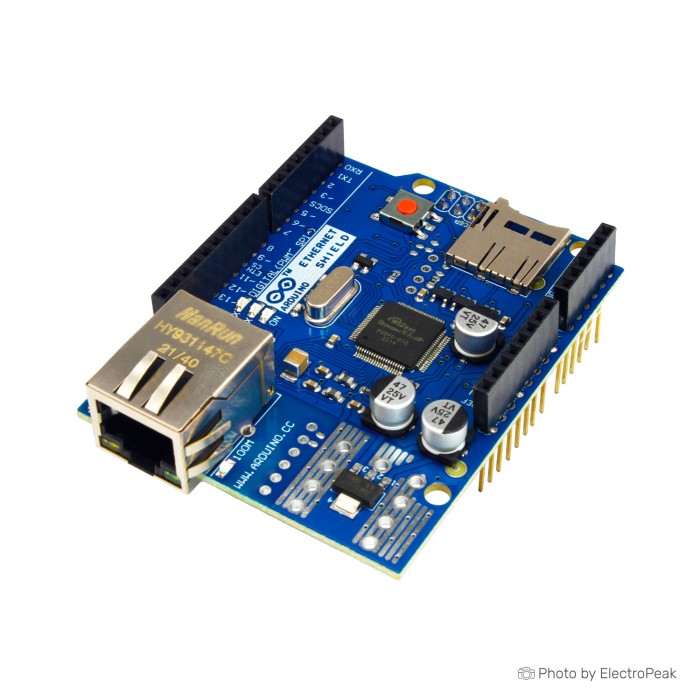
W5100 R3-2013 Ethernet Shield for Arduino
$8.9500
In stock
SKU
ARD-02-043
Volume discounts:
- +25 4 % $8.5900
- +50 6 % $8.4100
- +100 8 % $8.2300
- +300 10 % $8.0500
- +500 12 % $7.8800
Ships in 2-3 business days, then:
Free delivery in 12-15 days by Tracked Economic Shipping on orders over $100.
Free delivery in 7-10 days by Express Shipping on orders over $300.
More shipping info

Shop with confidence Learn More
 ENC28J60 Ethernet Network Module - SPI Interface Previous
The W5100 R3-2013 Ethernet Shield for Arduino enables Arduino boards to connect to an Ethernet network through the Wiznet W5100 chip. It provides an IP network stack with TCP and UDP support and supports four simultaneous socket connections. The shield includes a standard RJ45 Ethernet connection, an onboard micro-SD card slot for file storage, and a reset controller for proper module reset at power-up. It also includes an INT jumper for interrupt notification wiring.
Features of W5100 R3-2013 Ethernet Shield For Arduino
- Wiznet W5100 Ethernet chip
- TCP and UDP support
- Four simultaneous socket connections
- Standard RJ45 Ethernet connection
- Onboard micro-SD card slot
- Reset controller included
- INT jumper connection
Specifications of W5100 R3-2013 Ethernet Shield For Arduino
- Ethernet chip: Wiznet W5100
- Simultaneous socket connections: 4
- Interface: SPI
- Ethernet cable: Standard RJ45
- SD-Card slot: For file storage
- Reset controller: For proper module reset
- Compatibility: Older versions were not compatible with Mega boards and required manual reset
- IEEE802.3af compliant
- Input voltage range: 36~57V
- Output: 9V
- Overload and short-circuit protection
- High-efficiency DC/DC converter: approximately 75% @ 50% load
- Isolation (input to output): 1500V
- PWR LED: Indicates board and shield power
- LINK LED: Indicates network link and data transmit/receive activity
- FULL LED: Indicates full-duplex network connection
- 100M LED: Indicates 100Mb/s network connection
- RX LED: Indicates data reception activity
- TX LED: Indicates data transmission activity
- COLL LED: Indicates network collision detection
- INT jumper: Connects W5100 INT pin to Arduino digital pin 2
How to Use W5100 R3-2013 Ethernet Shield For Arduino
- Attach the shield to a compatible Arduino board.
- Connect an Ethernet cable through the RJ45 port.
- Use the SPI interface and the relevant libraries for W5100 and SD card access.
- Use the INT jumper only if interrupt notification wiring is required.
More Info
- The SPI bus is shared between the W5100 and the SD card.
- Only one of the shared SPI devices can be active at a time.
- Pin 10 is used to select the W5100.
- Pin 4 is used to select the SD card.
- On Duemilanove boards, SPI communication uses pins 11, 12, and 13.
- On Mega boards, SPI communication uses pins 50, 51, and 52.
| Platform | Arduino Mega, Arduino Uno |
|---|---|
| Interface Type | SPI, Ethernet |
| Operating Voltage (V) | 36~57V |
| Operating Temp (°C) | 0 to 70 |
| Mounting Type | Plug-in shield |
| Network Protocol | TCP/IP, UDP |
| Data transmission rate | 100Mb/s |
| Standard | IEEE802.3af |
| Voltage Levels | 5V |
| Chipset | Wiznet W5100 |
| Protection | Overload, Short circuit |
| Direction | Ethernet to SPI |
| Indicator LEDs | COLL, LINK, PWR, RX, TX, 100M, FULL |
Write Your Own Review

Please complete your information below to login.
Sign In
Create New Account