Product added to cart



No. This is a clone board built around the ATmega32U4, and Pro Micro is a board family associated with the SparkFun reference design rather than an official Arduino-designed “Pro Micro.”

Creating an account has many benefits: check out faster, keep more than one address, track orders and more.

We offer free shipping on all orders over $100and under 2kg.
Please note that free shipping is only available for orders under 2kg.
DHL is a renowned shipping courier known for its global reach and reliable delivery services. With a vast network and advanced logistics capabilities, DHL offers fast and secure shipping solutions for international shipments.
For the majority of countries, DHL provides an estimated delivery time of 5 to 7 days.
In certain instances, DHL may not be available for shipments to EU countries. In such cases, we may opt to ship your order using FedEx instead of DHL. Rest assured, FedEx offers a comparable estimated time of arrival (ETA) and your package should typically arrive within 5-7 days.
The base shipping cost for DHL is $35. You can see the final shipping amount on the checkout page. If your order is over $300and less than 2kg, you will qualify for free shipping through DHL Express.
Economy Shipping is a cost-effective international delivery option using a network of trusted logistics partners. Depending on the destination country, the carrier may vary to ensure the most efficient and reliable delivery.
Estimated delivery time is typically 10–15 business days in most cases; But may take up to 20 days. Orders over $100 and under 2kg qualify for free Economy Shipping.
All shipments include tracking. You will receive a tracking number along with a tracking link after dispatch. Most shipments can be tracked via 17TRACK.
Our shipping term is FOB Shenzhen, which does not cover any customs fees. It is important to note that you may be responsible for paying any charges imposed by your country's government, such as duties, taxes, and additional fees imposed by the courier company.
 Digispark USB Attiny85 Development Board Previous
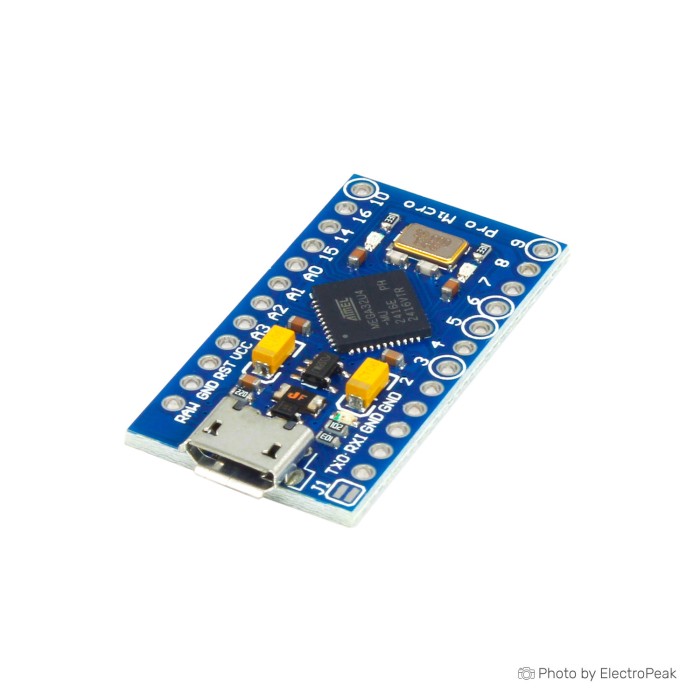
This board is a compact ATmega32U4 development board for small USB-capable Arduino projects. That matters most in builds such as custom keyboards, macro pads, and other HID-style devices, where the microcontroller itself can present as a USB device instead of relying on a separate USB-to-serial approach.
It makes the most sense for buyers who already know the basics of Arduino board selection and can handle a little setup friction if needed. It is less suitable as a first Arduino board, because clone-family variation can affect pin breakout, bootloader behavior, and USB handling. No cable is included, so you will also need a USB to Micro USB Cable - 30cm before first power-up.
For electronics and robotics projects that need a small development platform, the compact format is the main reason to choose this board. Need the same ATmega32U4 family in a larger, easier-to-handle format with more accessible I/O and a standard board footprint? Arduino Leonardo is the better fit. If you are still comparing options across the Arduino Boards range, the Arduino Buying Guide: How to Choose the Right Arduino For Your Project is a useful reference.
On paper, this is a 5V, 16MHz ATmega32U4 board with 12 digital I/O pins, 5 PWM channels, and 9 analog input channels. Memory is listed as 32KB flash, 2.5KB SRAM, and 1KB EEPROM, which matches the kind of small embedded and USB-device work this board is bought for.
A few physical details still matter before you order. The USB connector type is not specified, exact dimensions are not specified, and header inclusion or pre-soldered status is not specified. If those details matter for enclosure fit, breadboard use, or fast assembly, check the product photos carefully before treating this board as a drop-in match for another Pro Micro you have used before.
For buyers comparing more boards in the same general class, the Arduino Boards category is the right place to compare formats and I/O counts.
The raw specs are short, but the buying decision depends on what they mean in a real build. With Pro Micro-family boards, the biggest source of confusion is not the microcontroller itself. It is how different boards expose and count the available pins.
| Specification | What it means in practice |
|---|---|
| ATmega32U4 | This is the main reason to choose this board. The ATmega32U4 family is widely used for USB HID work such as keyboards, macro pads, mouse emulation, and joystick-style projects because the microcontroller supports native USB behavior. |
| Operating Voltage: 5V | This board is aimed at 5V logic projects. It suits many common Arduino sensors and modules, but it is not the right assumption-free choice for 3.3V-only systems without checking voltage compatibility first. |
| Clock Speed: 16MHz | 16MHz is the standard speed many Arduino users expect on 5V boards. It fits well with common Arduino libraries and typical USB-capable hobby projects. |
| Digital I/O Pins: 12 | Use 12 as the planning number for this board. The nuance is that ATmega32U4-family boards are often counted differently by different sellers, especially when analog-capable pins can also be used as digital pins, so tight pin-budget projects should verify the actual silkscreen or board photo. |
| PWM Channels: 5 | Five PWM outputs are enough for a modest number of dimming, motor-speed, buzzer, or LED-control tasks. If your design needs more PWM channels, this is where a larger 32U4 board is easier to work with. |
| Analog Input Channels: 9 | The listed value is 9 analog inputs, which is the number to rely on when comparing products. The caution is physical breakout: on Pro Micro-family clones, the full analog count is not always exposed or labeled the same way, so buyers depending on every analog channel should confirm the actual board layout. |
| Flash Memory: 32KB | 32KB is enough for many small firmware projects, including USB device logic, sensor handling, and moderate libraries. It is not a large-memory board, so complex graphics, networking stacks, or storage-heavy applications are outside its comfort zone. |
| SRAM: 2.5KB | SRAM is working memory used while the sketch runs. 2.5KB is fine for straightforward HID, control, and sensor applications, but it can become a limit if you combine several libraries, buffers, and string-heavy code. |
| EEPROM: 1KB | This gives you a small amount of non-volatile storage for settings such as keymap preferences, calibration values, or device behavior that must survive power loss. |
| DC Current per Digital Pin: 20mA | This is the safe planning figure for direct pin loads. It is enough for logic signals and light direct-drive tasks, but motors, relays, bright LEDs, and other heavier loads still need proper driver circuitry. |
| DC Current per 3.3V Pin: 50mA | The listed figure is 50mA, but the physical presence and behavior of the 3.3V pin on this exact 5V board are not specified. If your design depends on that output, verify the actual board before making it part of the power plan. |
If you want a compact board in the same ATmega32U4 family but prefer a listing with more supplied I/O, PWM, and analog capability details, Arduino Micro is the closest equivalent direction. For quick bench testing, this board pairs well with a 400 Points Half Size Breadboard - 5.5x8.5cm.
Power is simple only if you stay close to the stated figures. The board operates at 5V, and the listed input voltage is 6-9 V. Do not assume that every Pro Micro-family guide you find elsewhere applies directly if it suggests a different RAW-input range.
For USB programming, the board is meant to be connected with a compatible USB cable. The exact USB connector type on this version is not specified, so check the board itself or product imagery before ordering a cable if you are unsure. If you need one, the matched accessory is the USB to Micro USB Cable - 30cm.
On the software side, ATmega32U4 boards are commonly used in the Arduino IDE with an ATmega32U4-compatible board profile such as Arduino Leonardo or SparkFun Pro Micro. Windows, macOS, and Linux support for the ATmega32U4 family is common, but this exact board’s USB implementation is not fully specified, so USB recognition and setup behavior can vary more than on mainstream boards with tighter manufacturing consistency. If you need help with the development environment itself, How to Install Arduino IDE on Windows & MAC covers IDE setup.
This board is a compact embedded platform, not a standard shield-format board. It suits direct wiring on a breadboard or into a custom build better than Uno-style shield stacking. If your project does not need built-in USB, Arduino Pro Mini 5V Clone is the adjacent option to consider instead, since it uses an external USB-to-TTL adapter for programming and follows a different trade-off. For broader board comparisons, the Arduino Buying Guide: How to Choose the Right Arduino For Your Project is the right next read.
The main limitation is not the ATmega32U4 itself. It is clone-family variability. This board can be a very useful small USB-capable controller, but buyers should expect more variation in regulator choice, pin labeling, bootloader version, connector details, and overall consistency than they would on a board with a clearly defined manufacturer and revision.
Upload and bootloader issues are a recurring concern with Pro Micro clones. That does not mean every board will have trouble, but it does mean this is not the best choice if you need a low-risk first setup or a board for production work where you want every replacement unit to behave identically.
Connector durability is another practical concern. Reports across the clone family frequently mention fragile USB connectors, which matters if your workflow involves frequent reflashing, repeated unplugging, or a project where the cable will be stressed mechanically.
Common buying mistakes are predictable.
If you want an original-manufacturer ATmega32U4 listing instead of a clone-family board, Arduino Micro is the safer direction. If you are comparing board families before committing, the Arduino Buying Guide: How to Choose the Right Arduino For Your Project helps narrow that down.
Getting started is straightforward if the board and cable are both behaving normally. The goal of the first session is simple verification: confirm that the computer recognizes the board, the IDE can see the port, and a basic sketch uploads successfully.
The required software is Arduino IDE. Driver requirements are not specified for this board, and while ATmega32U4-family boards are commonly used for native USB projects, clone variation means some boards can still present setup issues or confusing USB behavior.
The most common first-time mistakes are using the wrong cable type, using a charge-only cable, selecting Arduino Uno instead of an ATmega32U4-compatible profile, choosing the wrong port, or assuming every Pro Micro clone behaves the same during reset and upload. If an upload fails, reset and bootloader timing methods commonly used in the Pro Micro community are often the next thing to try.
No cable is included, so the first required accessory is the USB to Micro USB Cable - 30cm. For temporary wiring and first tests, a Breadboard Jumper Wire Kit - 140 Pieces is useful. If you need a refresher on the software side, How to Install Arduino IDE on Windows & MAC covers the IDE installation steps.
The right alternative depends on why this board appealed to you in the first place. If the ATmega32U4 and USB-device capability matter, stay in that family. If the real goal is just a small general-purpose Arduino-compatible board, a different route may make more sense.
Arduino Leonardo is the one to choose when you want a full-size ATmega32U4 board with a standard Arduino format, more accessible I/O, and easier bench handling. It is a better fit for buyers who want more room to work, more conventional board handling, or a board that feels closer to the usual Arduino form factor.
If you want another compact ATmega32U4 option from an original-manufacturer listing, look at Arduino Micro. It suits buyers who want to stay in the same general USB-capable 32U4 category but place more weight on consistency and supplied board details.
Arduino Pro Mini 5V Clone is the adjacent choice if built-in USB is unnecessary and you are happy to program through an external USB-to-TTL adapter. Arduino Pro Mini 3.3V Clone is the adjacent direction when your project is built around 3.3V logic or lower-power parts and you can accept the 8 MHz trade-off.
If you are still comparing shapes, pin counts, and use cases across the wider range, the Arduino Boards category and the Arduino Buying Guide: How to Choose the Right Arduino For Your Project will narrow the field quickly.
No. This is a clone board built around the ATmega32U4, and Pro Micro is a board family associated with the SparkFun reference design rather than an official Arduino-designed “Pro Micro.”
Its USB capability is the main difference. This board is used for USB-capable projects such as HID devices, while the Pro Mini alternatives use a different board family and require an external USB-to-TTL adapter for programming.
The listed specification is 12 digital I/O pins, 5 PWM channels, and 9 analog input channels. Buyers still need to pay attention because Pro Micro-family boards are often counted differently across sellers, so if your project is tight on pins, verify the actual breakout before relying on every family reference.
The listed figures are 5V operating voltage and 6-9 V input voltage. If you plan to power external peripherals from the board, verify the actual voltages in your own setup rather than assuming every Pro Micro-family clone behaves the same.
Yes, it needs a compatible USB cable for programming, and no cable is included. Plan for the cable before ordering if this is your first board in this format.
Yes. Pro Micro-family ATmega32U4 boards are widely used for keyboards and other USB HID devices, which is one of the main reasons buyers choose this type of board at all.
Wrong board selection, wrong port, cable problems, reset timing, and clone bootloader differences are the usual causes. Most setup trouble is not about the sketch itself; it is about board profile selection and USB or bootloader behavior.
Choose this board for compact builds and small USB-capable projects. Choose Leonardo if you want a full-size ATmega32U4 board with a standard Arduino format and more room to work.
| MCU/SoC | ATmega32U4 |
|---|---|
| Product Family | Arduino |
| Architecture | AVR |
| CPU Cores | 1 |
| Clock Speed (MHz) | 16MHz |
| Flash | 32KB |
| SRAM | 2.5KB |
| EEPROM | 1KB |
| GPIO Pins | 12 |
| SPI interface Pins | 1 |
| I2C interface Pins | 1 |
| UART interface Pins | 1 |
| USB Ports | 1 |
| Ethernet Support | No |
| ADC Channels | 9 |
| PWM Channels | 5 |
| Operating Voltage (V) | 5V |
| GPIO Voltage (V) | 5V |
| GPIO Current (mA) | 20mA |
| Wireless | No |
| Input Voltage (V) | 6-9 V |
| Antenna Type | No |
| Bluetooth Ver. | No |

Please complete your information below to login.
Sign In
Create New Account