
Product added to cart

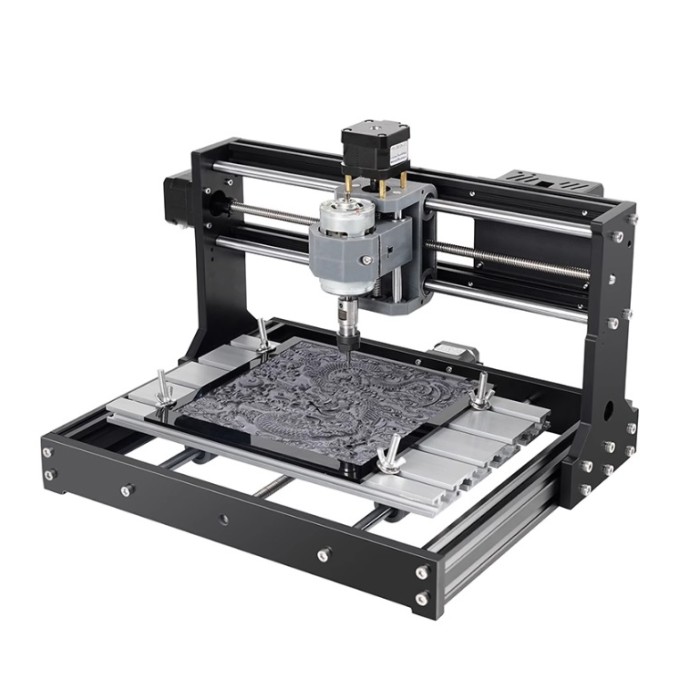
CNC 3018 Pro Engraving Machine Kit
$159.0000
In stock
SKU
CNC-01-001
Volume discounts:
- +5 4 % $152.0600
- +10 7 % $148.5800
- +25 9 % $145.1100
- +50 11 % $141.6400
- +100 13 % $138.1700
Ships in 2-3 business days, then:
Free delivery in 12-15 days by Tracked Economic Shipping
Free delivery in 7-10 days by Express Shipping on orders over $300.
More shipping info

Shop with confidence Learn More
 MakerBase MKS DLC32 CNC-Controller Board V.2 Previous
CNC 3018 Pro Engraving Machine Kit Review
The CNC 3018 Pro Engraving Machine Kit is a compact desktop CNC router for learning G-code, work offsets, and small-format subtractive machining. Its aluminum and Bakelite frame, 300x180x45mm working table, 775 spindle motor, and GRBL-based motion control support PCB isolation routing, prototype drilling, and light engraving in plastics and wood. It is an accessible entry point to computer numerical control, not a machine for production throughput, deep hogging passes, or routine metal milling.
Workshop buyers should expect an assembly kit that requires manual squaring, calibration, and toolpath preparation. Among CNC machines and desktop CNC projects, this is a lightweight machine for learning and prototyping rather than an industrial milling station.
Specifications of CNC 3018 Pro Engraving Machine Kit
- Working table size: 300x180x45mm
- Overall dimensions: 400x330x240mm
- Machine type: CNC Router
- Spindle motor: 775 spindle motor
- Spindle motor voltage: 24V
- Spindle speed: 9000 to 10000 rpm
- Rated power: 60W
- Maximum power: 120W
- Step motor: 1.3A
- Step motor voltage: 12V
- Step motor torque: 0.25N.m
- Lead screw: T8 lead screw
- Lead screw pitch: 4mm
- Chuck specification: ER11
- Chuck diameter: 3.175mm
- Construction: Aluminum + Bakelite
- Weight: about 7kg
- Control software: Candle GRBL
- Control method: USB and offline module
- Input voltage: 24V
- Input current: 5A
CNC 3018 Pro Specifications Explained
These physical dimensions and electrical ratings set practical limits for machining, tooling, and setup. Reading them in context helps prevent setup errors and unrealistic tooling expectations.
| Specification | Value | Why It Matters |
|---|---|---|
| Working table size | 300x180x45mm | Defines maximum bed space. Real cutting volume along the Z-axis is significantly smaller once you account for tool stick-out, spoilboard thickness, and hold-down clamps. |
| Overall dimensions | 400x330x240mm | Determines bench footprint. Keep clearance around the perimeter for Y-axis bed movement and wire harness travel. |
| Machine weight | about 7kg | Lightweight for relocation, but low mass means less vibration dampening during aggressive or high-load cuts. |
| Construction | Aluminum + Bakelite | Bakelite structural plates combined with aluminum extrusions lower cost and weight, but introduce structural flex under heavy lateral cutting forces. |
| Spindle motor | 775 spindle motor (24V, 9000 to 10000 rpm) | Brushed DC motor suitable for high-speed, light-chip-load operations such as PCB isolation routing and engraving. Lacks the low-end torque needed for large-diameter cutters. |
| Spindle power | 60W rated / 120W maximum | Indicates power draw under varying load. The continuous mechanical cutting capacity is conservative; running continuously at peak power will overheat the motor. |
| Step motors | 1.3A, 12V, 0.25N.m | Standard NEMA-17 class torque output, sufficient for moving the light axis carriages along lead screws without skipping steps under conservative feed rates. |
| Lead screw | T8 lead screw, 4mm pitch | Translates motor steps into linear movement. A 4mm lead offers a balance between travel speed and holding torque, though mechanical backlash must be monitored during fine detail passes. |
| Chuck & collet | ER11, 3.175mm chuck diameter | Directly accepts 1/8-inch (3.175mm) tool shanks. Tools with 4mm, 6mm, or 1/4-inch shanks cannot be installed without purchasing matching, compatible ER11 collets separately. |
| Power input | 24V, 5A | Provides total system power for the logic board, three stepper motors, and the 775 spindle. |
CNC 3018 Pro Setup and GRBL Compatibility
The machine uses standard GRBL firmware to interpret open G-code commands sent over a serial connection. The workflow starts with a CAD or vector design, then toolpath generation in CAM software. After exporting toolpaths as a .nc or .gcode file, a machine controller such as Candle GRBL streams the commands to the physical router through a USB interface.
The control board supports USB streaming and an external offline module. For computer-based jobs, use a verified data-capable USB cable; charge-only cables will not establish a serial COM port. With an offline module, jobs are read directly from memory cards, so a PC does not need to remain near cutting debris.
These control methods are mutually exclusive. On documented matching control boards, connecting the offline pendant and USB cable simultaneously causes serial communication conflicts and frozen axes. Disconnect the USB cable before plugging in the offline controller, and unplug the offline module before opening Candle on your computer.
Specific hardware details vary across production batches. The exact USB serial bridge chip, board revision, bundled media, and operating system installers remain unconfirmed before unboxing. macOS and Linux users should verify the onboard serial converter chip upon delivery before installing the appropriate communication drivers.
CNC 3018 Pro Materials, Accuracy and Limitations
The CNC 3018 Pro suits flat-stock routing, shallow decorative carving, and prototype electronics work. It processes wood, acrylic, PVC, plastics, and copper-clad PCB blanks effectively when cutting loads stay low. Its lightweight build is a useful platform for learning chip-load calculations, spindle-speed matching, and bed leveling.
Soft aluminum is listed among the supported materials, but expectations need to remain realistic. The Bakelite gantry plates, 775 brushed spindle, and small lead screws lack the mass and rigidity needed for true metal milling. Soft aluminum can only be engraved or cut with very shallow passes, minimal feed rates, sharp single-flute cutters, and external chip clearance. Aggressive aluminum depths of cut will induce chatter, ruin bit geometry, stall the spindle, or flex the gantry. The machine cannot cut steel, stainless steel, or hard alloys under any circumstances.
No factory repeatability, mechanical runout, or dimensional backlash figures are specified for this machine. Backlash spring tension, gantry squareness, and V-slot roller tightness directly affect finished cut tolerance. Test cuts and dimensional calibration are mandatory before attempting tight-tolerance joints or fine-pitch surface-mount PCB traces.
The control board includes laser engraving support, meaning the mainboard has circuitry to drive a compatible laser module. This kit does not include a diode laser, mounting brackets, optical safety glasses, or laser enclosure hardware. For clean surface engraving or thin-sheet cutting rather than 3D chip-making, purpose-built diode laser engravers offer larger beds, fixed focal spots, and ready-to-run software workflows without cutting-tool side loads. The TwoTrees TTS-55 PRO entry-level laser platform is worth considering for dedicated laser work, while the TwoTrees TTS-10 PRO higher-power diode-laser engraving workflow suits buyers who need more diode-laser output.
CNC 3018 Pro Accessories and Workholding
A CNC router needs supporting workshop hardware for safe, effective operation. Review your tooling and power setup before the first job.
Required Equipment
- 24V 5A Power Supply and Mains Cable: The unit requires a verified 24V supply to drive the spindle and steppers; confirm regional plug and PSU presence upon unboxing.
- USB Data Cable and Computer: Use a dedicated PC running Candle GRBL, or a compatible G-code sender, connected through a confirmed data cable.
- CAM Software: Software converts your 2D/3D models into machine-readable G-code before you open Candle.
- Job-Specific Cutting Tools: End mills, V-bits, or PCB engraving bits need a 3.175mm (1/8-inch) shank to match the pre-installed ER11 collet.
- Workholding Clamps: T-slot clamps or mechanical fixtures must hold the workpiece completely rigid against cutting forces.
- Sacrificial Spoilboard: Mount a flat MDF or composite sheet between the aluminum bed and the workpiece to prevent the bit from cutting into the aluminum table during through-cuts.
- Safety Gear: Use eye protection rated for flying debris and appropriate respiratory protection when cutting MDF, carbon-based stock, or plastics.
Recommended Additions
- Extra End Mills and Engraving Bits: Small 1/8-inch bits snap easily during initial feed-rate tuning; keep spare flat-end, ball-nose, and V-engraving cutters on hand.
- Calipers and Dial Indicator: Essential for measuring exact stock thickness, leveling the bed, and measuring axis backlash.
- Dust Extraction or Chip Shielding: Use a vacuum attachment or chip brush to clear swarf from the cut channel and prevent bit re-cutting and overheating.
- Alternative ER11 Collets: Add collet sizes such as 4mm or 6mm if you plan to use bits with non-standard shank diameters.
Optional Upgrades
- Offline Controller Pendant: Lets you jog and run jobs directly from a memory card without keeping a computer tethered in a dusty environment.
- Diode Laser Module: Adds light surface-marking capabilities, provided the module matches the board's voltage, pinout, and PWM logic.
- Limit and Homing Switches: Microswitches wired to the controller enable machine homing ($H) and coordinate recovery after stalls.
CNC 3018 Pro Quick Start
Use this initial sequence to confirm mechanical alignment and electrical operation before cutting final stock.
- Inventory and Frame Assembly: Unpack all components. Assemble the base and uprights on a known flat surface, tightening all aluminum extrusion fasteners evenly to ensure the frame is square.
- Mechanical Axis Verification: With power disconnected, turn each T8 lead screw by hand. The X, Y, and Z carriages must slide smoothly along their guide rods without binding, tight spots, or excessive play.
- Wiring and Secure Routing: Connect the three stepper motors and the 775 spindle to the control board. Secure loose cabling with zip ties so harnesses cannot snag on the moving bed or lead screws.
- Initial Power and Software Link: Connect the 24V power supply and plug the USB cable into your computer. Launch Candle GRBL, select the correct COM port, and verify that the console reports an active GRBL connection.
- Manual Jog Test: Use Candle's manual control panel to jog the X, Y, and Z axes in short 1mm increments. Verify that travel direction matches the interface buttons (+X moves right, +Y moves bed forward/gantry back, +Z moves spindle up).
- Dry Run Above the Bed: Load a simple test G-code file. Set work zero (X0, Y0, Z0) safely in the air, keep the spindle motor unpowered, and run the job to verify that the toolpath stays within the machine's physical limits.
- First Test Cut: Secure a piece of scrap wood or insulation foam over a spoilboard using your bed clamps. Set the physical Z-zero at the top surface of the stock, turn on the spindle, and run a conservative engraving profile.
Common beginner errors include charge-only USB cables that prevent software connection, failing to establish work coordinates before running code, positioning metal clamps directly inside the toolpath, and attempting deep single-pass cuts that stall the 775 spindle motor.
CNC 3018 Pro FAQ
What is the CNC 3018 Pro working area?
The listed working table size is 300x180x45mm. Usable cutting volume is smaller than the physical table size because stock clamps, spoilboard height, and tool stick-out consume available Z-axis travel. Measure stock clearance with the cutter retracted before starting a job.
Can the CNC 3018 Pro cut aluminum?
It can perform light, conservative surface engraving and very shallow passes in soft aluminum alloys, but it is not a production metal mill. The lightweight frame, Bakelite plates, and 775 spindle chatter and flex under aggressive feeds, making deep cuts or hard metals such as steel impossible.
Does the CNC 3018 Pro include a laser?
No, a laser module is not included in the standard kit. While the machine frame and control board support laser engraving, the physical diode module, laser mount, and safety goggles must be verified and purchased separately.
Is the offline controller included?
Package contents vary by batch, so offline controller inclusion is not guaranteed. The control board supports an offline module, but you must confirm whether the pendant, connecting cable, and memory card are bundled in your specific box.
Can I use USB and the offline controller at the same time?
No, the USB port and offline module cannot be used simultaneously. Connecting both causes serial bus conflicts that freeze the machine. Disconnect the USB cable before plugging in the offline pendant, and do the reverse before returning to USB control.
What software does the CNC 3018 Pro use?
The machine uses Candle GRBL to stream prepared G-code over USB. Candle is an execution sender; you still need external CAD/CAM software, such as Easel, Fusion 360, or FreeCAD, to generate toolpaths and export the G-code files first.
What bits fit the CNC 3018 Pro?
It fits 3.175mm (1/8-inch) shank bits using the included ER11 collet. To use cutters with other shank diameters, such as 4mm or 6mm tools, purchase the corresponding ER11 collet size separately.
Is the CNC 3018 Pro ready to use out of the box?
No, it arrives as an unassembled kit. You must assemble the physical frame, wire the stepper motors and spindle, install computer drivers, configure Candle GRBL, and square the mechanical axes before running the first cut.
Will the CNC 3018 Pro work with Mac or Linux?
Yes, because GRBL communicates over a standard serial interface supported by open-source senders across multiple operating systems. However, specific USB-to-serial drivers, such as CH340 drivers, may require manual installation depending on your operating system version and the board's bridge chip.
Does the CNC 3018 Pro have limit switches, homing, probing, or an emergency stop?
These features are not standard or pre-wired on this kit. While many GRBL control boards expose header pins for limit switches and Z-probe connections, you must supply the switches, wiring, and firmware configuration yourself.
CNC 3018 Pro Purchase Decision Summary
Ideal for:
- Makers, students, and hobbyists learning CNC toolpaths, work offsets, and GRBL workflows.
- Prototyping custom PCBs via isolation routing and small drill operations.
- Shallow engraving, signs, and flat-part cutouts in wood, acrylic, PVC, and modeling plastics.
Maybe for:
- Light, shallow-pass decorative engraving on soft aluminum using slow, highly conservative feeds.
- Users comfortable sourcing their own cutters, clamping kits, and software toolchains.
Consider another option if:
- You need routine milling of aluminum, brass, or steel parts.
- You require a turnkey, pre-assembled machine with guaranteed out-of-the-box tolerances.
- Your workpieces exceed the 300x180mm footprint or require more than 45mm of vertical Z clearance.
- Your primary focus is laser engraving; dedicated diode laser frames offer faster speeds and larger working envelopes.
CNC 3018 Pro Buying Checklist
- Verify that your typical workpiece, clamps, and spoilboard fit comfortably inside the 300x180x45mm envelope.
- Confirm that you have a CAD and CAM software pipeline ready to generate standard GRBL-compatible G-code files.
- Check package contents upon arrival for the power supply, USB cable, collet hardware, and frame fasteners.
- Ensure you have 1/8-inch (3.175mm) shank end mills and engraving bits suited to your intended materials.
- Verify whether your order includes an offline pendant if you intend to run jobs away from a computer.
- Purchase a dedicated spoilboard (MDF or similar scrap) and low-profile clamps before cutting through-parts.
- Prepare appropriate personal protective equipment, including safety glasses and dust management.
| Weight (g) | 7000 |
|---|
Write Your Own Review

Please complete your information below to login.
Sign In
Create New Account