
Product added to cart

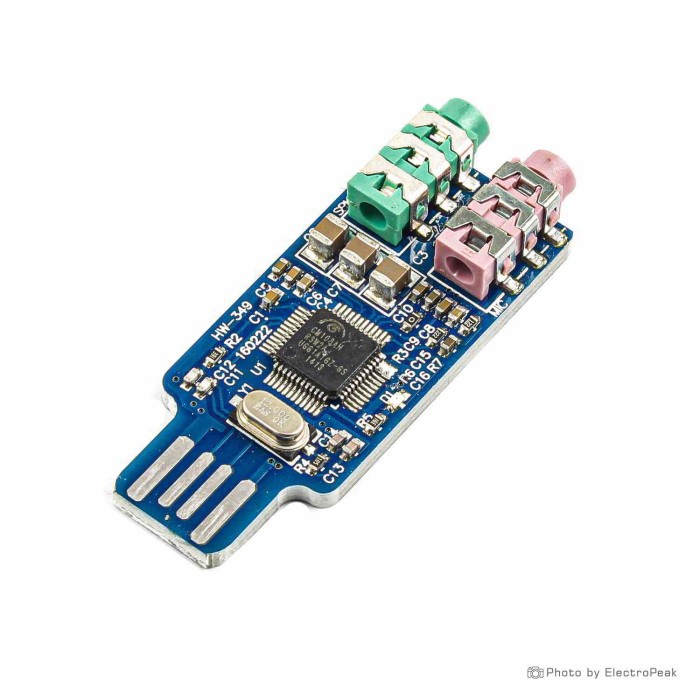
CM108 USB Drive Free External Sound Card Module
SAVE $0.4500
$2.5000 $2.9500
In stock
SKU
SEN-17-128
Ships in 2-3 business days, then:
Free delivery in 12-15 days by Tracked Economic Shipping on orders over $100.
Free delivery in 7-10 days by Express Shipping on orders over $300.
More shipping info

Shop with confidence Learn More
 XH-M139 Digital Power Amplifier Board - 2x50W+100W Previous
CM108 USB Sound Card Review
The CM108 USB sound card module adds external analog audio input and output to desktop computers and notebooks through a standard USB interface. With separate 3.5 mm jacks for headphone output and microphone input, it provides a straightforward way to add sound functionality to a host system or replace damaged onboard audio jacks. The module requires no additional driver installation on its supported Windows operating systems, making it a practical utility tool for quick PC repairs and custom embedded projects.
This compact board is intended primarily for basic voice, repair work, and maker audio applications. As an unshielded bare-board unit built around utility-grade audio hardware, it is not intended for critical music listening, studio monitoring, or multichannel recording setups. To compare other playback and recording hardware, browse our sound and audio modules catalog.
Specifications of CM108 USB Drive Free External Sound Card Module
- Chip model: CM108 external crystal oscillator
- Interface: USB
- Output input: 3.5mm green headphone jack, 3.5mm microphone jack
- Dimensions: 30x15x10 millimeters
- Compatibility: WIN2000, WINXP, WIN3003 systems
Although the stated compatibility list references legacy operating systems, modern operating system support is standard across the broader CM108 hardware family. Specific driverless behavior and operating system handling are covered in the setup section below.
CM108 USB Sound Card Specifications Explained
The CM108 USB sound card centers on a dual-jack analog layout. The green 3.5 mm jack provides analog stereo output for conventional headphones or self-powered external speakers. Beside it, the dedicated 3.5 mm microphone jack accepts analog computer microphone signals. Within the CM108 family, this microphone path is mono, making it suitable for utility voice capture and communication tasks rather than stereo line-level audio digitization.
The listed bare-board dimensions are 30x15x10 millimeters. Its compact footprint lets you tuck the board into custom project enclosures, direct-solder it to internal USB pin headers, or integrate it into compact robotics chassis. There is no molded plastic shell, however, so the board has no built-in strain relief or physical protection against electrical shorts. For enclosures with tight tolerances, measure the board after it arrives, as generic board dimensions can show slight physical variations between production runs.
The integrated USB connector carries both digital audio data and operating power directly from the host system. That direct connection is useful for adding basic sound support to headless systems, desktop motherboards with burned-out audio codecs, or notebooks without a working analog headset jack.
CM108 USB Sound Card Compatibility and Setup
The listed operating system compatibility covers WIN2000, WINXP, and WIN3003 systems, with the latter being legacy naming for Windows Server 2003. No additional driver installation is required for these supported Windows systems. The broader CM108 hardware family also operates through native USB Audio Class support across modern Windows versions, including Windows 10 and 11, standard Linux distributions, macOS, and Raspberry Pi OS. Direct testing and validation on modern platforms have not been formally documented for this specific inventory batch.
Set up the sound card by plugging it into an available host port, then routing your operating system's audio streams through it:
- Insert the module directly into an active USB port on your computer or single-board computer.
- Plug standard 3-pole (TRS) headphones or powered speakers into the green 3.5 mm jack.
- Connect an electret computer microphone to the dedicated microphone jack if voice capture is needed.
- Open your host operating system's sound control panel and select the newly recognized device for both playback and recording. Depending on your system, the card will typically register under the name "USB PnP Sound Device," "C-Media USB Headset," or "CM108 Audio Controller."
- Test audio playback with a short clip, then record a voice sample to confirm the input level.
On modern operating systems, low recording levels or an apparent lack of audio are generally configuration issues rather than hardware defects. In Windows 10 and 11, confirm that OS-level microphone privacy permissions allow desktop applications to access recording devices. On Linux and Raspberry Pi OS, check alsamixer to ensure the USB capture channel is unmuted and the input gain slider is raised above zero.
CM108 USB Sound Card Limitations and Buyer Mistakes
Understand the limits of generic bare-board USB audio devices before purchasing. The microphone port is strictly a mono input path. It does not support stereo recording or provide the line-level attenuation needed to digitize line-out signals from mixers or musical instruments. This board is also a standard 2-channel stereo output device; generic marketplace descriptors such as "5.1," "7.1," or "3D Sound" do not apply to this hardware.
Within the CM108 family, audio resolution remains within standard-definition limits of 16-bit depth at 44.1 kHz or 48 kHz sampling rates. It does not decode 24-bit or 96 kHz high-resolution streams. Bench measurements of visually identical generic bare boards have shown elevated noise and distortion alongside limited output drive under load. This module suits system alerts, basic voice calls, and utility maker audio, but it is not intended for critical music monitoring or production recording.
A common mistake is plugging a modern smartphone or gaming headset with a single 4-pole TRRS plug directly into the green headphone jack. The module separates playback and recording across two distinct 3-pole TRS jacks, so a combined TRRS plug will not route microphone signals. Such a headset requires an external TRRS-to-dual-TRS adapter splitter.
Output power also deserves attention. The green 3.5 mm jack is designed for standard low-impedance headphones and powered desktop speakers with an integrated amplifier. Connecting unpowered passive speakers directly to the 3.5 mm jack will produce virtually inaudible sound. Because the board is supplied as unbranded, generic bare-board stock, minor component variations may exist between production runs, and onboard status LED behavior is not definitively standardized across revisions.
For projects involving high-resolution digital playback through external high-end audio hardware, use a dedicated high-resolution USB-to-I2S audio interface instead. These interfaces send raw digital I2S and DSD signals to a downstream DAC rather than providing built-in analog headphone or microphone jacks.
CM108 USB Sound Card Uses and Accessories
This module serves several practical roles in computer maintenance and embedded electronics projects. It works as an inexpensive drop-in replacement when a desktop or laptop motherboard has physical audio jack damage or a failed onboard sound chip. In Raspberry Pi and small-form-factor Linux systems, it offers a simple way to add two-way analog audio when only digital HDMI sound is natively available.
Within amateur radio, CM108-family hardware is widely used for digital radio interfaces, AllStarLink nodes, and APRS packet systems. Community documentation shows continuous field operation on modified CM108 chips, but exposed GPIO pins and push-to-talk (PTT) pad availability depend entirely on the specific PCB trace layout and are not verified for this exact physical board revision.
Depending on your project setup, consider the following accessories:
- Required: Standard 3.5 mm TRS headphones or self-powered external desktop speakers for playback.
- Required for recording: A standard electret computer microphone with a 3.5 mm TRS plug.
- Recommended for combined headsets: A CTIA/OMTP-compatible TRRS female to dual 3.5 mm male splitter if using a modern single-plug headset.
- Recommended for external audio gear: A high-quality 3.5 mm cable for powered speakers or amplifier connections.
- Optional for permanent projects: An external project box or heat-shrink tubing to protect the bare PCB traces from accidental shorts against chassis metal.
For setups that need to transmit audio wirelessly to headphones or an external receiver rather than connect directly to an analog jack, use a dedicated adapter for Bluetooth audio transmission.
CM108 USB Sound Card FAQ
Does the CM108 USB sound card need drivers?
No additional driver installation is required for the supported Windows systems specified for the module. On modern operating systems such as Windows 10, Windows 11, Linux, macOS, and Raspberry Pi OS, CM108-family hardware uses standard USB Audio Class support native to the host platform.
Does the CM108 USB sound card work with Windows 10 or Windows 11?
Yes, CM108-family hardware operates across Windows 10 and Windows 11 through native operating system audio drivers. While broader hardware testing confirms this behavior, specific validation on modern Windows builds has not been formally conducted on this exact inventory stock.
Does the CM108 USB sound card work with Linux, macOS, or Raspberry Pi?
Yes, the CM108 chipset family is natively supported by Linux kernels, macOS, and Raspberry Pi OS without specialized drivers. After plugging it in, select the USB audio device in your host sound manager and confirm that input capture levels are raised in your mixer settings.
Is the microphone input stereo?
No, the microphone input on CM108-family hardware is strictly mono. The green headphone jack delivers two-channel stereo audio, while the microphone path processes only single-channel input.
Can I connect a phone or gaming headset with one TRRS plug?
No, a combined 4-pole headset cannot connect directly. The module has two physically separate 3-pole TRS jacks, so you must use a TRRS-to-dual-TRS splitter to route the audio and microphone lines to their respective jacks.
Can this CM108 USB sound card drive speakers directly?
No, the board cannot drive passive unpowered speakers directly. Its 3.5 mm output provides a line/headphone-level signal for headphones or self-powered speakers with an internal amplifier.
Is the CM108 USB sound card good for music, hi-fi, or podcast recording?
No, the module is not intended for critical audio reproduction or studio recording. Bench testing of visually identical generic boards shows measurable background noise and distortion, so the board is intended for basic system sounds, repair utility, and voice applications.
Why is my microphone quiet or silent?
A quiet microphone is generally caused by unconfigured software settings rather than hardware failure. Ensure the USB sound card is selected as your default recording device, confirm that input gain is raised in your operating system mixer, grant microphone permissions in Windows settings where applicable, and verify that you are using a powered electret computer microphone rather than an unamplified dynamic mic.
How can I identify a CM108-family device after receipt?
Check the USB hardware identification strings through Device Manager on Windows or by running lsusb in a Linux terminal. CM108-family hardware typically enumerates with the C-Media vendor ID (VID) 0x0D8C.
CM108 USB Sound Card Buying Decision
The CM108 USB sound card is an economical, practical utility module for solving specific input/output issues on host PCs and embedded development systems:
- Suitable for: Restoring audio on computers with broken 3.5 mm jacks, providing basic audio I/O on Raspberry Pi boards, voice intercoms, and compact embedded microcontroller projects needing simple USB sound.
- Maybe for: Amateur radio experimenters and tinkerers who understand bare-board hardware constraints, can accommodate board-to-board variation, and do not strictly require verified GPIO/PTT access on this specific revision.
- Consider another option if: You need high-fidelity music playback, studio-grade vocal recording, stereo line-in capture, support for passive speakers, or an enclosed consumer adapter with built-in cable strain relief.
For price reference, comparable generic CM108 bare-board listings sell in the $2.60 to $3.20 range across electronics marketplaces. To compare this board with other audio solutions, browse our wider selection of sound and audio modules.
Buying Checklist
- I need separate 3.5 mm headphone and microphone connections through USB.
- I will use headphones or powered speakers, not unamplified passive speakers.
- I understand the microphone path is mono rather than stereo line input.
- I have an electret computer microphone available for recording tasks.
- I have a TRRS-to-dual-TRS splitter if connecting a single-plug gaming or phone headset.
- I am purchasing this board for utility voice, PC repair, or maker audio rather than critical music production.
- I can safely accommodate an unenclosed bare PCB without a protective housing.
- I will select the USB audio device manually in my operating system's sound settings upon connection.
- I will measure the physical board before fabricating a custom enclosure rather than relying strictly on the 30x15x10 millimeter listed dimensions.
- I understand that specific chip revision markings and factory batch quality controls are not guaranteed on generic stock.
| Interface Type | USB |
|---|---|
| Operating Voltage (V) | 5V |
| Dimensions (mm) | 30x15x10 mm |
| Audio Function | Audio Recording and Playback |
| Sampling Rate (Hz) | 44.1kHz, 48kHz |
| Input Types | 3.5mm headphone jack, 3.5mm microphone jack |
| Bluetooth Ver. | No |
| Output Type | Analog |
| Channels | 2-channel |
| Chipset | CM108 |
Write Your Own Review

Please complete your information below to login.
Sign In
Create New Account