
Product added to cart

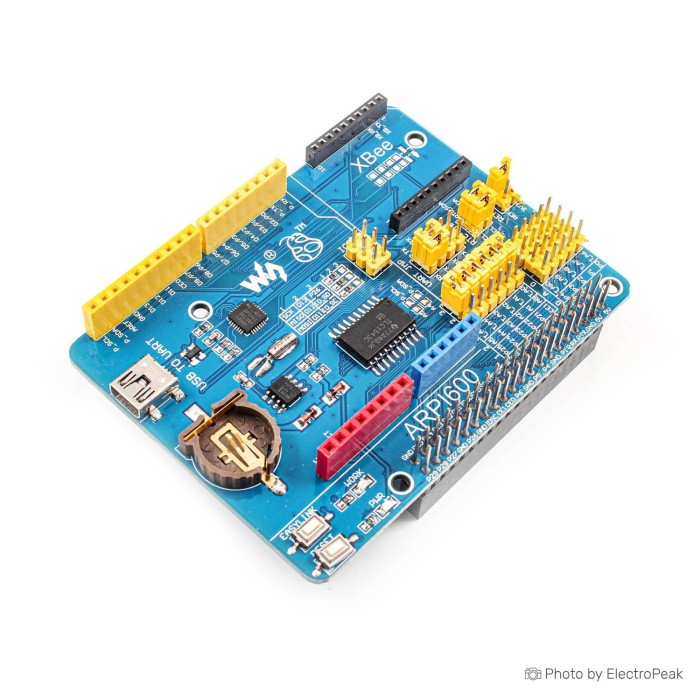
Waveshare Adapter Board for Arduino & Raspberry Pi
$0.0000
Out of stock
SKU
MIN-01-028
Shop with confidence Learn More
 Raspberry Pi GPIO Expansion Board (Works with Pi 4/3B+/3B) Previous
Waveshare ARPI600 Adapter Board for Arduino & Raspberry Pi is designed for connecting Raspberry Pi GPIO to Arduino pinouts. It supports use with Arduino shields and hardware resources through a standard Raspberry Pi 40PIN GPIO extension header. The board also supports XBee modules for wireless project expansion. It includes an onboard USB TO UART interface for serial port debugging and can also be configured as an XBee USB adapter. Onboard ADC and RTC functions are included for extended interfacing. Supported Pi models are listed below.
Features of Waveshare ARPI600 Adapter Board for Arduino & Raspberry Pi
- Standard Raspberry Pi 40PIN GPIO extension header
- Compatible with Arduino UNO and Leonardo
- XBee connector included
- Sensor interface included
- Onboard USB TO UART
- Onboard ADC
- Onboard RTC
- Power indicator
- XBee state LED
- Reset button included
- XBee EASYLINK button
- RTC battery holder included
- Multiple jumper configurations
Specifications of Waveshare ARPI600 Adapter Board for Arduino & Raspberry Pi
- Supported Pi: Raspberry Pi 1 Model A+
- Supported Pi: Raspberry Pi 1 Model B+
- Supported Pi: Raspberry Pi 2 Model B
- Supported Pi: Raspberry Pi 3 Model B
- Compatible with Arduino UNO
- Compatible with Arduino Leonardo
- Onboard ADC: 10 bit
- Onboard ADC: 38KSPS
- Onboard ADC channels: 11 channels
- ADC channels for Arduino interface: 6 channels
- ADC channels for sensors: 5 channels
- RTC: PCF8563
- Crystal: 32.768KHz
- RTC battery holder: CR1220 button battery
- UART jumper: P_RX and CP_TX, P_TX and CP_RX
- UART jumper: XB_RX and CP_TX, XB_TX and CP_RX
- UART jumper: XB_RX and P_TX, XB_TX and P_RX
- Arduino AD selection jumper: short 2 and 3
- Arduino AD selection jumper: short 1 and 2
- Arduino I2C selection jumper: short the jumper
- Arduino SPI selection jumper: short 1 and 2
- Arduino SPI selection jumper: short 2 and 3
How to Use Waveshare ARPI600 Adapter Board for Arduino & Raspberry Pi
- Connect the board to a supported Raspberry Pi model.
- Attach the Arduino shield, XBee module, or sensor as required.
- Set the jumpers for UART, AD, I2C, or SPI configuration.
- Use the USB TO UART interface for serial port debugging or XBee adapter mode.
More Info
- Supports Raspberry Pi serial port connection through jumper settings.
- Supports XBee serial port connection through jumper settings.
- Supports Raspberry Pi serial port to XBee serial port connection through jumper settings.
- Arduino A0-A5 can be used as AD input or digital control depending on jumper position.
- Arduino A4-A5 can be used as I2C control when the AD jumper is opened.
- Arduino D11-D13 can be used as SPI control or digital control depending on jumper position.
Write Your Own Review
Please complete your information below to login.
Sign In
Create New Account