
Product added to cart

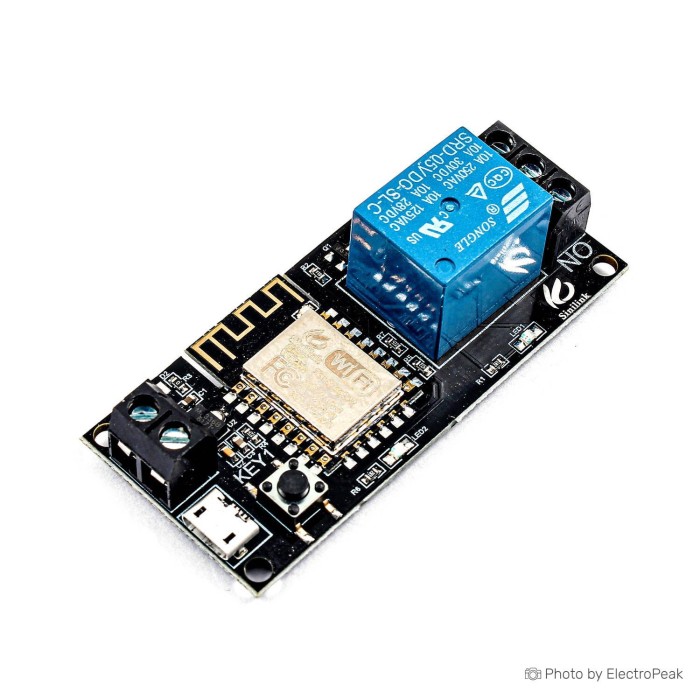
5V Relay Module with Wifi Mobile Phone Remote Control
$5.5000
In stock
SKU
REL-01-038
Volume discounts:
- +25 5 % $5.2500
- +50 7 % $5.1200
- +100 9 % $5.0000
- +300 11 % $4.8700
- +500 14 % $4.7500
Ships in 2-3 business days, then:
Free delivery in 12-15 days by Tracked Economic Shipping on orders over $100.
Free delivery in 7-10 days by Express Shipping on orders over $300.
More shipping info

Shop with confidence Learn More
 16-Channel Relay Module - 5V Previous
The 5V WiFi Relay Module is a single-channel wireless switch for mobile phone remote control through the Sinilink app. It supports app-based switching and button control on the module. The device works with WiFi mobile control and can be configured through the mobile application. It supports self-locking mode and inching mode, with mode changes handled in the app. Timing functions are also available, including countdown and scheduled on/off control.
This relay module is designed for smart home control and other remote switching applications. It connects one home appliance and allows on/off control from the app. The module can also be used for automatic motor control, production workshop intelligent operation, and intelligent farming control.
Features of 5V WiFi Relay Module - 2.4GHz, 10A
- Single-channel relay control
- WiFi mobile phone remote control
- App and button operation
- Self-locking mode
- Inching mode
- Countdown and scheduled on/off timing
Specifications of 5V WiFi Relay Module - 2.4GHz, 10A
- Working voltage: DC 5V
- Load voltage: DC 0V-30V & AC 0-250V
- Load current: 10A(max)
- WiFi standard: 2.4GHz b/g/n
- Operating temperature: -20~70
- Operating humidity: 5%-90%RH
How to Use 5V WiFi Relay Module - 2.4GHz, 10A
- Install the Sinilink app on your smartphone.
- Power the board with 5V through the USB port or input terminal.
- Connect the phone to the local WiFi network.
- Add the WiFi device in the app and enter the WiFi name and password.
- Select the device classification, then start the connection process.
- Power-cycle the board after it is detected so it stays connected.
More Info
- Supports one connected home appliance.
- Change the work mode from the app.
- If the board stays blinking, clear the app data and repeat the setup process.
Write Your Own Review

Please complete your information below to login.
Sign In
Create New Account