
Product added to cart

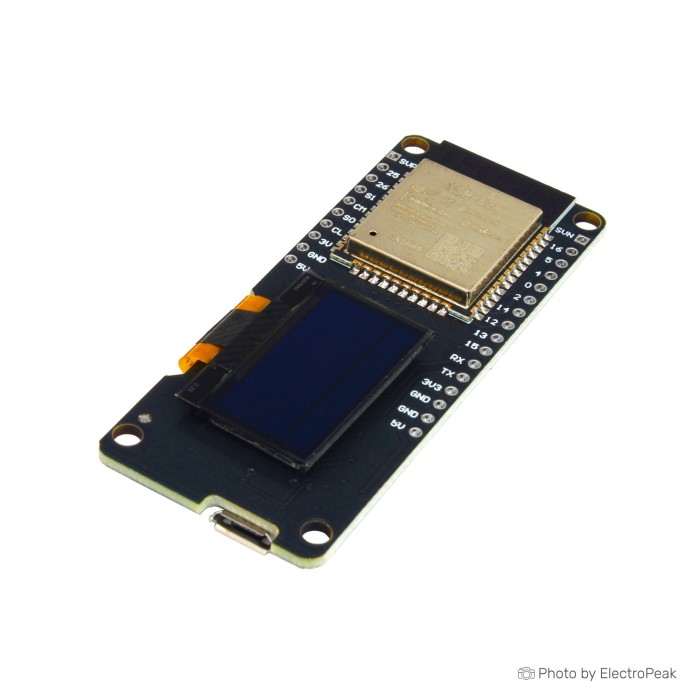
WeMos ESP32 Development Board with 0.96 OLED Display
$6.9500
Out of stock
SKU
COM-03-071
Volume discounts:
- +25 10 % $6.2600
- +50 12 % $6.1300
- +100 14 % $6.0100
- +300 15 % $5.8900
- +500 17 % $5.7700
Add an Accessory:


Shop with confidence Learn More
 ESP32-S3-Wroom-1 Development Board Previous
The WeMos ESP32 Development Board with 0.96 OLED Display combines an ESP32 core with an OLED screen for compact electronics and IoT projects. It supports WiFi and Bluetooth 4.0 (BLE) for wireless connectivity and includes a CP2102 USB to UART chip for USB programming. The board can be programmed with Arduino IDE and is designed for easy computer connection through USB. It also includes onboard power management and control switches for setup and reset.
This ESP32 development board provides 3.3V and 5V outputs with a maximum current of 1A. The OLED display connects through I2C, using GPIO5 for SDA and GPIO4 for SCL, with address 0x3C. Its small PCB design makes it suitable for integration into other products. The board also supports AP, STA, and AP+STA modes.
Features of WeMos ESP32 Development Board With OLED Display - CP2102, 128x64
- ESP32 core with WiFi and Bluetooth 4.0
- 0.96 OLED display with 128x64 resolution
- CP2102 USB to UART chip
- Arduino IDE support
- 3.3V and 5V outputs
- Maximum current of 1A
- Boot and reset switches
- AP, STA, and AP+STA modes
- I2C OLED connection
- Small PCB design
Specifications of WeMos ESP32 Development Board With OLED Display - CP2102, 128x64
- Chip: ESP32 WiFi + Bluetooth 4.0
- Display: 128x64 OLED
- USB to UART chip: CP2102
- Automatic program upload mode
- AMS1117-3.3 regulator IC
- USB input: 5V
- Output voltage: 3.3V
- Output voltage: 5V
- Maximum current: 1A
- Boot mode switch
- Reset switch
- OLED I2C address: 0x3C
- OLED SDA pin: GPIO5
- OLED SCL pin: GPIO4
- Supports LwIP protocol
- Supports AP mode
- Supports STA mode
- Supports AP+STA mode
How to Use WeMos ESP32 Development Board With OLED Display - CP2102, 128x64
- Connect the board through USB or VIN for power.
- Use Arduino IDE to upload the program.
- Connect the OLED display through I2C if needed.
- Use the boot and reset switches during setup and programming.
More Info
- Integrated antenna and RF block
- Power management module included
- Compact board for embedded projects
| MCU/SoC | ESP32 |
|---|---|
| Product Family | ESP32 |
| Architecture | Tensilica Xtensa LX6 |
| CPU Cores | Dual-core |
| Clock Speed (MHz) | 240 MHz |
| Flash | 4 MB |
| SRAM | 520 KB |
| GPIO Pins | GPIO4, GPIO5 |
| I2C interface Pins | 1 |
| USB Ports | Micro USB |
| Ethernet Support | No |
| Operating Voltage (V) | 3.3V |
| GPIO Voltage (V) | 3.3V |
| GPIO Current (mA) | 1000 |
| Wireless | Bluetooth, WiFi |
| Form Factor | Small |
| IDE Support | Arduino IDE |
| Input Voltage (V) | 5V |
| Antenna Type | Internal Antenna |
| Bluetooth Ver. | 4.2 |
Write Your Own Review
Please complete your information below to login.
Sign In
Create New Account